You open Instagram and your follower count is lower than yesterday. Maybe it's three people, maybe thirty. Instagram tells you when someone follows you, but it stays silent when they leave, so the natural question follows. Who unfollowed me on Instagram?
This guide shows you every safe way to find out in 2027, from quick manual checks to Instagram's own Insights and data export. You'll also see why apps that promise a full unfollower list can put your account at risk, the most common reasons people unfollow, how much follower loss is normal and what to do about it, including how to clean up your own following list without triggering limits.
Can you see who unfollowed you on Instagram?
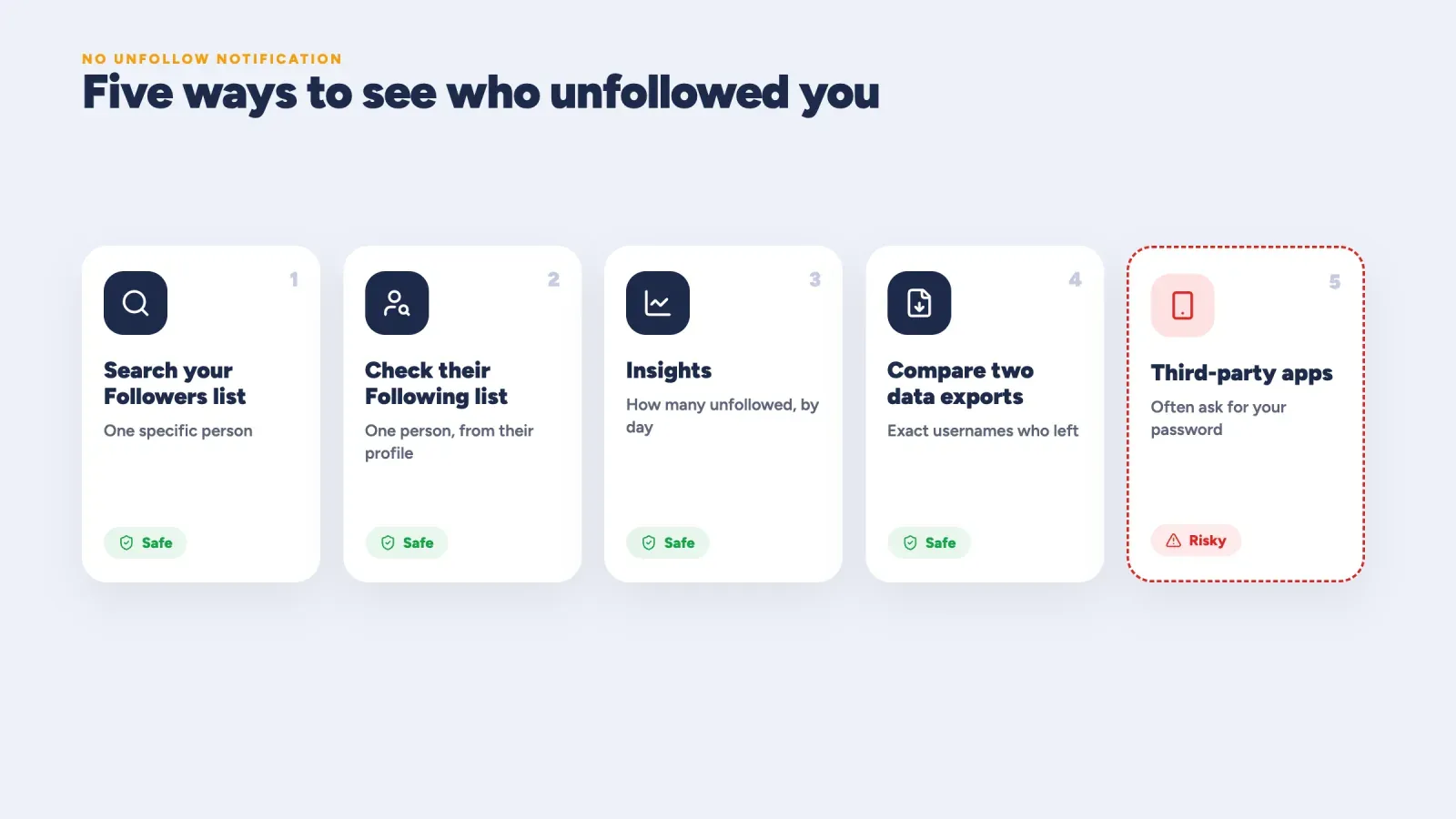
Yes, but not with a single tap. Instagram doesn't send a notification when someone unfollows you, and there's no built-in list of unfollowers. What you can do is check whether a specific person still follows you, see how many people unfollowed you on a given day with Insights, or compare two copies of your followers list to find exactly who left.
Here's a quick overview of the methods.
| Method | What it tells you | Best for | Safe? |
|---|---|---|---|
| Search your Followers list | Whether one specific person still follows you | Checking a friend or client | Yes |
| Check their Following list | Whether one person follows you, from their profile | Public accounts | Yes |
| Insights | How many people unfollowed you each day | Professional accounts | Yes |
| Compare two data exports | The exact usernames who left between two dates | A full list of unfollowers | Yes |
| Third-party unfollower apps | A list of recent unfollowers | Convenience | Often risky |
Does Instagram notify someone when you unfollow them?
No. Instagram doesn't notify anyone when they're unfollowed, and it doesn't notify you when someone unfollows you. The only way someone finds out is by checking, using one of the methods below. Keep that in mind in both directions. Unfollowing someone is quiet, yet anyone who checks their followers list can still notice.
Method 1, search your Followers list
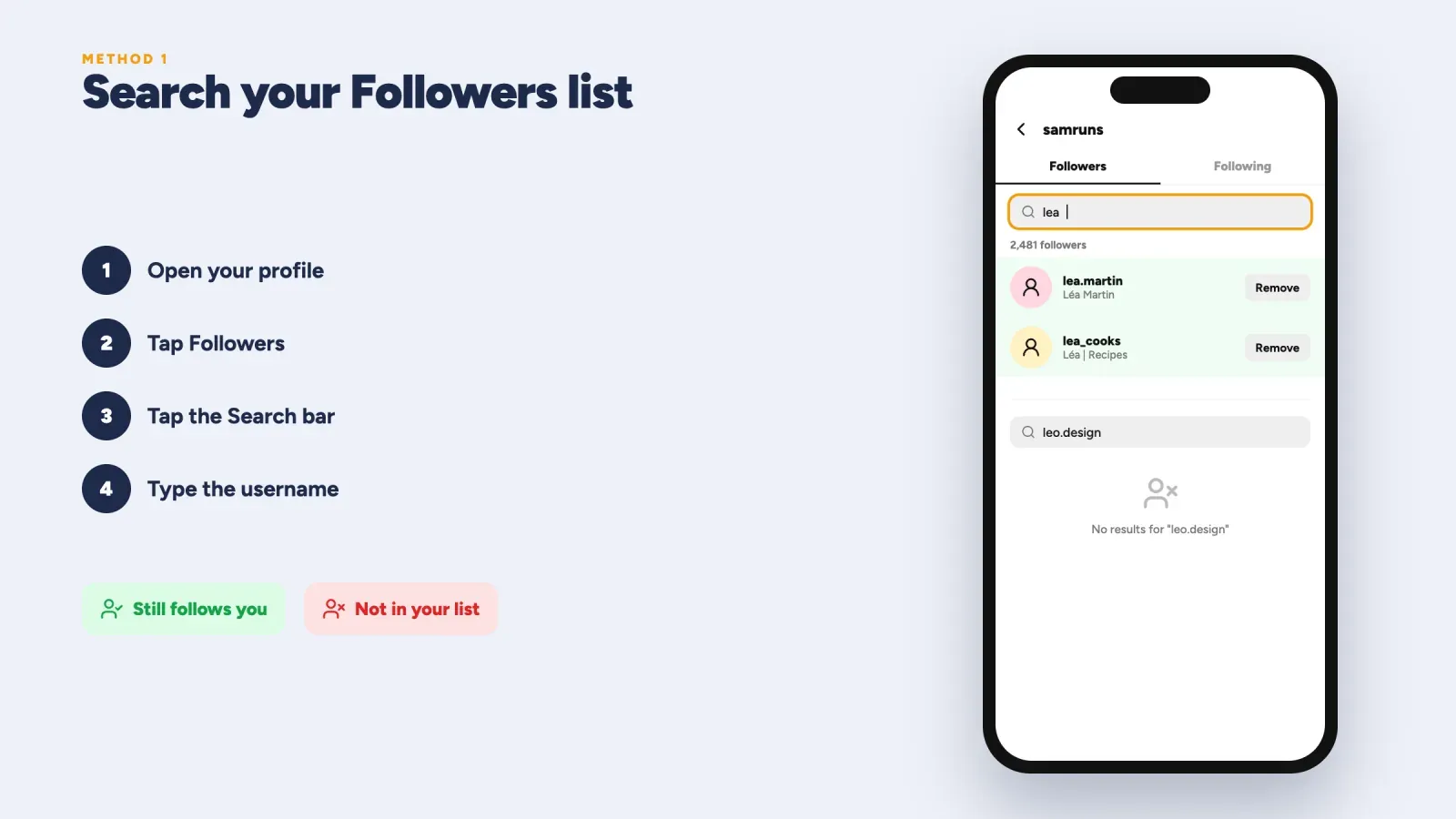
This is the fastest way to check whether one person still follows you.
- Open Instagram and tap your profile picture in the bottom right corner.
- Tap Followers at the top of your profile.
- Tap the Search bar.
- Type the person's username or name.
If their account appears, they still follow you. If it doesn't, they've unfollowed you, removed their account, deactivated it or blocked you. The limit is obvious, though. You have to know who you're looking for.
Method 2, check their Following list
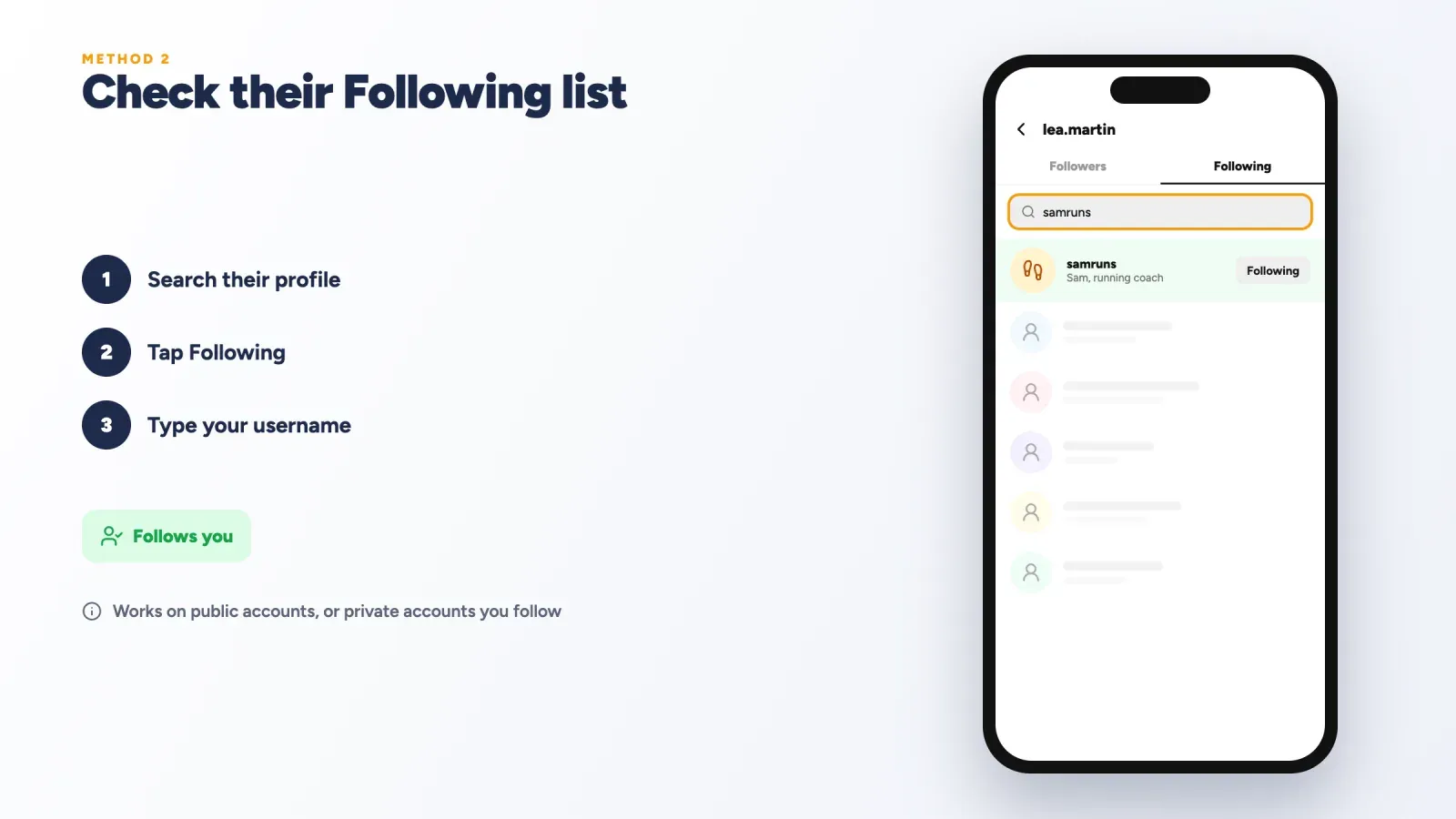
You can also check from the other person's side, as long as their account is public or you follow their private account.
- Tap the Search icon and find the person's profile.
- Tap Following at the top of their profile.
- Type your username in the search bar.
If your account appears, they follow you. If it doesn't, they don't. This method gives the same answer as method 1, but it's useful when you're already on their profile.
Method 3, see how many people unfollowed you with Insights
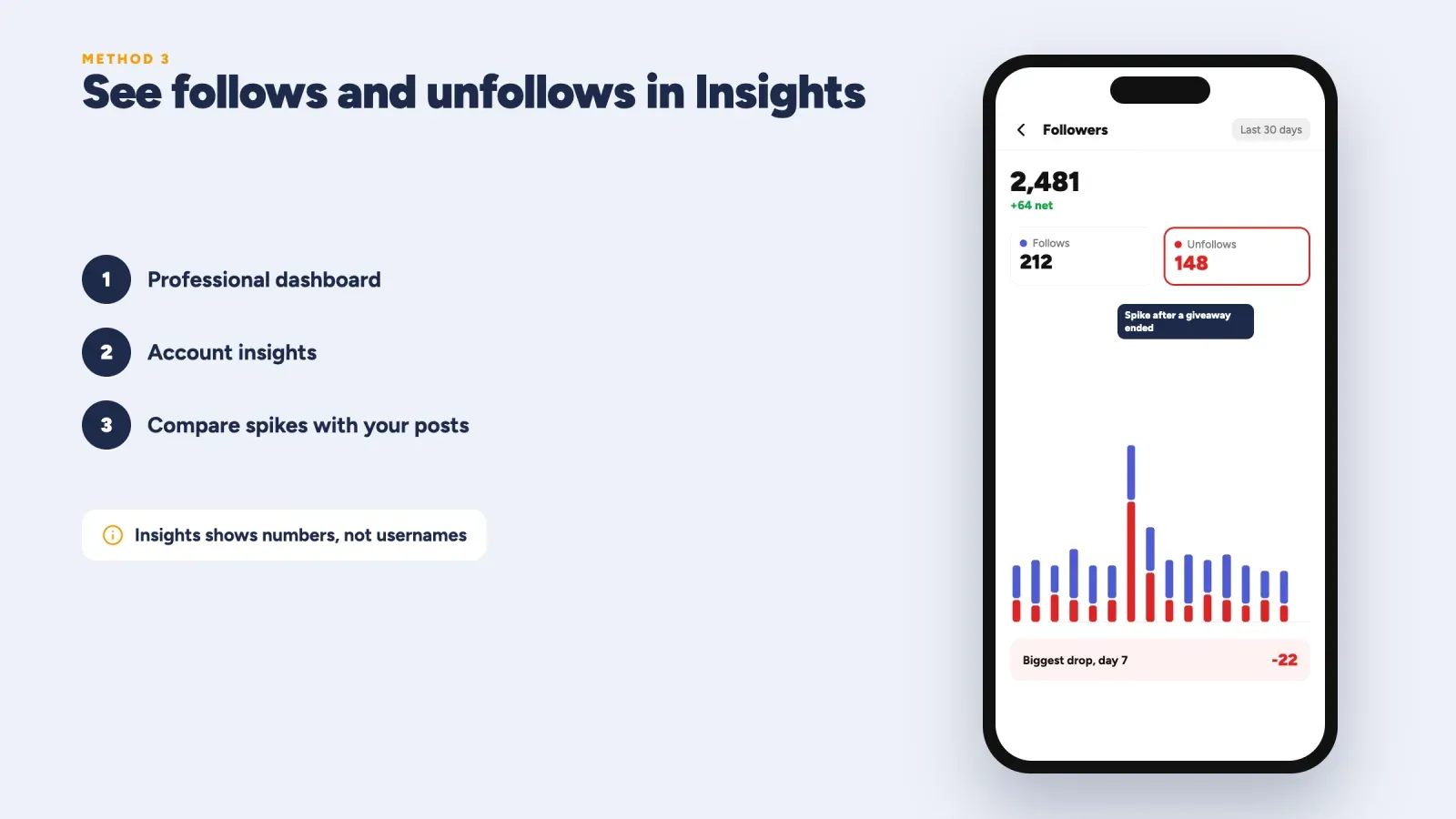
If you have a professional account (creator or business), Instagram Insights shows how your followers change over time, including the number of follows and unfollows each day. It won't give you usernames, but it shows when people leave, which is often more useful.
- Go to your profile and tap Professional dashboard.
- Tap Account insights or open the follower section.
- Look at the Follows and Unfollows numbers for the selected period.
Compare spikes in unfollows with what you posted that day. If a lot of people left after a specific post, a giveaway that ended or a change in your content, you've learned something important. If unfollows are spread evenly, it's probably normal churn. If you're still on a personal account, switching to a professional account is free and unlocks these numbers.
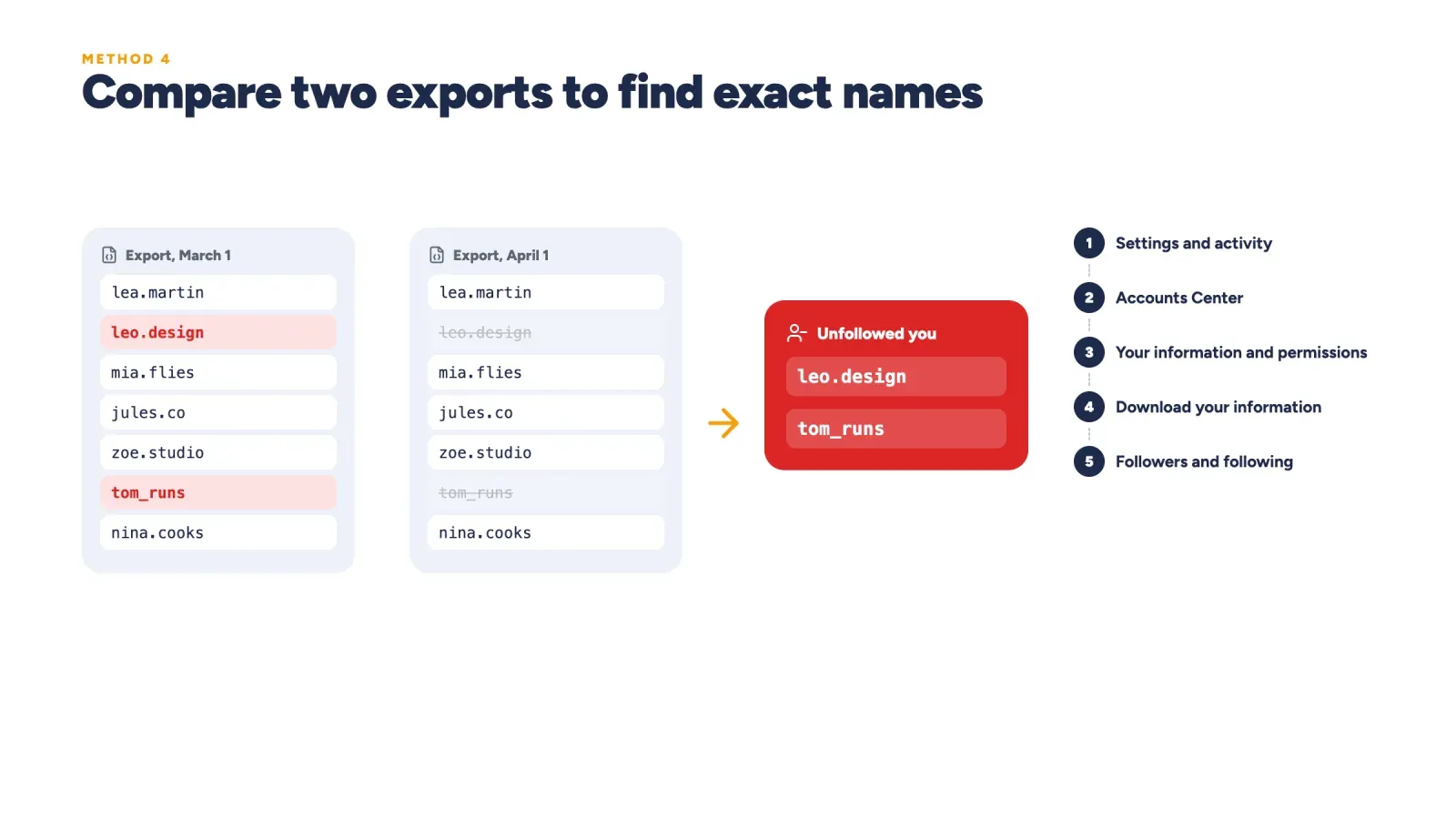
Method 4, compare two exports of your followers list
This is the most reliable way to get the exact usernames of people who unfollowed you, without giving your password to anyone. Instagram lets you download your information, including your full followers and following lists.
Step 1, request your first export.
- Go to your profile, tap the menu and open Settings and activity.
- Tap Accounts Center, then Your information and permissions.
- Tap Download your information and choose your Instagram account.
- Choose Some of your information, then select Followers and following.
- Choose to download to your device, pick the JSON or HTML format and submit the request.
Instagram prepares the file and notifies you when it's ready, which can take from a few minutes to a couple of days. Download it and keep it somewhere safe.
Step 2, request a second export later. Repeat the same steps a week or a month later.
Step 3, compare the two lists. Open the followers file from each export. Anyone who appears in the older list but not in the newer one has unfollowed you, deactivated their account or changed their username. If you have a lot of followers, paste both lists into two columns of a spreadsheet and use a simple lookup to find names that are missing from the newer column.
It takes a few minutes, but the result is accurate, and your data never leaves Meta and your own device.
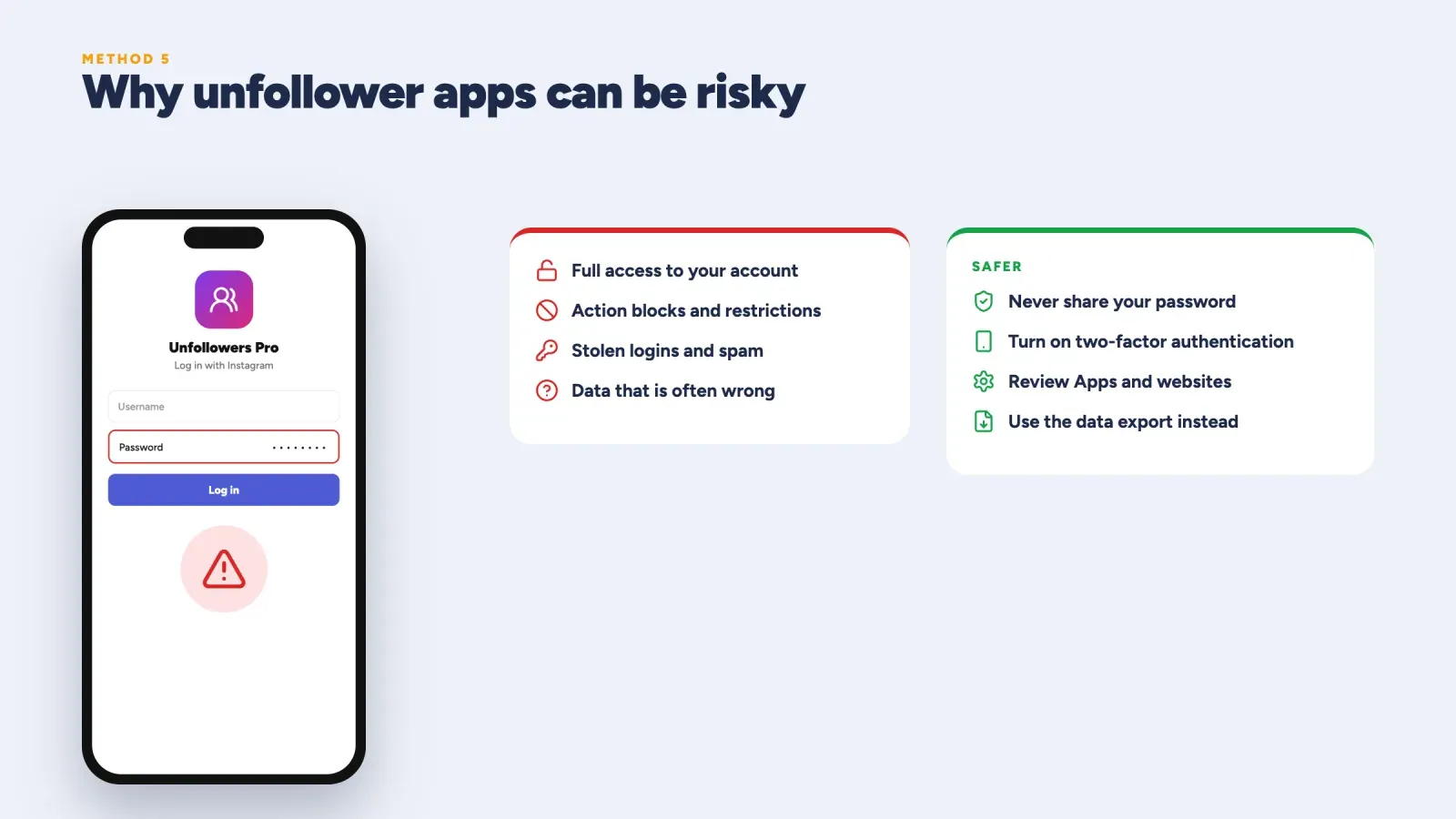
Method 5, third-party unfollower apps and their risks
Many apps promise to show you who unfollowed you in one tap. Some ask for your Instagram password. That's where the risk starts.
- Your account can be restricted. Instagram can detect apps that log in for you and act on your account. The result is often a temporary block on following, liking or commenting, and in more serious cases a longer restriction.
- Your password can be stolen. An app with your password has full access to your account, your messages and your followers. Some apps have been caught collecting logins or posting spam from users' accounts.
- The data can be wrong. Instagram limits what outside apps can read, so many unfollower trackers rely on guesswork, scraping or old data.
If you still want to use an app, follow a few rules.
- Never type your Instagram password into an app that isn't Instagram or Meta.
- Turn on two-factor authentication in Accounts Center.
- Check the developer, recent reviews and the permissions the app asks for.
- Regularly review Apps and websites in your Instagram settings and remove access you no longer use.
- Change your password if you ever entered it into an app you don't trust.
For most people, the data export method gives the same answer without any of these risks.
Unfollowed, blocked or deactivated, how to tell the difference
When someone disappears from your Followers list, it doesn't always mean they unfollowed you. Here's how to tell what happened.
- They unfollowed you. You can still find their profile with search, see their posts if the account is public and message them. They simply aren't in your Followers list anymore.
- They blocked you. Their profile doesn't appear in search, or it shows "User not found" or no posts at all. Their old comments and likes on your posts may disappear. If you check from a second account or a browser where you're logged out and the profile appears normally, a block is likely.
- They deactivated or deleted their account. The profile is unavailable to everyone, including from another account. Temporarily deactivated accounts come back later with their followers.
- They changed their username. Search for their name instead of their old handle. They may still follow you under a new username.
- Instagram removed the account. Spam and fake accounts are removed regularly, which also lowers follower counts.
What to do after a big spike in unfollows
A wave of unfollows can feel discouraging, but it's also useful feedback. Work through these steps before changing anything.
- Find the date. Use Insights to see exactly when the unfollows happened.
- Look at what you posted. Check the posts, Reels and Stories you shared on that day and the day before. A controversial opinion, a big sales push or a change of style are common triggers.
- Read the comments and DMs. People often say what bothered them before they leave.
- Check for outside causes. A giveaway ending, a collab that brought in a different audience or a wave of fake account removals can all explain a spike.
- Decide whether to adjust. If the people who left weren't your target audience, the change may be healthy. If they were, adjust your next posts and explain any change of direction to your followers.
A simple routine to keep an eye on your followers
You don't need to check every day. A light routine keeps you informed without turning follower counts into a source of stress.
- Weekly. Look at your follows and unfollows in Insights and note which posts brought the most new followers.
- Monthly. Request a data export of your followers list and compare it with last month's file if you want exact names.
- Every quarter. Review your bio, highlights and content pillars to make sure they still match what your audience follows you for.
Keep a small spreadsheet with your follower count, new follows, unfollows and best post for each month. After a few months, the patterns become obvious.
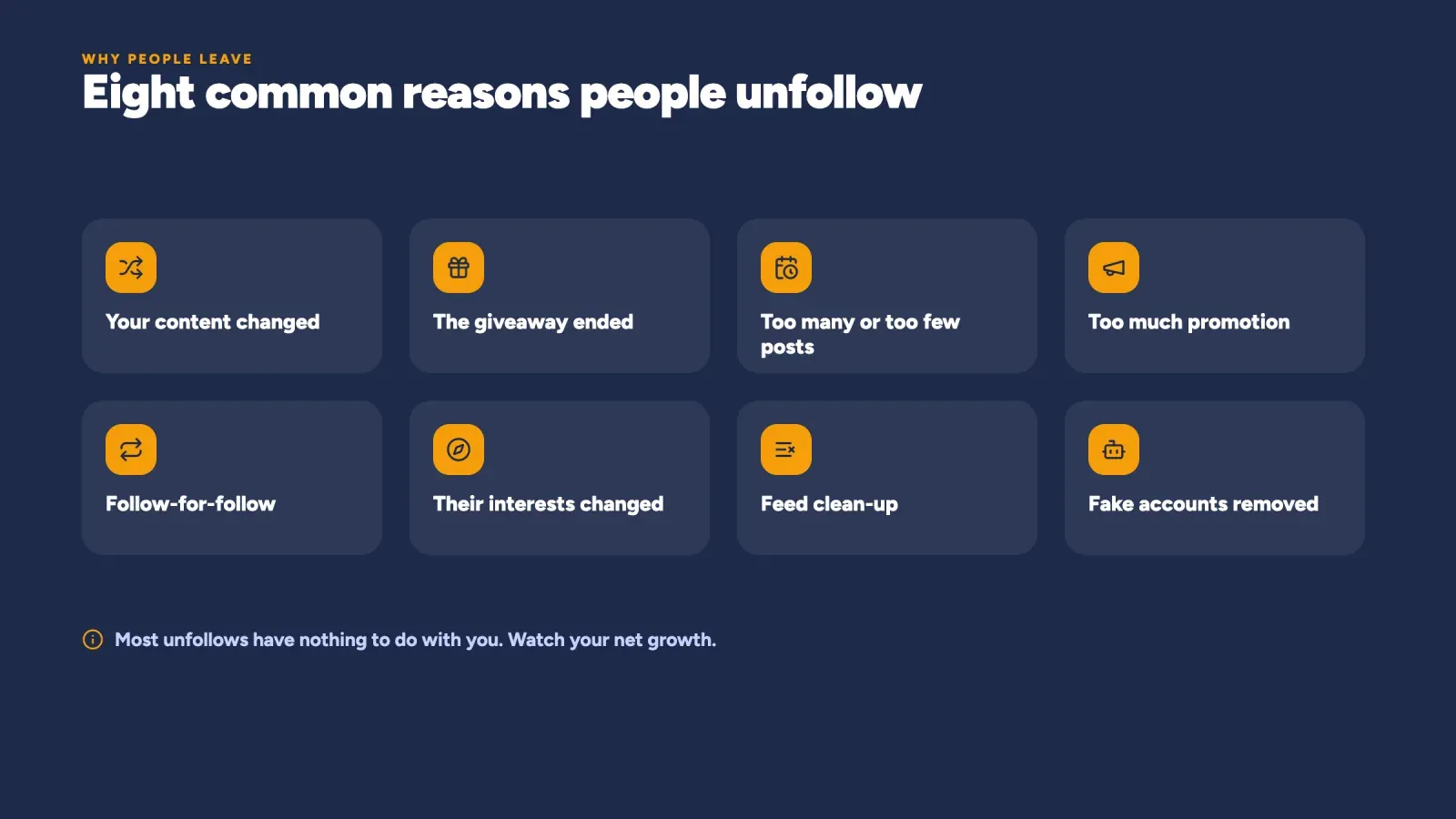
Why people unfollow you on Instagram
Before you worry about who left, it helps to understand why. People unfollow for reasons that often have nothing to do with you.
- Your content changed. If people followed you for travel photos and you now post mostly about your new business, some will leave.
- They followed for a giveaway. Contest followers often unfollow once the giveaway ends.
- You post too often or too rarely. Several posts and dozens of Stories a day can feel like too much, while months of silence make people forget why they followed.
- Too much promotion. If most posts are sales pitches, followers who came for useful or fun content may lose interest.
- Follow-for-follow. People who followed you only to get a follow back often leave after a few days.
- Their interests changed. People move, change jobs, finish a project or simply grow out of a topic.
- They're cleaning up their feed. Many people regularly unfollow accounts they don't interact with.
- Instagram removed fake or inactive accounts. When Instagram removes spam and bot accounts, follower counts can drop without anyone actively unfollowing.
How many unfollows are normal?
Some follower loss is normal for every account. People leave Instagram, clean up their following list or move on. What matters is your net growth, meaning new followers minus unfollows, over weeks and months.
A few signs suggest something is worth a closer look.
- A sudden spike in unfollows after one post. Check what the post said, how it looked and who it might have upset.
- Unfollows steadily higher than new follows for several weeks. Your content or posting rhythm may no longer match what your audience wants.
- A big drop all at once without any post. This is often Instagram removing fake accounts, which is actually good for your engagement rate.
How to reduce unfollows
You can't stop every unfollow, but you can give people fewer reasons to leave.
- Keep a clear focus. Tell people what your account is about in your bio and stick to it. If you change direction, explain it in a post or a Story.
- Find a sustainable rhythm. Posting a few times a week with daily Stories works for many accounts. Consistency matters more than volume. Our guide to the best time to post on Instagram helps you schedule.
- Balance value and promotion. Make most posts useful, entertaining or inspiring, and keep sales posts clear and occasional.
- Talk with your followers. Reply to comments and DMs, ask questions in Stories and show the person behind the account. Our guide on how to increase Instagram engagement has more tactics.
- Avoid giveaways that attract the wrong people. Ask entrants to do something related to your niche, so you attract people who care about your content.
- Never buy followers. Bought followers disappear, lower your engagement rate and can get your account flagged.
How to unfollow people who don't follow you back
Maybe you want to do the opposite and clean up your own following list. You can do it safely inside the app.
- Go to your profile and tap Following.
- Use the categories at the top, such as Least interacted with, to find accounts you rarely engage with.
- Tap Following next to an account, then confirm to unfollow.
To check whether someone follows you back before unfollowing, use method 1 or 2 above.
Go slowly. Instagram limits how many actions an account can take in a short time to fight spam. Unfollowing hundreds of accounts in a few minutes, especially with an app, can trigger a temporary block. Spread a big cleanup over several days.
Unfollowers on private and public accounts
The way unfollows affect you depends on whether your account is private or public.
- Private account. When someone unfollows you, they immediately lose access to your posts, Reels and Stories. If they want to follow you again, they have to send a new request, which you can accept or ignore.
- Public account. Anyone can still see your content after unfollowing. They just won't see your posts in their feed as often, and they won't count in your follower total.
If you switched from public to private recently, some people may have left because they couldn't be bothered to request access. That's a normal trade-off for more privacy. Our guide to viewers on Instagram explains who can see your Stories and profile in each case.
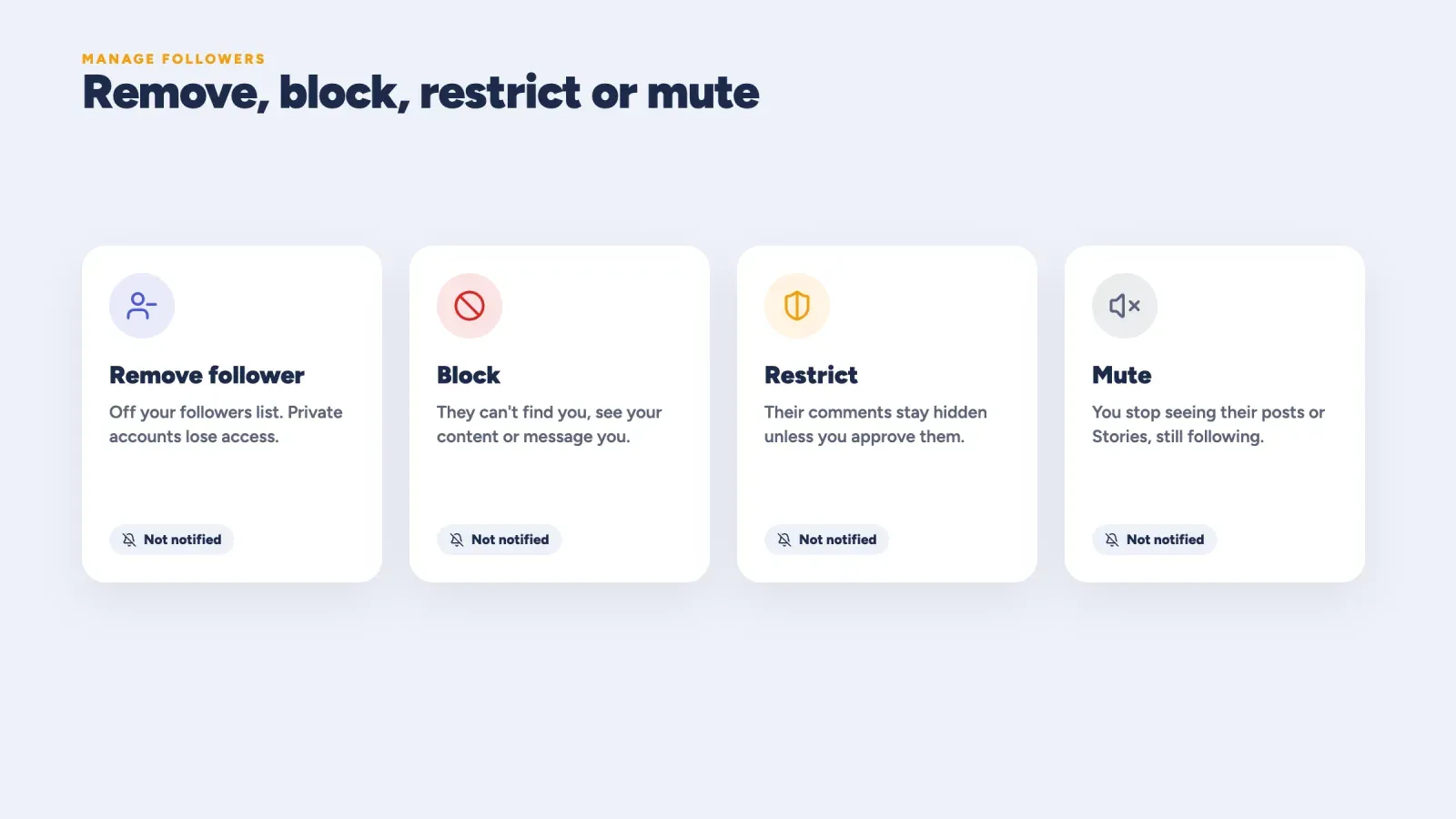
Remove, block, restrict or mute, which one to use
Sometimes the question isn't who unfollowed you but who you'd like to remove. Instagram gives you several options, and each one works differently.
| Option | What it does | Does the person know? |
|---|---|---|
| Remove follower | Removes them from your followers list. On a private account, they can no longer see your posts unless they request again | Not notified |
| Block | They can't find your profile, see your content or message you | Not notified, but they may notice |
| Restrict | Their comments on your posts are only visible to them unless you approve, and their messages go to requests | Not notified |
| Mute | You stop seeing their posts or Stories while still following them | Not notified |
To remove a follower, open your Followers list, tap Remove next to their name and confirm. To block, restrict or mute, open their profile and tap the menu or the Following button.
Mistakes to avoid
- Giving your password to unfollower apps. It's the main way accounts get restricted or hacked.
- Taking every unfollow personally. Most people leave for reasons that have nothing to do with you.
- Chasing unfollowers to ask why. It rarely brings them back and can feel uncomfortable for both sides.
- Mass unfollowing to "punish" people. Fast, large unfollow sprees can trigger action blocks.
- Focusing on unfollows instead of new follows. Your energy is usually better spent on content that attracts the right people.
FAQ
Can I see who unfollowed me on Instagram without an app?
Yes. Search your Followers list for a specific person, check their Following list, use Insights to see how many people unfollowed you or compare two downloads of your followers list to get exact usernames.
Does Instagram notify you when someone unfollows you?
No. Instagram doesn't send any notification when someone unfollows you or when you unfollow someone.
Why did my follower count drop suddenly?
A sudden drop is often caused by Instagram removing fake or inactive accounts. It can also happen after a post that didn't match what your audience expects, or after a giveaway ends.
Are Instagram unfollower apps safe?
Many aren't. Apps that ask for your Instagram password can get your account restricted or compromised. Instagram's own data download is a safer way to get the same information.
Can someone see that I looked at their followers list?
No. Instagram doesn't tell people when you view their followers or following lists.
Can I see who unfollowed someone else's account?
No. There's no safe way to see who unfollowed another account. You can only see their current followers list if their account is public or you follow them.
Do I lose likes and comments when someone unfollows me?
No. Likes and comments stay on your posts when someone unfollows you. They usually disappear only when the person blocks you or deletes their account.
How do I stop losing followers on Instagram?
Keep a clear focus, post consistently, balance helpful content with promotion, talk with your audience and avoid tactics like follow-for-follow and bought followers.
Focus on the followers who stay
Finding out who unfollowed you on Instagram is easy once you know where to look. Check a specific person in your Followers list, watch your Insights for spikes and compare data exports when you need exact names. Skip the apps that ask for your password. Then put your energy where it pays off, into content and conversations that keep the right people around.
The followers who stay are the ones who care about what you do. Create your free Roctify page and add it to your Instagram bio, so they can find your links, products and newsletter in one place and stay in touch beyond the feed.