You post, a handful of people like it, two friends comment and the post disappears into the feed. Meanwhile, accounts with fewer followers than you seem to get dozens of comments, shares and saves on everything they publish. The difference is rarely luck. It usually comes down to what the post asks of people, how quickly it earns their attention and whether the account feels like a conversation or a broadcast.
This guide shows you how to increase Instagram engagement in 2027 with 12 practical tactics, from hooks and carousels to Stories stickers, Trial Reels and collab posts. Before the tips, you'll see how to calculate your engagement rate, what counts as a good rate for your account size, and which signals Instagram actually uses to decide who sees your posts. After the tips, you'll find a 30-day plan, the mistakes that quietly kill engagement and answers to the most common questions.
If you're mainly wondering when to publish, our guide to the best time to post on Instagram covers timing by day and format. For caption ideas you can copy, see our list of Instagram captions. This article focuses on everything else that makes people stop, react and come back.
What Instagram engagement means
Engagement is every action someone takes on your content beyond simply seeing it. On Instagram, the main ones are:
- Likes, the quickest reaction and the weakest signal of real interest.
- Comments, which show that someone cared enough to type, and which start conversations.
- Shares, when someone sends your post to a friend in a DM or reposts it to their Story. Instagram calls DM shares "sends".
- Saves, when someone bookmarks your post to come back to it later. A strong sign that your content is useful.
- Replies and sticker taps on Stories, like poll votes, quiz answers and question responses.
- Profile actions, like visiting your profile, following you or tapping your link in bio.
Not all engagement is equal. A like takes half a second. A save or a send means your content was worth keeping or worth showing someone else. When you work on engagement, aim for the actions that show real value, not just more taps on the heart.
How to calculate your Instagram engagement rate
Your engagement rate tells you what share of your audience interacts with your posts. It's the number brands look at before paying for a partnership, and the number you should track to know if your efforts work.
There are two common ways to calculate it.
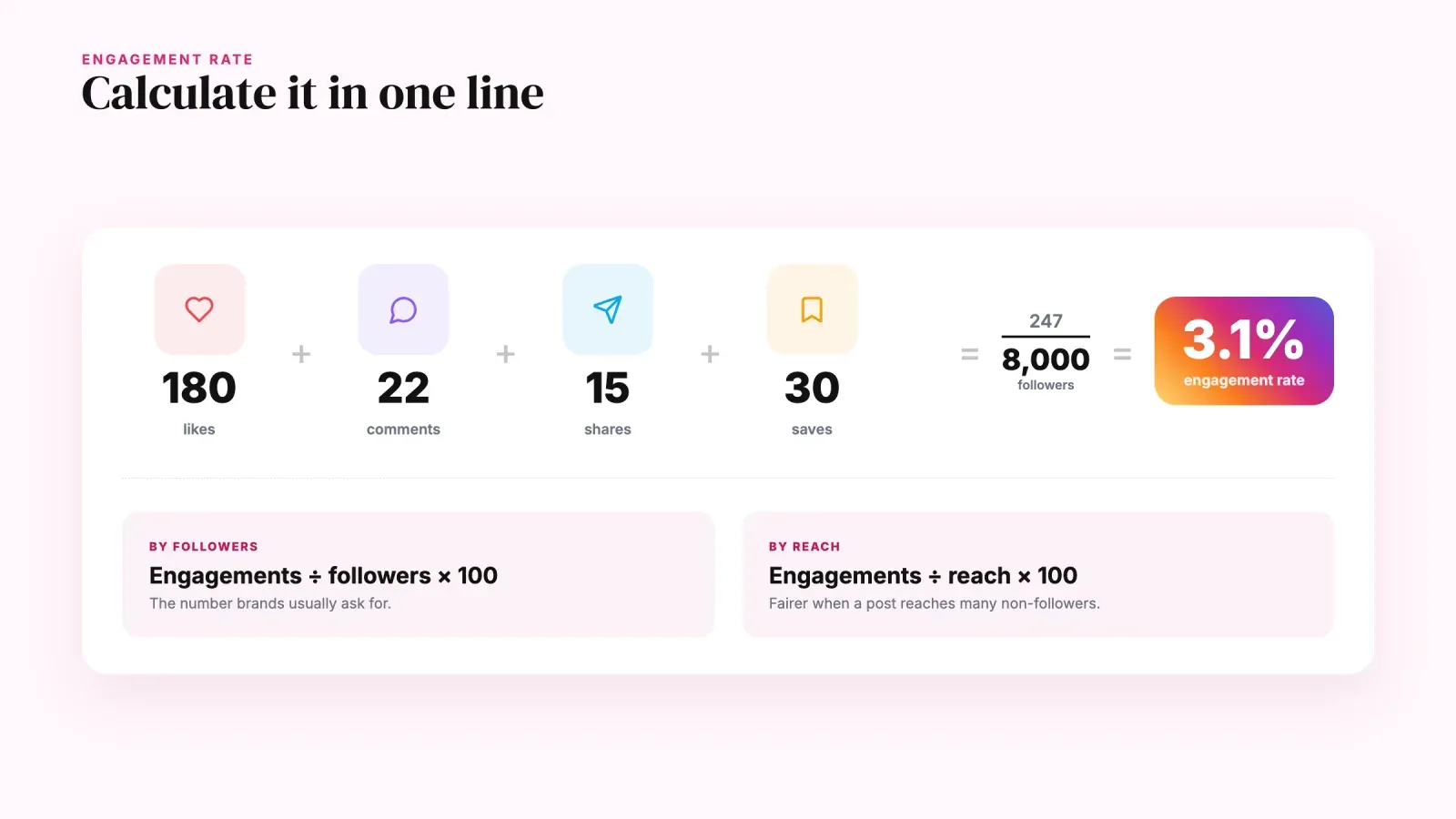
Engagement rate by followers. Add up likes, comments, shares and saves on a post, divide by your follower count and multiply by 100.
Engagement rate = (likes + comments + shares + saves) ÷ followers × 100
Example. A post gets 180 likes, 22 comments, 15 shares and 30 saves, so 247 engagements. You have 8,000 followers. Your engagement rate is 247 ÷ 8,000 × 100 = 3.1%.
Engagement rate by reach. Same engagements, divided by the number of accounts that saw the post. This version is fairer when a post reaches many non-followers, for example a Reel that gets recommended. If the same post reached 12,000 accounts, the rate by reach is 247 ÷ 12,000 × 100 = 2.1%.
To get your account's average, calculate the rate for your last 10 to 20 posts and take the average, or use the totals from Instagram Insights over 30 days. Compare like with like. A rate by reach and a rate by followers aren't the same number.
What is a good engagement rate on Instagram?
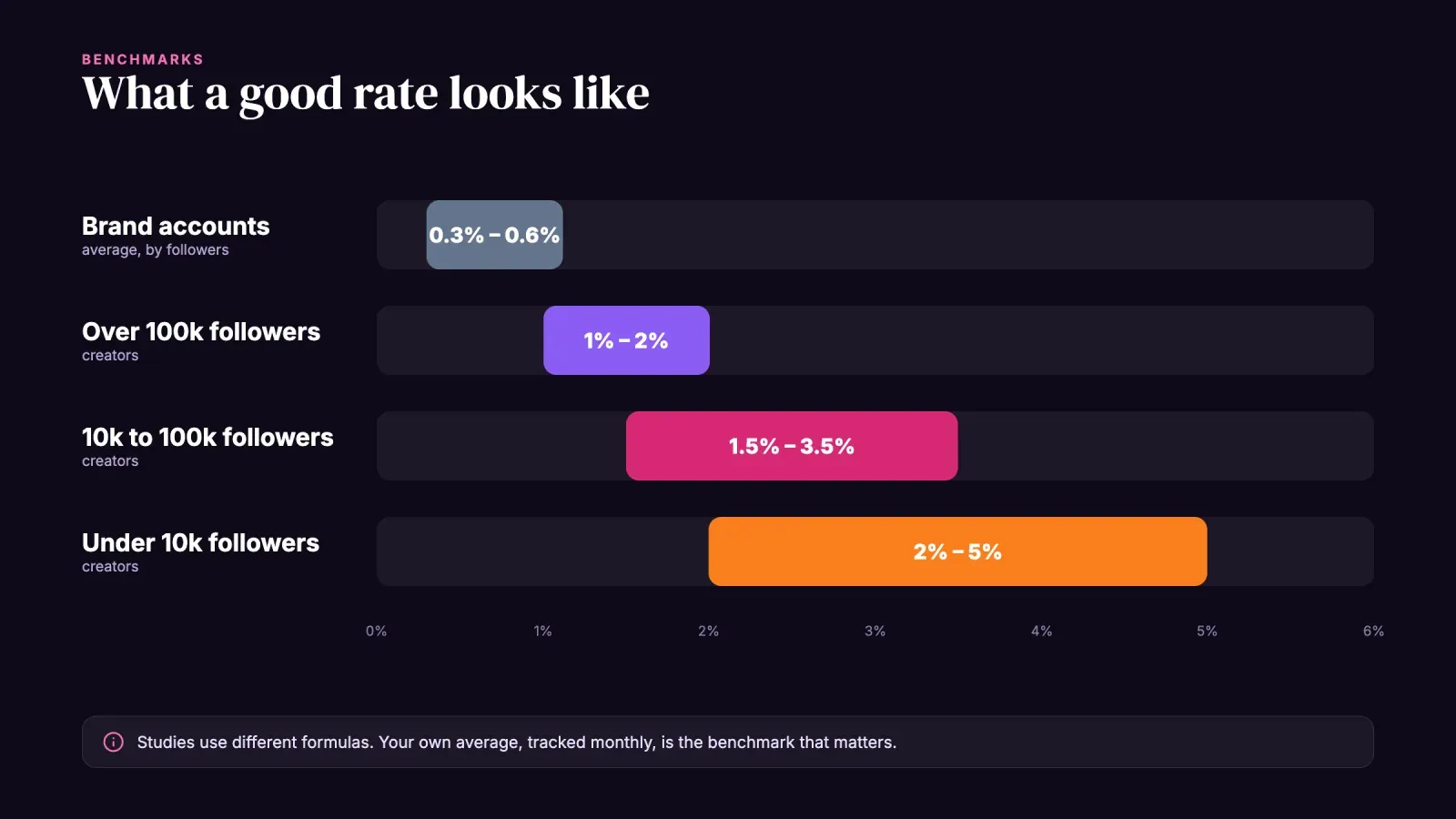
There's no single answer, because studies use different formulas and samples. Still, a few patterns are consistent across 2025 and 2026 benchmark reports from tools like Socialinsider, Rival IQ, Dash Social and Buffer.
- Brand accounts usually sit around 0.3% to 0.6% engagement by followers on average.
- Creators usually do better than brands, because people follow a person more closely than a logo.
- Smaller accounts engage more. Accounts with a few thousand followers often reach 2% to 5%. Accounts above 100,000 followers more often sit between 1% and 2%.
- Carousels and Reels tend to lead, with carousels often ahead on engagement by followers and Reels ahead on reach and views.
The most useful benchmark is your own. Write down your average rate today, apply the tactics below for a month, and compare. A move from 1.5% to 2.5% is a big improvement, whatever the industry averages say.
How Instagram decides who sees your posts
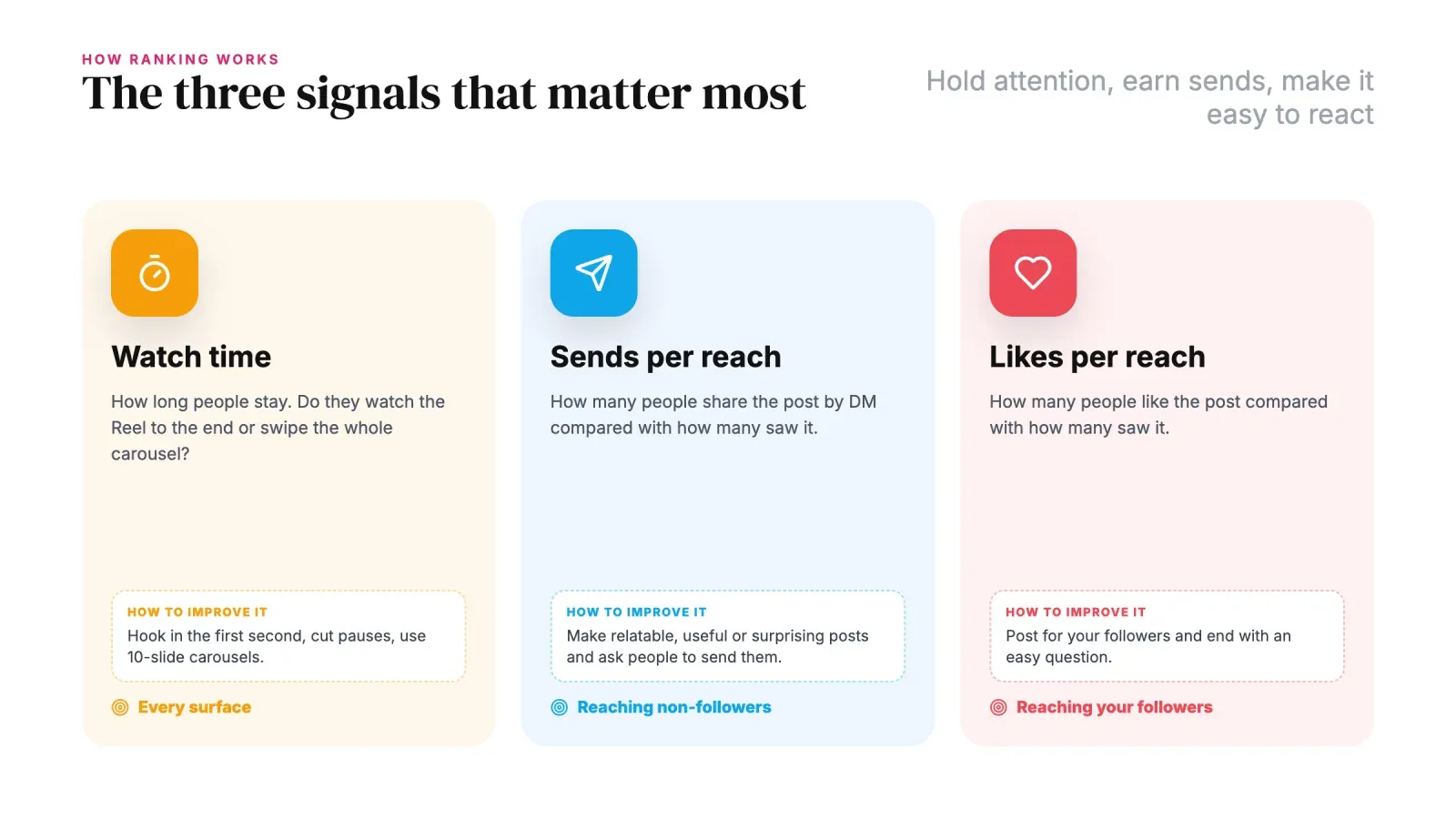
Instagram doesn't use one single algorithm. It ranks content differently in Feed, Stories, Reels and Explore. But Adam Mosseri, the head of Instagram, has repeatedly named the three signals that matter most for reach.
- Watch time. How long people spend on your post, especially whether they watch a Reel to the end or swipe through a whole carousel.
- Sends per reach. How many people share your post by DM, relative to how many saw it. This is the strongest signal for reaching people who don't follow you yet.
- Likes per reach. How many people like the post relative to how many saw it. This matters most for showing your content to your existing followers.
Comments, saves and profile visits also count, but these three explain most of the ranking. Every tactic below is designed to improve at least one of them. Hold people's attention, give them a reason to send the post to someone, and make it easy to react.
1. Hook people in the first second
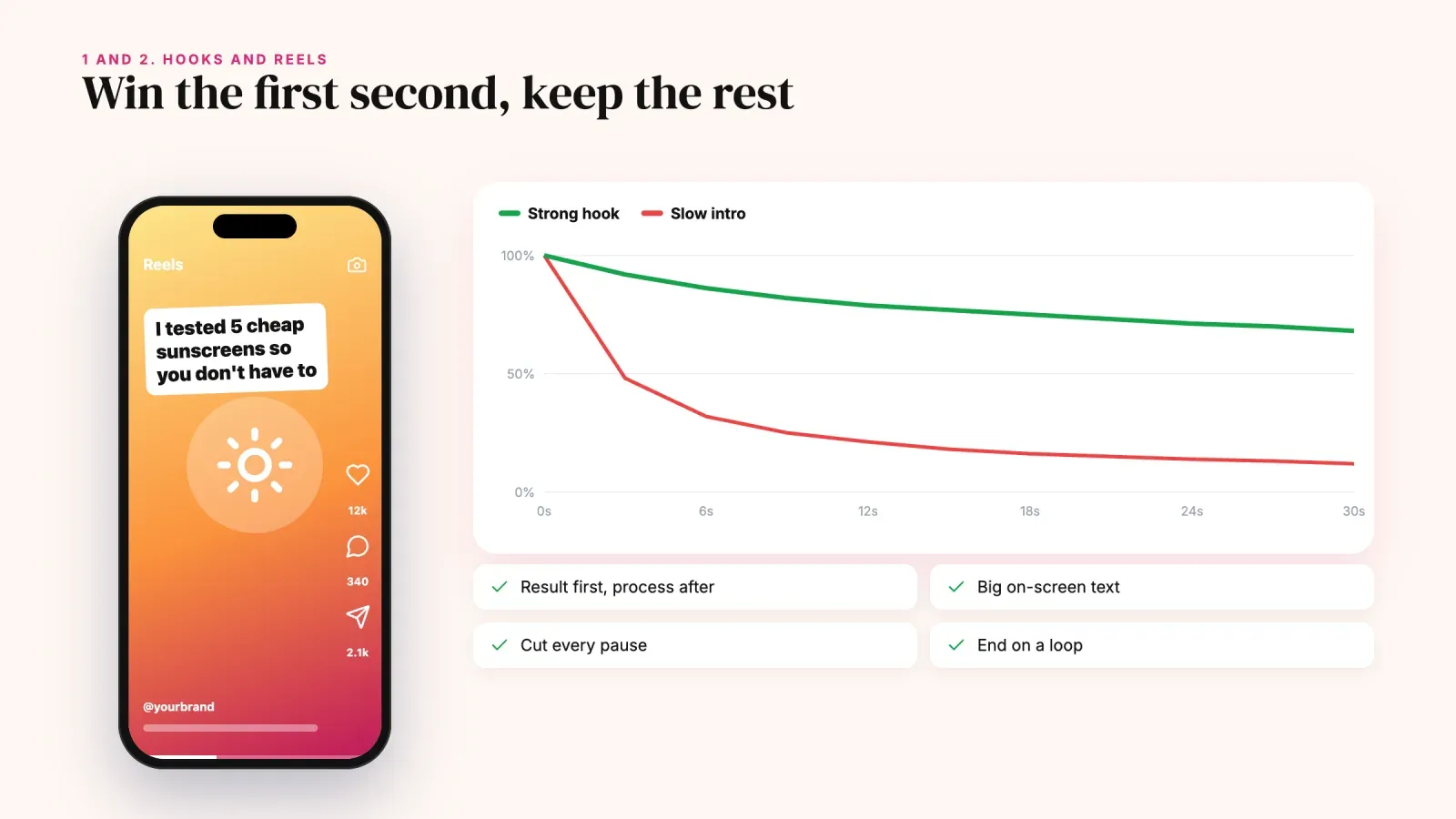
Most people decide in a second whether to keep watching a Reel or swipe away. If the first frame looks like every other post, they leave and Instagram reads it as low watch time.
Open with the most interesting part, not the introduction. Show the result before the process, ask a question on screen or state a surprising fact. Examples of strong hooks:
- "I tested 5 cheap sunscreens so you don't have to."
- "This is why your sourdough is flat."
- "Three things I'd never buy again as a nurse."
- A finished room makeover before the messy before.
Add the hook as large text on screen, because many people watch without sound. For carousels, the first slide is the hook. Treat it like a headline, with a bold promise and a reason to swipe. Our glossary entry on the viral hook has more formulas.
2. Make Reels people watch to the end
Reels are Instagram's main tool for reaching new people. Since early 2025 they can be up to three minutes long, but longer isn't better. A 20-second Reel that people watch twice beats a 90-second Reel they leave after five seconds.
A few habits raise watch time.
- Cut every pause. Remove "hi guys", breaths and slow transitions. Keep the pace fast.
- Deliver on the hook quickly. If you promised five tips, start the first one within three seconds.
- Use text and captions. On-screen text keeps silent viewers watching.
- End with a loop or a payoff. A last frame that connects back to the first one invites rewatches.
- Use Trial Reels. Instagram's Trial Reels feature shows a Reel to non-followers first. If it performs well, you can share it with your followers, or let Instagram do it automatically. It's a safe way to test new formats without hurting the engagement your followers see.
3. Post carousels that people save and swipe
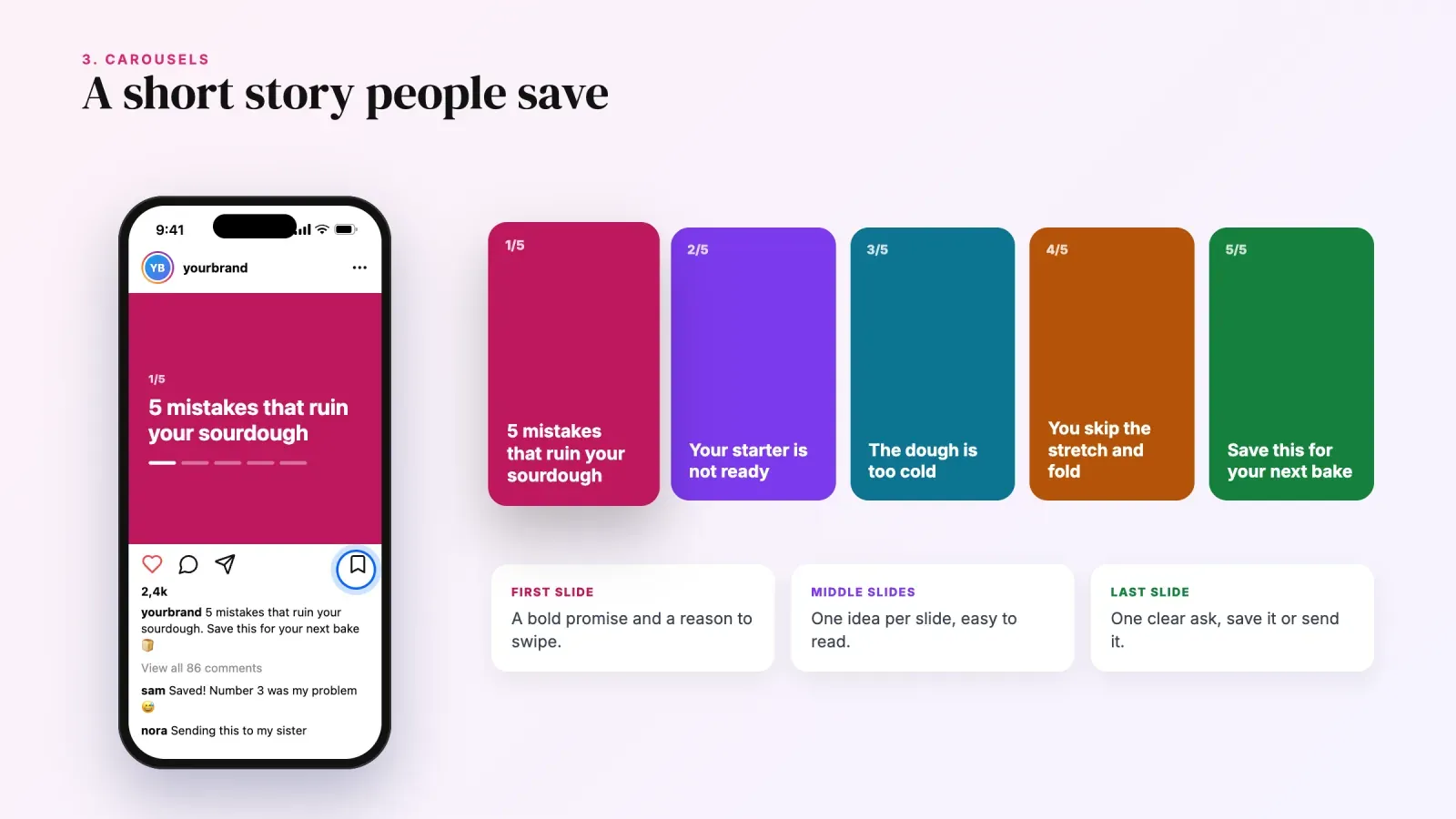
Carousels can hold up to 20 photos or videos, and each swipe is a signal that people are interested. Instagram also shows a carousel again to people who didn't swipe the first time, starting from the second slide, which gives you a second chance.
Carousels work best for content people want to keep. Step-by-step tutorials, checklists, before-and-after series, mini guides, recipes, outfit ideas or "5 mistakes to avoid" posts. These earn saves, and saves tell Instagram that your post has lasting value.
Build your carousel like a short story. The first slide makes a promise, each middle slide delivers one idea and the last slide asks for an action, like "save this for later" or "send this to someone who needs it". Learn more in our glossary entry on the carousel format.
4. Give people a reason to send your posts
Sends are the most powerful signal for reaching new people, so design some of your content to be shared. Ask yourself, who would someone send this to, and why?
Content that gets sent tends to fall into a few types.
- Relatable. "Tag the friend who always does this" moments, funny observations from your niche.
- Useful for a specific person. "Send this to your friend who's moving abroad."
- Surprising. A fact, a result or a comparison people want to show someone else.
- Plans and ideas. Restaurants, trips, gift ideas, workouts to do together.
You can also ask directly. "Send this to the person you'd do this challenge with" is a clear, natural call to action that turns a viewer into a distributor.
5. Use interactive Stories stickers
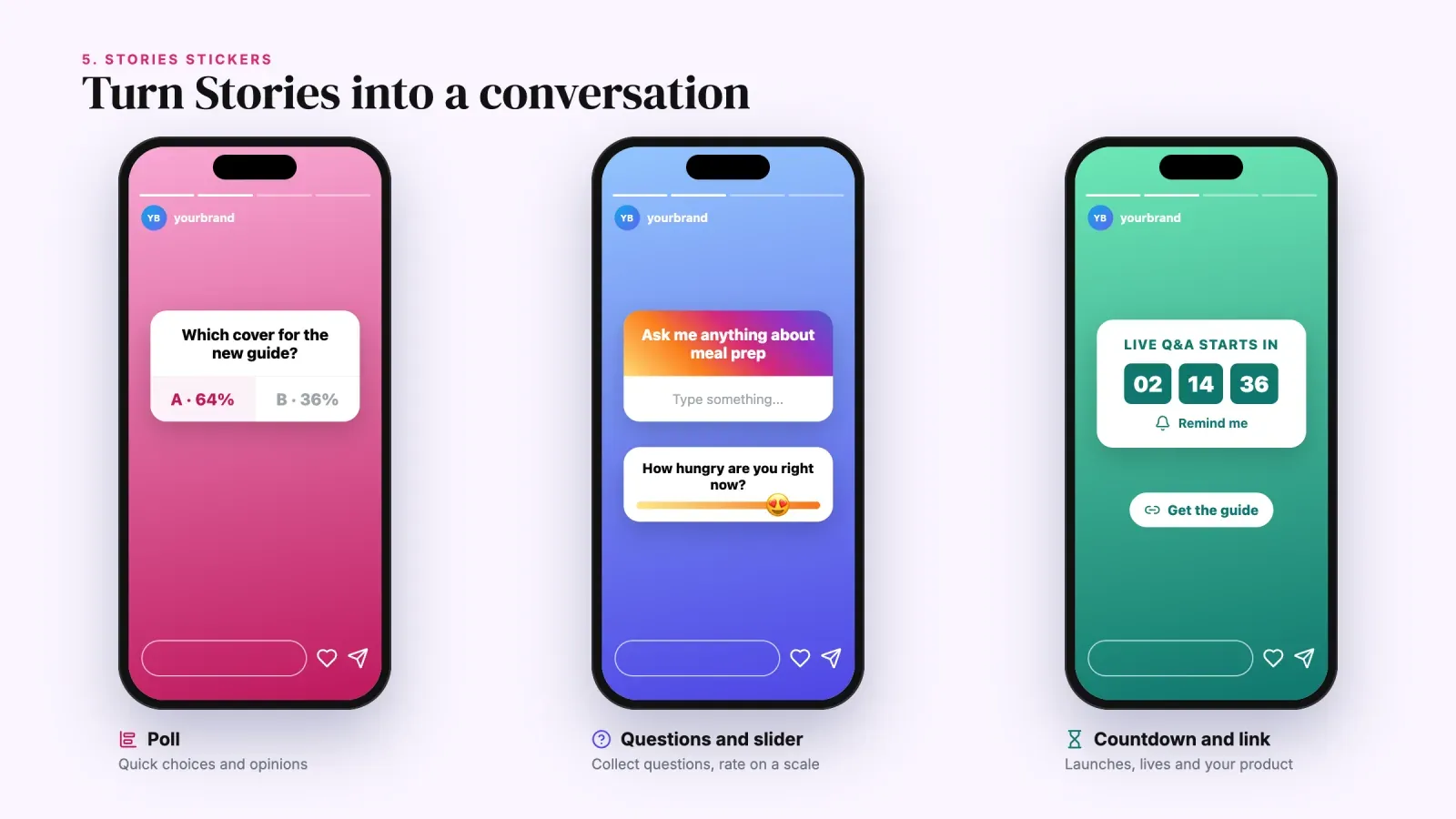
Stories are where your most loyal followers spend time. Each sticker tap is engagement, and Stories with high interaction help your other content appear higher for those followers.
The most useful stickers are:
- Poll, for quick choices. "Which cover should I use, A or B?"
- Quiz, for playful knowledge tests in your niche.
- Questions, for collecting questions you can answer in later Stories or Reels.
- Emoji slider, for rating something on a scale.
- Countdown, for launches, events or live sessions, with a reminder people can turn on.
- Link, to send people to your product, your newsletter or your latest post.
Make Stories feel like a conversation. Share behind the scenes, ask for opinions and show the results of your polls. When people see their votes matter, they keep voting.
6. Write captions that start conversations
A caption isn't just a description. It's a prompt. The first line shows before the "more" button, so make it count. Then end with an easy question or call to action.
Good engagement questions are specific and easy to answer.
- "Which one would you pick, 1, 2 or 3?"
- "What's the worst advice you got about this?"
- "Coffee or matcha before a workout?"
Avoid vague prompts like "Thoughts?" They ask people to think too hard. Our guide to Instagram captions has more than 240 ideas by mood, and the glossary entry on the CTA explains how to phrase a clear call to action.
Use keywords in your caption too. Instagram search reads captions, so writing "easy vegan meal prep for the week" helps people who search those words find your post.
7. Reply to comments fast and well
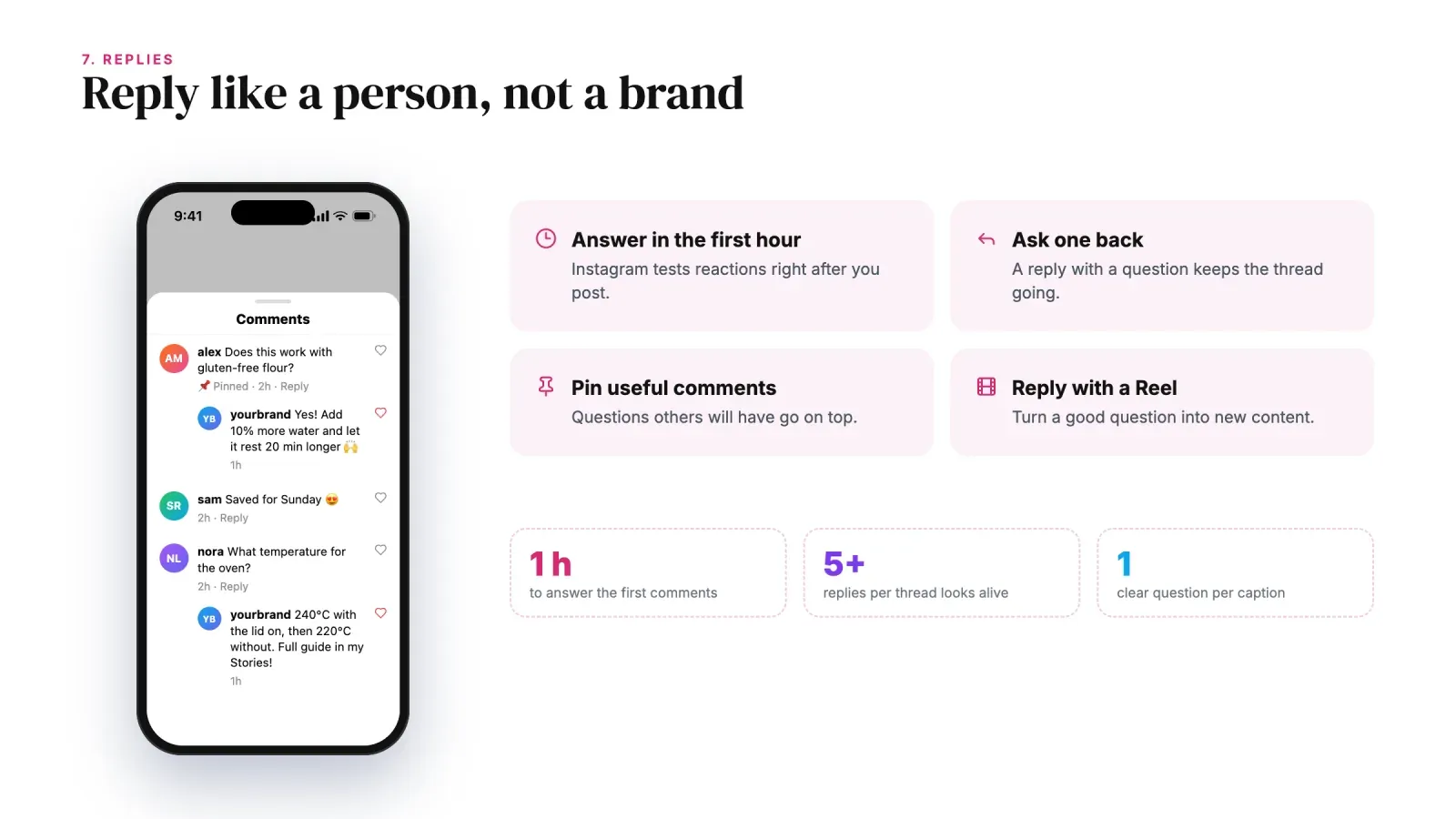
Every comment is a chance to start a conversation, and conversations bring more comments. Reply to as many comments as you can, especially in the first hour after posting, when Instagram is testing how people react.
Make replies meaningful. Instead of a heart or "thanks!", answer the question, ask one back or add a detail. A thread with five back-and-forth replies looks much more alive than twenty single comments.
Pin the best comments to the top, especially questions that others may also have. Reply to some comments with a short Reel, which turns a question into new content and shows your audience you're listening.
8. Show your face and your personality
People connect with people. Accounts where the creator appears on camera, talks directly to viewers and shares opinions usually get more comments than accounts that only post products or graphics.
You don't need to become a vlogger. Start small.
- Add a short talking clip to the start of a tutorial.
- Show your hands, your workspace or your process.
- Share the story behind a product or a project.
- Give your honest opinion on a trend in your niche.
If you prefer to stay off camera, a faceless brand can still feel personal through voiceover, a strong writing style and a consistent point of view.
9. Collaborate with other accounts
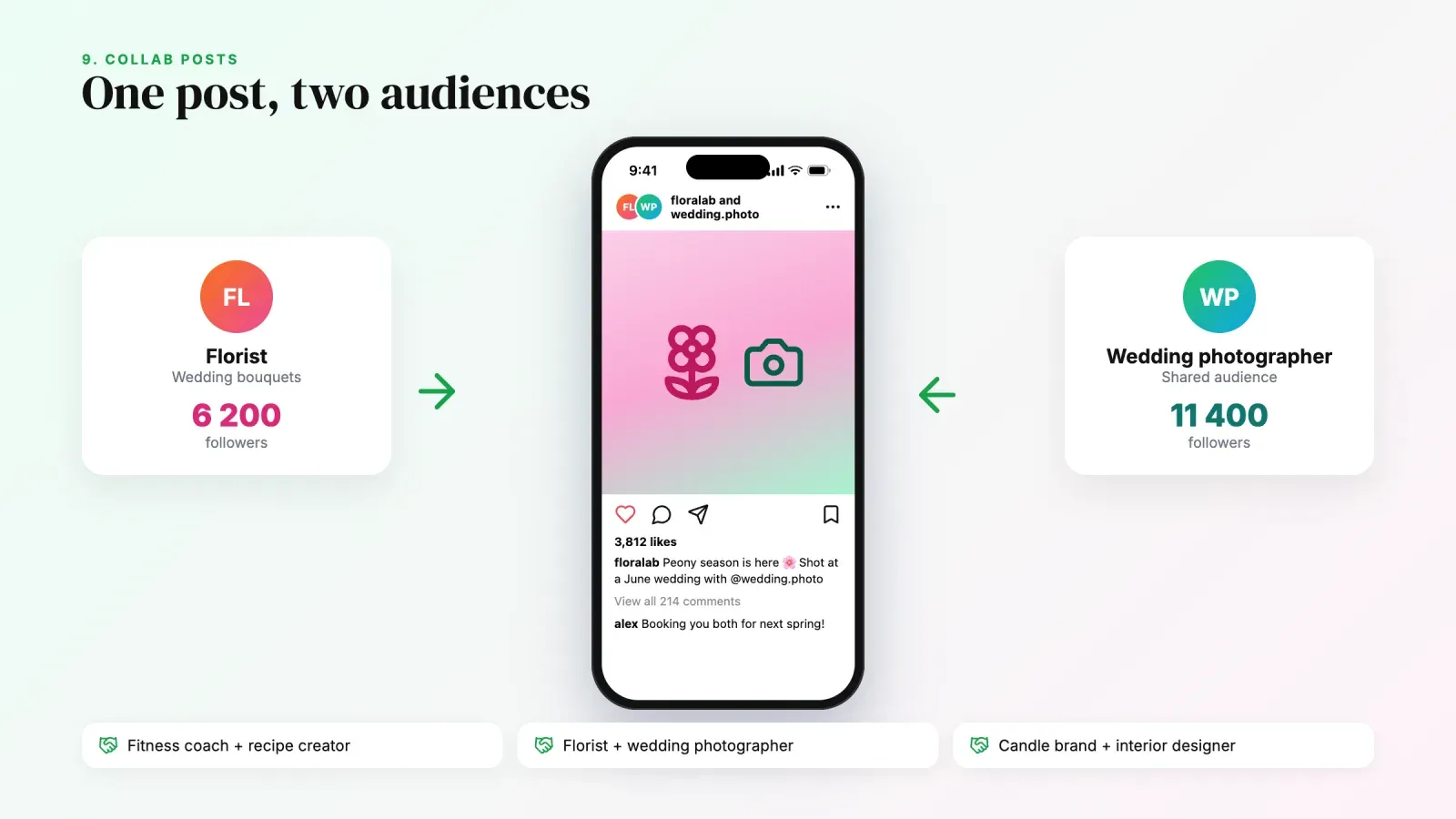
Collab posts let two accounts publish the same post together. It appears on both profiles and in both audiences' feeds, and the likes and comments are shared. It's one of the fastest ways to reach a relevant new audience.
Good collaboration partners share your audience but don't compete directly with you. A fitness coach with a healthy recipe creator, a florist with a wedding photographer, a candle brand with an interior designer. Plan the content together so it's genuinely useful to both audiences.
Tagging also helps. When you feature a product, a place or a person, tag them. Many will repost it to their Stories, which sends their audience back to you.
10. Run giveaways and challenges with clear rules
A giveaway can bring a burst of comments and new followers. The key is a prize your ideal audience wants, not a generic one. A free product or service of yours attracts potential customers. A random gadget attracts prize hunters who unfollow the next day.
Ask for actions that create real engagement. Comment with an answer to a question, save the post or follow your account. Instagram's promotion guidelines say you shouldn't encourage people to tag content inaccurately, and you need official rules that follow the law in your country. Our guide to types of sales promotions covers the legal side of giveaways and contests.
Challenges work too. Ask people to try something and share it with your hashtag or by tagging you. The posts they create become user-generated content you can repost.
11. Post consistently without burning out
Consistency matters because people engage with accounts they remember. Posting three times a week every week beats posting daily for two weeks and then disappearing for a month.
Pick a rhythm you can keep for months. For many creators and small brands, it looks like this.
- Feed or Reels. Three to five posts a week, mixing Reels and carousels.
- Stories. A few frames most days, with at least one sticker.
- Lives or Q&As. Once or twice a month if your audience likes them.
Batch your content. Film several Reels in one session, write captions for the week in one sitting and schedule them. Content pillars, three or four recurring themes your account is known for, make it much easier to keep ideas flowing. Our glossary entries on content pillars and batching explain both methods.
12. Use Insights to double down on what works
Instagram Insights shows what your audience actually responds to. Once a month, open your professional dashboard and look at your top posts by reach, shares, saves and comments.
Look for patterns, not single hits.
- Which format brings the most shares, Reels or carousels?
- Which topics get the most saves?
- Which hooks keep people watching past three seconds?
- Which posts bring the most profile visits and follows?
Then make more of what works. If your "mistakes to avoid" carousels always get saved, make it a series. If a Reel format gets shared, reuse the structure with a new topic. Engagement grows fastest when you stop guessing and start repeating your winners.
Hashtags in 2027, what still works
Hashtags matter much less than they used to. Instagram now relies mostly on what's in your post, the text on screen, your caption and how people react. Since late 2025, Instagram also limits posts and Reels to five hashtags.
Use them as labels, not as a growth hack.
- Choose three to five specific hashtags that describe the post, like #veganmealprep rather than #food.
- Avoid banned or spammy hashtags, which can limit your reach.
- Put your effort into keywords in the caption and on-screen text instead.
If your reach suddenly drops, check that you haven't posted content that goes against Instagram's recommendation guidelines. Our glossary entry on shadowban explains how to check your account status.
A 30-day plan to increase Instagram engagement
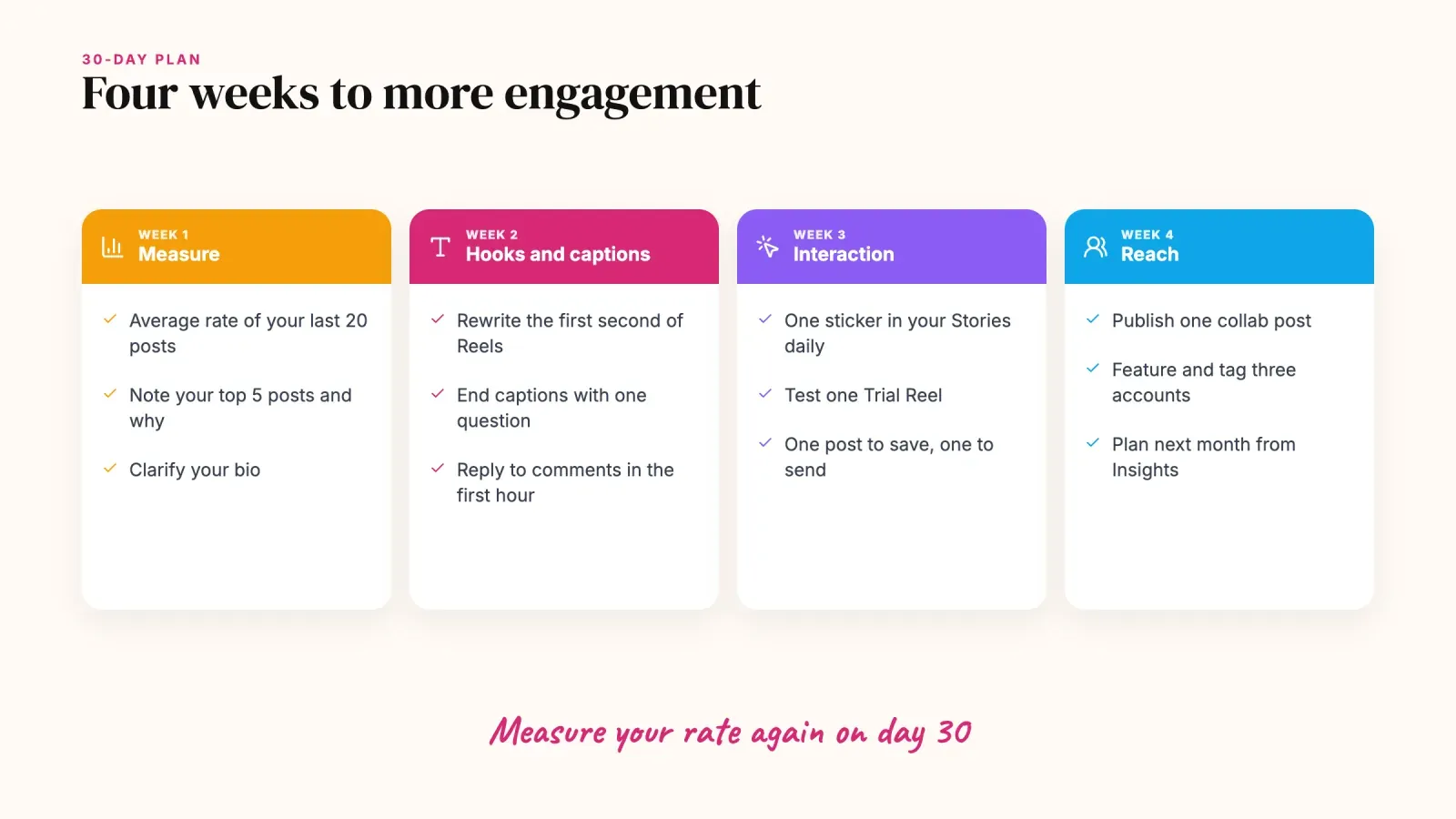
Here is a simple plan to apply the tactics without changing everything at once.
Week 1. Measure and clean up. Calculate your average engagement rate on your last 20 posts. Note your top five posts and why they worked. Update your bio so it says clearly who you help and what people get by following you.
Week 2. Improve hooks and captions. Rewrite the first second of every Reel and the first slide of every carousel. End every caption with a specific question. Reply to every comment in the first hour.
Week 3. Add interaction. Post Stories with at least one sticker each day. Test one Trial Reel. Publish one carousel built to be saved and one post built to be sent.
Week 4. Reach new people. Publish one collab post with a relevant account. Feature and tag three people or brands. Review Insights and plan next month around the formats and topics that performed best.
After 30 days, calculate your engagement rate again and compare it with week 1.
Mistakes that kill Instagram engagement
Buying followers or engagement. Fake followers don't engage, so your rate drops, and brands can spot it immediately.
Engagement pods and comment-for-comment groups. They create fake signals from people who aren't your audience, and Instagram is good at detecting them.
Posting and disappearing. If you never reply to comments, people stop leaving them.
Asking too much. "Like, comment, share, save and follow" in every caption is too many requests. Ask for one action per post.
Copying trends that don't fit. A trending audio only helps if the content makes sense for your audience.
Sending engaged followers nowhere. If people visit your profile and find a broken link or a long list of random links, the attention is wasted. A clear link in bio page turns engagement into newsletter signups, bookings and sales.
FAQ about Instagram engagement
What is a good engagement rate on Instagram in 2027?
By followers, brand accounts average around 0.3% to 0.6%, while creators and smaller accounts often reach 1% to 5%. The best benchmark is your own average. Track it monthly and aim to improve it.
Why is my Instagram engagement so low?
Common causes are weak hooks, posts that don't invite a reaction, inconsistent posting, not replying to comments, an audience that no longer matches your content or fake followers. Start by checking which of your recent posts performed best and what they have in common.
Do likes or shares matter more on Instagram?
Shares by DM, called sends, matter most for reaching people who don't follow you. Likes matter most for how your content is shown to existing followers. Saves and comments also help. Aim for content that people want to keep or send.
Do hashtags increase engagement on Instagram?
Only a little. Instagram limits posts to five hashtags and relies mostly on your content and keywords. Use a few specific hashtags as labels and focus on hooks, captions and on-screen text.
How often should I post to get more engagement?
Three to five feed posts or Reels a week plus Stories most days works well for most accounts. Consistency over months matters more than posting a lot for a short time.
Do Instagram engagement pods still work?
No. Pods create fake engagement from people outside your audience. Instagram detects these patterns, and the comments rarely turn into followers, customers or brand deals.
Turn engagement into results
Increasing Instagram engagement comes down to a few habits. Hook people in the first second, make content worth watching to the end, give people a reason to save and send it, reply like a person and repeat what works. Track your engagement rate every month so you know which changes made a difference.
Engagement is also the start of a relationship. When people like your content enough to visit your profile, give them somewhere to go. Create your free Roctify page to turn your link in bio into a page with your products, bookings, newsletter and best content, so the attention you earn on Instagram becomes customers and subscribers.