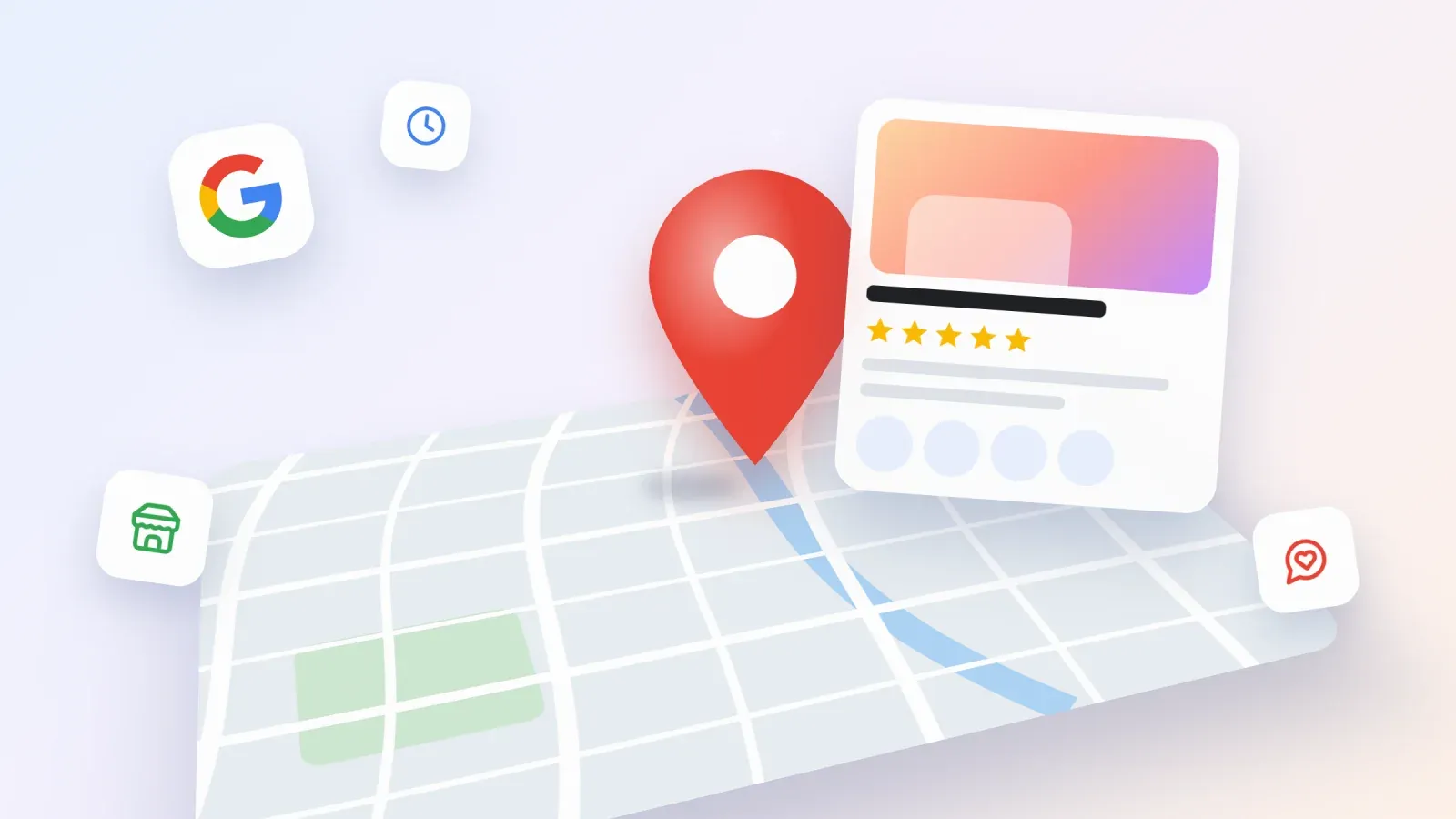
When someone types "florist near me", "yoga class open now" or the name of your business into Google, the first thing they often see is a box with a map, photos, opening hours, reviews and buttons to call or get directions. That box comes from a Google Business Profile. It is free, it appears on Google Search and Google Maps, and for many local businesses it brings more customers than their website.
This guide explains what a Google Business Profile is, who can create one, how to set it up and verify it step by step, and how to optimize it so it shows up higher in local results. You will also learn what Google changed recently, how creators, coaches and small sellers can use a profile, and what to do instead if your business is online only.
What is a Google Business Profile
A Google Business Profile is a free listing that lets a business control how it appears on Google Search and Google Maps. It was called Google My Business until late 2021, when Google renamed it and moved most of the management tools directly into Search and Maps.
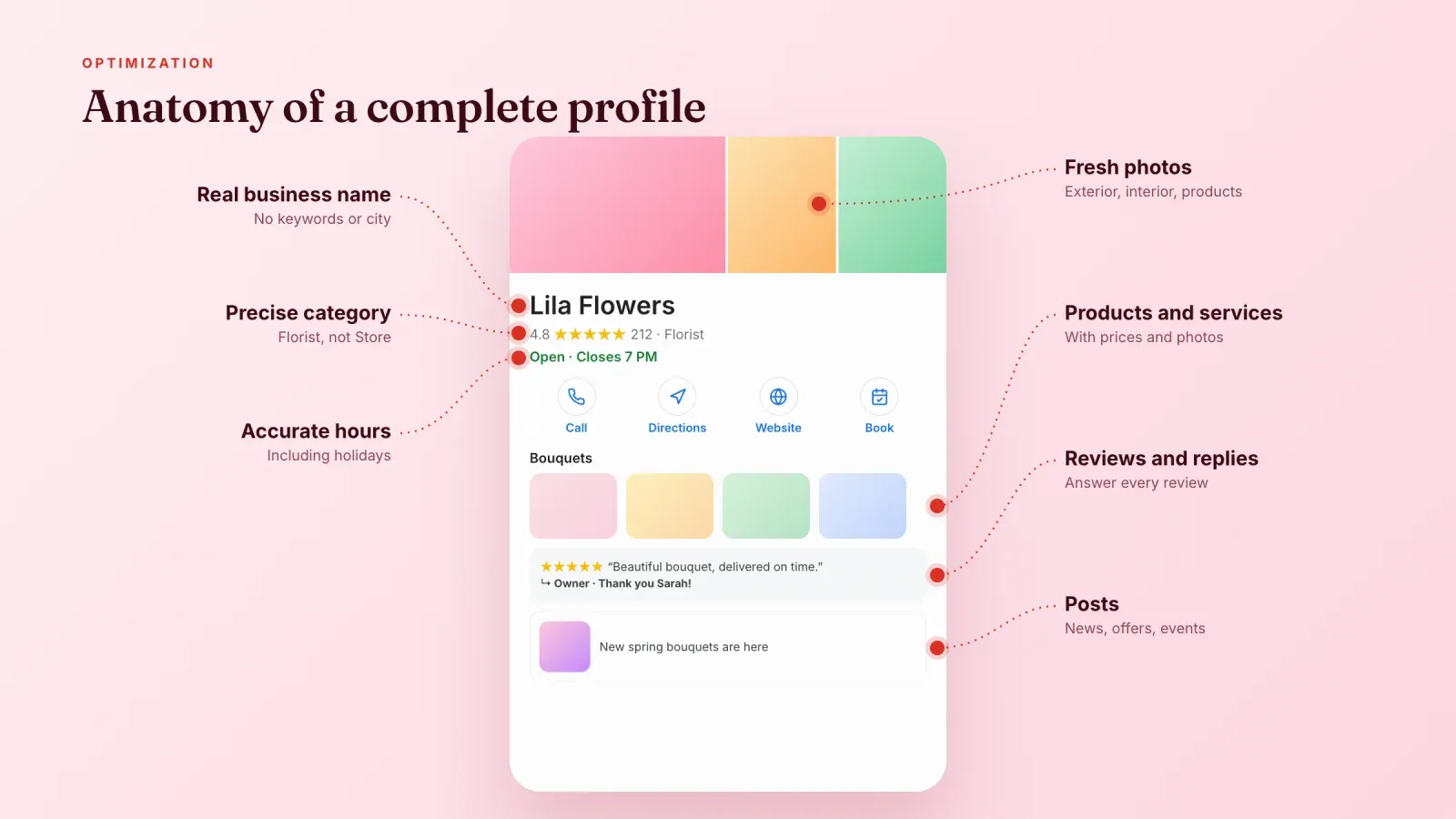
A complete profile can show your business name, category, address or service area, phone number, opening hours, website link, photos, videos, products, services, posts, reviews and buttons for calling, booking, messaging or getting directions. You manage all of it from your Google account, either by searching for your business name on Google or from the Google Maps app.
The profile works alongside your website, like a shop window on Google. People see the essentials at a glance, then decide whether to call, visit, book or click through to your site.
Why a Google Business Profile matters
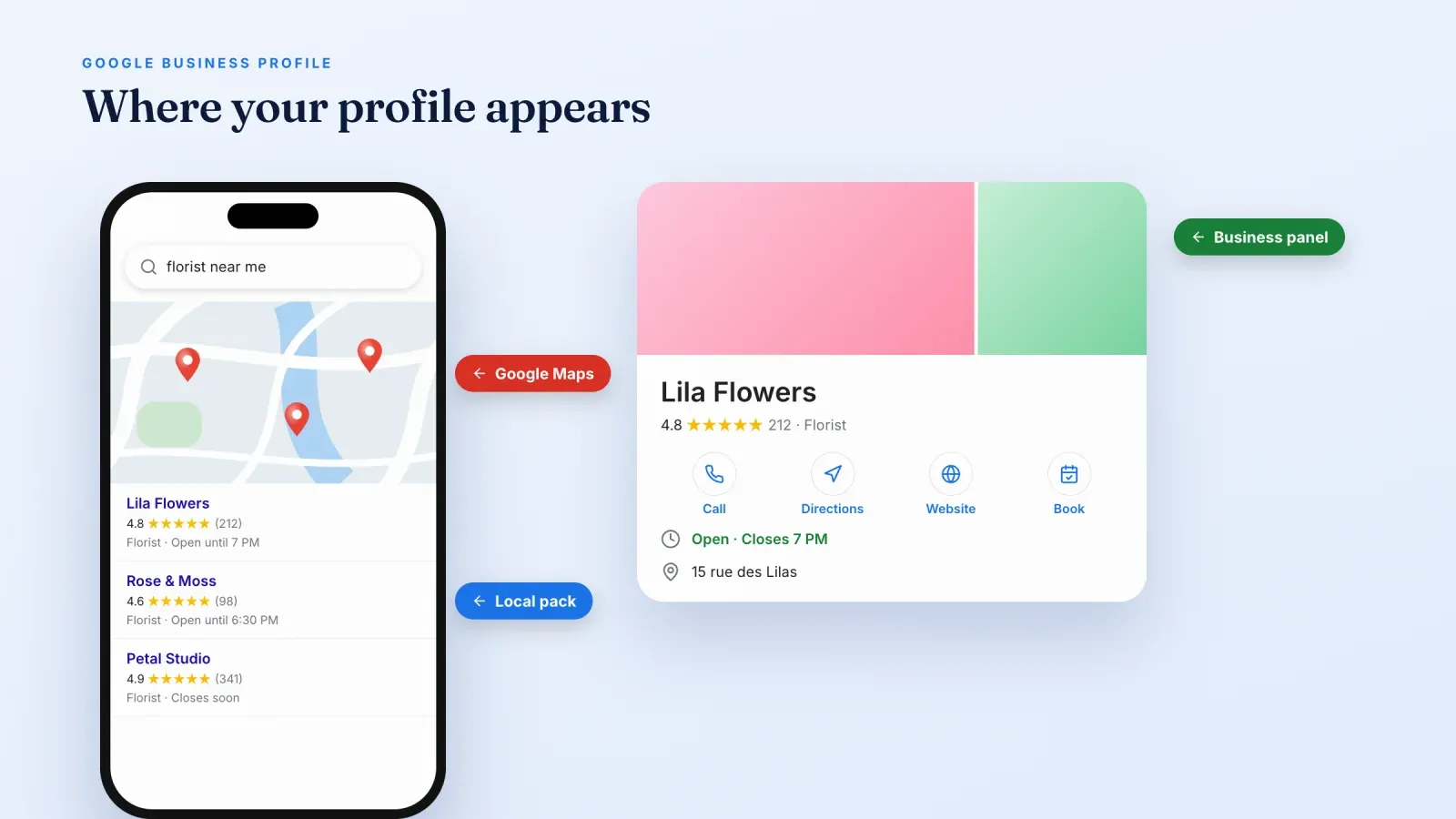
A profile makes your business eligible for three valuable places on Google.
The local pack. For searches with local intent, such as "bakery near me" or "hair salon in Lyon", Google often shows a map with three businesses under it. These three spots get a large share of the attention and clicks, and only businesses with a profile can appear there.
Google Maps. When people browse the map, search for a category or ask for directions, profiles are what they see and tap.
The business panel. When someone searches for your business name, your profile appears as a large panel on the right on desktop or at the top on mobile. It answers the practical questions immediately, like whether you are open, where you are and what other customers think.
Beyond visibility, a profile builds trust. Recent photos, accurate hours and real reviews reassure people before they ever contact you. It also removes friction, since the call, directions, booking and website buttons are one tap away. For a business that sells both online and in person, which is the heart of an omnichannel strategy, the profile connects the two worlds.
Who can get a Google Business Profile
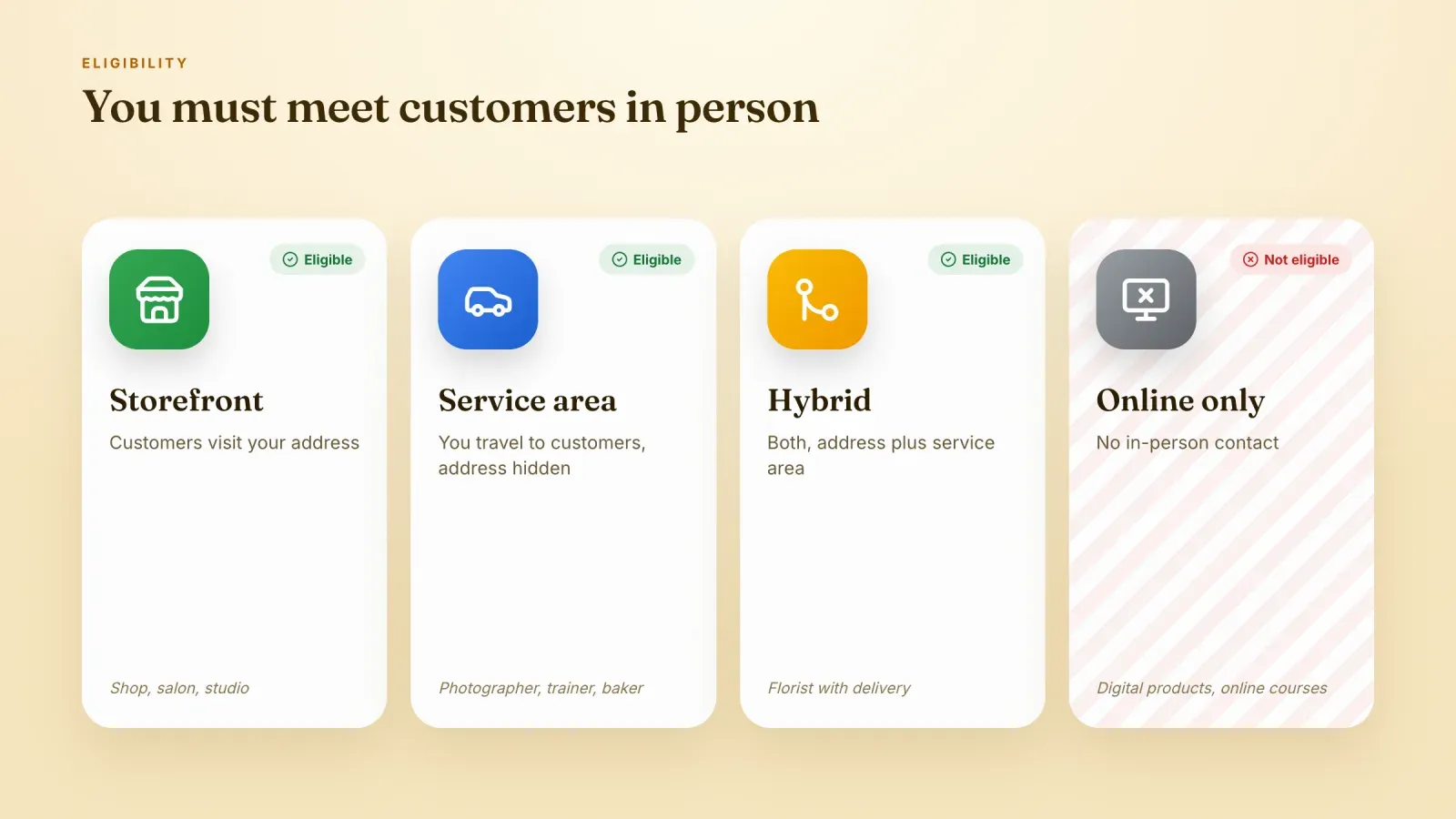
This is the part many people skip, and it causes most suspensions. Google only accepts businesses that make in-person contact with customers during their stated hours. There are three accepted types.
Storefront businesses. Customers come to your address, like a shop, restaurant, salon, studio or office. Your address is shown on the profile.
Service-area businesses. You travel to your customers, like a plumber, a photographer who shoots on location, a home cleaner, a mobile hairdresser or a cake maker who delivers. You hide your address and list the cities, regions or postal codes you serve instead.
Hybrid businesses. You welcome customers at an address and also travel to them, like a restaurant with delivery or a florist with a shop and a delivery service. You show your address and add a service area.
Some businesses are not eligible. These include online-only businesses with no in-person contact, rental or for-sale properties, ongoing services like classes or meetings held at a place you do not own or manage, and addresses that are virtual offices, mailboxes or PO boxes. A pop-up that runs for a few days is usually not eligible either. Creating a profile anyway often ends in a suspension, and getting reinstated can take weeks.
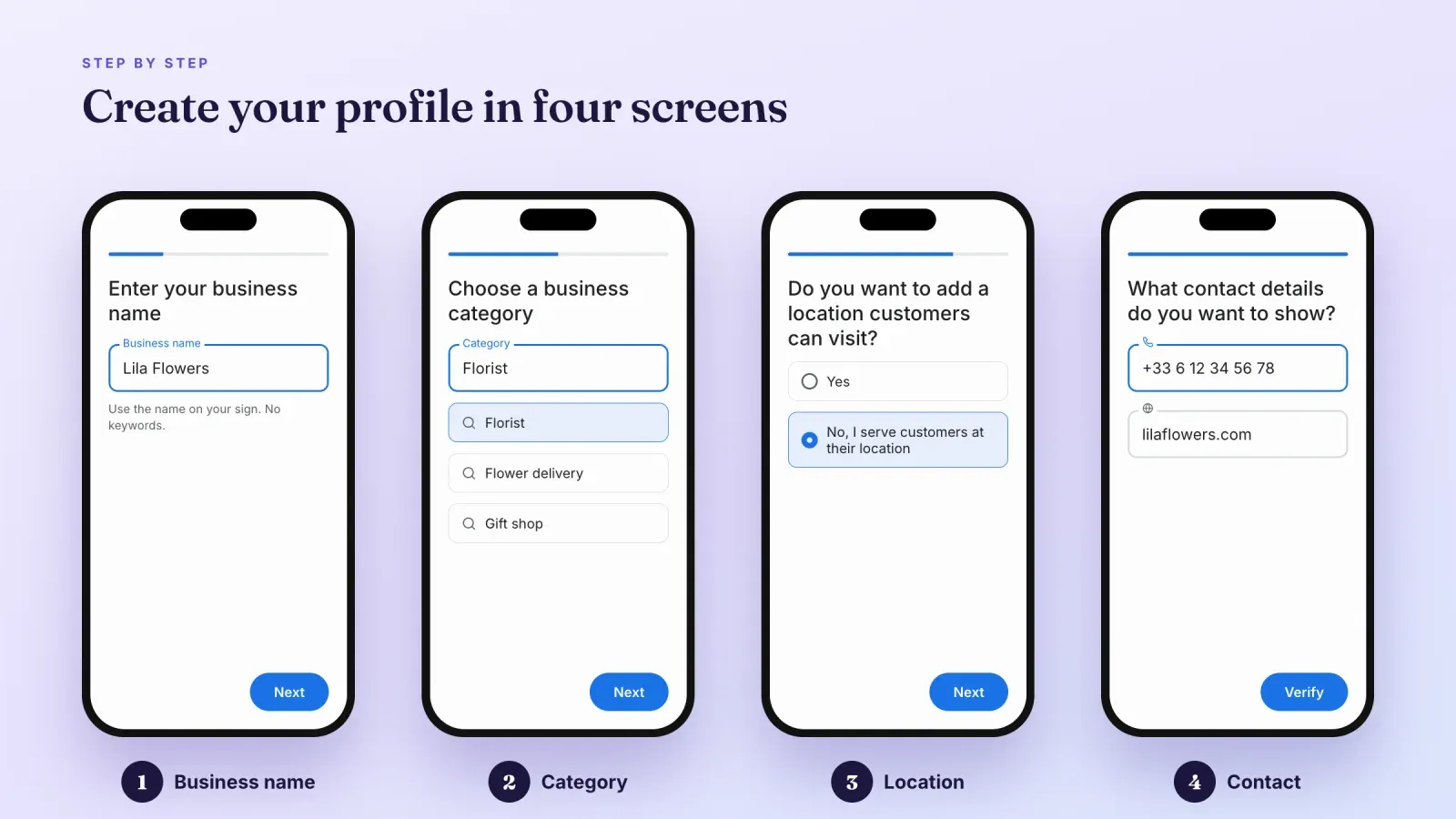
How to create a Google Business Profile step by step
Before you start, gather your exact business name, address or service area, phone number, website link, opening hours and a few good photos. Make sure these details match what is on your website and social profiles. Consistency helps both customers and Google.
- Use the right Google account. Sign in with a Google account that belongs to the business and that you will keep for years. Avoid using an employee's personal account. You can add other managers later.
- Check whether a profile already exists. Search for your business name and city on Google Maps. If a listing already exists, select it and choose the option to claim or own the business instead of creating a duplicate.
- Start the creation flow. Go to business.google.com and choose to add your business.
- Enter your business name. Use the real name your customers see on your signage, packaging or invoices. Do not add keywords, cities or slogans. "Lila Flowers" is correct, "Lila Flowers best florist Paris delivery" is a violation.
- Choose your primary category. Start typing what you do and pick the most precise category, such as "Florist" rather than "Store". You can add secondary categories later.
- Add your location or service area. Say whether customers can visit you. If yes, enter your address and place the pin correctly on the map. If you travel to customers, add your service area and hide your address.
- Add contact details. Enter your phone number and website. If you do not have a website, you can use a page you own, such as a booking page or a storefront page.
- Verify your business. Google will ask you to prove that the business is real and that you manage it. The next section explains the options.
- Complete your profile. After verification, add hours, a description, photos, products, services and attributes. Profiles that look complete tend to perform better.
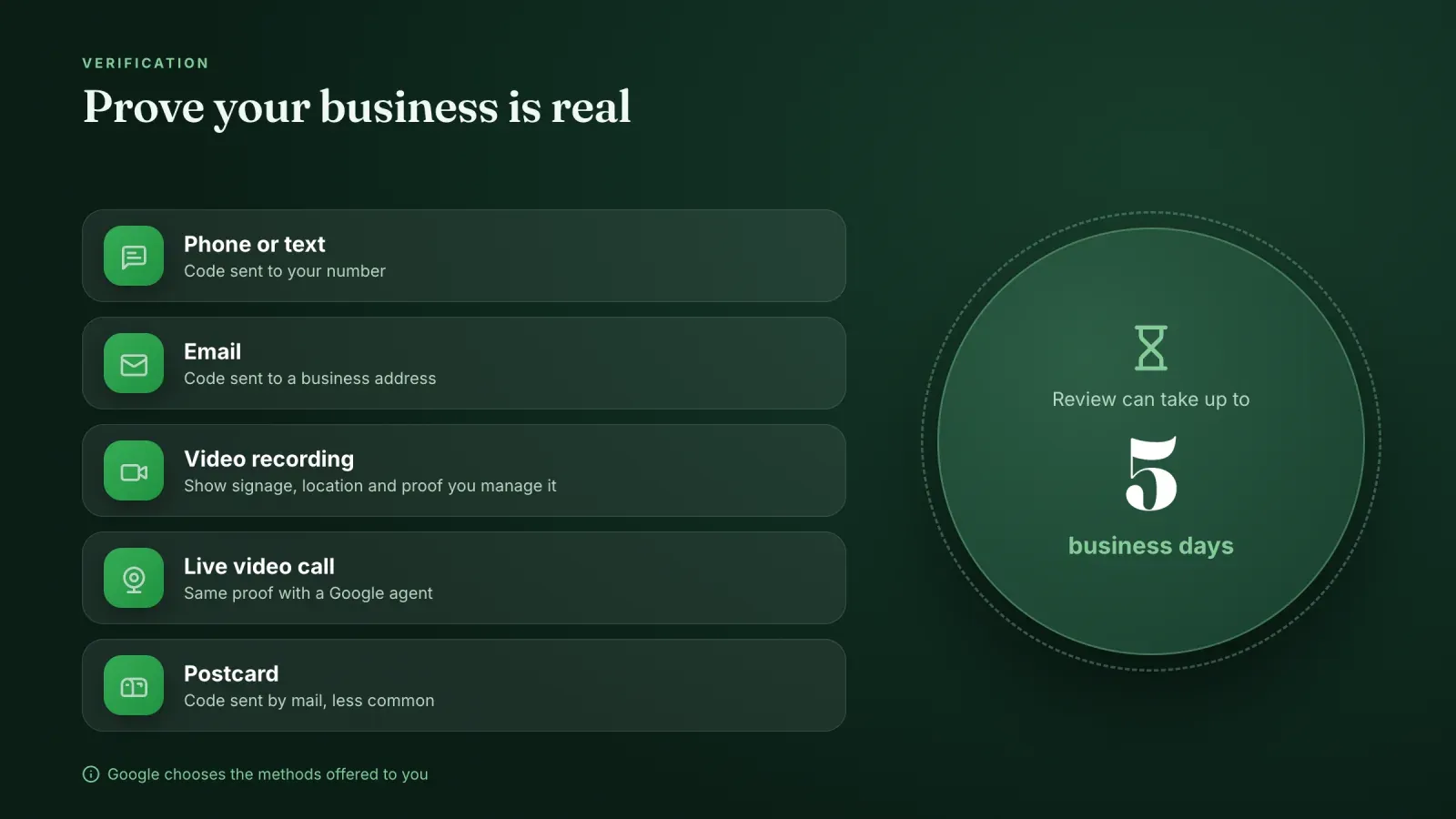
How to verify your Google Business Profile
Verification proves to Google that your business exists at the address or in the area you declared, and that you are allowed to manage it. Until a profile is verified, your edits may not appear publicly.
Google chooses which methods are available for your business. You cannot always pick, and you may be offered several. Common methods include:
- Phone call or text message. You receive a code on the business phone number.
- Email. You receive a code at an address linked to the business.
- Video recording. You record a short continuous video showing your location, your signage or equipment, and proof that you manage the business, such as opening the shop door with a key or showing tools of your trade.
- Live video call. You show the same elements to a Google support agent in real time.
- Postcard. A code is mailed to your address. This method has become less common.
According to Google, reviewing a verification can take up to five business days, and sometimes longer when more checks are needed. To speed things up, make sure your business name matches your signage, your address is complete, and your video clearly shows the location from the outside before entering.
How to optimize your Google Business Profile
Creating a profile is the first step. Optimizing it is what helps you appear above competitors and turn views into customers.
Write a helpful description. You have up to 750 characters. Explain what you offer, who you serve and what makes you different, using natural language. Put the most important information in the first lines. Do not include links or promotional claims like "best prices".
Pick categories carefully. The primary category has the most influence on the searches you appear for. Add a few secondary categories only if they truly describe your business. A bakery that also serves coffee could add "Coffee shop", while a bakery that sells one coffee a day should not.
Keep hours accurate. Add regular hours and special hours for public holidays, events and closures. Nothing destroys trust faster than a customer finding a closed door when your profile said "Open".
Add attributes. Attributes are short facts customers care about, like wheelchair accessibility, free Wi-Fi, outdoor seating, online appointments or identity attributes such as women-owned. Choose all those that are true.
Upload photos and videos regularly. Add your logo, a cover photo, exterior photos that help people recognize your entrance, interior photos, product photos and team photos. Real, recent images work better than stock photos. Short videos of your space or your work are a plus.
List products and services. Add your main products with photos, prices and descriptions, and your services with clear names. Shoppers can browse them directly from your profile, and these details can help you appear for more specific searches.
Add the right links. Besides your website, you can add links for booking, ordering or menus depending on your category. Add tracking parameters to your website link so you can measure visits from your profile in your analytics.
Publish posts. Posts let you share news, offers, events and new products on your profile. They show customers that your business is active. Use a strong photo, a short text and a button like "Learn more" or "Book".
Turn on messaging. Google's own chat feature was shut down in 2024, but you can add a WhatsApp or text message link so customers can contact you directly from your profile.
Collect and answer reviews. Reviews are so important that they get their own section below.
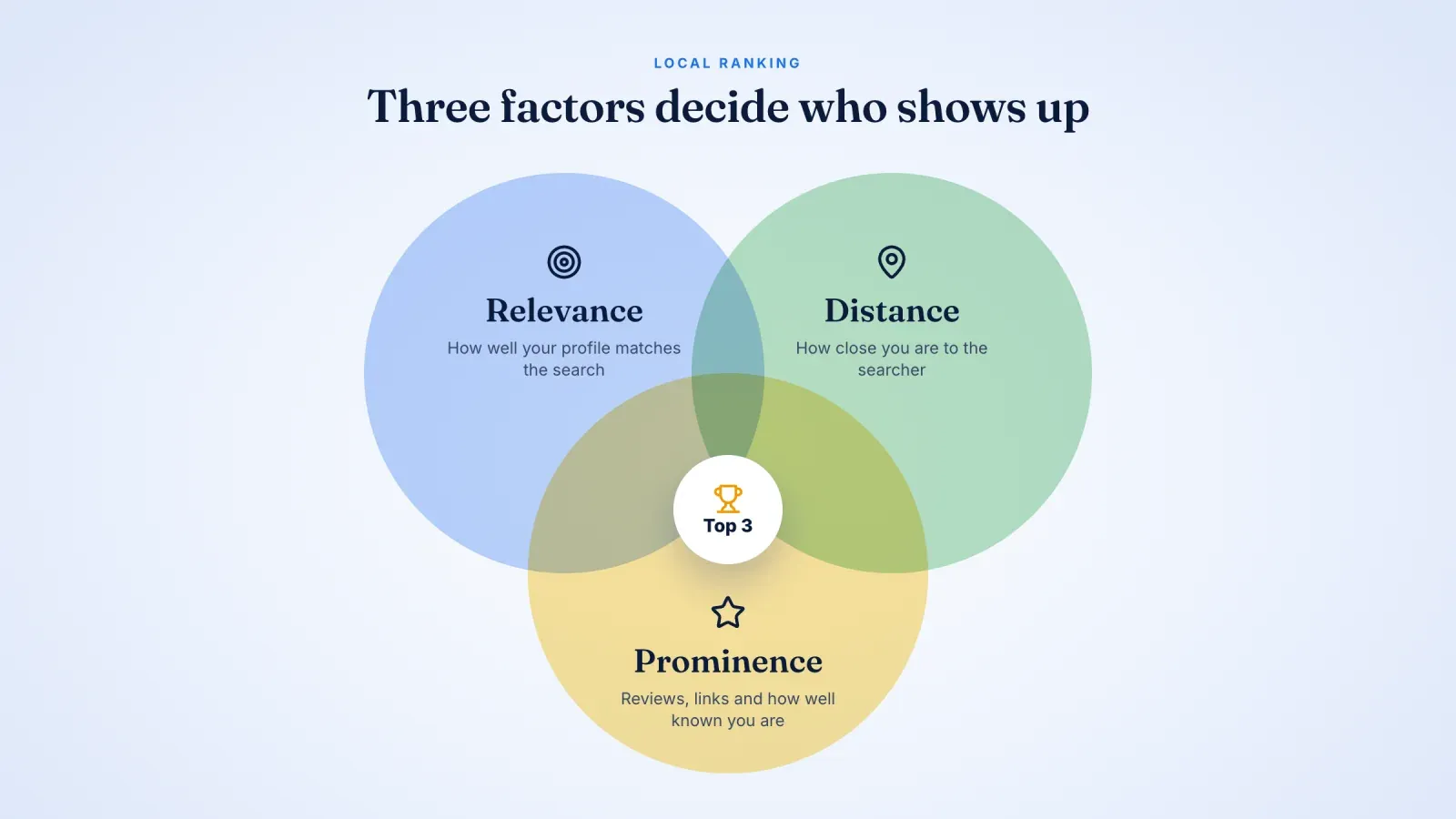
How Google ranks business profiles
Google explains that local results are based mainly on three factors.
Relevance. How well your profile matches what the person is looking for. Complete, detailed information, accurate categories, products and services all help Google understand when to show you.
Distance. How far your business is from the location used in the search, or from the person's current position. You cannot change where you are, but you can make sure your address and service area are correct.
Prominence. How well known your business is. Google considers reviews, ratings, links and mentions across the web, and your general presence in search results. Well-known brands, landmarks and businesses with many positive reviews tend to rank higher.
There is no way to pay for a better organic ranking in local results. Google Ads can place your business in sponsored spots on Maps and Search, but the organic positions depend on these three factors.
Reviews, how to get them and how to answer
Reviews influence both your ranking and the decision of the people who read them. Most shoppers check reviews before visiting a local business, and many ignore businesses with too few reviews or a low rating.
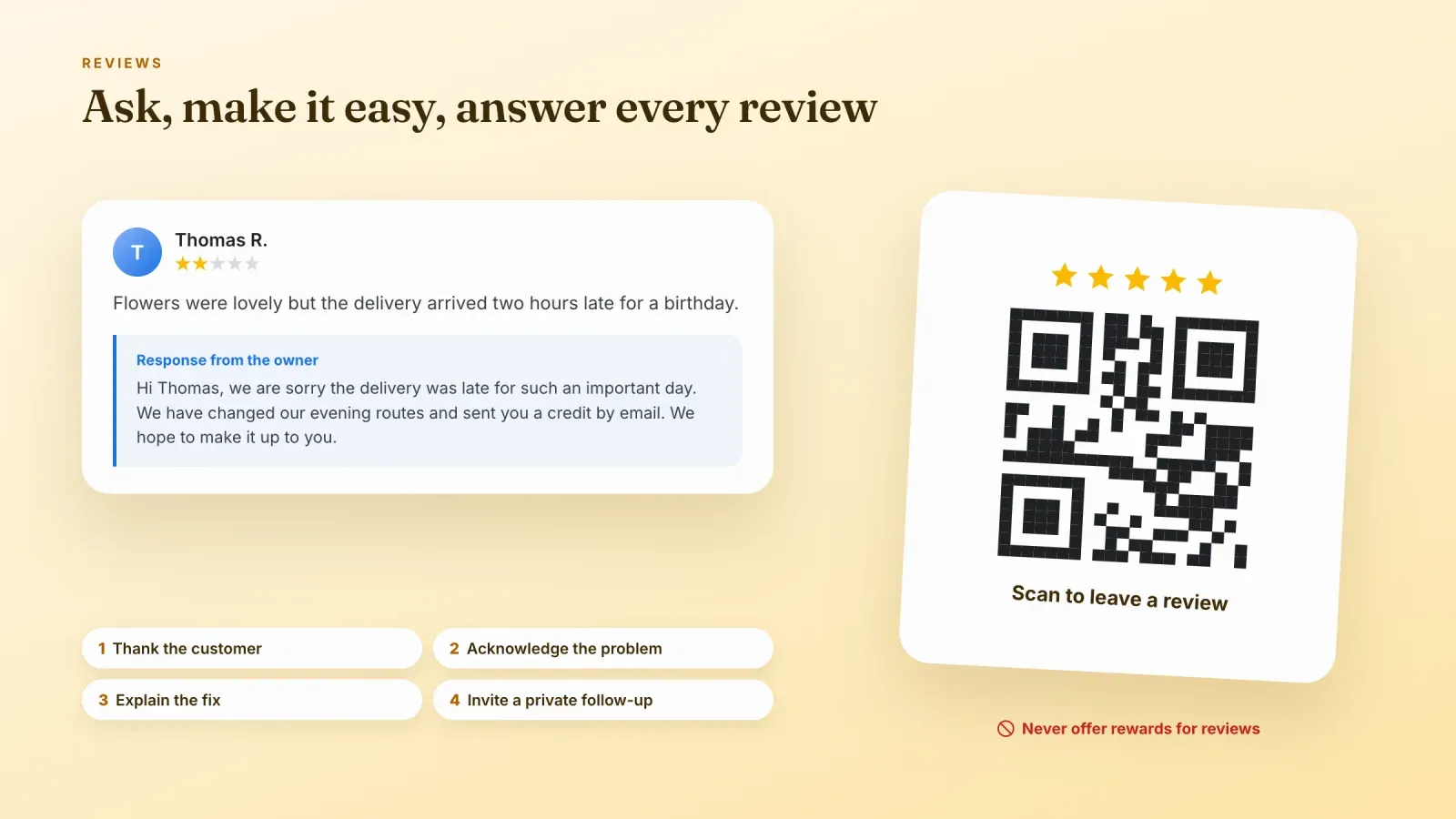
Ask every happy customer. The best time is right after a good experience. Share your review link by message, email, on receipts or with a QR code at the counter. You can find a short review link in your profile.
Make it easy. Send the direct link and suggest what they could mention, such as the product they bought or the service they received.
Follow the rules. Google does not allow you to offer discounts, gifts or payments in exchange for reviews, to ask only happy customers through filters, or to post reviews about your own business. Buying fake reviews can also break consumer protection laws, which are being enforced more strictly in many countries.
Answer every review. Thank people for positive reviews and mention something specific. Reply to negative reviews calmly and quickly. Acknowledge the problem, apologize when it is fair, explain what you are doing to fix it and invite the person to continue the conversation privately. Future customers read your replies as much as the reviews themselves.
Report reviews that break the rules. If a review is fake, offensive or clearly about another business, you can report it from your profile. Google will review it, though removal is not guaranteed.
What changed recently on Google Business Profile
Google regularly adds and removes features. If you read an old guide, some advice may no longer apply.
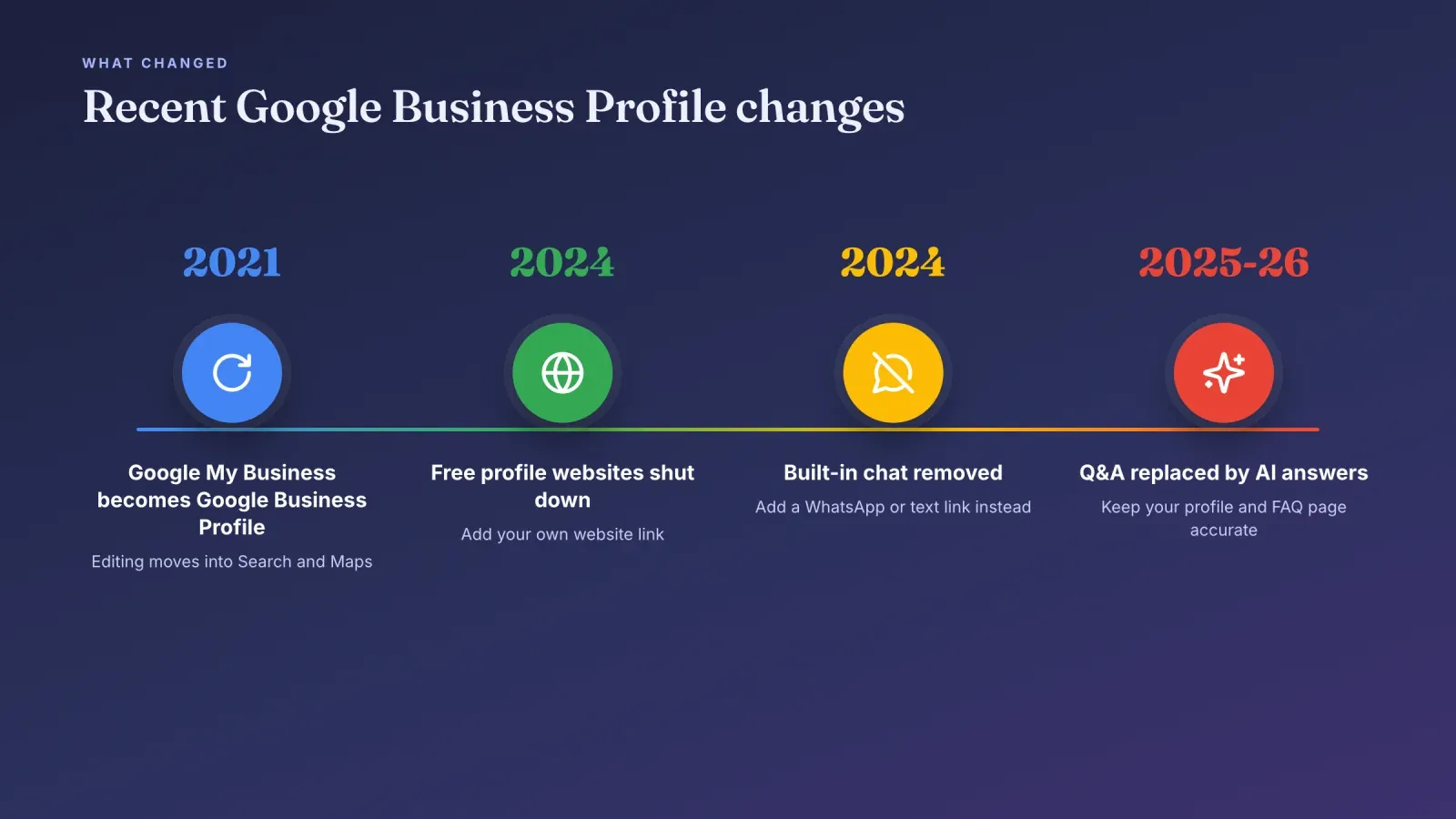
- 2021. Google My Business became Google Business Profile, and most editing moved directly into Google Search and Maps.
- 2024. The free websites that Google let businesses build inside their profile were shut down. Profiles that used them now need another website link.
- 2024. Google's built-in chat and call history were removed. Businesses can now add a WhatsApp or text message link instead.
- 2025 and 2026. The public questions and answers section is being replaced by AI-generated answers based on your profile, your reviews and information found online. Accurate details on your profile and an FAQ page on your website are now the best way to influence these answers.
The basics have not changed. Accurate information, a precise category, regular photos and genuine reviews remain the foundation of a strong profile.
Google Business Profile for creators, coaches and small sellers
Many creators and solo entrepreneurs wonder if a profile is for them. The answer depends on whether you meet customers in person.
You probably qualify if you are a personal trainer who coaches clients in a gym or at their home, a photographer or videographer who shoots on location, a makeup artist, a tattoo artist, a tutor giving lessons in person, a caterer or baker who delivers, or a maker who welcomes customers in a workshop with regular hours. Most of these work as service-area businesses, so your home address stays hidden.
You probably do not qualify if you sell only digital products, online courses, memberships or coaching by video call, or if you ship products without ever meeting customers. In that case, see the next section.
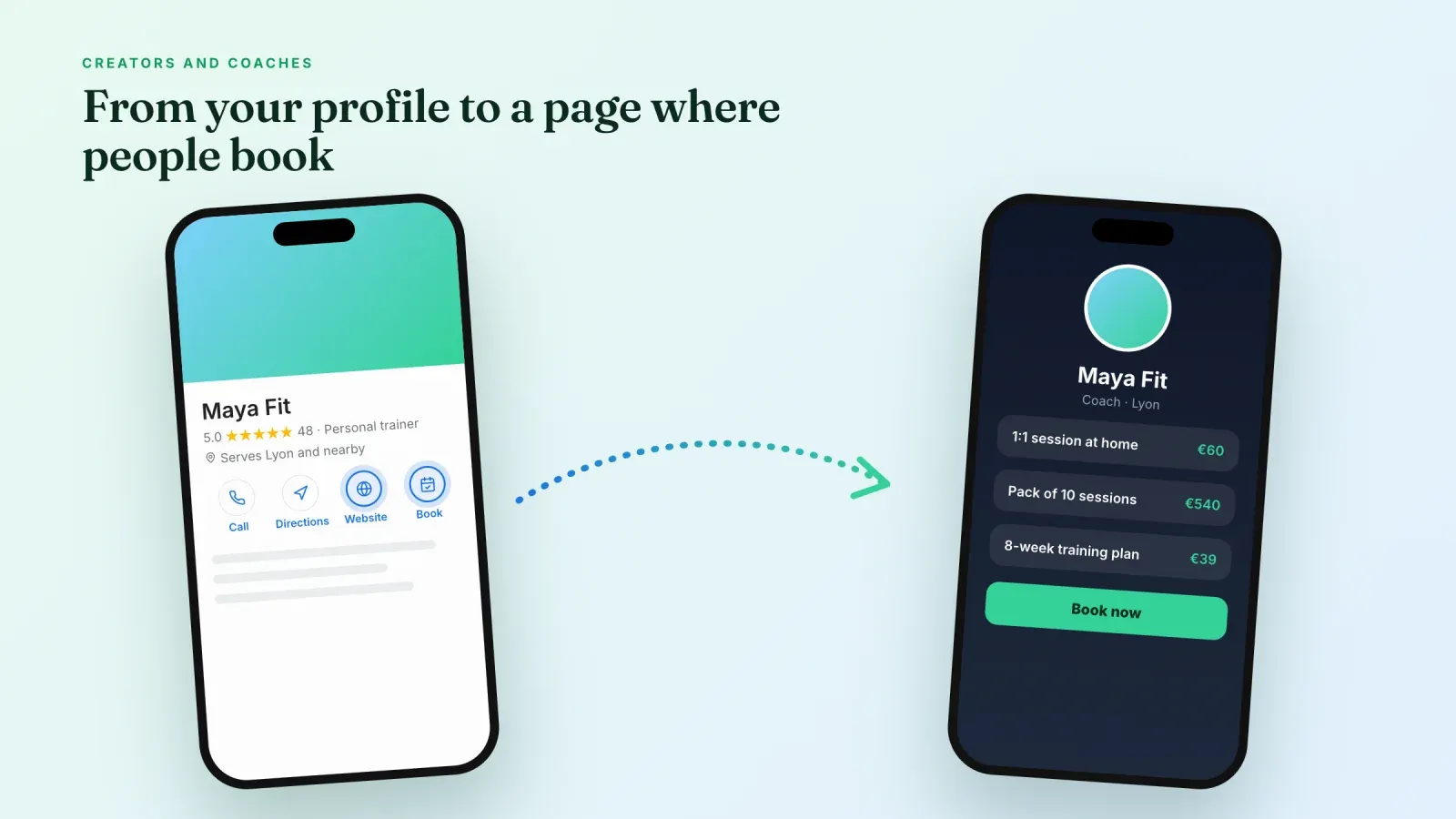
If you qualify, your profile can send people straight to the page where they book or buy. A link in bio page that gathers your booking calendar, services, products and payment works well as the website link of your profile, especially if you do not have a full website. Use the same name, photo style and description on your profile, your social accounts and your page, so people recognize you everywhere. A custom domain for that page makes the link on your profile look more professional.
If your business is online only
Online-only businesses cannot have a Google Business Profile, but they still have good ways to appear on Google.
- Free product listings. Online stores can upload their products to Google Merchant Center to appear for free in the Shopping tab and in some product results.
- SEO for your website. Clear pages for your products, services and brand name help you rank in regular search results. A strong brand page also influences what Google shows when people search for your name.
- Google Search Console. It shows which searches bring people to your site and alerts you to technical problems.
- YouTube and social profiles. They often rank for your brand name and give you more space on the first page of results.
- Paid search. Google Ads lets you appear for specific searches immediately while your organic visibility grows.
If you are not sure where your visitors come from, our guide to sites to check website traffic shows how to measure it.
How to measure your results
Your profile includes a performance report. It shows how many people viewed your profile, which searches led to it, and how many took action, such as calling, requesting directions, clicking to your website, booking or sending a message.
Look at the trend month by month rather than day by day. Compare it with what you changed, such as new photos, a new category or a review campaign. Add UTM parameters to your website link to see in your analytics how many of those clicks turn into sales or bookings. If calls matter, ask new customers how they found you.
Common mistakes to avoid
Adding keywords to your business name. It can lead to suspension and does not help for long.
Creating duplicate profiles. One location equals one profile. If a duplicate exists, ask Google to merge or remove it.
Using a virtual office or PO box. Google requires a real address where you meet customers or a hidden address with a service area.
Choosing a vague category. "Store" or "Service" tells Google very little. Choose the most specific category available.
Inconsistent details. Different phone numbers, names or addresses on your website, social profiles and directories confuse customers and search engines.
Ignoring reviews. Unanswered reviews, especially negative ones, look like nobody is listening.
Letting the profile age. Photos from five years ago and outdated hours make customers doubt everything else.
Editing too much at once. Changing your name, address and category at the same time can trigger a new verification. Make important edits one by one.
Frequently asked questions
Is a Google Business Profile free? Yes. Creating, verifying and managing a profile is free. Only Google Ads, which are optional, cost money.
Is Google Business Profile the same as Google My Business? Yes. Google My Business was renamed Google Business Profile in 2021.
Can I create a Google Business Profile without an address? Yes, if you serve customers at their location. Create a service-area business, hide your address and list the areas you serve. You still need to make in-person contact with customers.
Can an online store have a Google Business Profile? Not if it is online only. You need in-person contact with customers during your stated hours, at your address or at theirs.
How long does verification take? It can be immediate, but Google says reviews can take up to five business days, and sometimes longer.
How do I get more Google reviews? Ask happy customers right after a good experience, send them your direct review link and make it simple. Never offer rewards in exchange for reviews.
Can I have a Google Business Profile without a website? Yes. A website is optional, but adding a page where people can book, buy or contact you makes your profile much more useful.
How do I rank higher on Google Maps? Choose the most precise category, complete every section, keep your information accurate, add photos regularly and collect genuine reviews. Distance to the searcher also matters and cannot be changed.
Give your profile a page that converts
A Google Business Profile brings people to your door. What they find when they click your link decides whether they book or buy. Create your free Roctify page to put your services, products and booking options behind one clean link, with built-in checkout and 0% transaction fees on every plan, then add it as the website on your profile. To decide whether you need a full website, read our comparison of link in bio vs website.