You see a Story with a beautiful film look, or a Reel where the creator's face is framed by a perfect soft glow, and you want the same effect. Then you open your camera and cannot find it anywhere. Searching for effects on Instagram sounds simple, but the tools have changed a lot in the last two years, and many guides online still describe features that no longer exist.
This guide explains how effect search works today. You will learn what changed when Meta closed its effect creation platform, the difference between filters, effects and AI edits, and every way to find an effect: from the Stories camera, from the Reels camera, from someone else's content, from your saved effects, with AI Restyle and in the Edits app. You will also get search keywords that actually work, a method to build a signature look, fixes for the most common problems and a few ideas to turn effects into more profile visits and clicks.
Instagram updates its interface often and tests features in some countries first, so the exact position of a button can vary slightly on your phone. The paths below describe the current version of the app and the labels you are most likely to see.
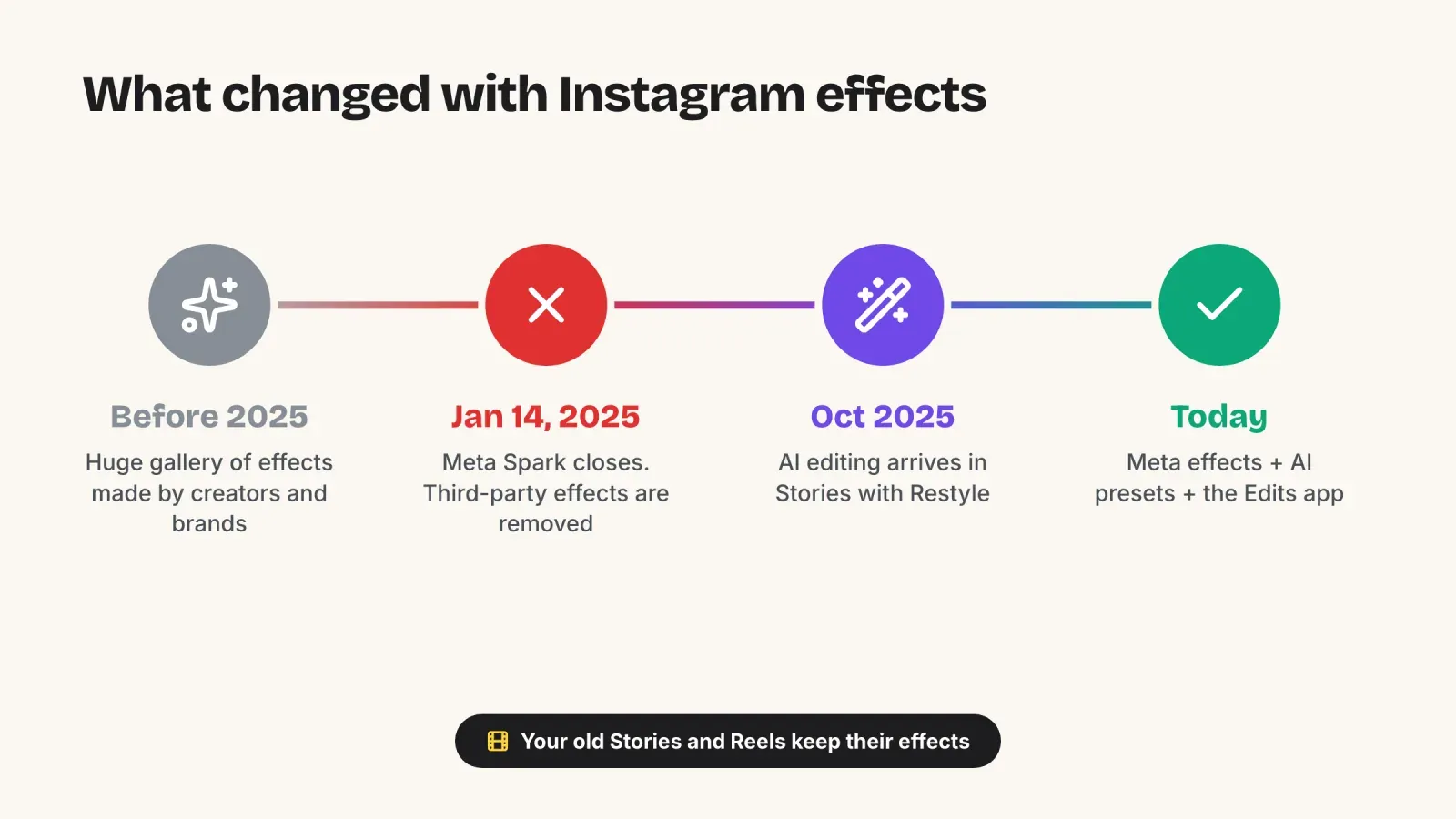
What changed with Instagram effects
If you have been on Instagram for a few years, you probably remember an endless gallery of effects made by independent creators: face filters, quizzes like "which character are you", games and branded effects. Most of them are gone.
Meta closed its effect creation platform, Meta Spark, and on January 14, 2025, effects built by third-party creators and brands were removed from Instagram, Facebook and Messenger. The tools used to build them, such as Meta Spark Studio and Meta Spark Hub, were shut down at the same time.
Three things are important to know:
- Effects made by Meta remain available. The effect gallery still exists, but it is smaller and only contains effects created by Meta.
- Your old content is not affected. Stories and Reels you published with a third-party effect before the shutdown keep their look.
- Searching by creator no longer works. Older guides recommend following effect creators and browsing the effects tab on their profiles. That route disappeared with the creators' effects.
Since then, Instagram has pushed in another direction: AI editing. In October 2025, Meta added AI tools directly to the Stories editor, letting people restyle a photo or video with presets or a short text prompt. Instagram has kept adding AI presets since, such as film camera or flash looks. Effect search today is therefore a mix of the classic effect gallery and these AI tools.
If you are trying to find an effect from a Story you saw years ago and cannot find it anywhere, it was most likely a creator effect removed in January 2025. Look for a similar look among Meta's effects or AI presets instead.
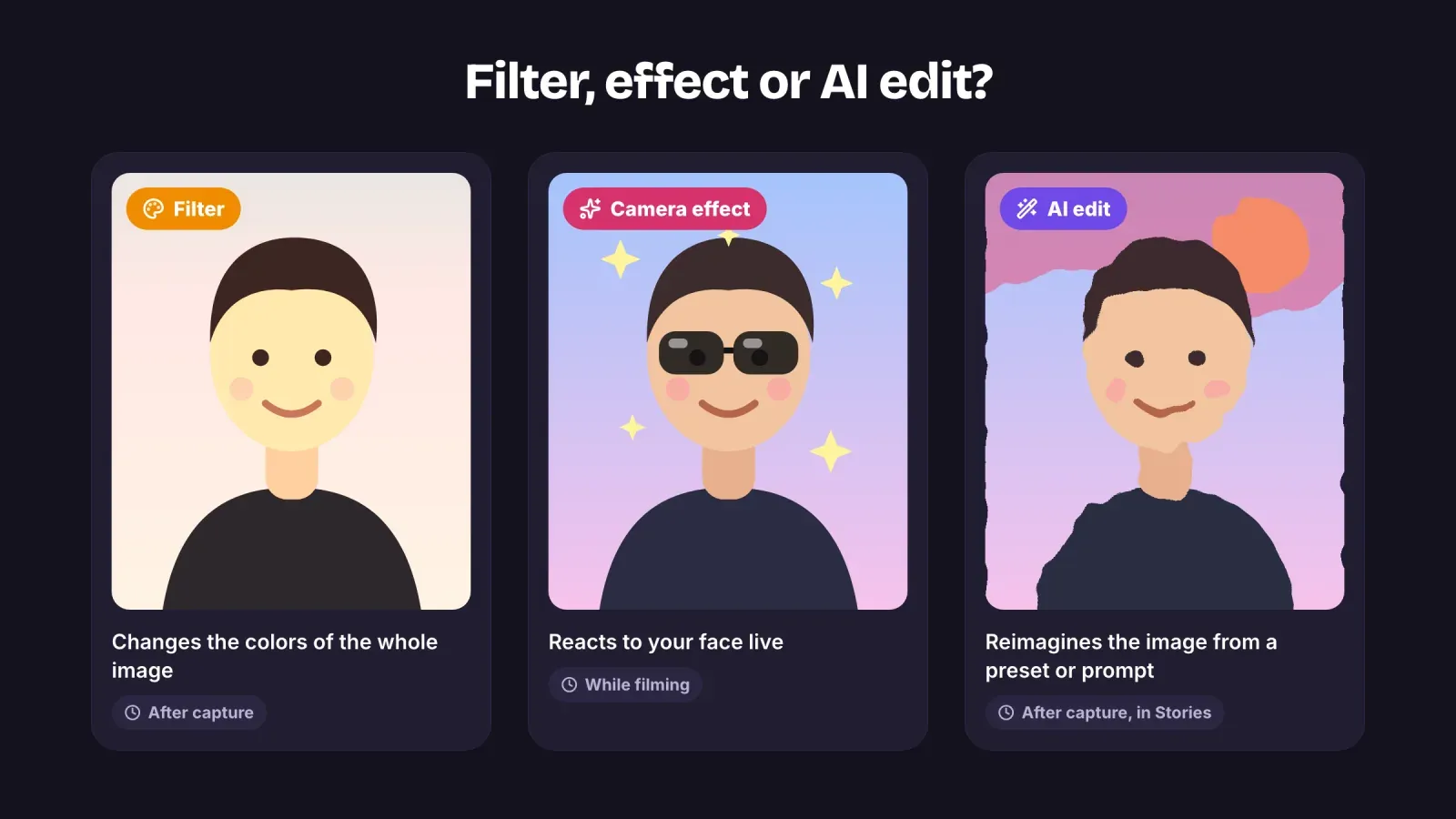
Effects, filters and AI edits, what is the difference
People often use these words for the same thing, but in the app they behave differently, and knowing which one you are looking for saves time.
Filters change the colors and tones of the whole image, like a color grade. They are applied after you take the photo or record the video, usually by swiping left or right in the Stories editor or choosing a filter when editing a Reel or a post. They do not track your face or move.
Camera effects (sometimes called AR effects) are live. They react to your face, your hands or the space around you while you film: glasses that follow your head, makeup, sparkles, background changes, distortions. You find them in the camera before or while you record.
AI edits transform a photo or a video after you capture it. You choose a preset style, or describe what you want to add, remove or change, and Meta AI generates a new version. They are found in the Stories editor rather than in the effect gallery.
A simple way to remember it: filters change the colors, effects react to you live, and AI edits reimagine the image.
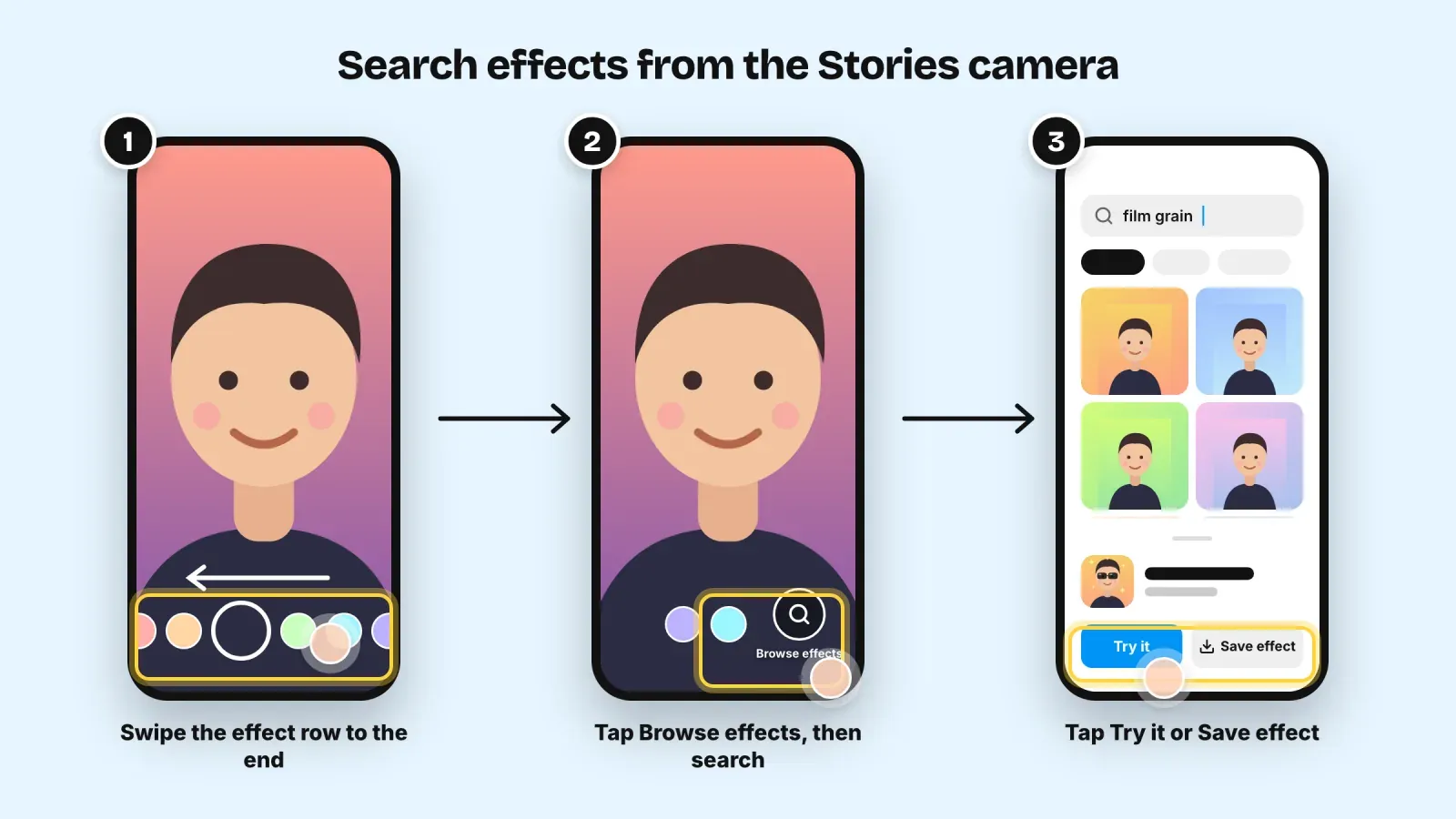
1. Search effects from the Stories camera
The Stories camera is the main place to browse and search the effect gallery.
- Open Instagram and swipe right from your feed, or tap the plus icon and choose Story.
- At the bottom of the camera, you see a row of round effect icons next to the capture button. Swipe through them to the end of the row.
- Tap Browse effects (a magnifying glass icon) at the end of the row. The effect gallery opens.
- Browse the categories, or tap the search icon and type a keyword such as "film grain", "soft glow" or "blur".
- Tap an effect to preview it. You can then tap Try it to use it immediately in your camera, or Save effect to add it to your camera row for later.
When you tap Try it, the camera opens with the effect applied. Film or take a photo as usual, then publish your Story. If you saved it, the effect now appears among the round icons at the bottom of your Stories camera, so you will not need to search for it again.
Tip: preview effects in the lighting you usually film in. An effect that looks great in daylight can look grainy or flat in a dim room.
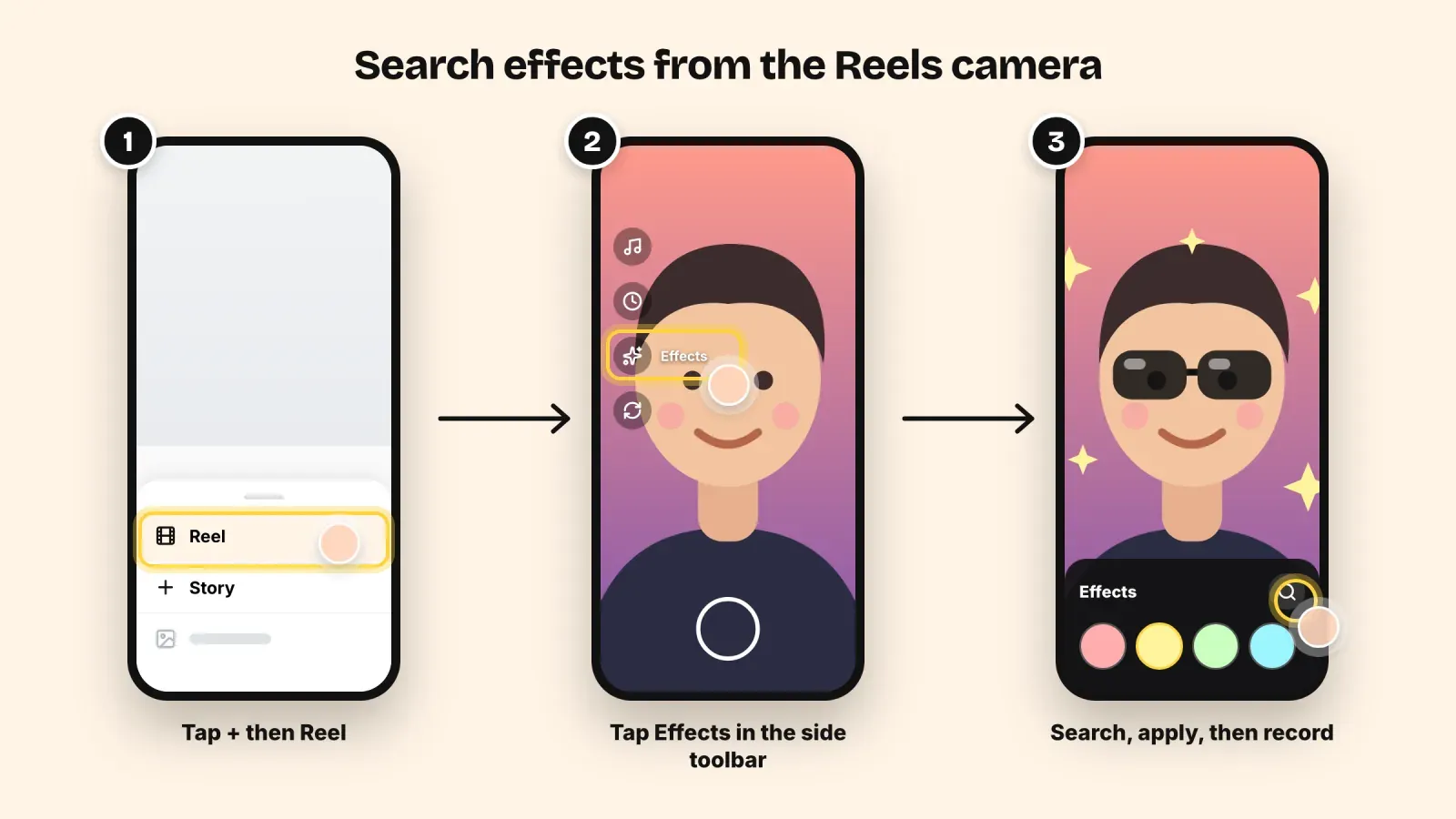
2. Search effects from the Reels camera
Reels have their own camera with an effects panel. Effects you saved are available here too.
- Tap the plus icon and choose Reel.
- In the camera, tap Effects in the toolbar on the side of the screen (a sparkles icon).
- A panel opens with your saved effects and suggested effects. Tap the search icon or Browse effects to open the full gallery and type a keyword.
- Tap an effect to apply it, then record your clip.
You can use a different effect for each clip of a Reel. Record the first clip, change the effect, then record the next one. Many creators use this to create a transition, for example a plain clip followed by the same shot with an effect.
If you import a video from your gallery instead of recording, live camera effects that track your face are not always available. In that case, use filters or AI edits in the editor, or record directly in the camera when you need a live effect.
3. Find the effect used in someone else's Story or Reel
This is often the fastest way to discover good effects, because you see them in real use, on real faces and in real lighting.
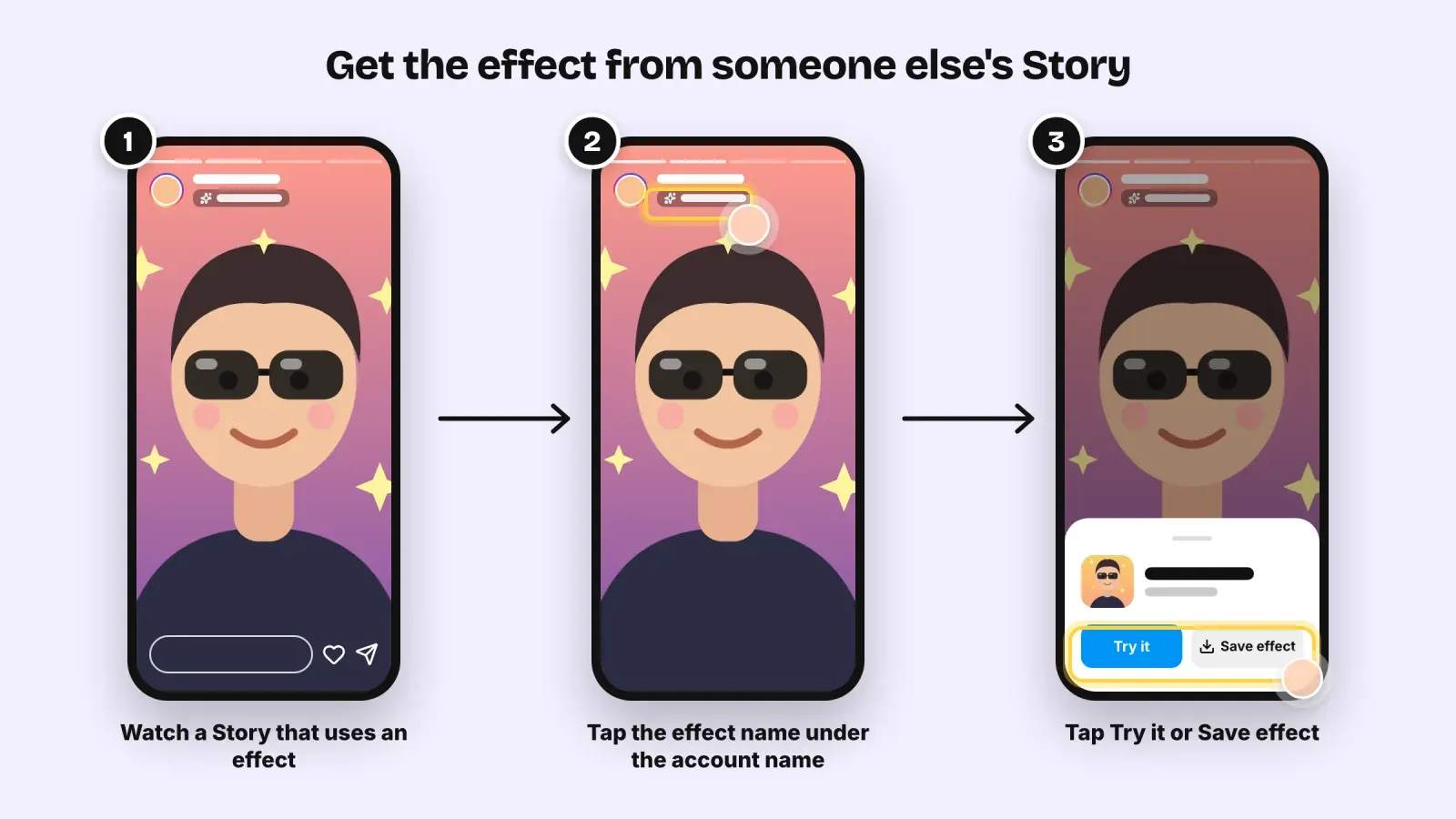
- When you watch a Story or a Reel that uses a camera effect, look for the effect name shown near the top of the screen, under the account name, or in the information at the bottom of a Reel.
- Tap the effect name.
- A card opens with the effect. Tap Try it to open your camera with the effect, or Save effect to keep it for later.
Not every Story shows an effect name. If you see none, the creator probably used a filter, an AI edit, an external app or color grading done outside Instagram. In that case, you cannot pick up the effect directly, but you can look for a similar style in the gallery or among AI presets.
Tip: when you see a good effect, save it right away. You will not remember its name tomorrow, and finding it again by searching can take much longer.
4. Save effects and find your saved effects
Saving builds your own short list of effects and makes every future Story or Reel faster to create.
To save an effect, tap Save effect on its card, from the gallery or from someone else's content. Saved effects appear in the row of round icons at the bottom of your Stories camera and in the Effects panel of the Reels camera.
To find your saved effects, open the Stories camera and swipe through the row of effects, or open the Effects panel in the Reels camera. Your saved effects are listed there with the effects Instagram suggests.
To remove a saved effect, open the effect card again and tap the option to remove it from your saved effects. Do this regularly. A row of 30 effects is no faster to use than a search bar.
Keep your list short. Most consistent creators rely on three to five effects they know work well with their face, their lighting and their niche.
5. Use Restyle and AI effects in Stories
AI editing is now one of the main ways to change the look of a Story. Availability depends on your country, your language and your account, so you may not see every option yet.
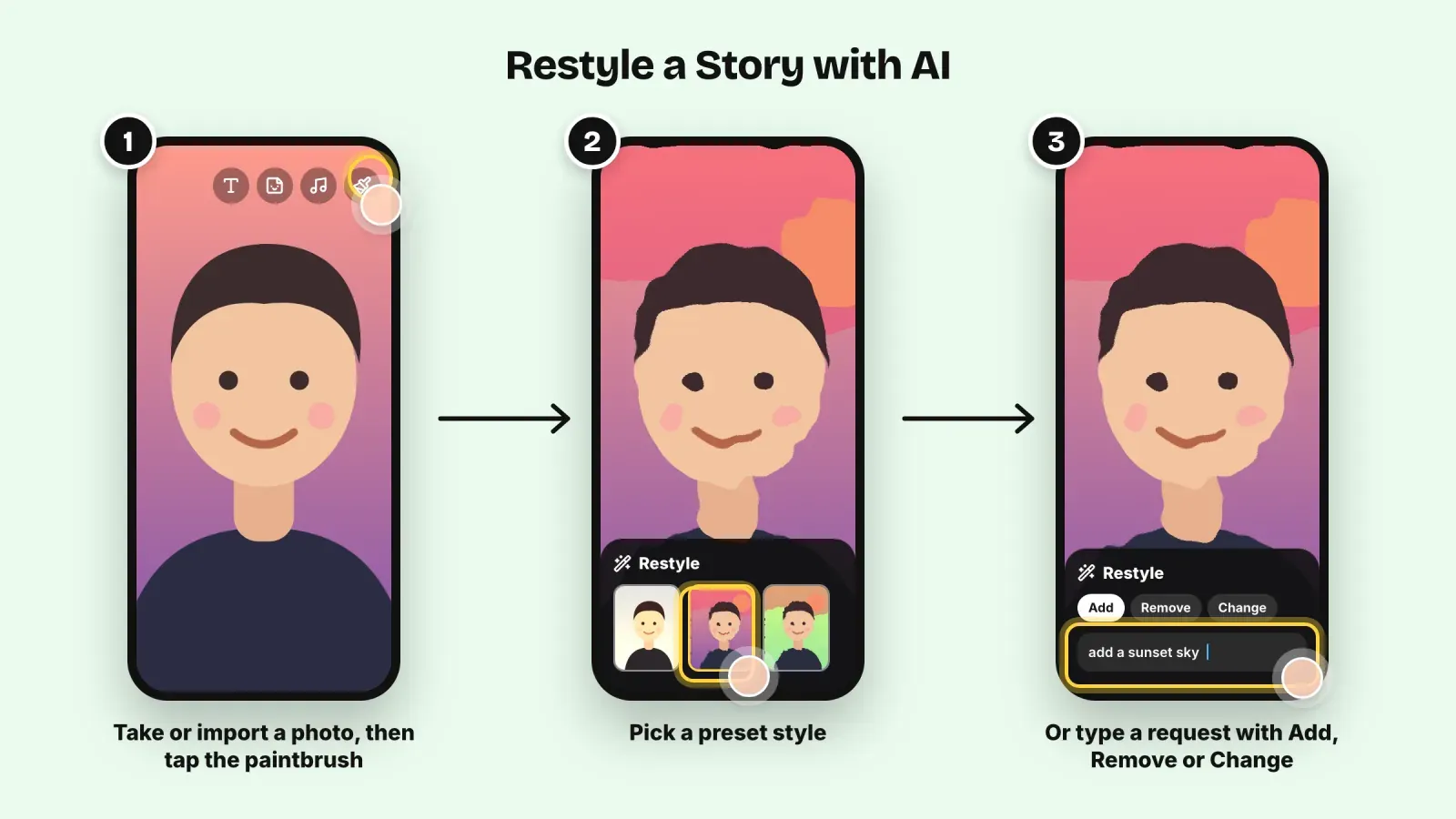
- Open the Stories camera, then take or import a photo or a video.
- In the editor, tap the paintbrush icon at the top of the screen to open the AI editing menu, called Restyle in English.
- Choose a preset to transform the image in one tap, for example a painting style, a film look or a seasonal theme. For videos, some presets add motion such as falling snow or light effects.
- Or describe a change in the prompt bar using Add, Remove or Change, such as "add a sunset sky" or "change my jacket to red".
- Review the result, try again if needed, and publish the Story.
AI edits are generated, so results vary from one try to the next. Use them for fun and creative content, and avoid them on anything that must look exactly like reality, such as a product photo, a before and after or a customer testimonial. Showing an AI-modified product as real can mislead customers.
6. Find effects in the Edits app
Edits is Meta's free video editing app for creators. It is useful when you want more control than the Reels editor gives you, and it connects directly with Instagram.
In Edits, you can add filters, visual effects, transitions, text and sound to your clips, adjust them on a timeline and then share the video to Instagram as a Reel. Recent updates also let you apply some effects across a whole video as an adjustment layer, so the same look covers every clip.
Use Edits when:
- You film with your phone's normal camera and want to add effects later.
- You want the same color look across several clips.
- You need precise timing, for example an effect that starts exactly on a beat.
Live face effects remain in the Instagram camera. Edits is better for post-production looks and transitions.
7. Search smarter, keywords that work
The effect gallery search is literal. It matches words in effect names and descriptions, so vague words return vague results. Describe what you want to see, not how you want to feel.
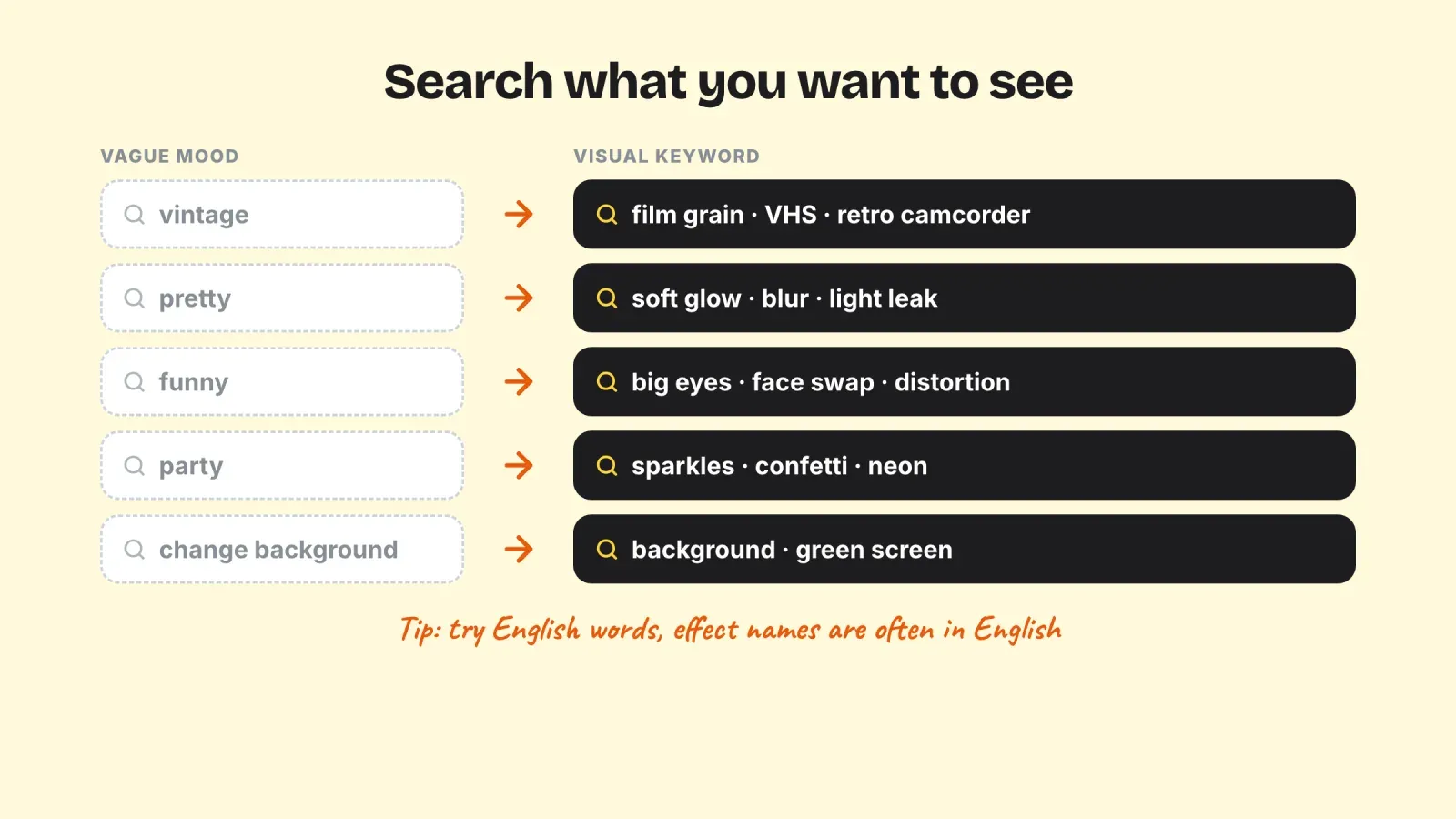
Use visual words instead of moods.
- Instead of "vintage", try "film grain", "VHS" or "retro camcorder".
- Instead of "pretty", try "soft glow", "blur" or "light leak".
- Instead of "beauty", try "skin smoothing" or "natural makeup" (and use these lightly).
- Instead of "funny", try "big eyes", "face swap" or "distortion".
- Instead of "party", try "sparkles", "confetti" or "neon".
Try English keywords. Many effect names are in English, even when your app is in another language. If a search in your language returns little, try the English word.
Search the use, not only the look. Words such as "background", "green screen", "zoom" or "mirror" find effects by what they do.
Use categories when you are not sure. Browsing a category is often faster than guessing the right word.
Note the name of effects you like. When you find a good effect, write its exact name in your notes along with what you used it for. It takes ten seconds and saves a lot of searching later.
8. Build a signature look with a few effects
Effects can make your content recognizable, or make it look random. The difference is consistency.
Choose three to five effects that fit your brand. A food creator might keep a warm color look, a soft glow for close-ups and one playful effect for behind-the-scenes Stories. A skincare brand should avoid strong beauty effects that change skin texture, because they work against the honesty of its product demos.
Match each effect to a content type. For example, one look for tutorials, one for behind the scenes and one for announcements. Your audience starts to recognize the type of content in the first second.
Do not stack effects. One effect plus a light filter is usually the maximum. Several layers make the image muddy and distract from your message.
Test with your real lighting and camera. Try each candidate in your usual filming spot, at your usual time of day, and look at the result on a second phone before you adopt it.
Review your set every season. Effects get updated or removed, and your brand evolves. A short review every three months keeps your look fresh without losing recognition.
Effect ideas by type of content:
- Behind the scenes. A light film grain or a warm vintage look makes casual footage feel intentional, and signals "this is the real, unpolished side".
- Product launches. A subtle sparkle or light effect around the reveal moment, then a clean shot of the product without any effect so people see exactly what they buy.
- Tutorials and talking-head videos. Keep effects minimal. A soft, natural look or a background blur keeps attention on what you say and on your hands.
- Polls, questions and community Stories. This is the place for playful effects. A funny face effect on a question sticker invites replies.
- Events and seasonal content. Seasonal AI presets or themed effects work well for holidays, anniversaries and sales periods, as long as you use them for a short time.
- Testimonials and results. No effect at all. Authenticity matters more than style when you show real customers or real outcomes.
9. Troubleshooting effect search
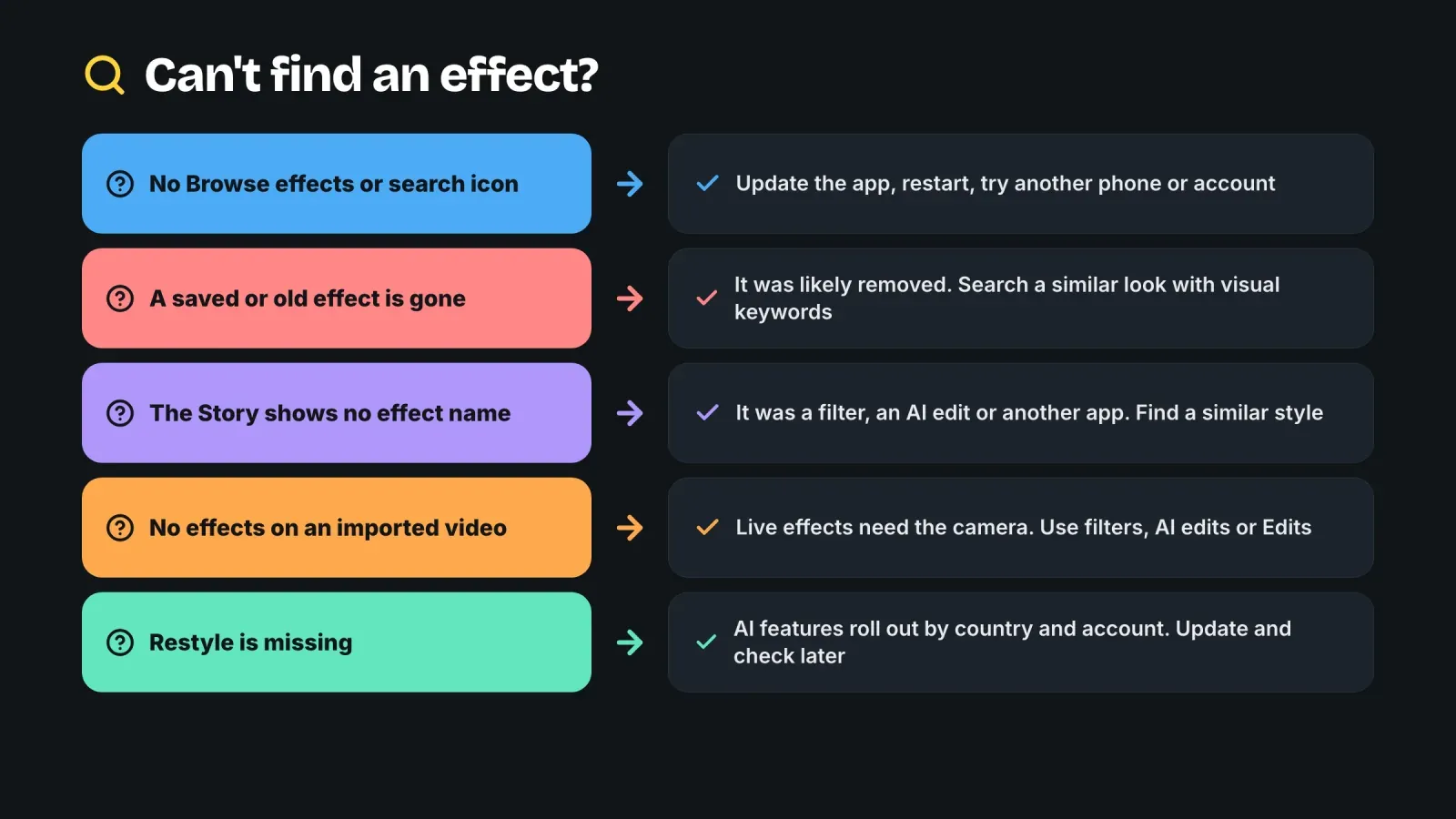
The search icon or Browse effects is missing. Update Instagram from the App Store or Google Play, then restart the app. If it is still missing, check on another phone or another account. Some features roll out progressively, so your account may receive them later.
An effect you saved has disappeared. It was probably removed. Many third-party effects disappeared in January 2025, and Meta also updates or retires its own effects. Search for a similar look with descriptive keywords.
You cannot find an effect you saw in a Story. If the Story shows no effect name, it was probably made with a filter, an AI edit, Edits or another app. If it is an older Story, the effect may be one of the removed creator effects.
Effects do not appear when you import a video. Live face effects only work in the camera. Record directly in the Stories or Reels camera, or use filters and AI edits for imported media.
AI Restyle is not available. AI features depend on your country, language and account, and on Meta's rollout. Make sure the app is up to date, and check again later.
Effects lag or look wrong. Close other apps, free some storage, clean your camera lens and film in better light. Older phones may not support every effect.
If the camera itself does not work, check that Instagram has access to your camera and microphone in your phone's settings, then restart your phone.
Turn effects into profile visits and clicks
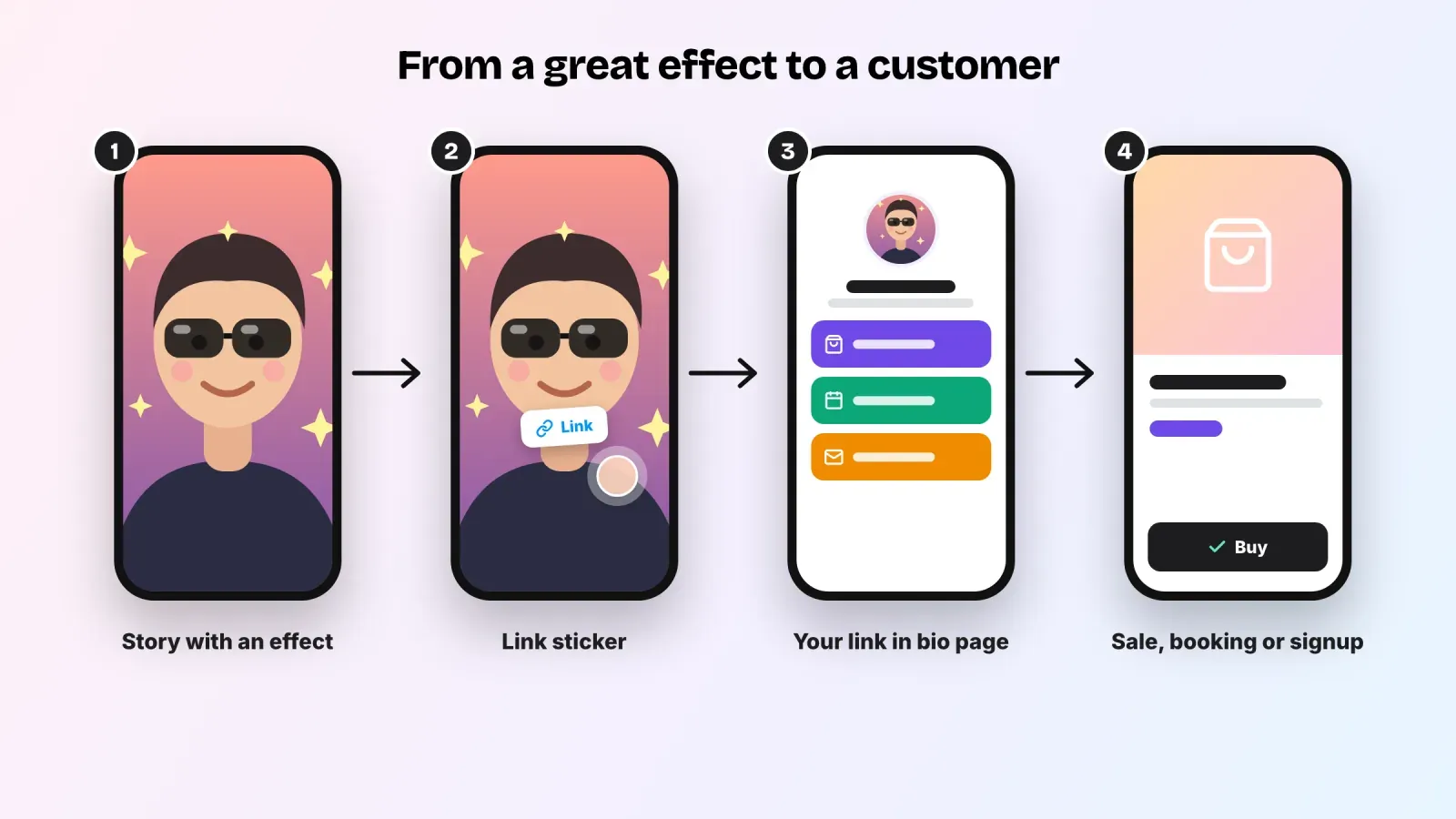
An effect can stop someone on a Story, but it is only useful for your business if that attention leads somewhere. A few habits help.
Use effects to support the message. A sparkle effect on a launch announcement or a film look on a behind-the-scenes Story adds mood. The product or the offer should remain clearly visible.
Add a link sticker. In Stories, the link sticker lets viewers tap through to a page. Put it on the Stories where the effect has done its job of catching attention, such as a launch, a new product or a limited offer.
Point the link to a focused page. When people tap your Story link or your bio link, they should land on a page that continues the same look and shows them what to do next. With Roctify, your link in bio page can feature your latest product, your booking options or your newsletter, so the attention earned by a great Story becomes a sale, a booking or a subscriber. If you need to update that link, our guide on how to change the link in your Instagram bio walks you through it.
Measure what works. Compare the reach, replies and link taps of Stories with and without effects for a few weeks. Keep the effects that help and drop the ones that do not. For more ideas on turning content into sales, see our tips on how to sell more on social media.
Mistakes to avoid with Instagram effects
Following outdated tutorials. Guides that tell you to browse effect creators' profiles describe a system that closed in January 2025.
Using effects that hide your product. Heavy beauty effects, strong distortions or busy backgrounds can make a product hard to see or misrepresent it.
Saving too many effects. A long list is as slow as searching. Keep a short, curated set.
Changing your look every day. Random effects make your feed feel inconsistent. Keep a small signature set and use it regularly.
Ignoring how effects look on other screens. Check your Story on another phone. Colors and brightness vary between devices.
Presenting AI edits as reality. Use AI looks for creative content, and keep product photos, results and testimonials authentic.
Frequently asked questions
Why can I not find effects made by creators anymore? Meta closed its Spark effect platform, and third-party effects were removed from Instagram on January 14, 2025. Only effects made by Meta remain in the gallery.
How do I search for effects on Instagram? Open the Stories camera, swipe through the row of effects to the end, tap Browse effects, then use the search icon and type a descriptive keyword. In the Reels camera, tap Effects and then search.
How do I get an effect I saw in someone's Story? Tap the effect name shown near the top of their Story or in the details of their Reel, then tap Try it or Save effect.
Where are my saved effects? In the row of round icons at the bottom of your Stories camera and in the Effects panel of the Reels camera.
Can I use effects on a video from my gallery? Live face effects need the camera. For imported videos, use filters, AI edits in Stories or the Edits app.
Why does my account not have Restyle? AI features roll out progressively and depend on your country, language and account. Update the app and check again later.
Can I still create my own Instagram effect? Not for public use. The tools that let creators and brands publish custom effects were shut down with Meta Spark. You can create your own look with filters, AI edits and the Edits app instead.
Find your look, then send people somewhere useful
Searching for effects on Instagram is easier once you know where they live: the effect gallery in the Stories and Reels cameras, the effect name on other people's content, your saved effects, AI Restyle in Stories and the Edits app for post-production. Search with visual keywords, save what you like right away, and build a small signature set that fits your brand.
Then make sure the attention you earn has a destination. Create your free Roctify page to turn your Instagram link in bio into a page that showcases your products, bookings and newsletter in the same style as your content, with 0% transaction fees on every plan.