Almost every piece of software you pay for today bills you every month or every year. Your design tool, your chat app, your AI assistant, your accounting program and your online store all run on a subscription. But behind that monthly charge, the rules are very different from one product to the next. Some charge one flat price, some charge per person, some charge for what you use, and a growing number charge in credits for AI.
These rules are called software subscription models. Picking the right one is one of the biggest decisions a software company makes, because it decides who can afford the product, how revenue grows with each customer and how often people cancel. If you build or sell software, even a small tool, a plugin or a template app, the model you choose shapes your business more than almost any feature.
This guide explains the nine software subscription models you'll meet in 2027, with real examples and prices from well-known products, the pros and cons of each, how monthly and annual billing compare, and a simple method to choose the right model for your own product. Prices quoted below are US list prices checked in October 2026. Software companies change them often, so treat them as examples and check the vendor's pricing page before you buy.
What is a software subscription model?
A software subscription model is the way a software product charges its customers on a recurring basis, for continued access to the product. Instead of buying a license once and owning a version forever, the customer pays every month or every year, and keeps access as long as they keep paying. In return, they get updates, hosting, support and new features without buying a new version.
Most subscription software is SaaS, software as a service. It runs in the browser or connects to the vendor's servers, so the vendor can update it for everyone at once and check who has an active plan. Desktop apps can be sold on subscription too, like Adobe Creative Cloud or Microsoft 365, which install on your computer but check your plan regularly.
The subscription model is the structure of the price. It answers three questions:
- What does the customer pay for? Access, a number of people, an amount of usage, a result, or a mix.
- How does the price grow? It can stay fixed, rise in steps, or rise smoothly with usage.
- How often is it billed? Monthly, yearly, or sometimes upfront for several years.
The "value metric" is the unit the price is tied to: a user, a project, a contact, a gigabyte, an API call, a task, a resolved ticket or an AI credit. Choosing it well matters more than the exact number on the pricing page, because a good value metric makes the bill grow when the customer gets more value from the product.
Software subscription models at a glance
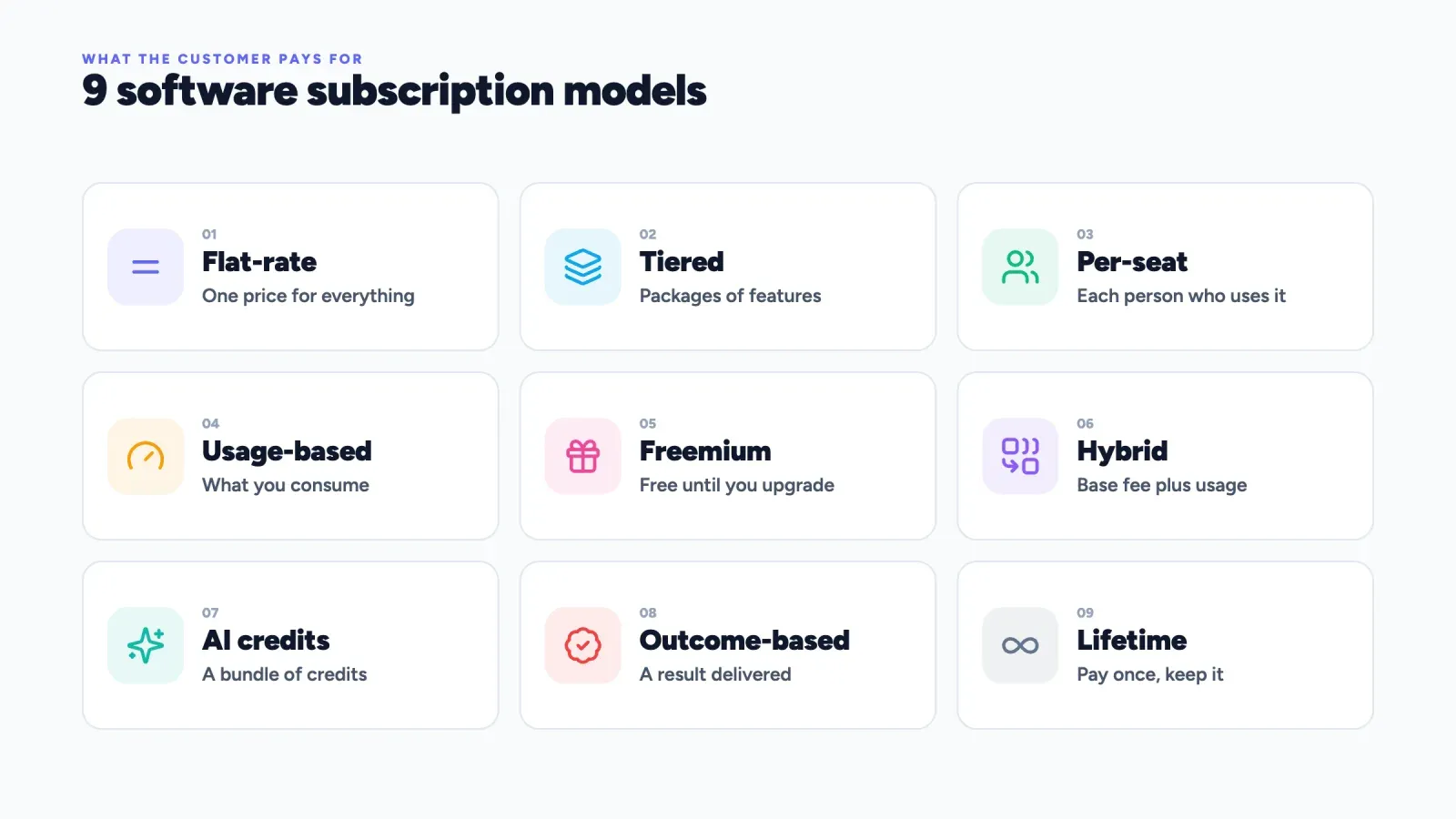
Here are the nine models covered in this guide, with what the customer pays for and a typical example.
| Model | Customer pays for | Example | Best for |
|---|---|---|---|
| Flat-rate | One price for everything | Basecamp Pro Unlimited | Simple products, teams of any size |
| Tiered | A package of features and limits | Roctify, Zapier, Mailchimp | Products serving different sizes of customer |
| Per-seat | Each person who uses it | Slack, Notion, Figma | Collaboration tools |
| Usage-based | What they consume | AWS, Twilio, Stripe | Infrastructure and APIs |
| Freemium | Nothing, until they upgrade | Canva, Dropbox, Zoom | Products people adopt alone first |
| Hybrid | A base fee plus usage | Zapier, Notion Business, HubSpot | Most modern SaaS |
| Credit-based | A bundle of credits, mostly for AI | ChatGPT, GitHub Copilot, Adobe Firefly | AI features with variable cost |
| Outcome-based | A result delivered | Intercom Fin | AI agents that complete tasks |
| Lifetime and perpetual | One payment, keep it forever | JetBrains fallback license, lifetime deals | Desktop tools, early cash for small makers |
Most products combine two or three of these. Slack is per-seat and tiered and freemium. ChatGPT is freemium and tiered and credit-based for heavy features. Understanding each building block makes any pricing page easier to read.
1. Flat-rate subscription
How it works. One price, one plan, everything included. The customer pays the same amount whatever the size of their team or how much they use the product.
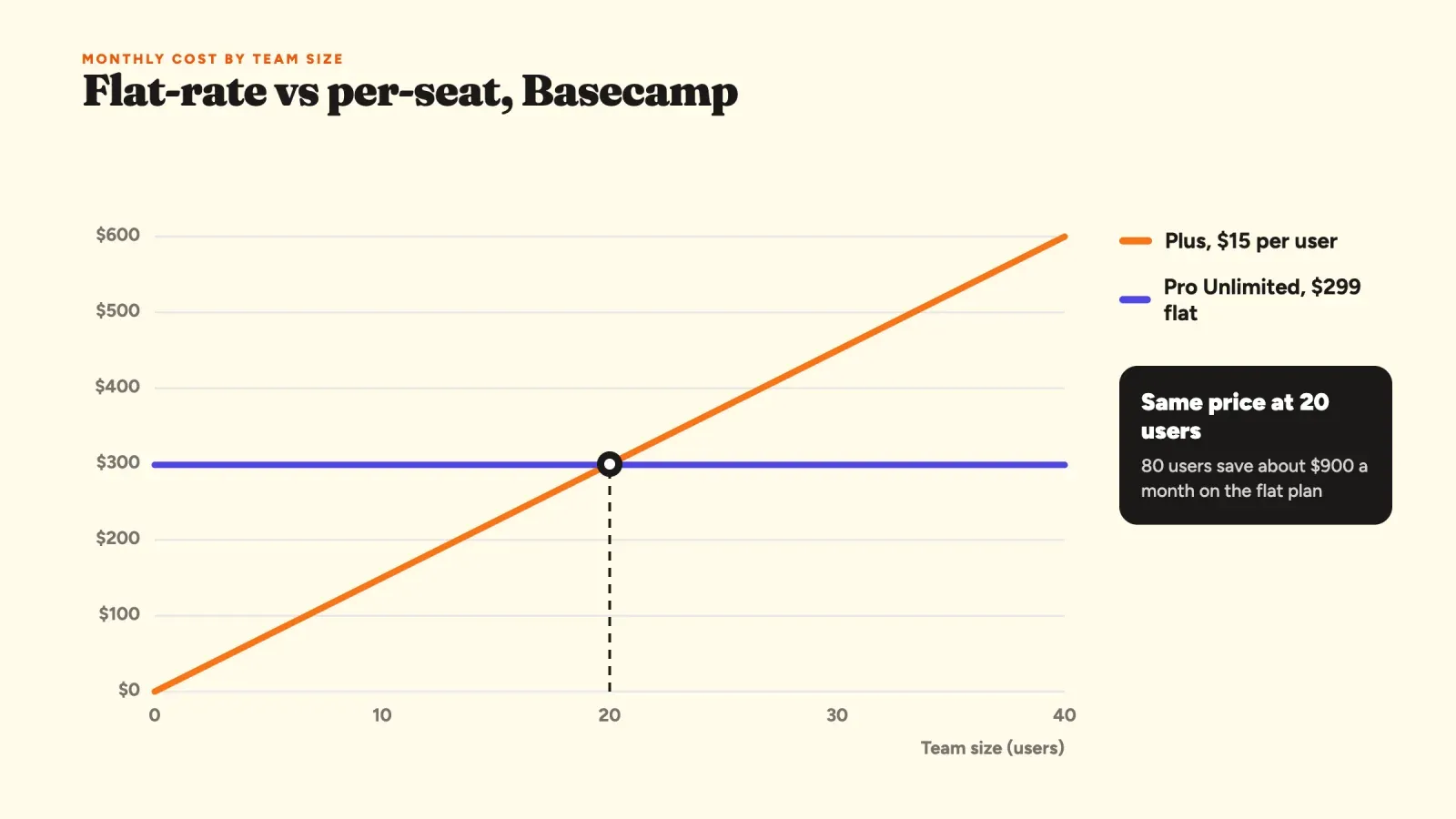
Example. Basecamp, the project management app, is the best-known example. Its Pro Unlimited plan costs $299 a month billed annually for unlimited users and every feature, while its smaller Plus plan charges $15 per user per month. The two plans cross at about 20 people, since 20 × $15 = $300. A team of 8 pays less on Plus, a company of 80 saves a lot on the flat plan, about $900 a month compared with paying per seat.
Pros.
- Very easy to understand and to sell. There is nothing to calculate.
- No surprise bills, which buyers in finance love.
- Customers are never punished for inviting more people, so the product spreads inside a company.
Cons.
- You leave money on the table with big customers, who would happily pay more.
- Small customers may find the single price too high and never start.
- Revenue only grows by adding customers, never by growing with existing ones.
When to use it. Flat-rate works for simple products with a clear job and similar customers, and for companies that want pricing to be a selling point in itself. It is rarer than it used to be, because most software companies want revenue that grows with each account.
2. Tiered pricing
How it works. The product is sold in two to four packages, often named something like Free, Starter, Pro and Business. Each tier adds features, higher limits or more support. Customers pick the package that fits their size and needs, and upgrade as they grow.
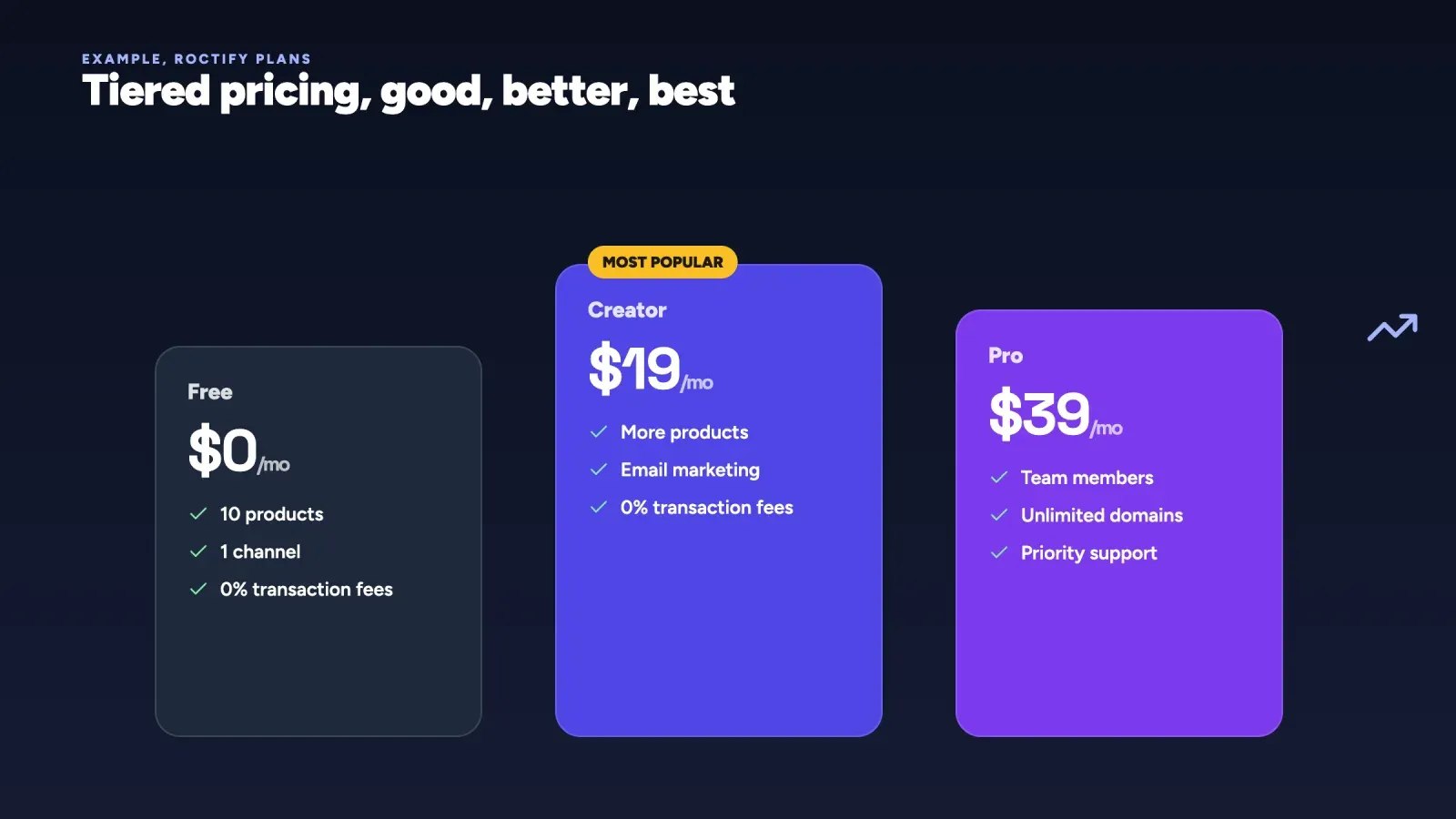
Example. Roctify uses tiered pricing. The Free plan costs $0 forever with 10 products and one sales channel, Creator is $19 a month and Pro is $39 a month with team members, unlimited domains and priority support. Mailchimp, HubSpot and Zapier follow the same pattern, with tiers tied to contacts, tasks or features.
Pros.
- Serves very different customers with one product, from solo creators to companies.
- Gives every customer a natural next step, which drives upgrades.
- Lets you use price anchoring. A visible expensive tier makes the middle one feel reasonable.
Cons.
- Too many tiers confuse buyers. Three or four is the usual sweet spot.
- Choosing which feature goes in which tier is hard. Put a must-have feature too high and people leave, too low and nobody upgrades.
- A customer stuck between two tiers may feel they pay for features they don't use.
When to use it. Tiered pricing is the default for most software sold to small businesses and creators. Build tiers around a clear upgrade trigger, such as more products, more contacts, more team members or a feature that only growing businesses need. The best tier structures map to stages of a customer's growth, so upgrading feels like progress rather than a penalty.
3. Per-seat (per-user) pricing
How it works. The customer pays for each person who uses the software, usually per month. Add five people, pay for five more seats.
Examples. Slack Pro costs about $7.25 per user per month billed annually, or $8.75 billed monthly. Notion Plus is $10 per member per month billed annually, or $12 monthly, and Notion Business is $20 per member with its AI features included. Microsoft 365 for business and Salesforce also charge per user.
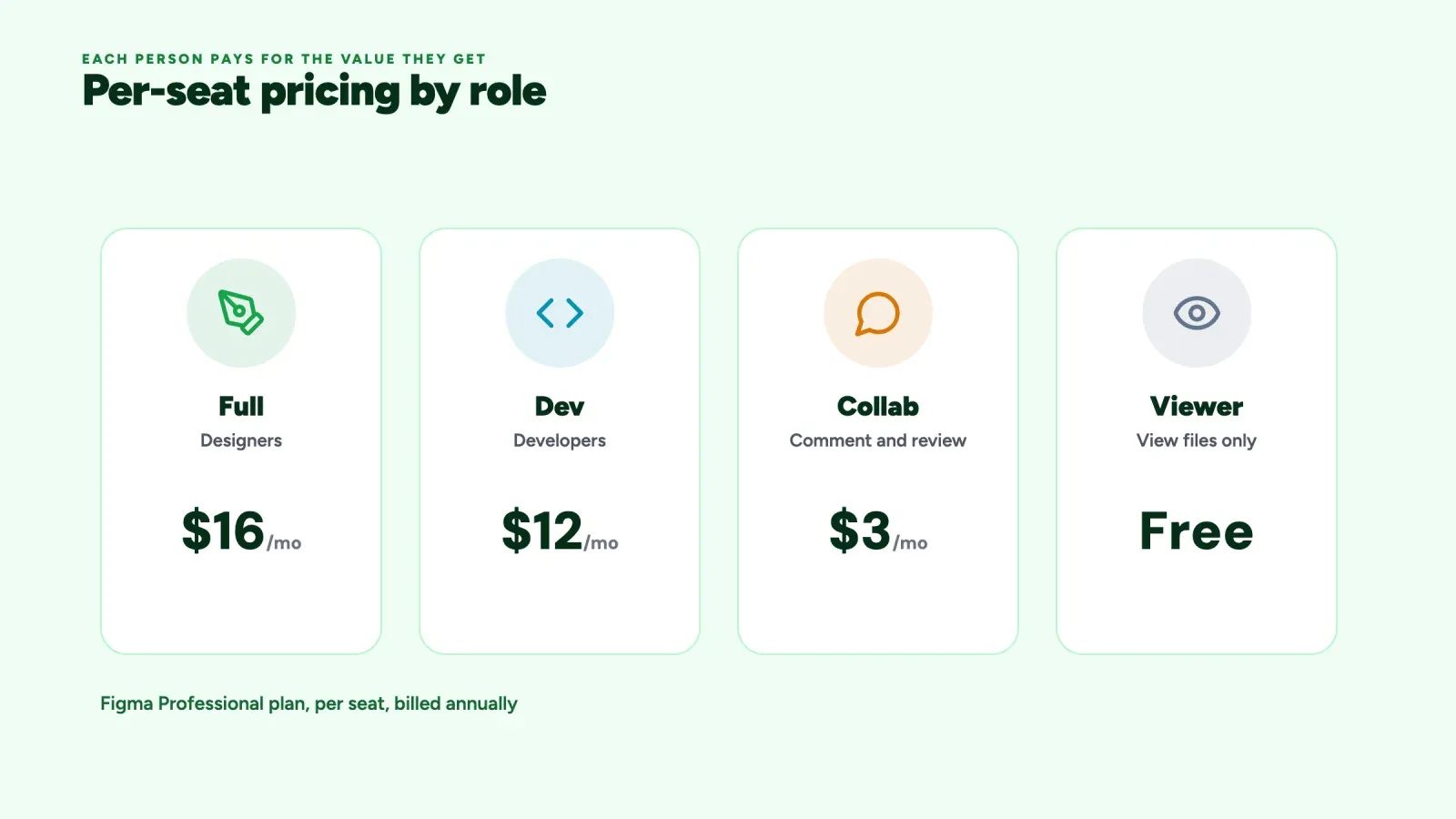
Figma shows how per-seat pricing has evolved. On its Professional plan, a Full seat for designers costs about $16 a month billed annually, a Dev seat for developers about $12 and a Collab seat for people who only comment about $3. Viewing files stays free. Different roles pay different prices, because they get different value from the tool.
Pros.
- Easy to predict for both sides. Revenue grows naturally as the customer's team grows.
- Fits collaboration tools, where each extra person makes the product more useful.
Cons.
- Customers share logins or limit who gets access to save money, which slows adoption.
- AI is weakening the model. When software does more of the work, a team may need fewer seats, so revenue falls just as the product becomes more useful.
- Big customers negotiate heavy volume discounts.
When to use it. Per-seat pricing still works for tools where value really grows with each person, like chat, documents or design. But it is losing ground. In Kyle Poyar's Growth Unhinged 2025 pricing survey, pure seat-based pricing fell from 21% to 15% of companies in a year, while hybrid models grew. Many companies now add role-based seats, free viewer seats or a usage component.
4. Usage-based pricing
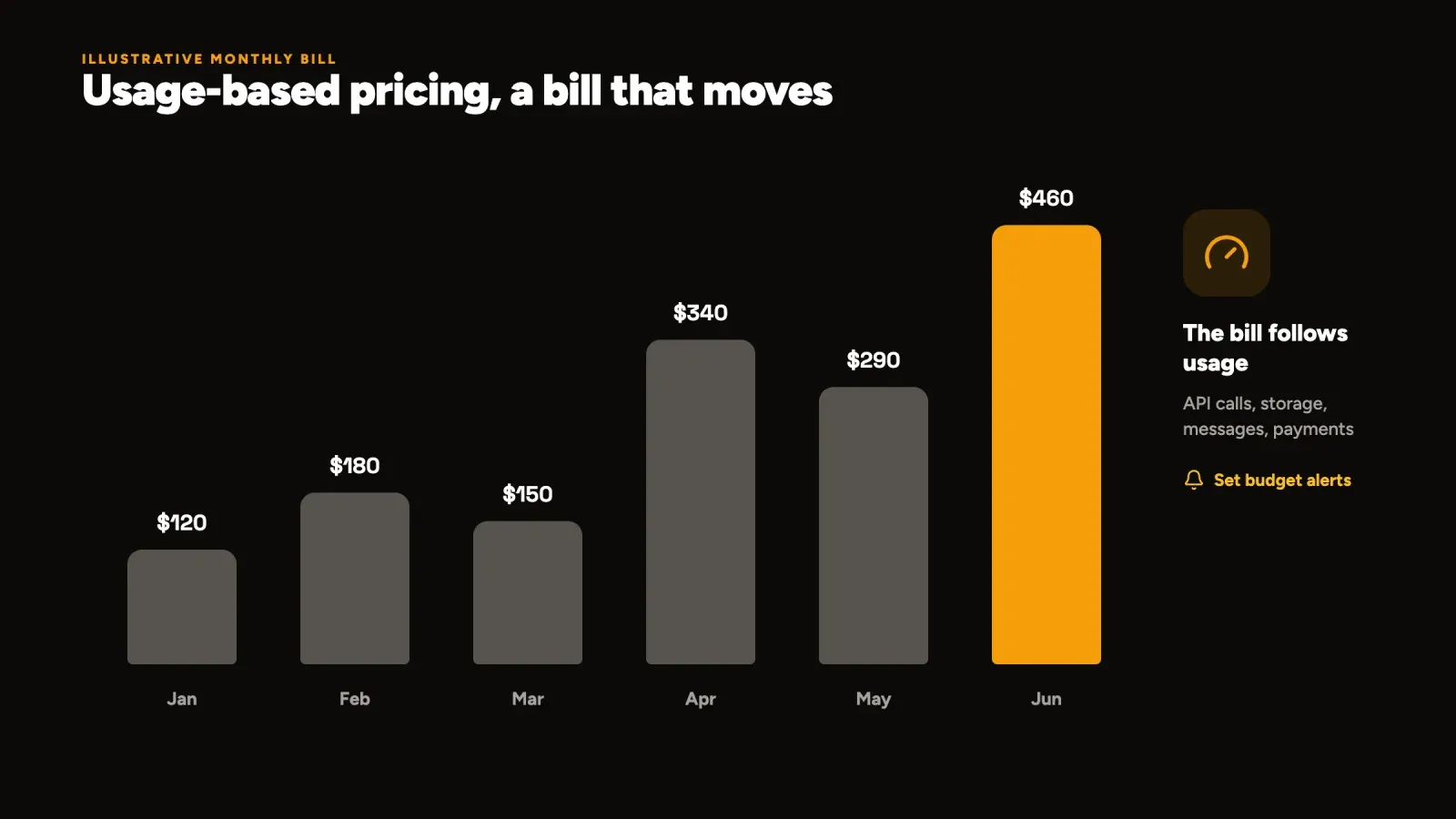
How it works. The customer pays for what they consume: computing time, storage, API calls, messages sent, minutes of video, transactions processed. The bill moves up and down every month with usage. It is also called pay-as-you-go or consumption-based pricing.
Examples. Amazon Web Services charges for each hour of computing, each gigabyte stored and each gigabyte transferred. Twilio charges per text message, per call minute and per API request. Stripe takes a percentage plus a small fixed fee on each successful card payment, so a store that sells nothing in a month pays nothing.
Pros.
- The price follows value. Customers pay little while small and more as they succeed.
- Very low barrier to start, which suits developers who want to test before they commit.
- Revenue grows automatically with your best customers, without a sales call.
Cons.
- Bills are hard to predict, which scares finance teams. Surprise invoices are a classic complaint about cloud services.
- Revenue is less stable. If a customer has a quiet month, you have a quiet month.
- You need accurate metering, clear dashboards and spending alerts, which is real engineering work.
When to use it. Usage-based pricing fits infrastructure, APIs, payments and any product where consumption varies a lot between customers and costs you money each time. Give customers tools to stay in control, like usage dashboards, budget alerts and optional caps. Many usage-based companies also offer committed plans, where a customer agrees to a minimum spend in exchange for a lower rate.
5. Freemium
How it works. A useful version of the product is free forever. A share of users later upgrades to a paid plan for more features, more capacity or fewer limits. The free tier works as marketing. See our freemium glossary entry for the full mechanics.
Examples. Canva lets anyone design for free and charges about $120 a year for one person on Canva Pro, which adds premium templates, the background remover and more AI features. Dropbox gives free storage with a limit, Zoom limits the length of free group meetings, and Notion has a free plan for individuals. Canva even made the Affinity design apps free for anyone with a Canva account in October 2025, a striking example of using free professional software to grow a paid ecosystem.
Pros.
- Lowers the barrier to zero. People try the product with no risk and no sales call.
- Free users spread the product by sharing files, links and invites.
- Builds a large audience you can convert over months.
Cons.
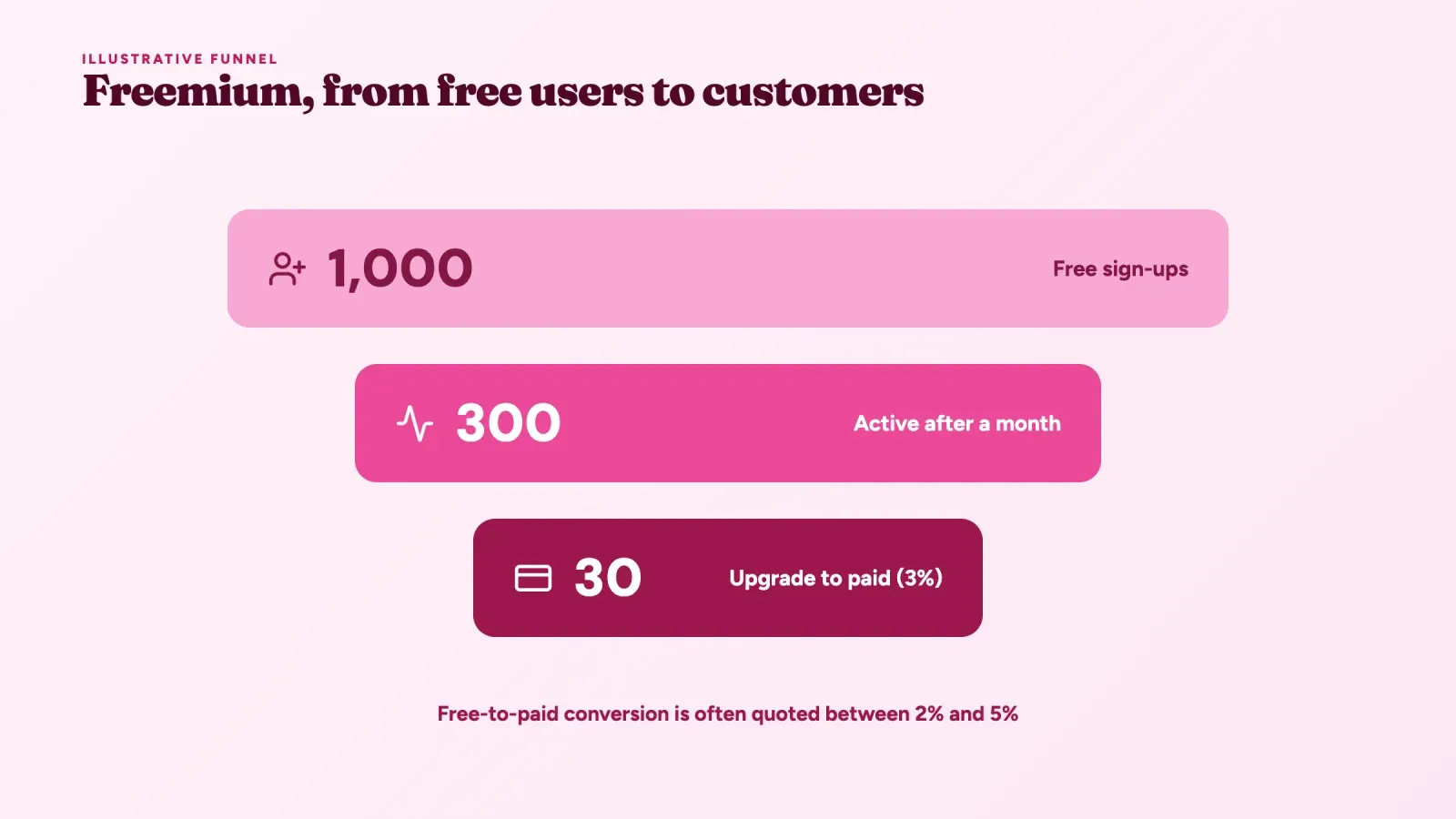
- Most free users never pay. Free-to-paid conversion is often quoted between 2% and 5%.
- Free users still cost money in hosting and support.
- Set the free tier too generous and nobody upgrades. Set it too tight and nobody stays.
When to use it. Freemium works when individuals can adopt the product alone, when the free version shows its value quickly and when each extra free user costs very little. It works badly for products that need setup, training or a big upfront cost per user. A common alternative is a free trial, often 7 to 30 days of the full product, or a "reverse trial", where new users start on the paid plan for two weeks and fall back to free if they don't pay.
6. Hybrid pricing (base fee plus usage)
How it works. The customer pays a fixed subscription that includes an allowance, then pays extra for usage above it, or buys a bigger allowance. It combines the predictable revenue of a subscription with the growth of usage-based pricing.
Examples. Zapier's Professional plan starts at about $19.99 a month billed annually, or $29.99 monthly, for 750 tasks a month, and the price rises as you choose higher task volumes. HubSpot's marketing software charges a base fee per plan plus more as your number of marketing contacts grows. Notion Business includes AI features in the seat price, with extra AI credits available for heavy use.
Pros.
- Predictable base revenue for the vendor and a predictable minimum for the buyer.
- Still grows with the heaviest users.
- Protects margins when some customers use far more than others.
Cons.
- More complex to explain. Pricing pages with seats, tiers and usage at once can overwhelm buyers.
- Customers need to watch two things, the plan and their usage.
When to use it. Hybrid is now the most common variable model in SaaS. In the same Growth Unhinged survey, hybrid pricing grew from 27% to 41% of companies in twelve months. Reports define "hybrid" differently, so treat exact percentages as directional, but the trend is clear. Use it when your costs grow with usage but buyers still want a stable monthly number.
7. Credit-based pricing for AI features
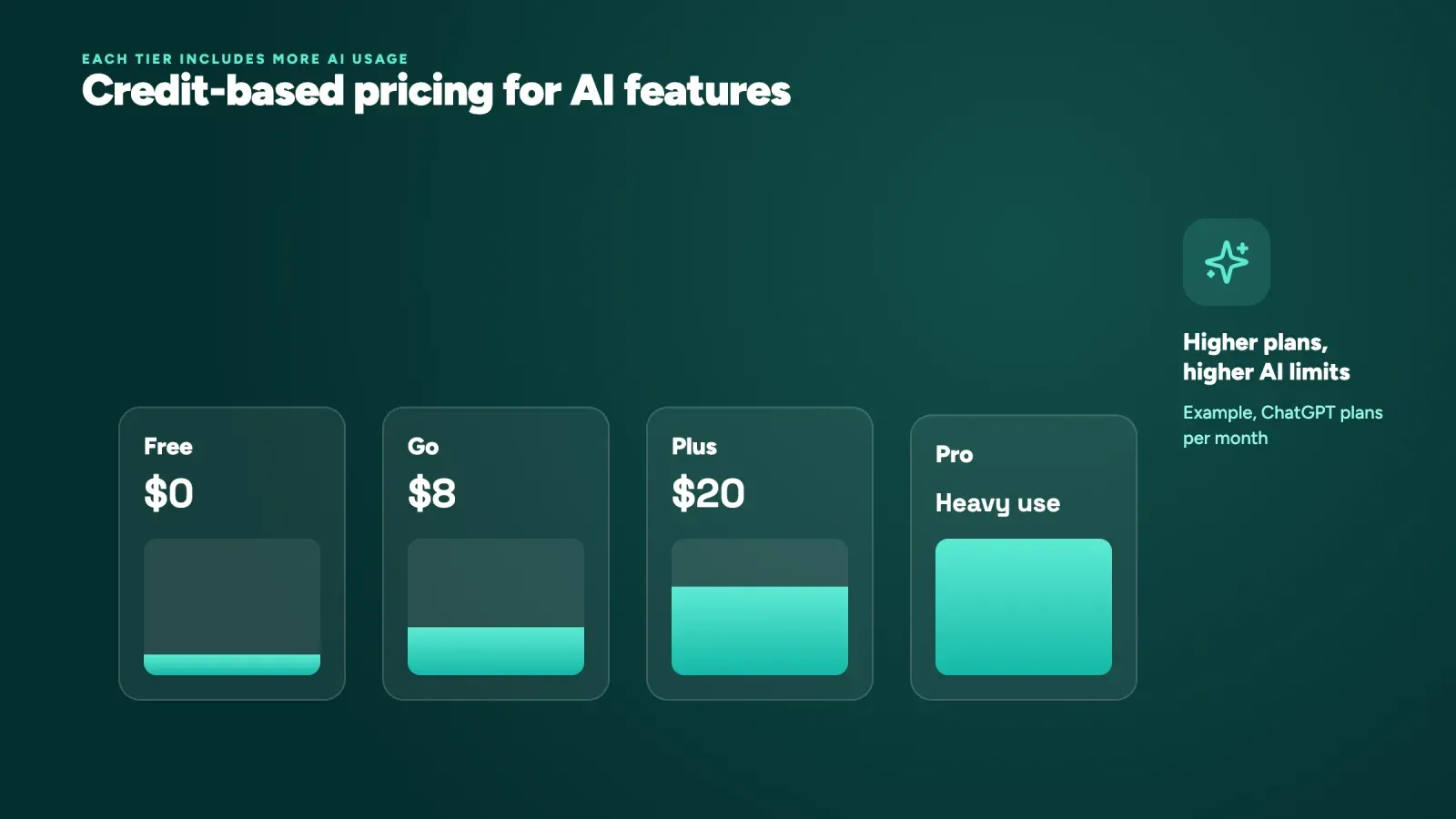
How it works. The customer gets a monthly bundle of credits with their plan and spends them on actions that cost the vendor money, mostly AI generations. Heavier plans include more credits, and extra packs can be bought. Credits are a form of usage-based pricing, wrapped in a subscription.
Examples.
- ChatGPT has a free plan, a low-cost Go plan at about $8 a month in many countries, Plus at $20 a month and Pro plans for heavy users that cost several times more. Each tier raises the limits on advanced models and features.
- GitHub Copilot costs $10 a month for Pro and $39 for Pro+. In June 2026 GitHub moved its premium features to AI credits worth one cent each, while basic code completions stay unlimited on paid plans.
- Adobe Creative Cloud Pro costs $69.99 a month on an annual plan and includes a monthly allowance of generative credits for Firefly features.
- Microsoft 365 Personal costs $99.99 a year and now includes a monthly allowance of Copilot AI credits, which came with a price increase.
Pros.
- Protects the vendor from customers whose AI usage would cost more than they pay.
- One currency for many features, which keeps the pricing page simple.
- Lets customers who need more buy more without changing plans.
Cons.
- Credits are abstract. Customers rarely know what one credit buys, so they feel uncertain.
- Running out in the middle of a task is frustrating.
- Unused credits that expire at the end of the month feel like lost money.
When to use it. Use credits when a feature has a real, variable cost per use, which is the case for most generative AI. Make credits easy to read, by showing what a typical action costs and how many are left, and send a warning before customers run out.
8. Outcome-based pricing
How it works. The customer pays only when the software delivers a defined result, such as a support ticket solved, a meeting booked or a document processed. It is the newest model, driven by AI agents that complete whole tasks.
Example. Intercom's AI agent, Fin, charges $0.99 per resolution, a conversation the AI handles without a human taking over. A company with 1,000 resolutions in a month pays about $990, and nothing extra for the conversations Fin doesn't solve.
Pros.
- The clearest link between price and value. The customer pays for results.
- Easy to compare with the cost of a human doing the same task.
Cons.
- Defining the outcome is hard. Does a customer who stops replying count as solved? Disputes are common.
- Revenue depends on how well the product performs, and on things outside your control.
- Hard to forecast for both sides.
When to use it. Outcome-based pricing fits AI products that replace a measurable task. Define the outcome precisely in your terms, show customers each billed outcome, and offer a minimum or a cap so both sides can plan.
9. Lifetime deals and perpetual licenses
How it works. The customer pays once and keeps the software forever. A perpetual license is the old model of desktop software. A lifetime deal is a newer version, common with small software makers, who sell lifetime access to a web app for a single payment, often through deal sites.
Examples. Adobe sold Creative Suite as perpetual licenses until it moved to subscription-only Creative Cloud in 2013. JetBrains, which makes developer tools, uses a mixed approach. Customers subscribe yearly, and after 12 months of paid subscription they get a perpetual fallback license to keep the version they had when the subscription started. Affinity was sold with perpetual licenses until Canva made it free in 2025.
Pros.
- Cash upfront, which helps a small maker fund the next months of development.
- Some customers strongly prefer to own their tools and will pay more once.
Cons.
- No recurring revenue. Every new month needs new customers.
- Lifetime customers keep costing you in hosting and support, forever.
- Big lifetime deal campaigns can bring many customers who would never pay a subscription.
When to use it. Perpetual licenses still make sense for offline desktop tools with low ongoing costs. Lifetime deals can fund an early product, but cap their number and keep a subscription as the main model. The JetBrains approach, where a subscription earns a permanent license, is a good compromise for tools that buyers want to own.
Monthly vs annual billing
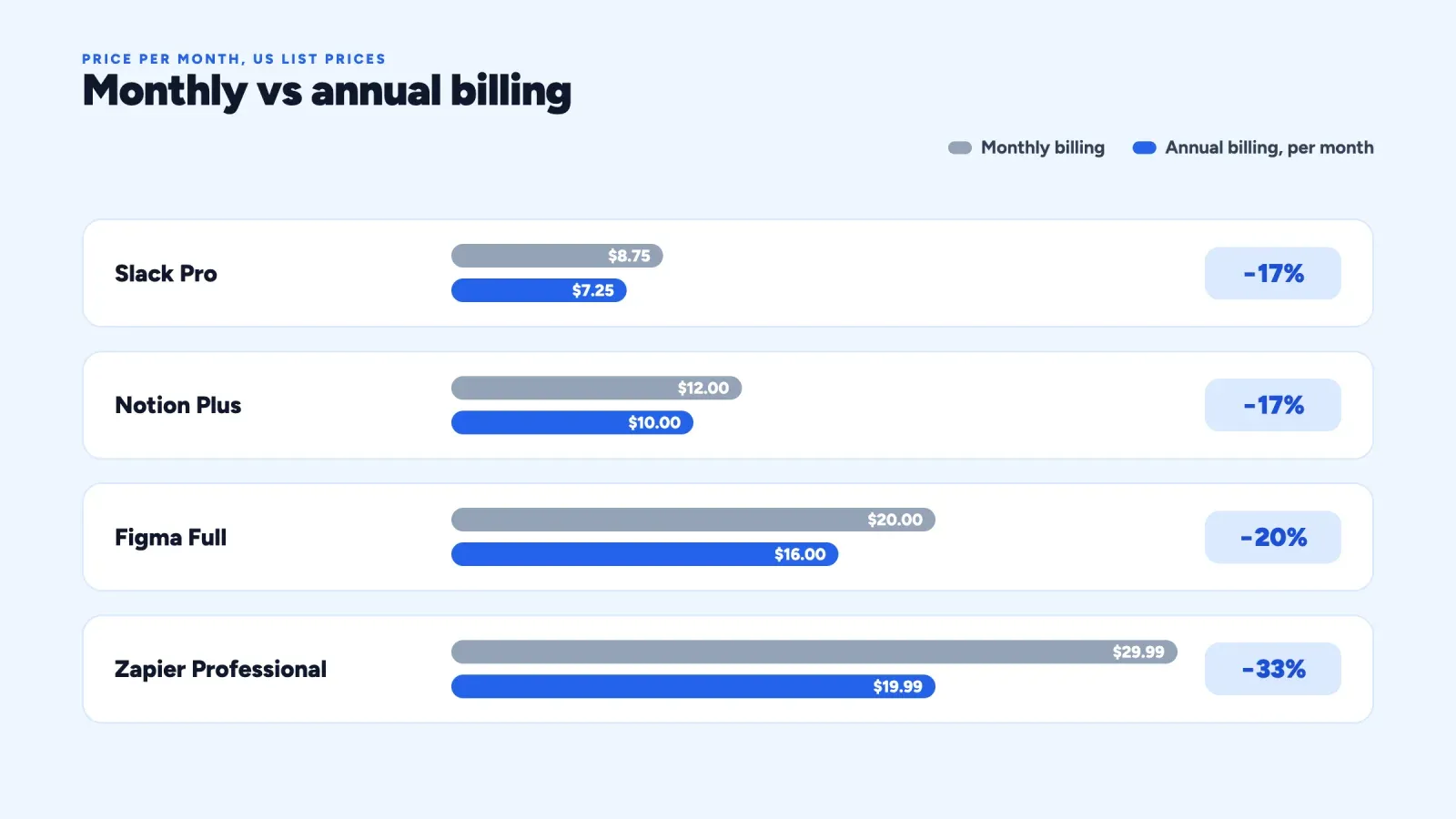
Most software subscription models offer both monthly and annual billing, with a discount for paying a year upfront.
| Product | Monthly billing | Annual billing (per month) | Discount |
|---|---|---|---|
| Slack Pro | $8.75 per user | $7.25 per user | About 17% |
| Notion Plus | $12 per member | $10 per member | About 17% |
| Figma Professional Full seat | $20 | $16 | 20% |
| Zapier Professional | $29.99 | $19.99 | About 33% |
A discount between 15% and 20%, often described as "two months free", is the most common. Annual plans help the vendor in three ways. They bring cash upfront, they cut monthly cancellations to one decision a year, and they reduce payment failures from expired cards.
For the customer, monthly billing gives flexibility while they test a product, and annual billing saves money once they're sure. A good practice for vendors is to offer annual billing after a customer has used the product for a few months, when they trust it, rather than pushing it on day one. Some vendors, like Adobe, use an annual commitment billed monthly, which gives the buyer a lower monthly price but charges a fee if they cancel early. Make that kind of term very clear, because hidden cancellation fees damage trust and attract complaints.
How to choose the right subscription model
There is no best model, only the best fit for your product, your costs and your buyers. Work through these questions in order.
- What makes your product more valuable for a customer? If value grows with team size, look at seats. If it grows with volume, such as messages, contacts or tasks, look at usage or hybrid pricing. If it is about the same for everyone, flat-rate or simple tiers are enough.
- Do your costs grow with each use? If every action costs you money, like AI generations, cloud computing or sending texts, you need usage, credits or limits in your tiers. Otherwise your heaviest customers can cost more than they pay.
- Who buys, and how? Individuals and small teams want to start alone, for free or cheaply, and buy with a card. Large companies want predictable annual contracts and will negotiate.
- Can people see value alone and quickly? If yes, freemium or a free trial will drive growth. If the product needs setup or training, a demo and a trial work better.
- What do your competitors charge for? You don't need to copy them, but buyers compare. A different value metric can be a strong advantage if it is easier to understand.
- Can you explain it in one sentence? If not, simplify. A slightly less optimal model that people understand will sell more than a clever one nobody can read.
Start simple. Most young products do well with two or three tiers, a free plan or trial, and monthly and annual billing. Add usage or credits when you see real variation in how customers use the product. Revisit your pricing at least once a year, and grandfather existing customers when you raise prices, at least for a few months, to protect trust.
A worked example, pricing a small software product
Imagine a small booking tool for independent coaches, built by one developer. It costs about $2 per customer per month to host, plus about $0.01 for each reminder text sent. There are three options.
Flat-rate at $15 a month. Simple, and the margin is high for most coaches. But the busiest coaches send 2,000 texts a month, which costs $20 for texts alone. Those customers lose money for the business.
Tiered. Starter at $12 a month for one calendar and 200 texts, Pro at $29 a month for three calendars and 1,500 texts, and Studio at $59 a month for ten calendars and 5,000 texts. Every tier stays profitable, the busiest coaches move up naturally, and a coach who grows from solo to a small team upgrades without a conversation.
Hybrid. $15 a month with 300 texts included, then $1 per 100 extra texts. Fair and profitable, but customers now watch a second number every month.
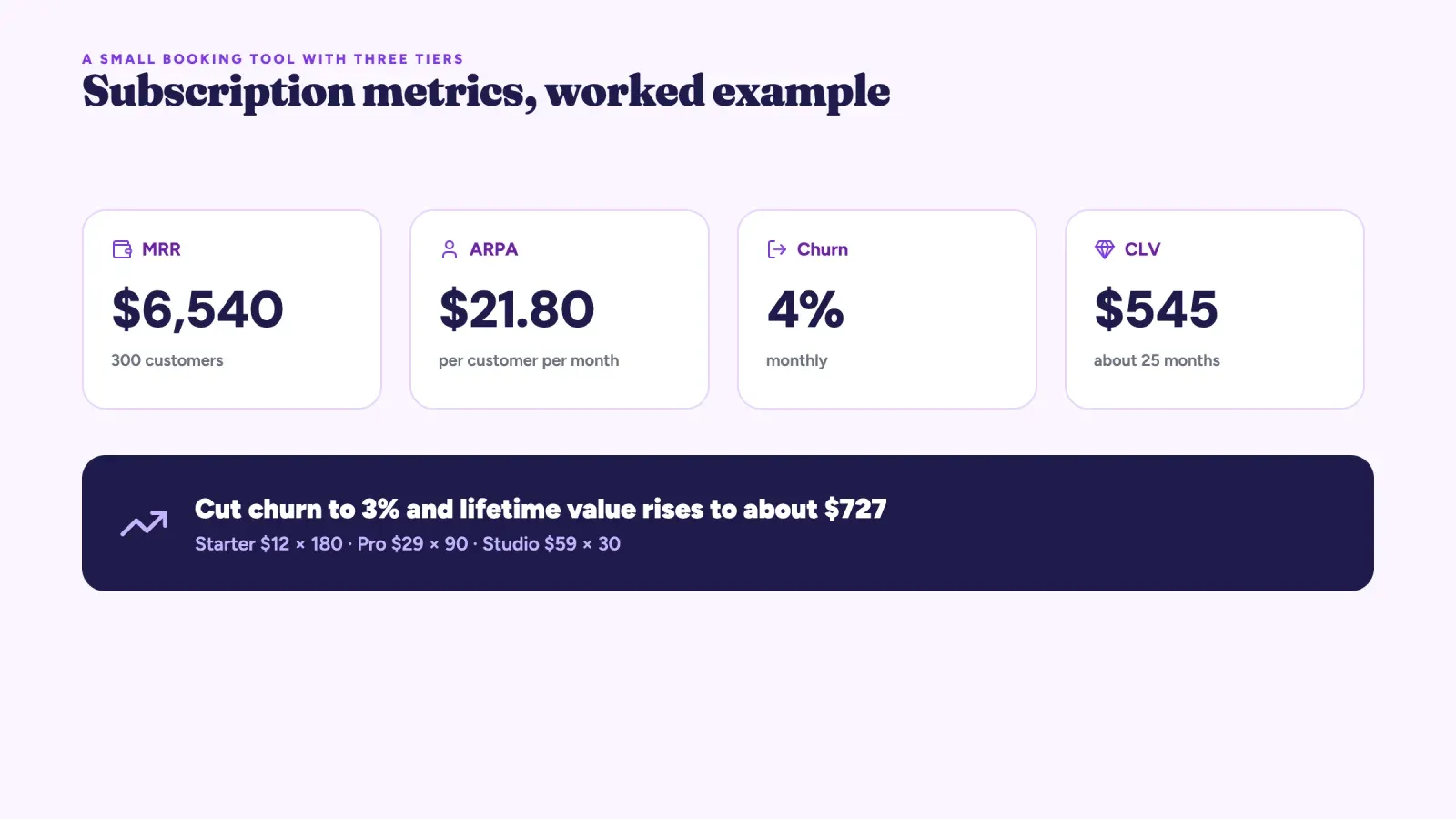
Our developer picks the tiered model. With 300 customers, 60% on Starter, 30% on Pro and 10% on Studio, monthly recurring revenue is 180 × $12 + 90 × $29 + 30 × $59 = $2,160 + $2,610 + $1,770 = $6,540. The average revenue per customer is about $21.80 a month.
Now look at churn. At 4% monthly churn, a customer stays about 25 months on average, so each one is worth about $21.80 × 25 = $545 in revenue. That is the customer lifetime value. If the same tool could cut churn to 3%, with better onboarding and annual plans, lifetime value would rise to about $727. In subscription software, keeping customers is often worth more than a higher price.
Metrics every subscription business tracks
Whichever model you choose, a few numbers tell you if it works.
- MRR and ARR. Monthly recurring revenue is the total of all active subscriptions for one month, with annual plans divided by 12. Annual recurring revenue is MRR × 12.
- Churn rate. The share of customers, or of revenue, lost each month. For small business software, monthly customer churn between 3% and 7% is common, and lower is better.
- Net revenue retention. Revenue this year from last year's customers, divided by their revenue last year. Above 100% means upgrades and extra usage outweigh cancellations. Usage and hybrid models usually score higher here.
- Average revenue per account. MRR divided by the number of paying customers. It shows if your tiers push customers up over time.
- Free-to-paid conversion. For freemium and trials, the share of new users who start paying within a set period.
- Customer acquisition cost payback. How many months of a customer's revenue it takes to recover what you spent to win them. Under 12 months is a common target.
Track them per plan and per month of sign-up, not only as a global average. A tier that converts well but churns fast is a warning sign that its promise doesn't match the product.
Common mistakes with software subscription models
- Charging for the wrong unit. If your price grows with something customers want to avoid, like adding colleagues, they'll avoid it, and your product spreads more slowly.
- Ignoring costs that grow with usage. Unlimited AI or messaging in a flat plan can turn your most active customers into your biggest losses.
- Too many plans and add-ons. Every extra choice slows a buyer down. Each tier should have a clear audience.
- Hiding the price. Small buyers leave when they see "Contact sales". Show prices for everything except true enterprise deals.
- Raising prices without warning. Announce changes early, explain what customers get, and protect existing customers for a while.
- Making cancellation hard. Hidden renewal terms and long cancellation paths bring complaints and, in several countries, legal trouble. Clear terms build the trust that keeps people subscribed.
- Never revisiting pricing. A price set at launch is a guess. Review it as you learn who your best customers are.
What software subscription models mean for creators
You don't need to build a SaaS company for these models to matter. Creators and small brands increasingly sell software-like products: Notion templates, Lightroom presets, design kits, plugins, spreadsheets, small apps and paid communities. The same choices apply. Should a template pack be a one-time purchase or a yearly subscription with updates? Should a plugin offer a free version and a paid one? Many makers start with a one-time price, because it is simple and buyers like owning things, then add a paid tier with updates or extra content once they have an audience. Our guide to digital products that sell covers which products fit each approach, and the micro-SaaS glossary entry shows how solo makers run small software businesses.
Roctify itself is a working example of tiered and freemium pricing. The Free plan costs $0 with 10 products and 1 channel, Creator is $19 a month and Pro is $39 a month, and there are 0% transaction fees on every plan. On Roctify, you can sell templates, presets, plugins, downloadable software and license files as digital products with a built-in checkout, from your link-in-bio page or your own store. Recurring billing for memberships and subscriptions is on the roadmap but not available today, so the usual approach is a one-time product, or a yearly "edition" you sell again with each update, while the email marketing tools (Creator plan and up) keep buyers informed about new versions.
FAQ about software subscription models
What are the main software subscription models? The main models are flat-rate, tiered, per-seat, usage-based, freemium, hybrid, credit-based, outcome-based, and lifetime or perpetual licenses. Most software combines several of them, such as a freemium plan with paid tiers priced per seat.
What is the most common SaaS pricing model? Tiered pricing is the most common structure, usually with per-seat or usage limits inside each tier. Hybrid models, with a base fee plus usage, are growing fastest, especially for products with AI features.
Is a subscription better than a one-time license? For the vendor, a subscription brings recurring revenue that funds updates and hosting. For the buyer, it means lower upfront cost and constant updates, but a never-ending payment. One-time licenses still suit offline tools with low running costs and buyers who want to own their software.
How much discount should annual billing give? Between 15% and 20% is the most common, often presented as two months free. Some products, like Zapier, offer more, around 33%, to push annual commitments.
Why are so many apps adding AI credits? AI features cost the vendor money every time they run. Credits let vendors include some AI in every plan while charging heavy users more, so a few customers don't cost more than they pay.
Choose the model that grows with your customers
The best software subscription models have one thing in common. The price grows when the customer gets more value, and stays fair when they don't. Flat-rate wins on simplicity, tiers fit growing customers, seats fit collaboration, usage and credits fit products with real running costs, and outcomes fit AI that completes whole tasks. Start simple, measure churn and upgrades, and adjust once a year.
If you sell digital products, templates or small software, you can start today without building billing yourself. Create your free Roctify store, list your first product and sell it from your link in bio, with 0% transaction fees on every plan.