Every day, people visit your Instagram profile, read your bio and leave. Some of them were interested. They might have bought from you next month, booked a call or come to your event. But once they scroll away, you have no way to reach them again, except by hoping the algorithm shows them your next post.
Collecting leads from your Instagram bio fixes that. A lead is simply someone who has given you permission to contact them, usually with an email address or a phone number. This guide shows you how to turn your bio into a lead generation system in 2027. You'll see what to offer in exchange for contact details, how to write a bio that gets clicks, how to build a form people actually fill in, the three places you can capture leads on Instagram, how to send more people to your bio and what to do once the leads arrive.
Why your Instagram bio is the best place to collect leads
Your bio is the most visited page of your account that you fully control. People who reach it have already seen something from you, a Reel, a carousel, a Story or a collab, and they want to know more. That makes them warmer than almost any other audience.
There's another reason to start there. Links in feed captions aren't clickable on Instagram, so your bio links and the link sticker in Stories are the main ways to send people somewhere outside the app. Instagram lets you add up to five links to your bio, but every extra link competes for attention. Most accounts get better results by putting one main link in their bio that leads to a simple page with a sign-up form at the top.
You also don't own your followers. Reach can drop, accounts can be hacked or restricted, and only a small share of your followers sees each post. An email list or a list of phone numbers is different. You can export it, contact everyone on it whenever you want and keep it if you ever leave the platform.
How collecting leads from your Instagram bio works
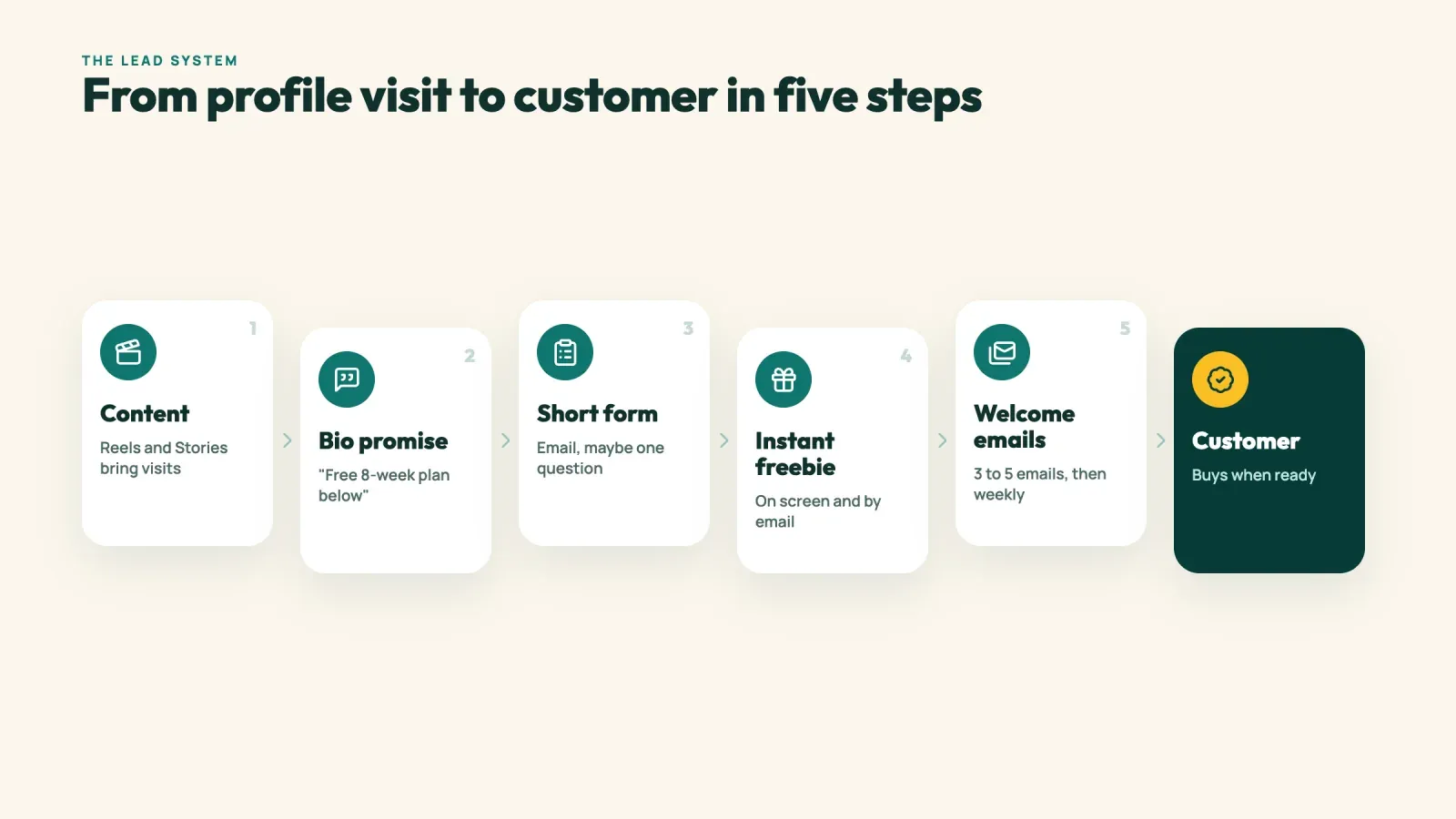
The process has five parts, and each one has a job.
- Content brings people to your profile. Reels, carousels and Stories make people curious enough to tap your name.
- Your bio makes a promise. It tells visitors what they'll get if they click, such as a free guide, a discount or a spot on a waitlist.
- A short form captures the lead. The visitor enters an email address and maybe one other detail.
- You deliver what you promised instantly. The freebie arrives on the thank-you screen and by email.
- Follow-up emails build trust. A short welcome sequence turns a new lead into a customer over the following days and weeks.
If one of these steps is weak, the whole system leaks. A great freebie with a vague bio gets no clicks. A clear bio with a 10-field form gets no sign-ups. And a big list without follow-up emails never turns into revenue.
Step 1, choose a lead magnet people actually want
A lead magnet is what you offer in exchange for contact details. It's the single biggest factor in how many leads you collect. "Subscribe to my newsletter" rarely works on its own, because people don't know what they'll get. A specific, useful freebie works much better.
A good lead magnet has four qualities.
- It solves one specific problem. "The 7-day meal plan for busy parents" beats "Healthy eating tips."
- It's quick to consume. A checklist, a template or a short video gets used. A 90-page ebook often doesn't.
- It's related to what you sell. If you sell a budgeting course, offer a budget template. People who download it are your future buyers.
- It delivers a quick win. When the freebie works, people trust that your paid offer will work too.
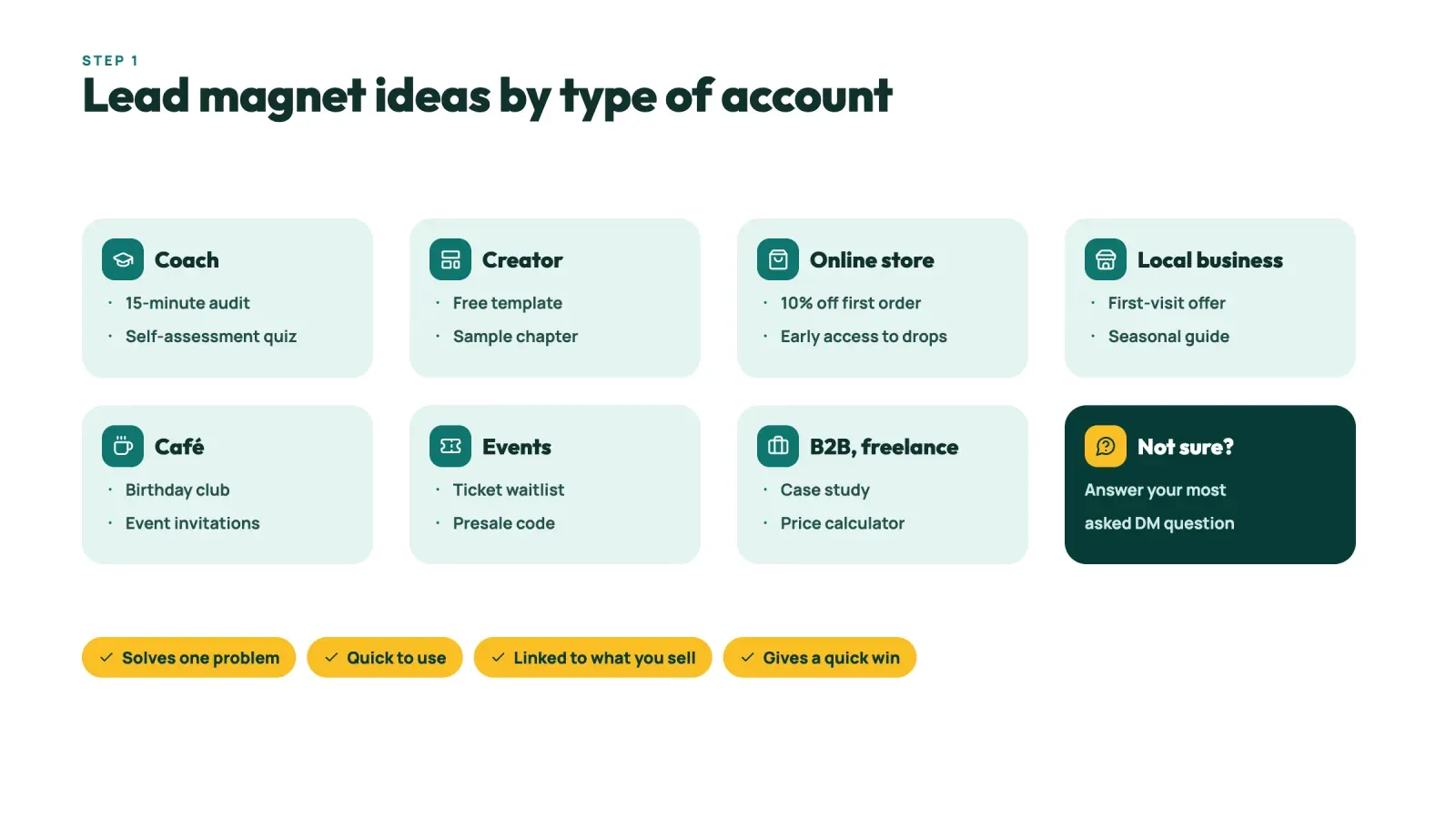
Here are ideas for different types of accounts.
| Account type | Lead magnet ideas |
|---|---|
| Coach or consultant | Free 15-minute audit, self-assessment quiz, mini email course |
| Creator selling digital products | Free template, sample chapter, preset pack |
| Online store | 10 percent off the first order, early access to drops, size guide |
| Local business | First-visit offer, seasonal guide, giveaway entry |
| Restaurant or café | Free dessert with the next meal, birthday club, event invitations |
| Event organizer | Waitlist for tickets, presale code, free replay |
| B2B or freelancer | Case study, price calculator, project checklist |
If you're not sure what to offer, look at the questions people ask in your comments and DMs. The question you answer most often is usually your best lead magnet.
Step 2, write a bio that makes people click
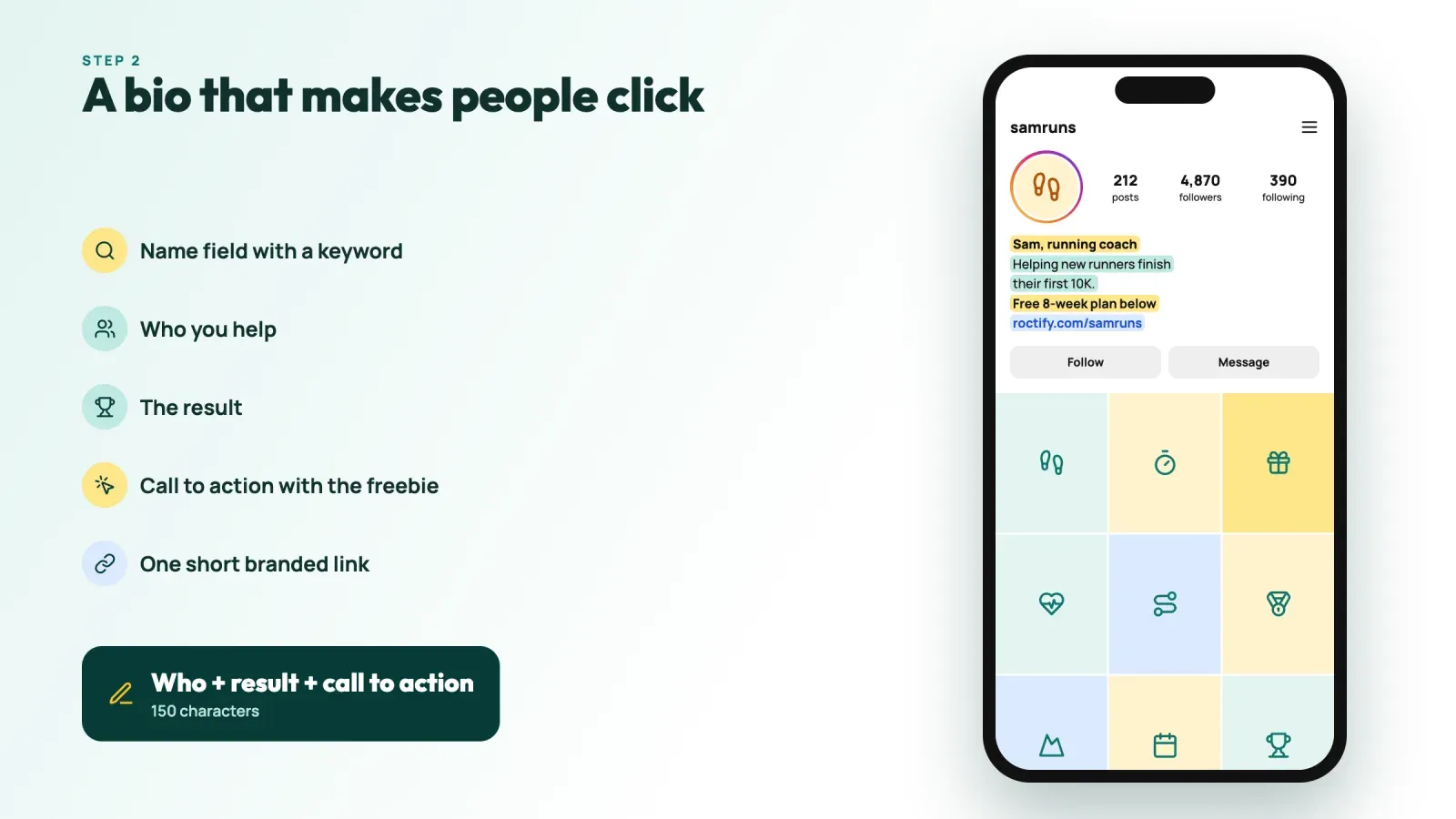
Your Instagram bio has room for 150 characters. That's enough for a clear promise, as long as you don't waste it. A simple formula works for most accounts.
Who you help + the result + a call to action.
- "Helping new runners finish their first 10K. Free 8-week plan below."
- "Handmade ceramics for slow mornings. 10 percent off your first order below."
- "Notion templates for freelancers. Grab the free client tracker below."
A few details make a big difference.
- Say what's behind the link. "Free 8-week plan" works better than "Link below" or "Check out my link."
- Use your name field. It's searchable and appears above your bio, so it can carry a keyword such as "Sam, running coach."
- Use a clear call to action. Words like "Get," "Grab," "Join" or "Download" tell people what to do.
- Keep your link clean. A short branded link looks more trustworthy than a long URL full of tracking codes.
- Update it when your offer changes. If you're running a waitlist or an event, put it first. Our guide on how to change the link in your Instagram bio shows how.
Step 3, build a sign-up form people actually fill in
Most people who tap your bio link are on a phone, inside the Instagram app, with only a few seconds of attention. Your form has to be fast and obvious.
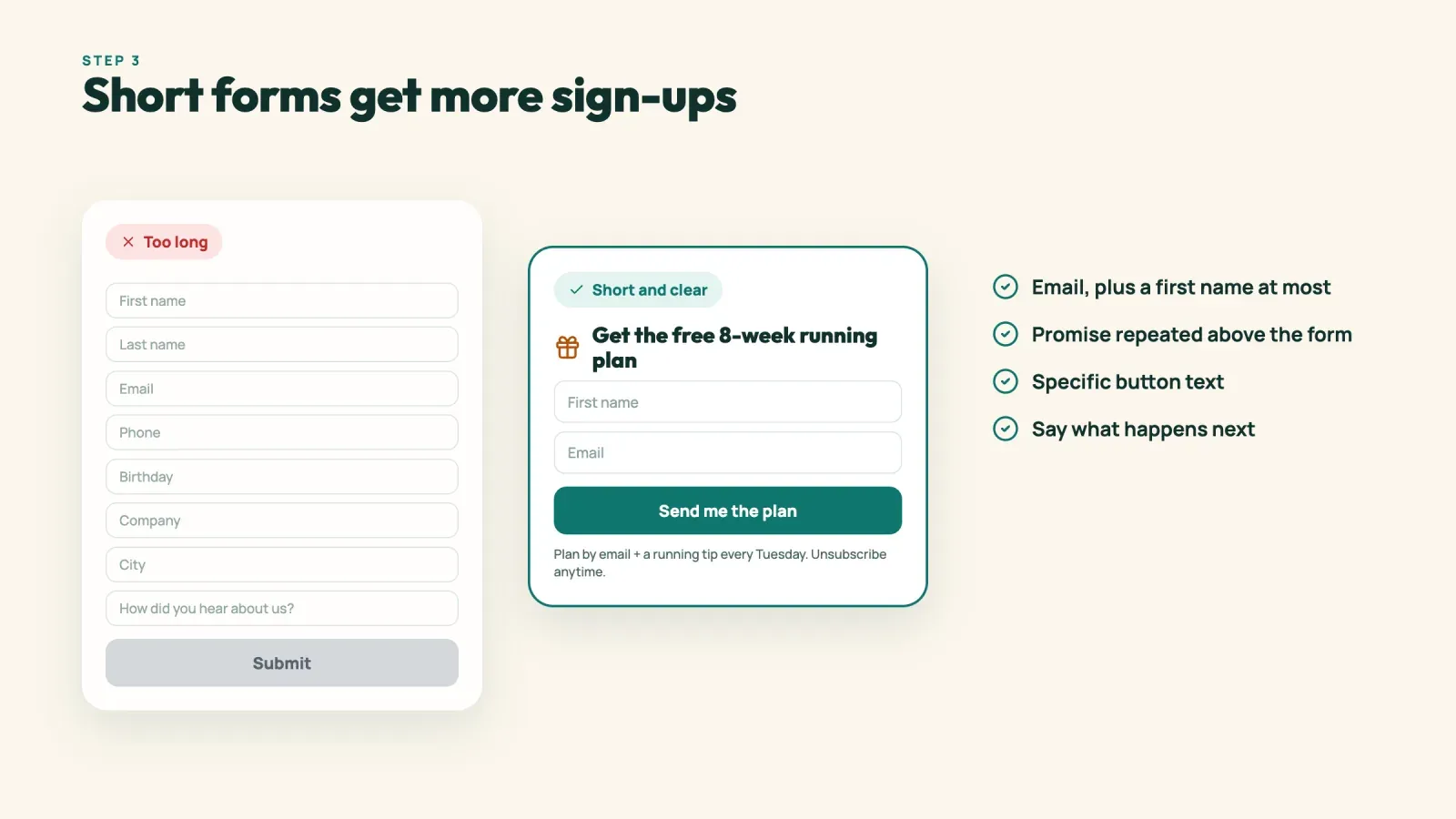
Ask for as little as possible. An email address is often enough. Every extra field lowers the number of sign-ups. Add a first name if you want to personalize emails, and one optional question if it really helps you segment people, for example "What's your biggest challenge?" with three choices.
Put the form at the top of the page. Don't make visitors scroll past 15 links to find it. If you use a link page, make the form the first and most visible element.
Repeat the promise above the form. Use the same words as your bio, such as "Get the free 8-week running plan," so visitors know they're in the right place.
Make the button specific. "Send me the plan" works better than "Submit."
Explain what happens next. A short line such as "You'll get the plan by email and a running tip every Tuesday. Unsubscribe anytime" sets expectations and reduces fake email addresses.
Show a thank-you screen with the freebie. Let people download it right away, and send it by email as well. This first moment of trust is when people are most likely to open your emails later.
Our guide on turning followers into customers with your link in bio covers how to organize the rest of the page around the form.
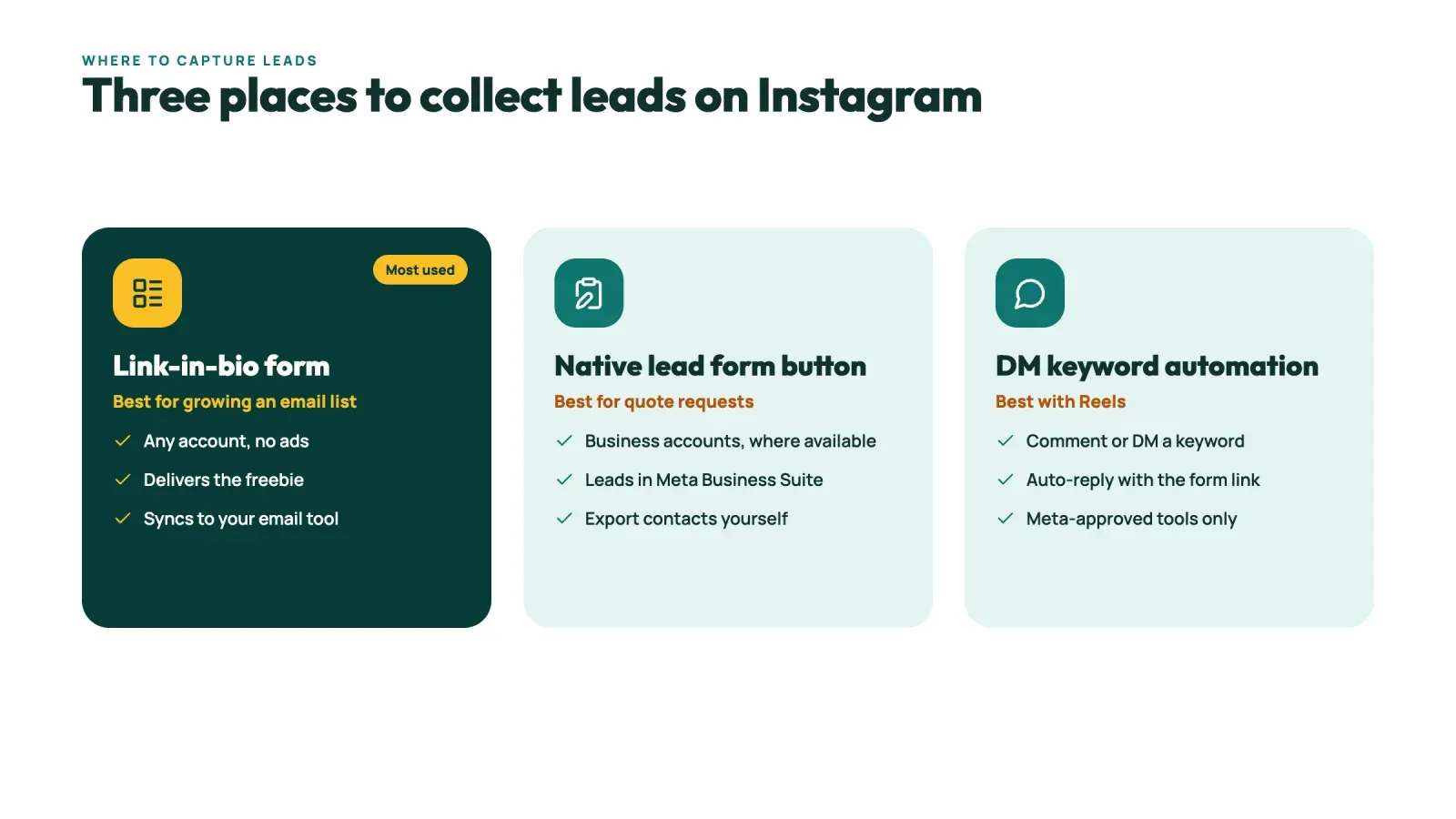
Three places to capture leads on Instagram
Your bio link is the main place, and two other options can add more leads. Most accounts get the best results by combining these three options.
1. A form on your link-in-bio page
This is the most flexible option. A link in bio page with a built-in form lets you capture emails, deliver a freebie, add products and links below it and export or sync your contacts to an email tool. It works for any account, with no ads and no approval needed.
2. Instagram's native lead form button
Business accounts can add action buttons to their profile, and one of the options is a lead form. Visitors tap a button such as "Get quote" and fill in a short form without leaving Instagram. You can usually choose a standard form (name, email, phone and a short message) or customize it with a few questions of your own. Leads appear in your Professional dashboard and in Meta Business Suite, where you can download them.
This option is useful for service businesses, such as a cleaning company, a photographer or an agency, that want quote requests. It's less useful for growing an email list, because you have to move the contacts to your email tool yourself. Availability depends on your account type and region, and only one action button shows at a time, so check what appears under Edit profile, then Action buttons.
3. DM automation with a keyword
You can also collect leads in DMs. Ask people to comment or send a keyword, such as "PLAN," and a tool approved by Meta replies automatically with a link to your form or asks for their email in the conversation. This works well with Reels, because the call to action happens at the moment someone is interested. Instagram's messaging rules limit what tools can send, so stick to tools that use the official API. Our guide on how to sell digital products on Instagram explains how comment-to-DM automation works and what the rules are.
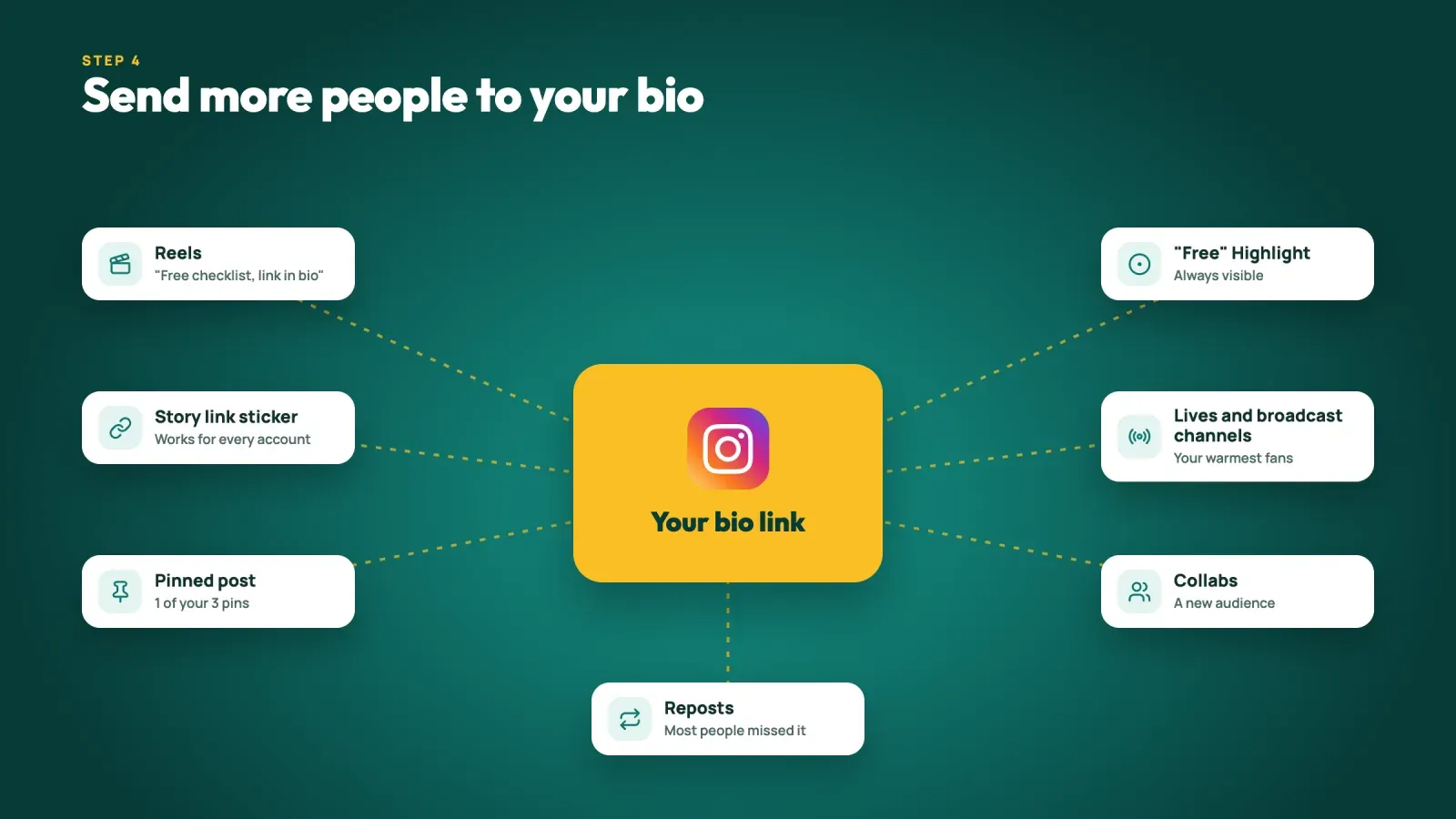
Step 4, send more people to your bio
A great bio and form only work if people visit them. Here's how to drive steady traffic to your lead form.
- End Reels with a clear call to action. "The full checklist is free, link in bio" at the end of a useful Reel turns viewers into profile visitors.
- Use the link sticker in Stories. It sends people straight to your form, and it works for every account. Mention the freebie in Stories a few times a week, from different angles.
- Pin a post about your freebie. You can pin up to three posts to the top of your grid. One of them should explain the lead magnet and where to get it.
- Create a "Free" Highlight. Save your best Stories about the freebie so new visitors can find it any time.
- Mention it in lives and broadcast channels. Your most engaged followers are often the first to sign up.
- Run collabs. A collab post with a complementary account shows your content to a new audience, and some of them will visit your profile.
- Reuse your best posts. When a post about your freebie performs well, post a new version a few weeks later. Most of your followers missed it the first time.
Every piece of content doesn't need to promote the freebie. A good rule is to mention it whenever your content touches the same problem. If your Reel is about running form, the free training plan is the natural next step.
Step 5, get consent and respect privacy laws
Collecting contact details comes with rules, and the people on your list will trust you more if you follow them.
- Be clear about what people sign up for. Say on the form that they'll receive your emails as well as the freebie.
- Don't pre-tick consent boxes. In the European Union, the GDPR requires consent for marketing emails to be freely given, specific and active.
- Add a privacy policy link. Explain who you are, what data you collect and how people can ask to have it deleted.
- Make unsubscribing easy. Every marketing email needs a one-click unsubscribe link.
- Consider double opt-in. Asking people to confirm their email address reduces fake sign-ups and keeps your list clean. Our glossary entry on opt-in explains single and double opt-in.
- Keep data safe. Use a reputable email tool and don't download contact lists to shared drives without a reason.
Step 6, what to do after someone signs up
A new lead still has to decide whether to buy from you. What happens in the first few days decides whether they ever become one.
Send a welcome email right away. Deliver the freebie, thank them and tell them what to expect. Welcome emails are usually the most opened emails you'll ever send, so make them count.
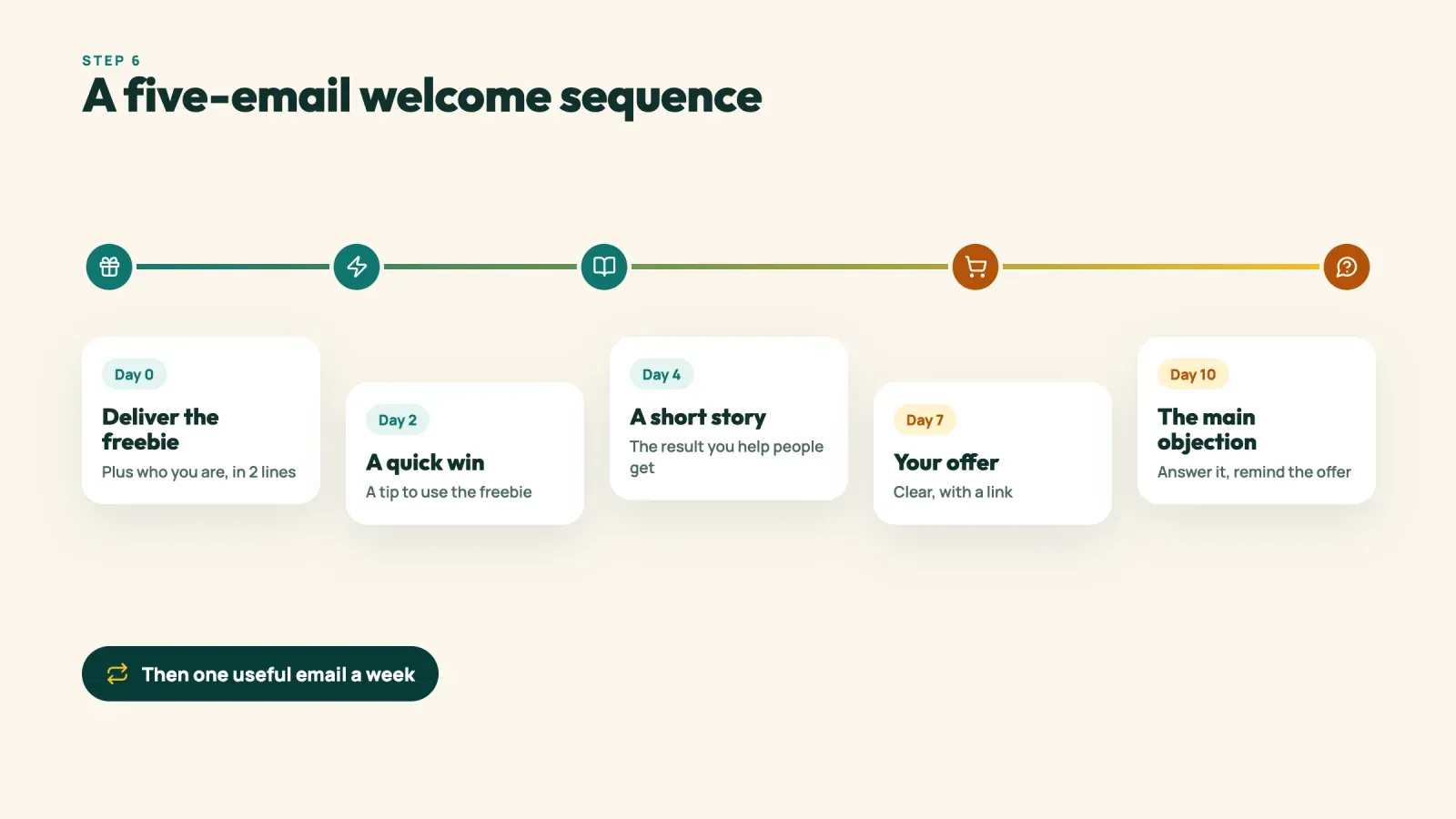
Follow with a short welcome sequence. Three to five emails over one or two weeks is enough. Here's a simple structure.
- Day 0. Deliver the freebie and introduce yourself in two or three lines.
- Day 2. Share a quick win or a tip that helps them use the freebie.
- Day 4. Tell a short story, yours or a customer's, that shows the result you help people get.
- Day 7. Present your paid offer clearly, with a link.
- Day 10. Answer the most common objection and remind them of the offer.
After the sequence, keep emailing regularly, for example once a week, with useful content and occasional offers. This ongoing lead nurturing is what turns a list into revenue. If you collected an answer to a question on your form, use segmentation to send each group the emails that fit them best.
Examples of bio lead funnels
A running coach. Bio, "Helping new runners finish their first 10K. Free 8-week plan below." The link opens a page with a two-field form. The plan arrives instantly, followed by five emails over ten days that end with an offer for a 12-week coaching program.
A ceramics shop. Bio, "Handmade ceramics for slow mornings. 10 percent off your first order below." The form asks only for an email. The welcome email contains the code, a second email tells the story of the studio and a third shows the bestsellers. Subscribers also get early access to each new collection.
A wedding photographer. The profile uses Instagram's lead form button labeled "Get quote," with questions about the date and location. The link page offers a free guide to planning a wedding photo timeline for couples who aren't ready to ask for a quote yet. Both lists feed into the same email tool.
Each example follows the same pattern. One clear promise, one short form and a follow-up plan that leads to a paid offer.
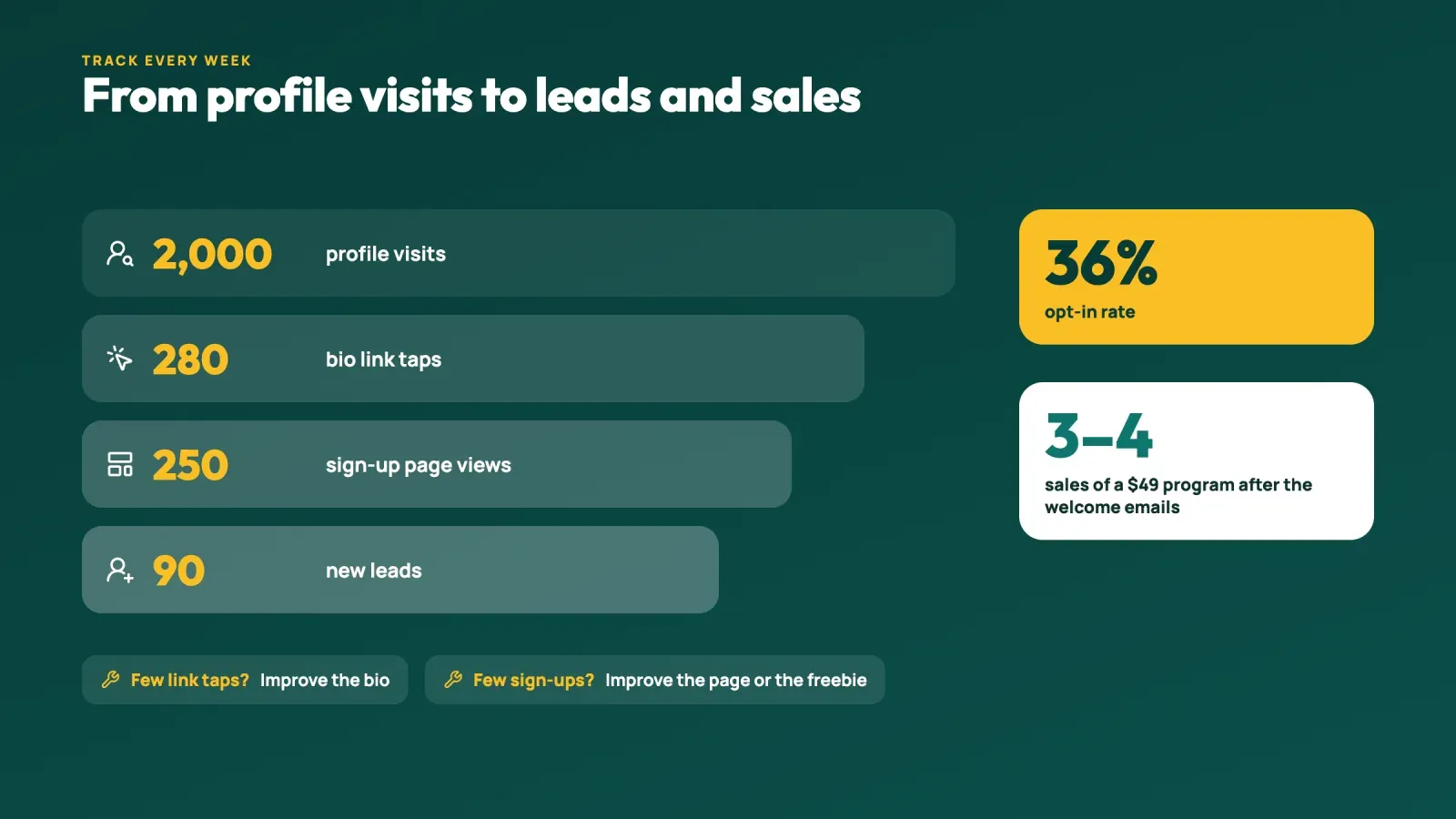
Track the numbers that matter
To improve your lead generation, track a few numbers every week.
- Profile visits. From Instagram Insights.
- Link taps. How many people tapped your bio links, also in Insights.
- Page views. How many people landed on your sign-up page.
- Sign-ups. How many people filled in the form.
- Opt-in rate. Sign-ups divided by page views.
Here's an example. In a month, a fitness coach gets 2,000 profile visits. 280 people tap her bio link, 250 land on her page and 90 sign up for her free 8-week plan. That's a 36 percent opt-in rate and 90 new leads. If 4 percent of them buy her 49 USD program after the welcome sequence, that's 3 or 4 sales from one free plan, and the other 86 people are still on her list for the next launch.
Opt-in rates vary a lot by offer and audience. Instead of comparing yourself with someone else, compare this month with last month. If profile visits are high but link taps are low, work on your bio. If link taps are high but sign-ups are low, improve your page or your lead magnet.
Mistakes that cost you leads
- Asking people to "subscribe to my newsletter." Without a specific reward, few people sign up.
- Hiding the form under a long list of links. Put the form first.
- Asking for too many details. Every extra field lowers sign-ups.
- A freebie that has nothing to do with your offer. You'll collect leads who never buy.
- Never mentioning the freebie in your content. Your bio alone won't drive enough traffic.
- Collecting leads and never emailing them. People forget who you are within a few weeks.
- Breaking privacy rules. Pre-ticked boxes or bought email lists can hurt both your reputation and your deliverability.
A 30-day plan to start collecting leads
Week 1, choose and create. List the five questions your audience asks most. Pick one and turn the answer into a simple lead magnet, such as a checklist, template or short guide.
Week 2, set up. Create your sign-up page with the form at the top and connect it to your email tool. Write your welcome email and a three to five email welcome sequence. Rewrite your bio with the "who, result, call to action" formula.
Week 3, promote. Post two Reels and one carousel related to the freebie, each with a clear call to action. Share it in Stories with a link sticker, pin a post about it and create a "Free" Highlight.
Week 4, measure and improve. Check profile visits, link taps, page views and sign-ups. Fix the weakest step, whether that's your bio, your page or your offer. Then plan the next piece of content that leads to your freebie.
FAQ
Can you collect emails directly on Instagram?
Yes, in a few ways. Business accounts can add a native lead form as a profile action button where it's available, and you can collect emails in DMs. Most creators and businesses still use a form on their link-in-bio page, because it connects directly to their email tool and delivers the freebie automatically.
How many links can you put in your Instagram bio?
Instagram lets you add up to five links to your bio. For lead generation, it usually works better to use one main link that leads to a page with your sign-up form at the top.
What's the best lead magnet for Instagram?
Short, practical freebies that solve one specific problem work best, such as a checklist, a template, a mini guide, a discount code or a waitlist spot. The best lead magnet is closely related to what you sell.
Do you need a business account to collect leads on Instagram?
You can collect leads with any account through your bio link and Stories. A professional account gives you Insights to measure profile visits and link taps, and a business account can access action buttons such as the native lead form where it's available.
Is it legal to collect emails from Instagram followers?
Yes, as long as people actively sign up and you follow privacy laws. In the EU, that means clear consent, no pre-ticked boxes, a privacy policy and an easy way to unsubscribe. Never add people to your list without their permission.
How do I get more people to sign up from my bio?
Offer a specific freebie, describe it clearly in your bio, put the form at the top of your page and mention the freebie regularly in Reels and Stories with a link sticker. Then check your numbers each week and fix the weakest step.
Turn profile visits into leads you own
Collecting leads from your Instagram bio comes down to a simple system. A freebie people want, a bio that promises it clearly, a short form at the top of your page, steady content that sends people there and a welcome sequence that turns new leads into customers. Once it's running, every Reel and Story adds people to an audience you own.
Create your free Roctify page to add a sign-up form, deliver your lead magnet instantly and keep your products and links in one place, behind one link in your bio.