Instagram is where a lot of people discover the templates, guides, presets and courses they end up buying. It's also a place where a lot of creators post about their product for weeks and sell almost nothing. The difference is rarely the product itself. It's usually the path between the post and the payment.
This guide shows you how to sell digital products on Instagram in 2027, step by step. You'll see what Instagram allows and doesn't allow, how to set up your profile and your sales page, which content formats sell, how to automate DMs without breaking the rules, how to run a launch and which numbers to track. If you're still deciding what to make, start with our list of digital products that sell, then come back here to sell it.
Can you sell digital products inside the Instagram app?
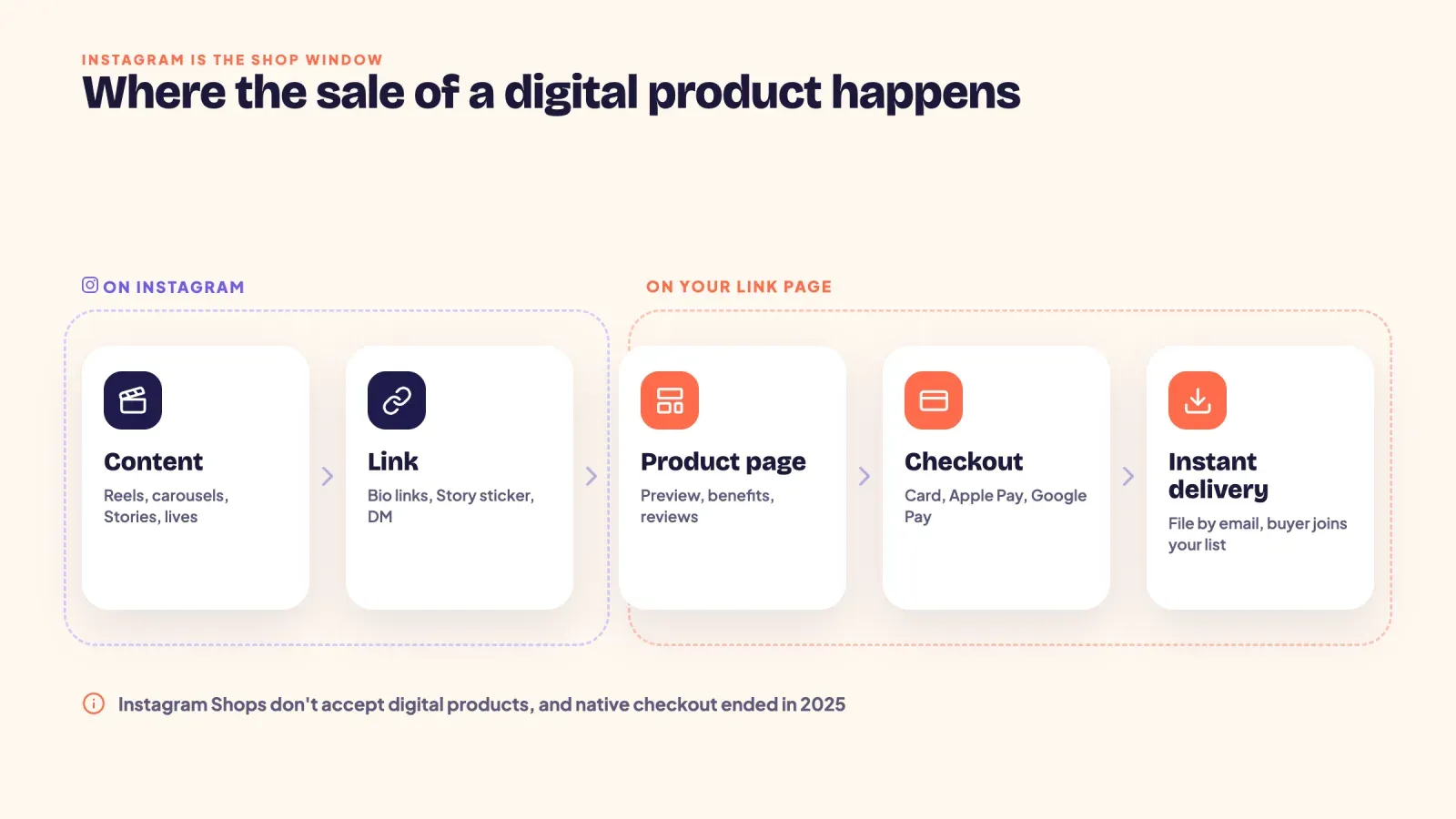
You can't complete the sale inside the app. Instagram Shops were built for physical products, and Meta's commerce policies don't allow downloadable digital content, digital subscriptions or online courses to be listed or tagged as shop products. On top of that, Meta phased out native checkout on Facebook and Instagram Shops in 2025, so even physical products now send buyers to an outside website to pay.
That sounds like a problem, but it actually makes things simpler. For digital products, Instagram does two jobs.
- It brings attention. Reels, carousels, Stories and lives put your product in front of people who need it.
- It sends people to a link. Your bio links, the Story link sticker and DMs move buyers to a page you control.
The sale itself happens on that page, which takes the payment, delivers the file instantly and collects the buyer's email. Once you see Instagram as the shop window and your link page as the till, every decision in this guide becomes easier.
What sells best on Instagram
Almost any digital product can sell on Instagram, but some types fit the platform better because they're easy to show in a short video or a few slides.
| Product | Typical price | Best format to show it |
|---|---|---|
| Templates (Canva, Notion, spreadsheets) | 9 to 39 USD | Screen-recorded Reel of the template in use |
| Presets and filters | 9 to 29 USD | Before and after Reel or carousel |
| Guides and ebooks | 9 to 29 USD | Carousel with a preview of the contents |
| Printables and planners | 5 to 19 USD | Flat-lay photo or a page flip Reel |
| Workout or meal plans | 15 to 49 USD | Reel showing one day of the plan |
| Mini courses and workshops | 29 to 149 USD | Live session or a Reel with a quick lesson |
| Memberships and communities | 5 to 30 USD a month | Stories showing what members get each week |
The common thread is that the result is visible. If people can see what your product does in a few seconds, Instagram will do much of the selling for you. If your product is harder to show, such as a deep course, sell a cheaper, visible product first and use it as an entry point.
Step 1, set up your profile to sell
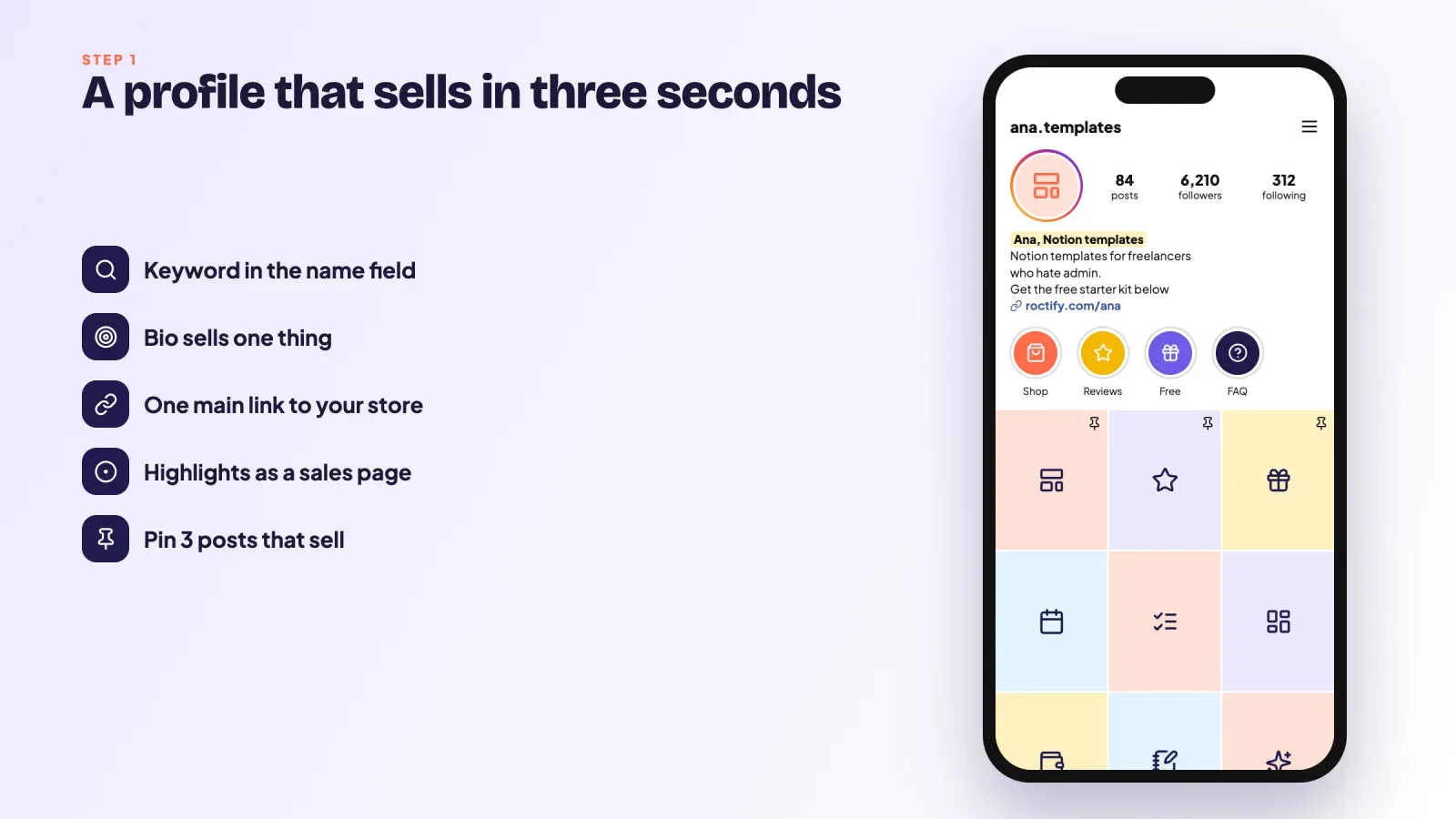
Your profile is the first page every buyer sees, so it needs to answer three questions in a few seconds. Who is this for? What do you sell? Where do I click?
Switch to a professional account. A creator or business account gives you Insights, so you can see which posts bring profile visits and link taps. It costs nothing.
Use the name field for a keyword. The name field is searchable. Instead of just your name, try "Ana, Notion templates" or "Sam, meal prep plans."
Write a bio that sells one thing. Say who you help, the result you deliver and what to do next. For example, "Notion templates for freelancers who hate admin. Get the free starter kit below."
Keep one main link. Instagram lets you add up to five links to your bio, but too many choices lower clicks. Put your link page first and use it as a mini store, so every product, freebie and offer lives in one place.
Use Highlights as a sales page. Create Highlights such as "Shop," "Reviews," "Free" and "FAQ." People who visit your profile often tap them before buying.
Pin your best selling posts. You can pin up to three posts to the top of your grid. Pin one post that explains your product, one that shows results or reviews and one that gives away something free.
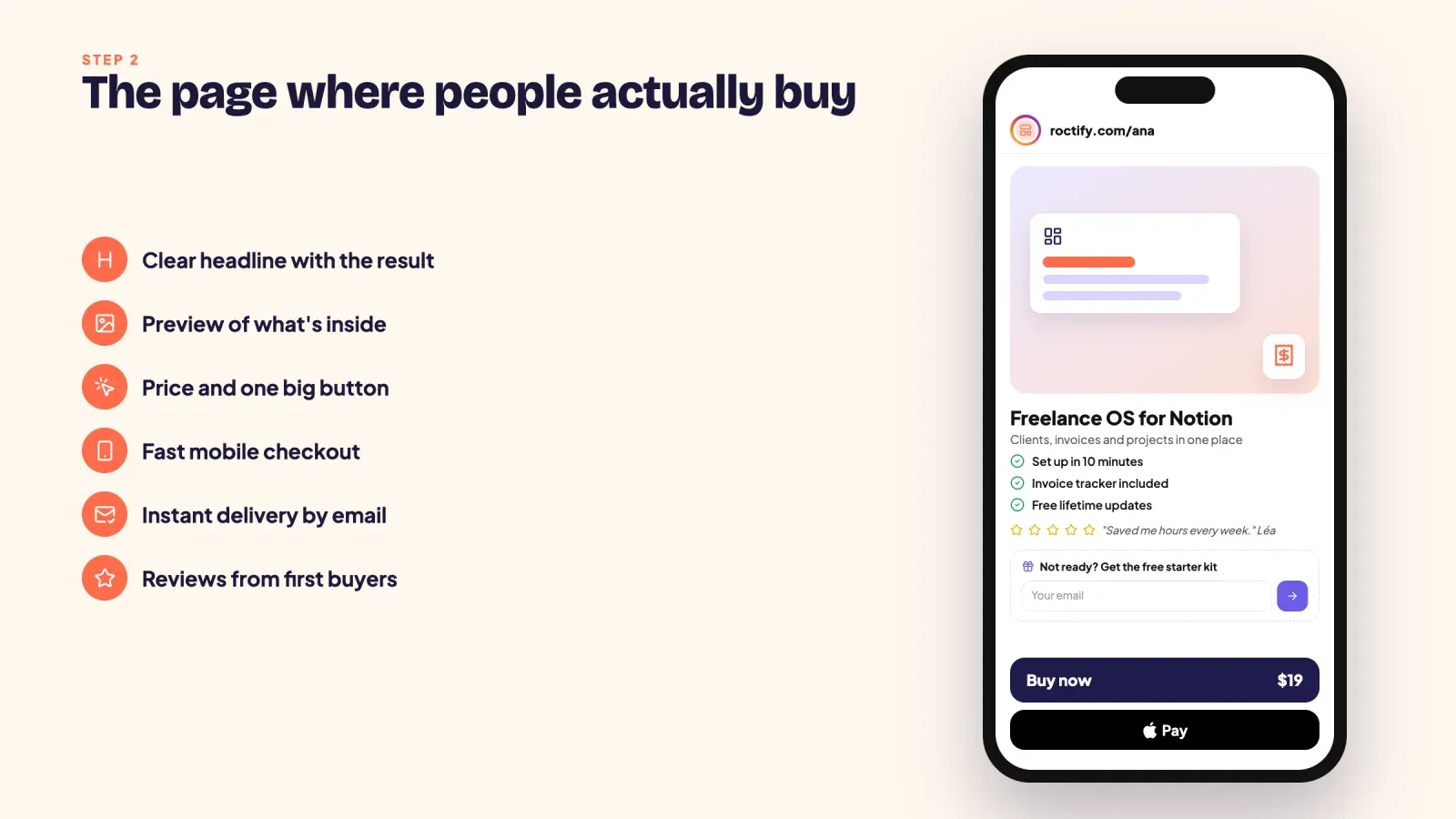
Step 2, build the page where people buy
Your sales page does the work Instagram can't do. Most buyers will arrive on a phone, from inside the Instagram app, often in the middle of scrolling. Anything that slows them down costs you sales.
A page that converts usually has these elements.
- A clear headline. Name the product and the result in one line.
- A product image or short preview. Show what's inside, such as a page, a screen or a short clip.
- Three to five benefits. Describe the result each one gives the buyer.
- The price and one big button. Don't make people scroll to find how much it costs.
- Fast mobile checkout. Card, Apple Pay and Google Pay, with as few fields as possible.
- Instant delivery. The file or access link should arrive right after payment, both on screen and by email.
- Reviews. Even three short quotes from early buyers help.
- An email sign-up for people who aren't ready yet. A free lead magnet keeps non-buyers in touch.
Match the page to the content that sent people there. If your Reel was about a budgeting template, the link should land on the budgeting template, not on a list of 15 products. Our guide on turning followers into customers with your link in bio goes deeper into page layout.
Step 3, validate your idea before you build it
The fastest way to waste a month is to build a product nobody asked for. Instagram gives you free research tools.
- Poll stickers. Ask "Would you use a template for X?" in Stories and look at the share of yes answers, not just the total.
- Question stickers. Ask "What's your biggest struggle with X?" and save the answers. They become your sales copy.
- A waitlist. Post about the idea and ask people to comment a word or tap a link to join a waitlist. If 30 people sign up, you have buyers. If two do, change the angle.
- A pre-sale. Offer the product at an early price before it's finished. Payments are the strongest form of validation.
Start with a small, focused version, then improve it based on what buyers ask for. A simple minimum viable product launched this month teaches you more than a perfect one launched next year.
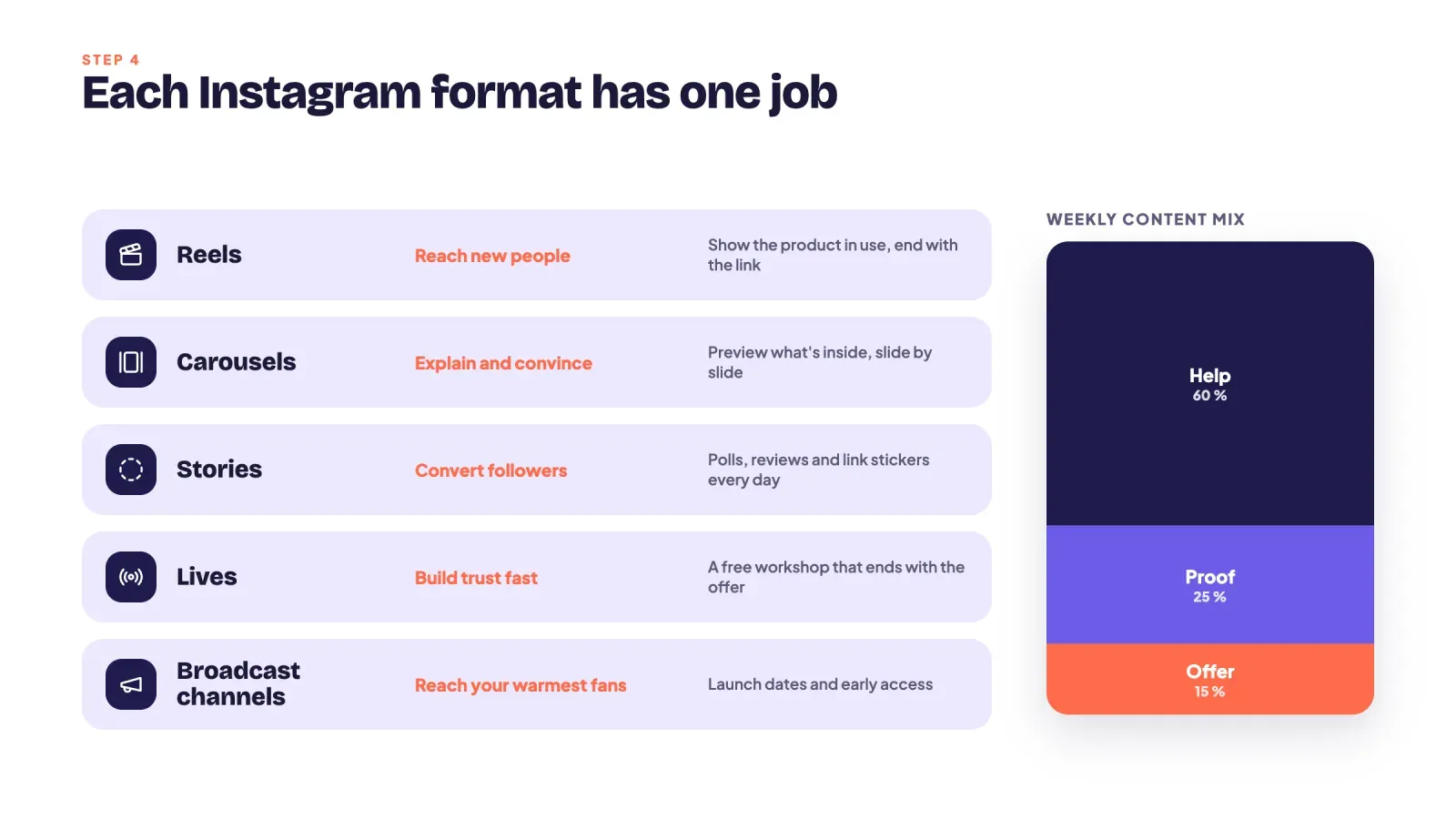
Step 4, post content that sells without feeling like ads
People don't follow you to see ads. They follow you because your content helps them. The trick is to make your content and your product point in the same direction, so promoting the product feels like the next step.
Each format has a job.
| Format | Main job | Example |
|---|---|---|
| Reels | Reach new people | "3 Notion shortcuts that save me an hour a week" ending with the template |
| Carousels | Explain and convince | Slide by slide preview of what's inside the guide |
| Stories | Convert followers | Daily behind-the-scenes, polls, reviews and link stickers |
| Lives | Build trust fast | A free workshop that ends with your offer |
| Broadcast channels | Reach your warmest fans | Launch dates, early access and exclusive discounts |
A simple mix that works for many creators is three types of posts. Help posts teach something useful on their own. Proof posts show results, reviews and the product in use. Offer posts clearly present the product, the price and the link. A rough split that works for many creators is about 60 percent help, 25 percent proof and 15 percent offers. Most of your content should be help and proof, but you should still make a clear offer at least once or twice a week. Many creators under-promote because they're afraid of being annoying, while most of their followers haven't even seen the offer yet.
Every post should end with one call to action. "Comment GUIDE and I'll send you the link" or "Link in bio" works far better than ending with nothing.
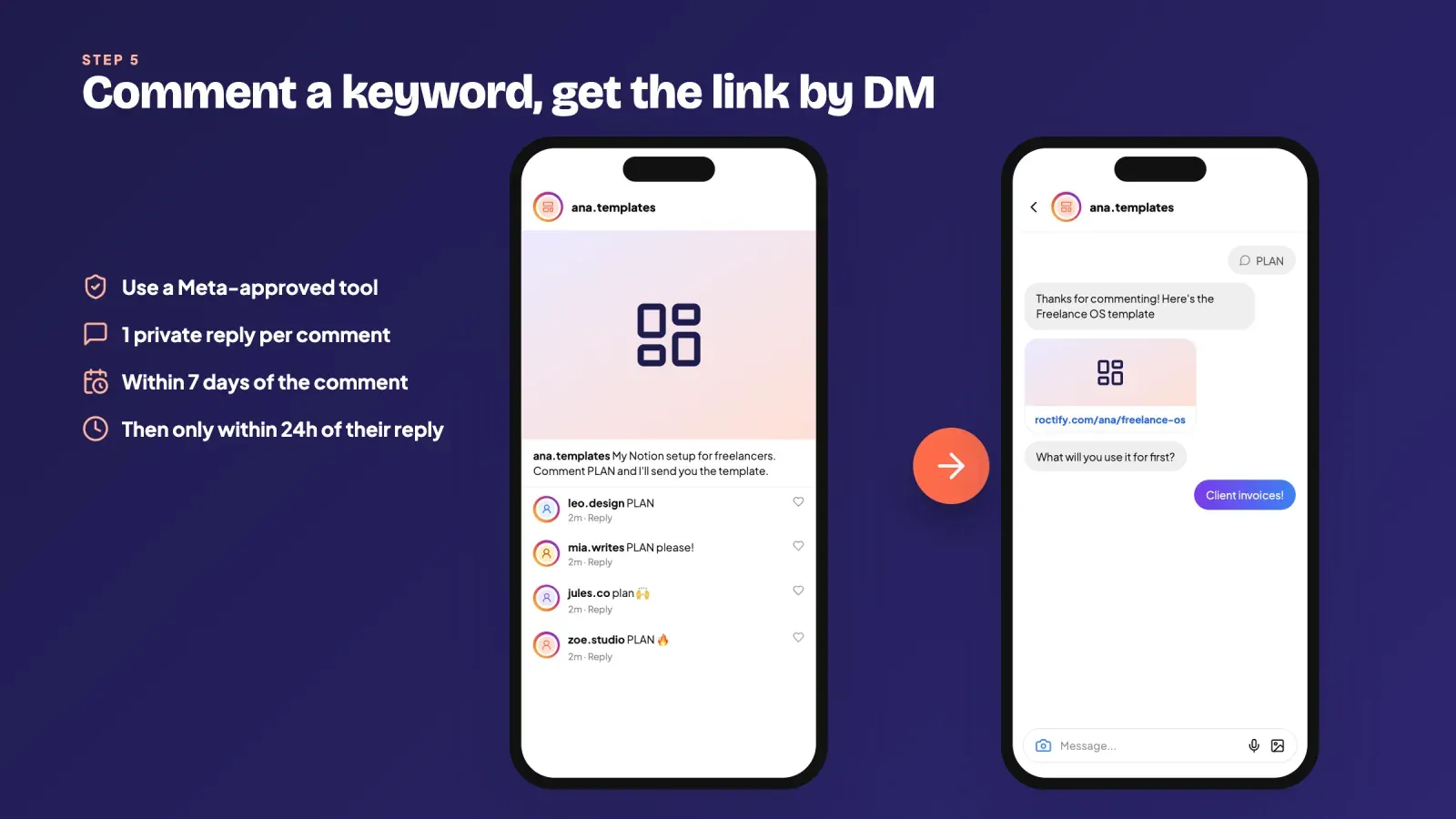
Step 5, automate DMs with comment keywords
Comment-to-DM automation is one of the most effective ways to sell digital products on Instagram. You ask people to comment a keyword, and a tool instantly sends them a DM with the link. It works because the link arrives in a private, clickable message at the exact moment someone is interested, and the comments also boost the post.
Here's how to set it up properly.
- Pick a Meta-approved tool. Use a tool that connects through Instagram's official messaging API. Tools that log in with your password or simulate taps can get your account restricted.
- Choose one simple keyword per post. Words like "GUIDE," "PLAN" or "TEMPLATE" work well. Avoid words people might type by accident.
- Write a short, human first message. Thank them, give the link and ask a small question such as "What will you use it for first?"
- Follow up only when they reply. Keep the conversation going if they answer, and don't send the same link five times.
Know the rules before you automate. Instagram's messaging API lets a business send one private reply to a comment, within 7 days of the comment. After that, you can only keep messaging someone if they reply, and standard messages must be sent within 24 hours of their last message. Good tools handle these rules for you, but they explain why "comment to get the link" works best right after you post. Our glossary entry on auto DMs and auto replies explains the options in more detail.
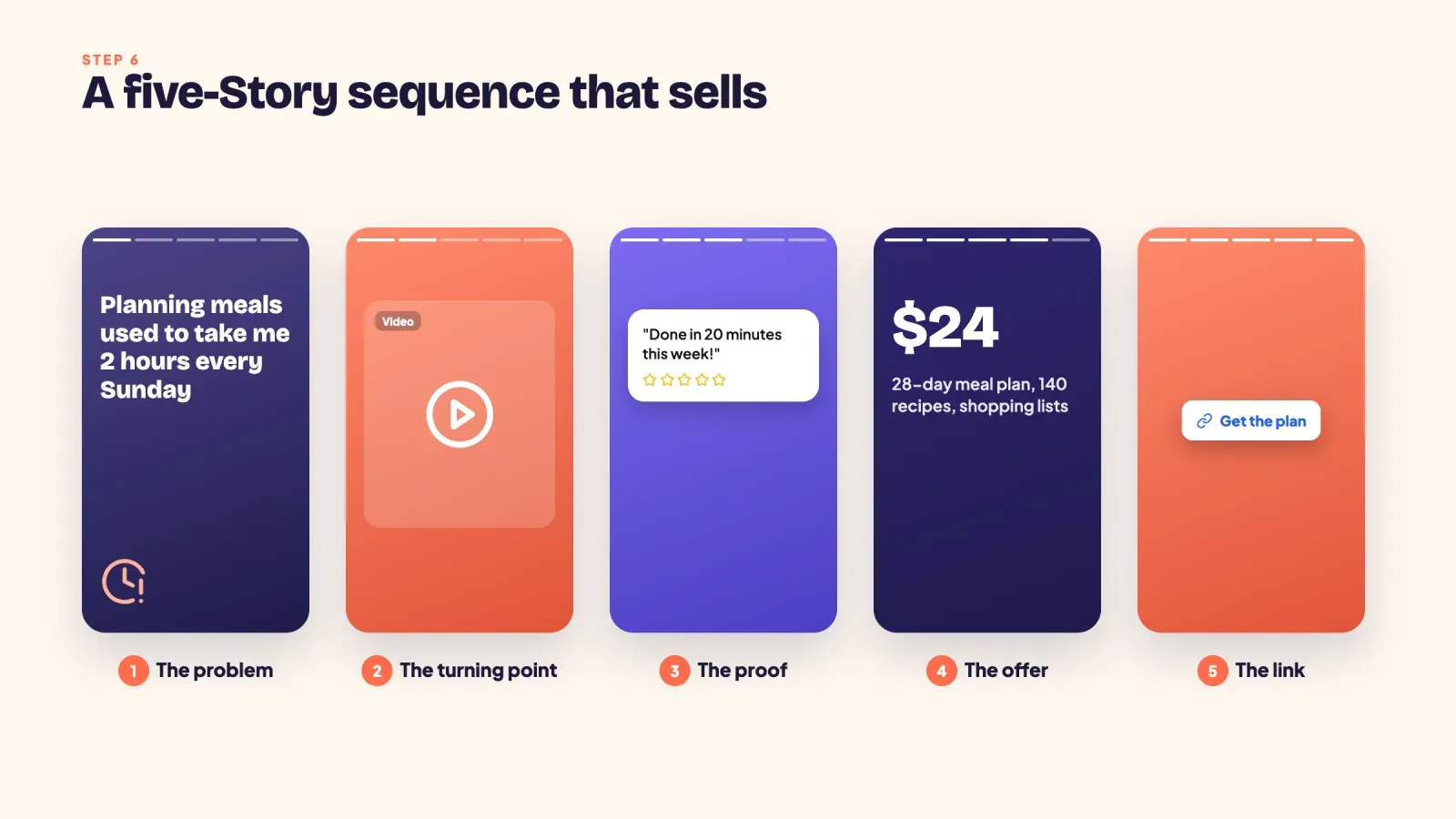
Step 6, sell every day in Stories
Stories are where followers turn into buyers. They're seen mostly by people who already know you, and the link sticker works for every account, whatever your follower count.
Try this five-frame sequence when you want to sell.
- The problem. "Planning meals every Sunday used to take me two hours."
- The turning point. A short clip of you using the product.
- The proof. A screenshot of a buyer's message or a result.
- The offer. What it is, the price and what's included.
- The link. A link sticker with a clear label, such as "Get the plan."
Share buyer messages and reviews regularly, with permission. Use the countdown sticker before a launch, the poll sticker to choose between two versions and the question sticker to answer objections such as "Will it work for beginners?" Then save the best frames to your "Shop" and "Reviews" Highlights.
Step 7, run a launch instead of a single announcement
A single "my product is out" post usually brings a few sales and then silence. A short launch brings far more, because people need to see an offer several times before they act.
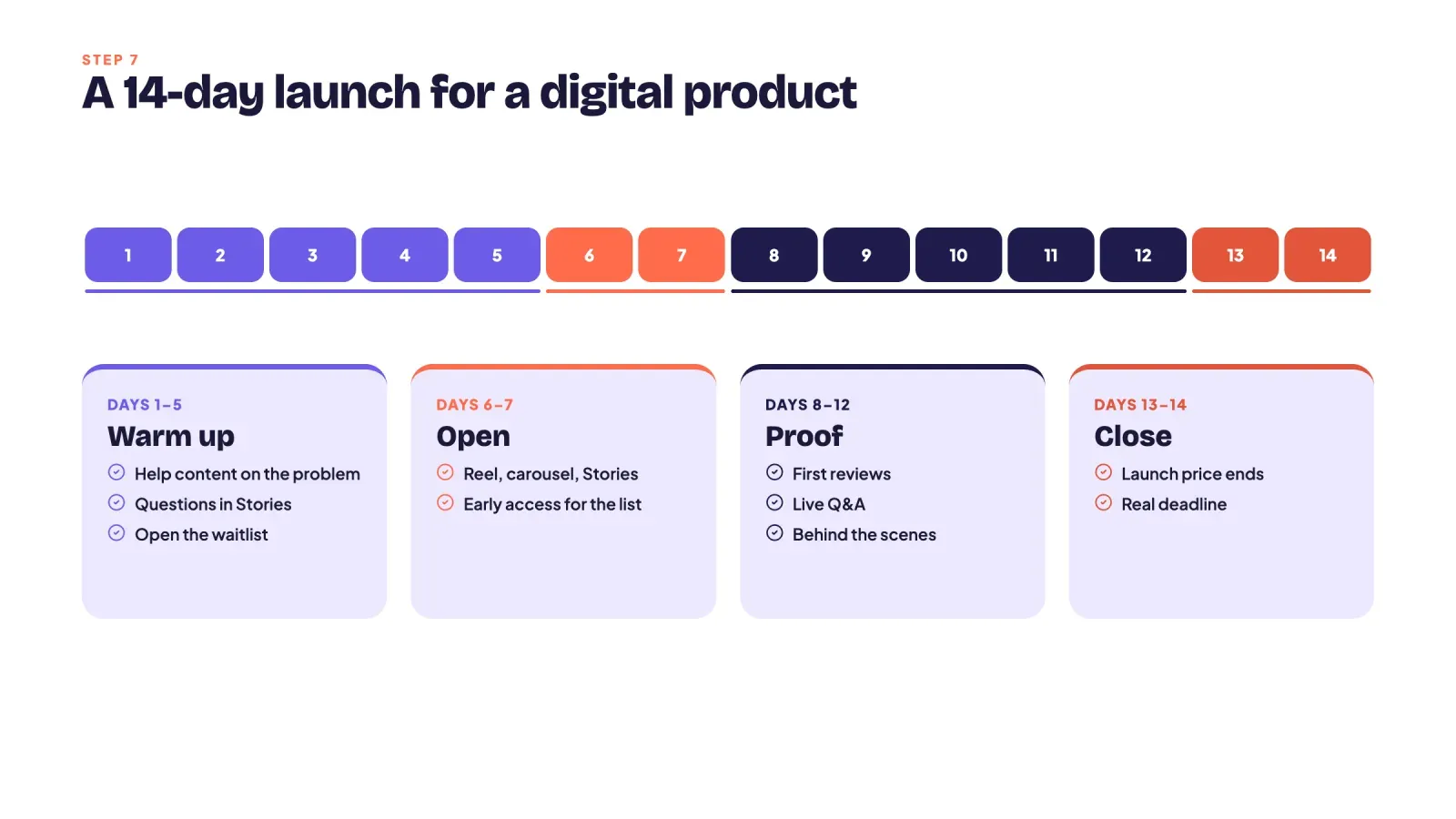
A simple 14-day launch looks like this.
- Days 1 to 5, warm up. Post help content around the problem your product solves. Ask questions in Stories and open a waitlist.
- Days 6 to 7, open the cart. Announce the product with a Reel, a carousel and a Stories sequence. Give waitlist members early access or a small bonus.
- Days 8 to 12, show proof. Share first reviews, answer questions in a live and post behind-the-scenes content.
- Days 13 to 14, close. If you offer a launch price, end it clearly on the date you announced. Real deadlines are what make many people decide.
Never invent fake urgency. If you say the price goes up on Friday, raise it on Friday. Your audience will remember. If you want a smaller version, our glossary entry on a sublaunch explains how to run a mini launch for an existing product.
Step 8, turn buyers and followers into an email list
Instagram reach changes all the time, and you don't own your followers. Every sale and every free download should add someone to your email list. With an email list, you can announce new products, send reminders before a price change and sell to people who bought before, without depending on the algorithm.
Buyers who already trust you are also the easiest people to sell to again. Offer a bundle of related products, an order bump at checkout or a more complete version later. Selling a second product to an existing customer is much easier than finding a new one.
Step 9, use ads once something already sells
Ads speed up what already works, so they come later. Once a product sells steadily from your organic content, you can put a small budget behind the Reel or carousel that already performs best. Many creators get better results by advertising a free lead magnet, then selling to the people who join their list, rather than sending cold traffic straight to a paid product.
Start with a small daily budget, run it for at least a week and judge the result by sales and email sign-ups.
How to price digital products for Instagram buyers
Instagram buyers often decide quickly, on a phone, while scrolling. That affects pricing.
- Start with an easy first purchase. A product between 9 and 29 USD is an impulse buy for most people. It turns followers into customers, which makes later sales easier.
- Anchor your prices. Show the value of what's inside or a bundle next to the single product. Price anchoring makes your main offer look reasonable.
- Bundle related products. Three templates for 25 USD instead of 36 USD raises your average order value.
- Raise prices as proof grows. Once you have reviews and steady sales, test a higher price. Many creators charge too little for too long.
For more detail on pricing and platform fees, see the pricing section of our guide on digital products that sell.
Taxes, refunds and delivery basics
Selling files online still comes with rules. Here are the basics to check before your first sale.
- Sales tax and VAT. In the European Union, digital products sold to consumers are taxed at the VAT rate of the buyer's country, and sellers can declare it through the One Stop Shop. Many US states also tax digital goods. Some checkout tools calculate and collect these taxes for you. Our glossary entry on sales tax for digital products explains the details.
- Refunds. In the EU, buyers normally have 14 days to withdraw from an online purchase, but for digital content that's delivered immediately, that right can end once the buyer gives explicit consent at checkout. Write a clear refund policy either way.
- Delivery. Send the file instantly, both on screen and by email, and make sure buyers can download it again if they lose the link.
- Licenses. Say clearly whether buyers can share, resell or use your templates for client work.
Track the numbers that lead to sales
Likes don't pay the bills. Track the steps that lead to a sale, every week, in a simple spreadsheet.
- Reach. How many accounts saw your content.
- Profile visits. How many people came to see who you are.
- Link taps. How many tapped your bio links or Story stickers, plus DM link clicks.
- Page views. How many landed on your product page.
- Sales. How many bought, and your conversion rate from page view to sale.
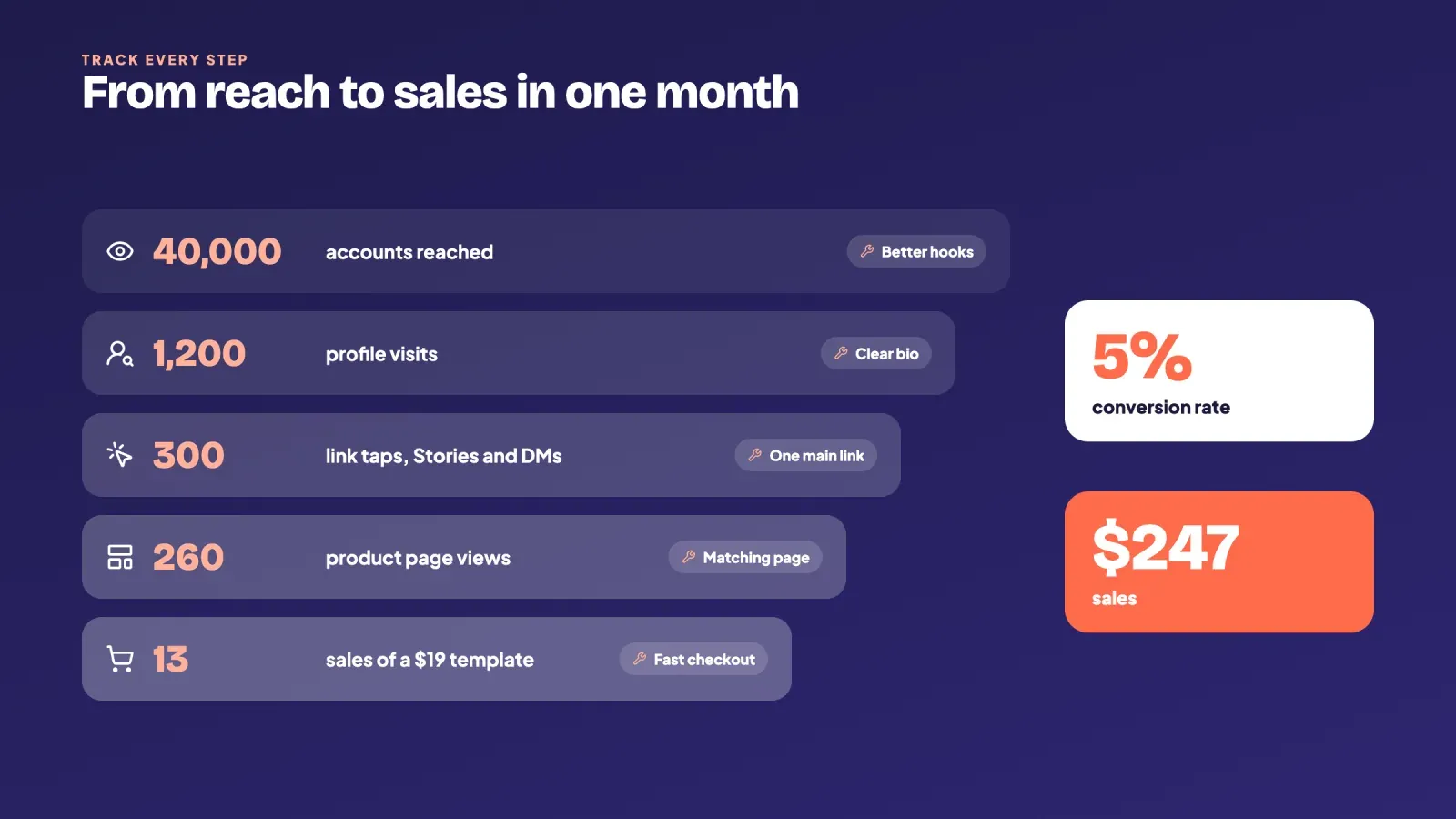
Here's an example. In a month, Ana's content reaches 40,000 accounts, which bring 1,200 profile visits. 300 people tap her link or her DM links, 260 land on her template page and 13 buy her 19 USD template. That's a 5 percent conversion rate and 247 USD in sales. Now she knows where to work. Better hooks increase reach, a stronger bio raises link taps and a better page lifts the conversion rate. Improving any one of these steps raises sales without needing more followers.
Mistakes that stop digital products from selling on Instagram
- Mentioning the product once. Most followers never see a single post. Talk about your product every week, from different angles.
- Sending people to a cluttered link page. If buyers have to search for the product, many give up.
- Posting only "buy now" content. Without help and proof posts, offers feel like ads and get ignored.
- Using unofficial automation tools. Bots that like, follow or DM through your password risk restrictions on your account.
- Ignoring DMs. Questions in DMs are often buyers asking for one last push. Answer them quickly.
- Building the full product before validating it. Test interest with polls, a waitlist or a pre-sale first.
- Not collecting emails. If your account disappeared tomorrow, could you still reach your buyers?
A 30-day plan to make your first sales
Week 1, prepare. Switch to a professional account. Rewrite your bio and name field. Run two polls and a question sticker about your idea. Create your link page with a free lead magnet.
Week 2, build and validate. Create a simple first version of your product. Open a waitlist with a comment keyword and set up comment-to-DM automation. Post three Reels and one carousel around the problem your product solves.
Week 3, launch. Open sales with a Reel, a carousel and a five-frame Stories sequence. Give waitlist members early access. Go live to answer questions.
Week 4, prove and improve. Share first reviews. Look at your numbers from reach to sales and fix the weakest step. Save your best Stories to Highlights and pin your best selling post.
At the end of the month, you'll have a product, a page, real buyers and data to guide your next move.
FAQ
Can you sell digital products directly on Instagram?
No. Instagram Shops don't support downloadable digital products, courses or digital subscriptions, and Meta removed native checkout in 2025. You promote the product on Instagram and sell it through a link in your bio, Stories or DMs.
Do you need a lot of followers to sell digital products on Instagram?
No. Many creators make their first sales with a few hundred engaged followers. What matters is a clear niche, a product that solves a specific problem and a simple path to buy. Our guide on how many followers you need to make money on Instagram shows what each follower level can earn.
What's the best digital product to sell on Instagram?
Products with a visible result sell best, such as templates, presets, guides, workout or meal plans and mini courses. They're easy to show in a Reel or a carousel.
How do you get paid when you sell digital products on Instagram?
Payments go through the checkout on your sales page, usually connected to a payment provider such as Stripe or PayPal, which pays out to your bank account. Instagram doesn't take a cut, but your checkout tool and payment provider charge fees.
Is comment-to-DM automation allowed on Instagram?
Yes, as long as you use a tool that connects through Instagram's official messaging API and follows its rules, including one private reply per comment within 7 days and the 24-hour messaging window. Avoid tools that ask for your password.
Do you need a business account to sell digital products on Instagram?
You can sell with any account, but a professional account (creator or business) gives you Insights, contact options and access to official automation tools. It's free and worth switching to.
Turn your Instagram audience into buyers
Selling digital products on Instagram comes down to a simple path. Content that helps, a profile that explains what you sell, a link that leads straight to the product and a checkout that delivers instantly. Add DM automation, regular Stories and a real launch, and your followers will see the offer often enough to act on it.
Create your free Roctify page to sell your templates, guides and courses from one link in your bio, with instant delivery and email capture built in.