Digital products are the closest thing the internet has to a perfect business model. You create something once, deliver it automatically as a file or an access, and sell it again and again with almost no extra cost per sale. No stock, no shipping, no warehouse. A $29 template sold 100 times is $2,900 of revenue, and the 100th sale costs you nothing more than the first.
But "sell digital products" is advice everyone gives and few explain properly. Which products actually sell? At what price? Where should you sell them, and how much do the platforms really take? This guide answers those questions with concrete numbers.
You will find more than 30 digital product ideas grouped into eight categories, with typical price ranges and the platforms where each one sells best, a simple method to choose and validate your first product, pricing strategies that raise your revenue per customer, a comparison of what you actually keep from a $29 sale on the main platforms, and the tax rules to know before your first sale. If you want the definition and the basics first, our glossary entry on digital products covers them.
What makes a digital product sell
Thousands of digital products launch every week and most of them sell a handful of copies. The ones that sell well share five traits.
- They solve a specific problem. "A Notion template to plan 30 days of Instagram content" sells better than "a productivity template." Buyers pay for a result they can picture, not for a format.
- They deliver a fast win. The best-selling products give a result in minutes or hours: a ready-to-use spreadsheet, a preset that transforms a photo in one click, a checklist that avoids a costly mistake.
- They target a clear audience. Wedding photographers, new freelancers, small bakery owners, people training for their first marathon. The narrower the audience, the easier it is to reach and convince.
- They are priced for the value, not the effort. A one-page pricing calculator that helps a freelancer charge $500 more per project is worth far more than its size suggests.
- They come from someone the buyer trusts. Creators with an audience have an unfair advantage: their followers already know their taste and expertise.
Keep these five traits in mind as you read the ideas below. Every category can produce a bestseller or a flop. The difference is almost always specificity.
Digital products that sell, at a glance
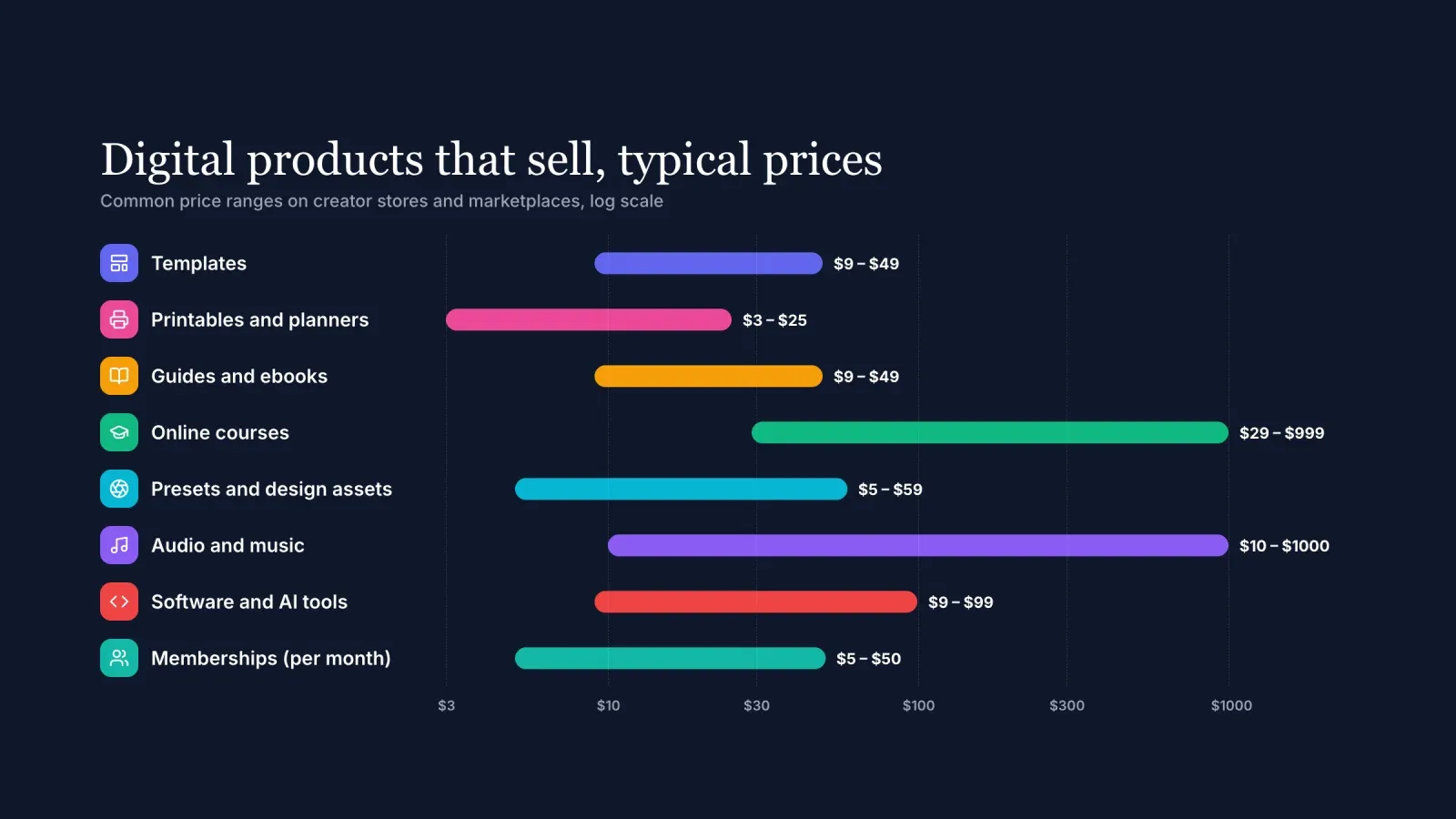
Here are the eight categories covered in this guide, with common price ranges seen on creator stores and marketplaces.
- Templates, from $9 to $49. Fast to create, easy to explain, strong on Etsy and creator stores.
- Printables and planners, from $3 to $25. Low prices, high volume, Etsy is the main marketplace.
- Guides and ebooks, from $9 to $49. Works best on narrow topics with a clear promise.
- Online courses and workshops, from $29 for a mini course to $999 for a flagship program.
- Presets and design assets, from $5 for a single asset to $59 for a large pack.
- Audio and music, from $10 for sound packs to several hundred dollars for exclusive beat licenses.
- Software, code and AI tools, from $9 for a prompt pack to $99 or more for a plugin or a script.
- Memberships and communities, from $5 to $50 per month, with recurring revenue.
Prices vary widely with quality, niche and the seller's audience. Use these ranges as a starting point, then adjust after your first sales.
1. Templates
Templates are the most popular first digital product, and for good reason. They are quick to create if you already use a system that works, easy to show in a screenshot, and immediately useful.
Ideas that sell:
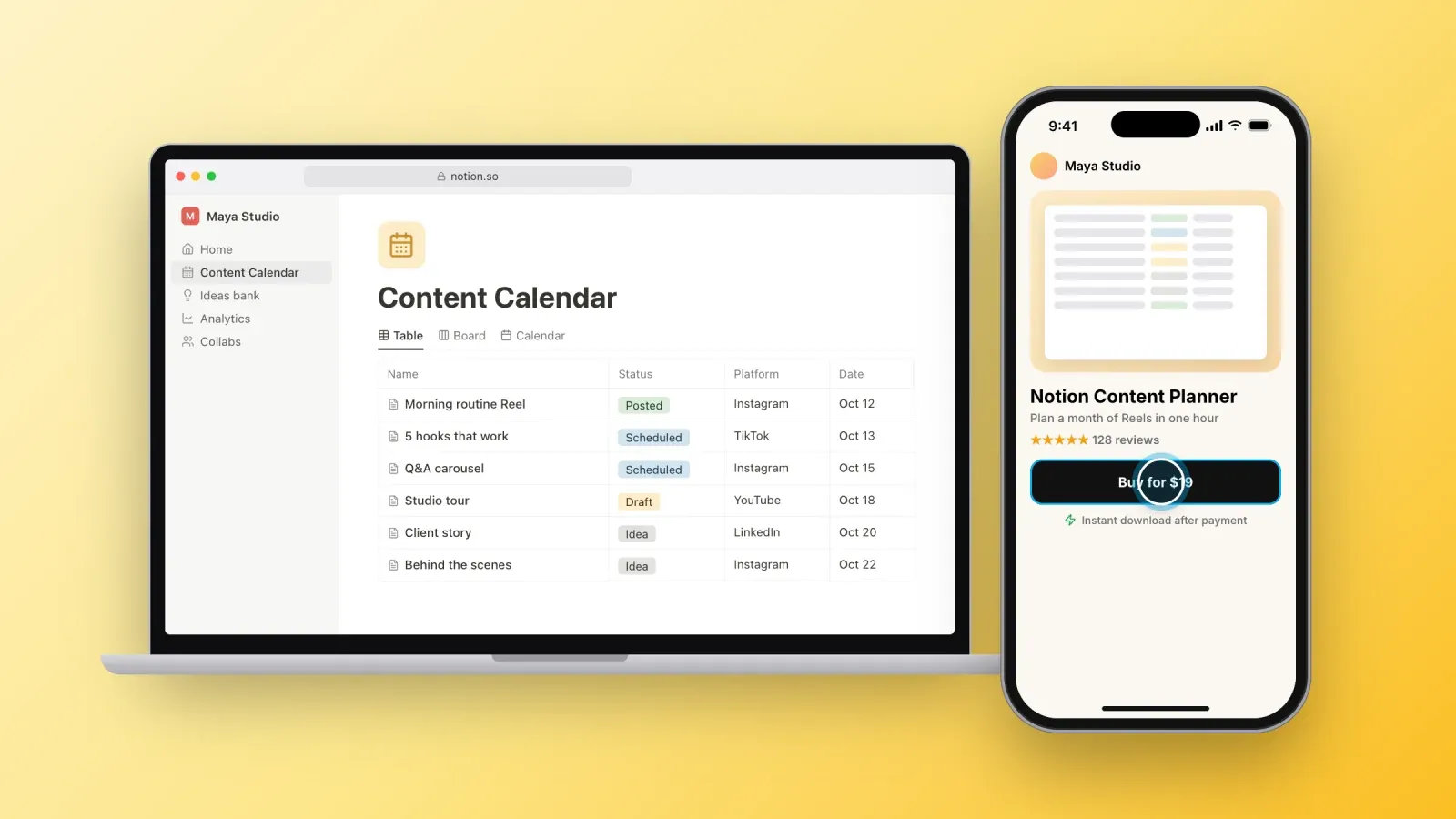
- Notion templates: content calendars, client portals for freelancers, habit trackers, student planners, wedding planners, small business dashboards.
- Canva templates: Instagram post and Story packs for a niche, Pinterest pin templates, media kits for creators, ebook layouts, menus for restaurants.
- Spreadsheet templates: budget planners, invoice trackers, pricing calculators, meal planners, inventory sheets for Etsy sellers.
- Business documents: proposals, contracts reviewed for a specific profession, onboarding questionnaires, pitch decks.
- Website templates: Framer, Webflow or WordPress themes for a niche such as photographers, coaches or restaurants.
Typical prices: $9 to $29 for a single template, $29 to $79 for a complete system or a bundle. Website templates often sell between $49 and $129.
Where they sell best: Etsy for Canva and planner templates, creator stores for audiences that already trust you, and dedicated marketplaces such as the Notion template gallery or the Framer marketplace.
Tip: sell the outcome, not the file. "Plan a month of Reels in one hour" is a stronger promise than "Notion content calendar." Show a short screen recording of the template in action on your product page.
2. Printables and planners
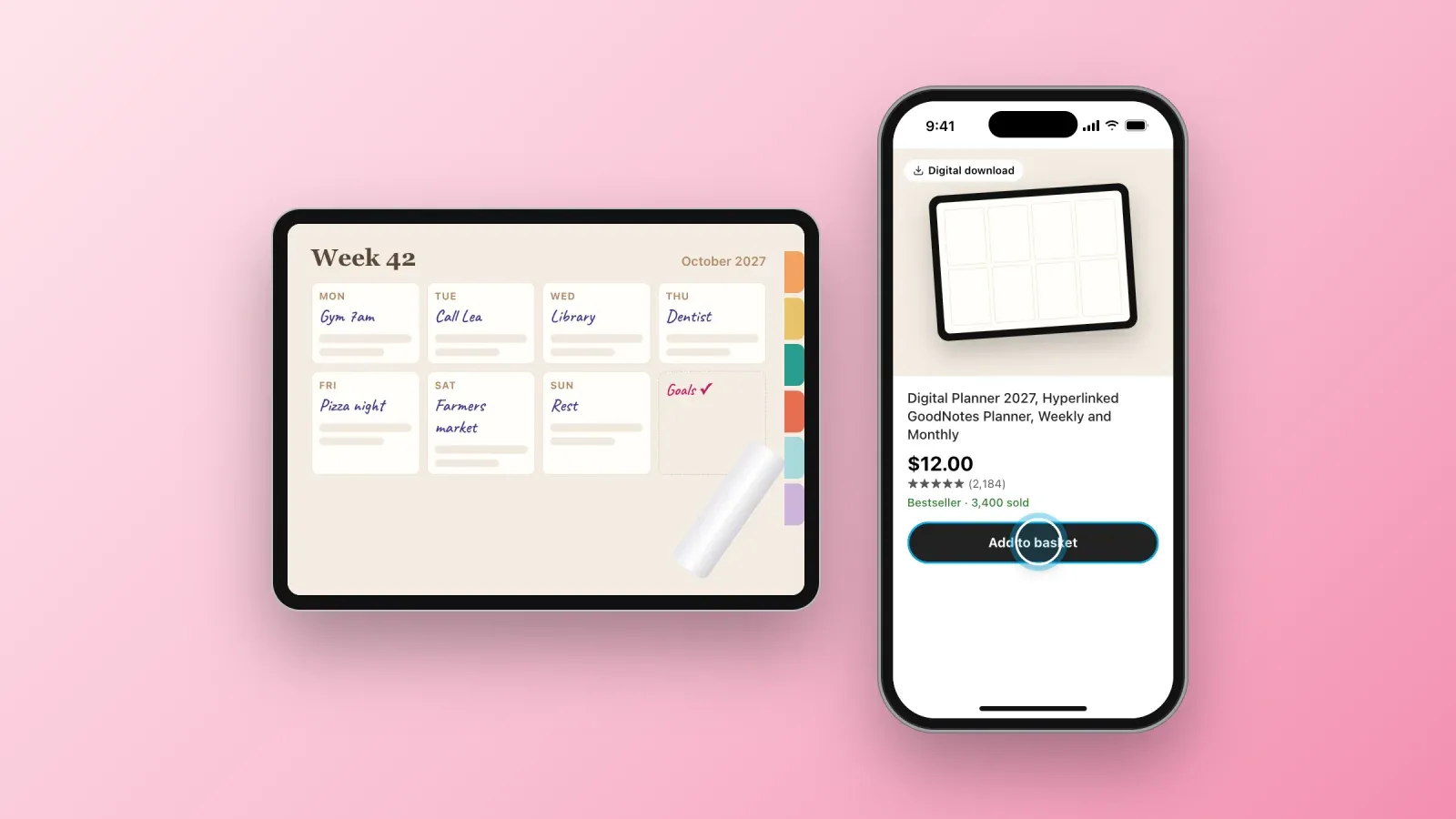
Printables are files people download and print at home or use on a tablet: planners, worksheets, wall art, checklists. Individual prices are low, but volume can be high, especially on Etsy, where buyers actively search for them.
Ideas that sell:
- Digital planners for GoodNotes or Notability, with hyperlinked tabs, for students, teachers or busy parents.
- Printable wall art: botanical prints, quotes, nursery art, minimalist line drawings in several sizes.
- Worksheets for kids: handwriting practice, math games, coloring pages for a theme.
- Event printables: wedding signs, invitation templates, party games, seating charts.
- Trackers and checklists: fitness, reading, cleaning schedules, travel packing lists.
Typical prices: $3 to $9 for a single printable, $9 to $25 for a planner or a bundle.
Where they sell best: Etsy dominates this category. It charges a $0.20 listing fee, a 6.5% transaction fee and, for a typical US sale, payment processing of 3% plus $0.25. Your own store makes sense once you have an audience, for example a teacher with a following on Instagram or TikTok.
Tip: competition is intense, so niche down. "Printable chore charts for kids with ADHD" or "wedding seating chart template for a rustic barn wedding" find buyers more easily than generic designs.
3. Guides and ebooks
An ebook is not a book. The digital guides that sell are short, practical and focused on one problem. Twenty pages that solve a real problem will outsell 200 pages of general advice.
Ideas that sell:
- Niche playbooks: "How to get your first 10 clients as a freelance translator," "The complete guide to selling sourdough at farmers markets."
- Recipe ebooks for a specific diet or goal: high-protein vegetarian meals, 20-minute dinners for families, gluten-free baking.
- Travel guides for a city or a type of trip, with maps, budgets and places you personally tested.
- Swipe files: collections of proven email subject lines, ad hooks, sales page examples or captions for a niche.
- Workbooks that combine short lessons with exercises, for example on budgeting, career change or launching a side business.
Typical prices: $9 to $29 for a guide, $29 to $49 for a premium playbook with templates included.
Where they sell best: your own store and email list, because guides sell on trust. Amazon Kindle Direct Publishing is an option for books meant to be found through search, but its royalties and pricing rules are a different model.
Tip: add a template, a checklist or a spreadsheet to the guide. A guide plus tools feels like a kit, which justifies a higher price.
4. Online courses and workshops
Courses are the highest-priced digital products and the ones with the highest perceived value. They also take the most work to create and to sell, so it is usually smarter to start with a smaller format.
Ideas that sell:
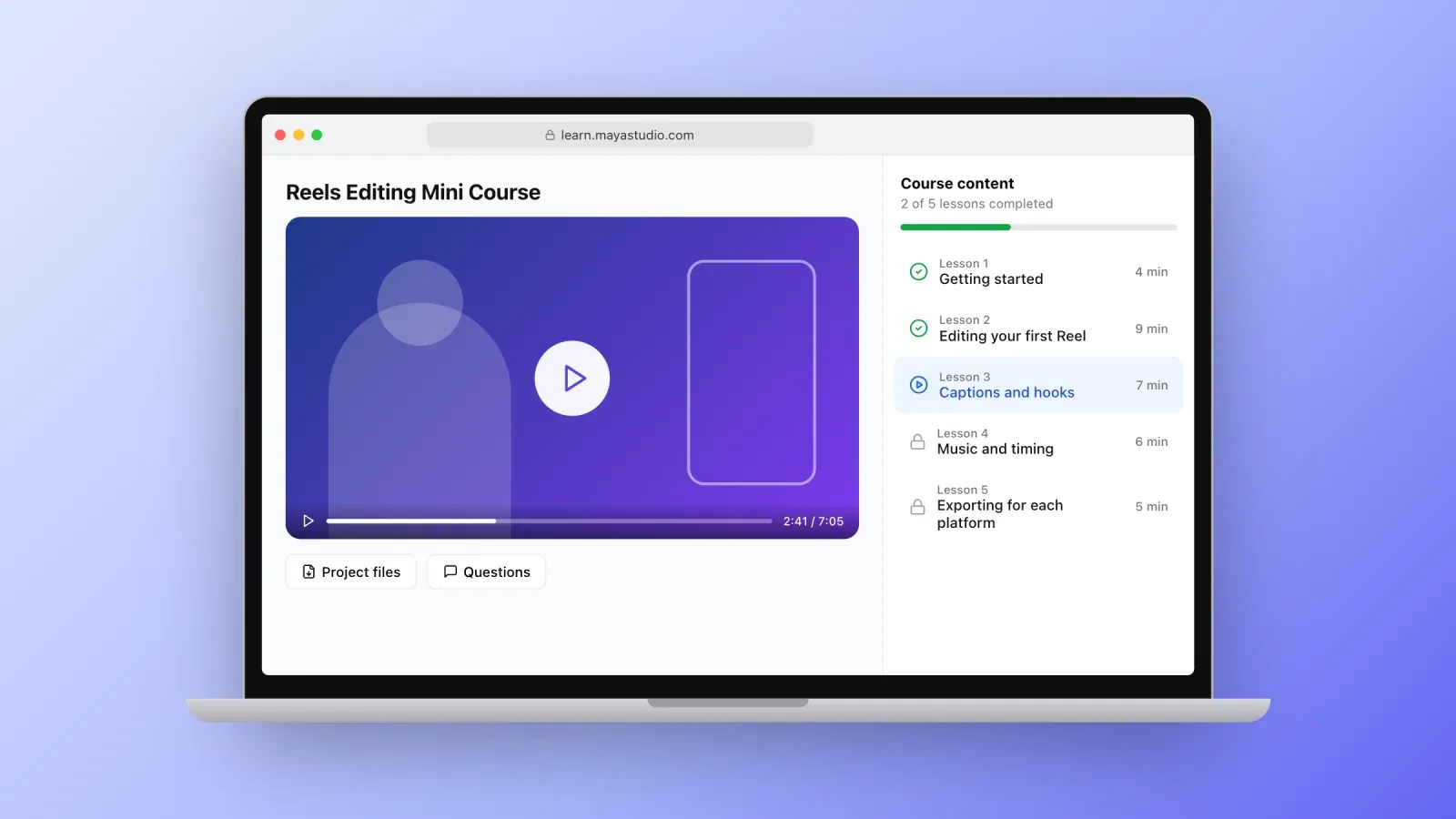
- Mini courses of 60 to 90 minutes that teach one skill: editing Reels in CapCut, setting up a Shopify store, writing a cold email that gets replies.
- Recorded workshops: run a live session once, then sell the replay with the slides and resources.
- Cohort-based programs where students go through the content together over a few weeks, with live calls.
- Certification-style courses for professionals who need a specific skill for their job.
- Language, music or art lessons organized as structured series.
Typical prices: $29 to $99 for a mini course, $99 to $299 for a full course, $300 to $2,000 for cohort programs with live support.
Where they sell best: your own course platform or creator store when you have an audience. Udemy can bring students, but it controls prices and promotions: instructors receive 37% of sales coming from Udemy's marketplace and 97% of sales they bring themselves through their own coupons and links.
Tip: sell the course before you record all of it. Pre-sell a cohort, deliver the first version live, and turn the recordings into the evergreen product. Our glossary entries on online courses and cohort-based courses explain both models in detail.
5. Presets, filters and design assets
Visual creators can turn their style into products other people use in their own work. These products sell especially well when the creator's own feed is the best advertisement for them.
Ideas that sell:
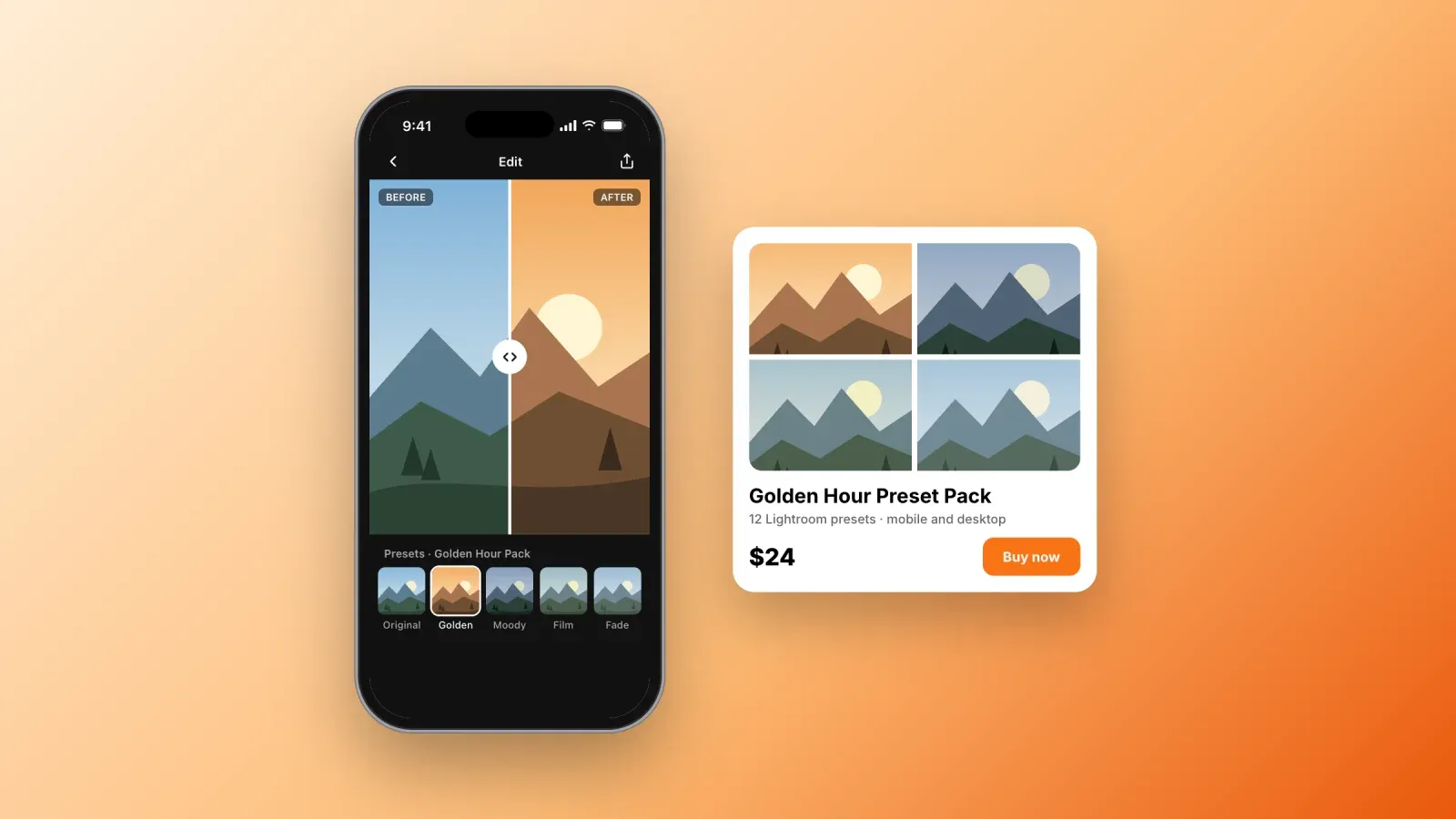
- Lightroom presets for a style or a situation: moody interiors, golden hour portraits, film looks, food photography.
- LUTs for video editors, for Premiere Pro, Final Cut or DaVinci Resolve.
- Procreate brushes and stamps for illustrators and lettering artists.
- Fonts and icon sets, licensed for personal and commercial use.
- Stock photos and videos of a niche the big stock sites cover poorly, such as a specific city or a profession.
- Mockups for designers who present logos, packaging or apps to their clients.
Typical prices: $5 to $15 for a single asset, $15 to $59 for a pack. Commercial licenses for fonts and mockups can cost more.
Where they sell best: your own store linked from Instagram or TikTok for presets, and creative marketplaces such as Creative Market or Envato for fonts, mockups and design assets.
Tip: show before and after. A swipe between the original photo and the edited version is the single most convincing piece of content for a preset pack.
6. Audio and music
Producers, musicians and sound designers can sell their work as licenses, packs and tools to other creators.
Ideas that sell:
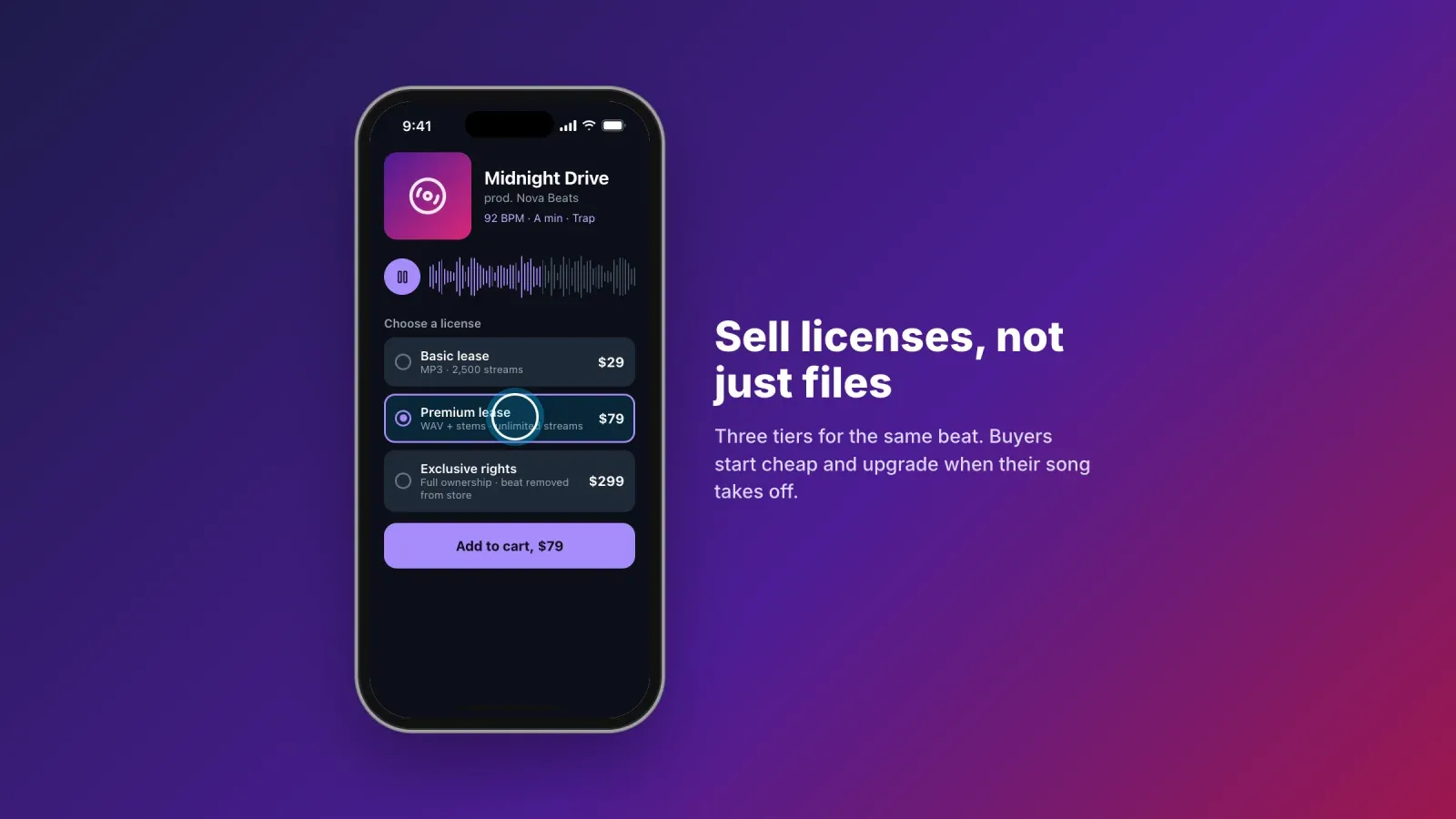
- Beat licenses for rappers and singers, sold in tiers: a basic lease, a premium lease with stems, and an exclusive license.
- Sample packs and loops for a genre, a drum kit or a vocal library.
- Sound effects for video creators and game developers.
- Royalty-free background music for YouTube, podcasts and ads.
- Guided meditations and sleep audio for wellness audiences.
Typical prices: $10 to $49 for sample packs, $25 to $100 for a beat lease, $200 to $1,000 or more for an exclusive license.
Where they sell best: dedicated beat stores and marketplaces such as BeatStars, your own store for sample packs, and audio marketplaces for sound effects and music.
Tip: offer license tiers. Many buyers start with a cheap lease, then come back for the premium or exclusive version when their song takes off.
7. Software, code and AI tools
You do not need to build a startup to sell software. Small tools that save time for a specific audience sell well, and AI has created a new category of lightweight products.
Ideas that sell:
- Prompt packs for a profession: prompts for real estate listings, lesson plans, product descriptions, social media captions.
- Spreadsheet tools with formulas and automations, such as a financial model for small businesses.
- Plugins and extensions for WordPress, Figma, Chrome or Shopify that fix one annoying problem.
- Scripts and automations for Zapier, Make or Google Apps Script.
- Code templates and starter kits for developers, such as a SaaS boilerplate or a component library.
Typical prices: $9 to $29 for prompt packs, $29 to $99 for plugins and kits, more for professional tools with support.
Where they sell best: your own store or a platform that handles license keys, such as Lemon Squeezy or Gumroad, and app marketplaces for plugins.
Tip: promise a measurable time saving. "Write a week of listings in 15 minutes" sells better than "50 AI prompts."
8. Memberships and communities
Memberships turn a one-time purchase into recurring revenue. Members pay every month for ongoing access to content, a community or both.
Ideas that sell:
- Content libraries that add new templates, recipes, workouts or lessons every month.
- Paid communities around a goal: launching a business, training for an event, learning an instrument.
- Behind-the-scenes memberships for fans of a creator.
- Professional networks with job boards, deal flow or peer reviews.
- Accountability groups with weekly check-ins.
Typical prices: $5 to $15 per month for a fan or content membership, $20 to $50 per month for professional communities, often with an annual option at a discount.
Where they sell best: membership and community platforms, or your own store with recurring payments. Our glossary entry on membership sites covers retention and churn.
Tip: retention is everything. A membership at $10 per month that keeps members for 10 months is worth $100 per member. Plan your content calendar for the first three months before launching.
How to choose and validate your first digital product
The best first product sits at the intersection of what you know, what your audience asks and what people already buy.
- List the questions people ask you. Comments, direct messages, questions after a talk or from clients. Repeated questions are product ideas.
- Look at what already sells. Search your idea on Etsy, Gumroad Discover or Udemy. Competition is a good sign: it proves demand. No results at all can mean no demand.
- Read the negative reviews. One and two star reviews of similar products tell you exactly what to do better.
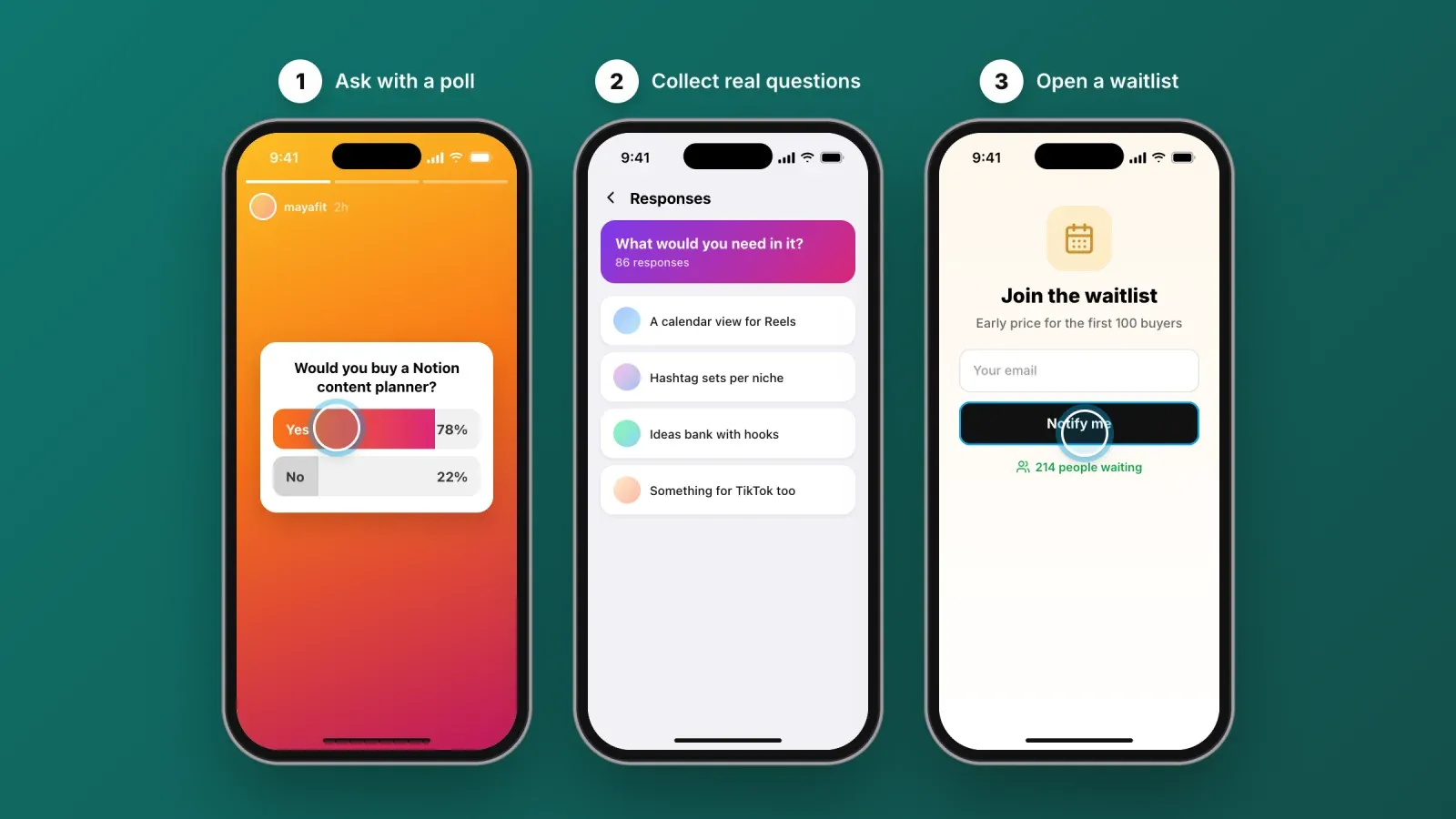
- Ask your audience. A Story poll, a question sticker or a short survey to your email list. Ask what they would pay for, not just what they like.
- Pre-sell or build a waitlist. Offer an early price before the product is finished. Ten pre-sales prove more than a thousand likes.
- Start small. Ship a $19 template or a $29 mini course in two weeks rather than a $499 course in six months. You will learn more from real buyers than from planning.
A small product also works as an entry point. A buyer who loves your $19 template is the most likely buyer of your $199 course later. This logic is known as a value ladder.
How to price digital products
Pricing is where most creators leave money on the table. A few principles help.
- Price the result, not the time or the page count. If your template saves a freelancer three hours per week, a $29 price is a bargain.
- Look at the market, then position. Find the price range of similar products and decide whether you are the affordable option, the standard or the premium.
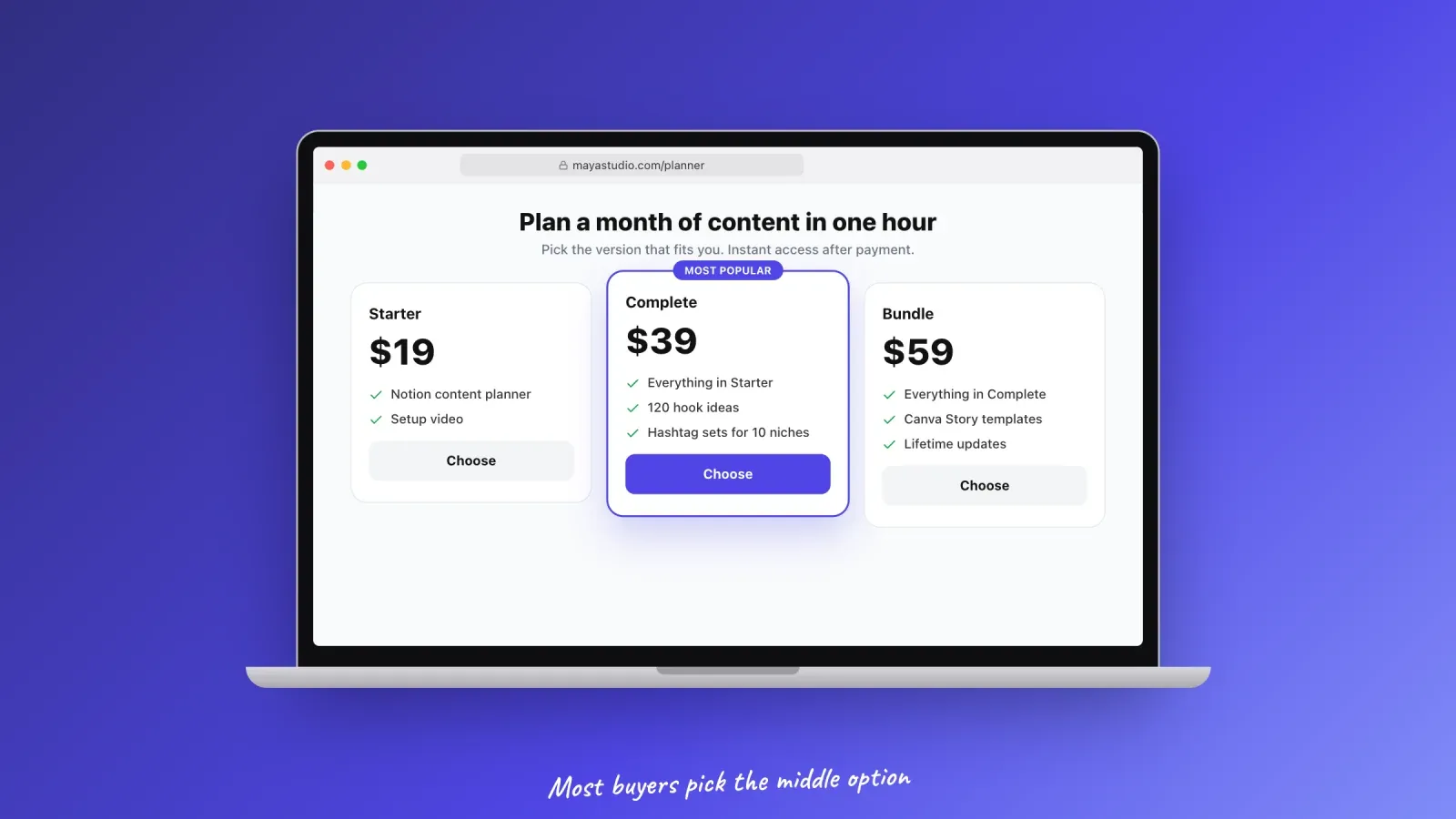
- Offer tiers. A basic version, a complete version and a bundle with a bonus. Most buyers choose the middle option, and the top tier makes it look reasonable. This is the price anchoring effect.
- Create bundles. Three templates sold separately at $19 each can be bundled at $39. The bundle raises the average order value and moves older products.
- Use launch prices carefully. An early bird discount for the first 48 hours rewards your most engaged followers. Permanent discounts train people to wait.
- Test. Raise the price on your next product or after your first 50 sales. If conversions barely move, you were too cheap.
Where to sell digital products and what the platforms take
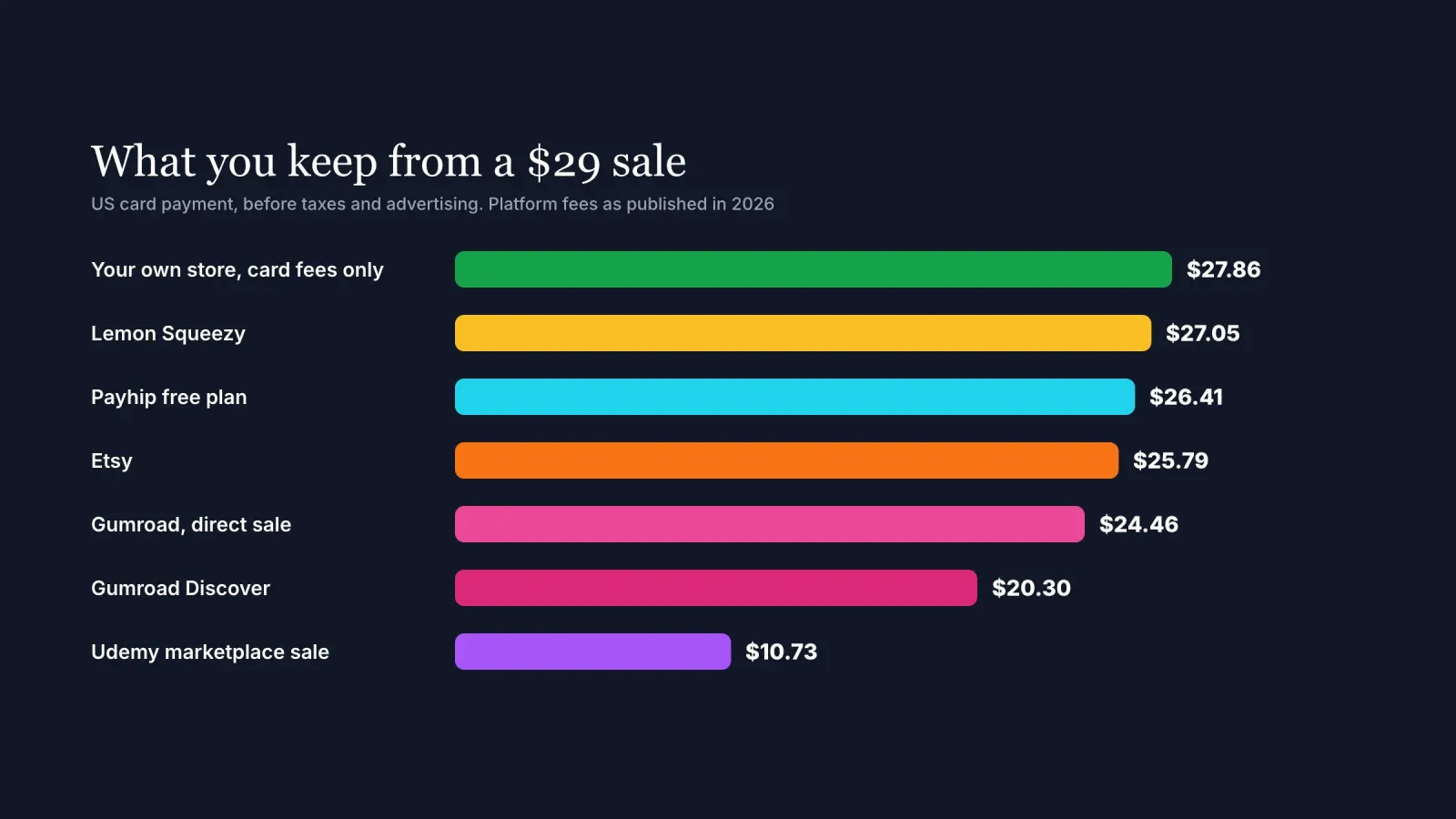
The platform you choose changes how much you keep from every sale, who owns the customer relationship and how buyers find you. Here is what you would keep from a $29 sale on the main options, for a US card payment, before taxes and before any advertising.
- Your own store with card payments only: about $27.86, after typical card processing of 2.9% plus $0.30. You keep the customer's email and full control, but you bring all the traffic.
- Lemon Squeezy: about $27.05, after a fee of 5% plus $0.50, which includes payment processing and tax handling as merchant of record.
- Payhip free plan: about $26.41, after a 5% fee plus card processing.
- Etsy: about $25.79, after the $0.20 listing fee, the 6.5% transaction fee and payment processing of 3% plus $0.25. Optional Offsite Ads can take 12% to 15% more on attributed sales.
- Gumroad, direct sale: about $24.46, after a 10% plus $0.50 fee and card processing. Gumroad has acted as merchant of record since 2025.
- Gumroad Discover: about $20.30, after a flat 30% on sales that come from its marketplace.
- Udemy marketplace sale: about $10.73, since instructors receive 37% of sales that come from Udemy's marketplace. Sales from the instructor's own coupons pay 97%.
These numbers explain a common strategy. Marketplaces are excellent for discovery, so many creators use them to find their first buyers, then move their audience to a channel they own, where they keep more of every sale and can email customers about new products.
For creators who sell to their social media audience, the simplest owned channel is often a link in bio storefront. Your followers click the link in your profile and land on a page where they can buy your products in a few taps, without a separate website. Our guide to turning followers into customers with your link in bio explains how to set one up.
Taxes and delivery, what to know before your first sale
Digital products are simple to deliver but not always simple to tax.
- In the European Union, VAT on digital products sold to consumers is charged at the rate of the buyer's country, not yours. The One Stop Shop system lets sellers declare all EU sales in one quarterly return.
- In the United States, sales tax on digital products depends on the state. Some states tax digital downloads, others do not, and thresholds apply before you have to collect.
- In the United Kingdom, Canada, Australia and many other countries, similar rules apply to sales to consumers.
A merchant of record such as Lemon Squeezy, Paddle or Gumroad becomes the legal seller of your products and handles these taxes for you, in exchange for a higher fee. If you sell through your own store, check which taxes apply to you or use a tool that calculates them at checkout.
For delivery, use a platform that sends the file or access link automatically after payment, protects download links from being shared, and lets you send updates to past buyers. Being able to email a "version 2 is out" message to every customer is one of the most underrated advantages of owning your sales channel.
How to sell digital products on social media
An audience is the best distribution channel for digital products, because people buy from creators they already follow.
- Show the product being used. A 15-second Reel of your template filling itself in, a before and after of your preset, a clip of a student result.
- Teach for free, sell the shortcut. Share the method in your content, then offer the template, the course or the toolkit as the faster way to apply it.
- Use social proof. Share messages from buyers, results, and the number of copies sold once it becomes impressive.
- Make buying easy. Put your product at the top of your link in bio page, use link stickers in Stories, and mention the link in captions and videos.
- Build an email list. A free lead magnet, such as a mini version of your product, turns followers into subscribers you can reach without depending on the algorithm.
Our 12 tips to sell more on social media go deeper into content, offers and conversion. Once sales start, a web traffic checker shows which channels actually send your buyers.
Mistakes that stop digital products from selling
- Building in silence. Months of work without asking a single potential buyer. Validate first.
- Being too generic. "Productivity planner" competes with thousands of products. "Planner for nurses working night shifts" stands out.
- Underpricing. A $3 price signals low value and leaves no margin for ads or affiliates.
- A weak product page. One screenshot and two lines of text. Show what is inside, who it is for, the result, and answer objections.
- Ignoring licenses. Fonts, photos, music and AI outputs used in your product must allow commercial use and resale.
- No follow-up. Buyers who never hear from you again are a lost opportunity. Send a thank you, ask for a review and tell them about your next product.
FAQ about digital products
What digital products sell the most? Templates, printables, guides, online courses, presets and memberships are among the best-selling categories. Within each category, products that solve a specific problem for a clear audience sell far better than generic ones.
What is the easiest digital product to create? Templates and checklists are usually the fastest, because you can turn a system you already use into a product in a few days. Guides and presets are also quick if you have expertise or a visual style.
How much can you earn selling digital products? It depends on your price, audience and conversion rate. As an example, a $29 product bought by 1% of 10,000 monthly visitors brings in $2,900 per month before fees. Many sellers earn a few hundred dollars a month, while established creators with large audiences earn much more.
Where is the best place to sell digital products? Marketplaces like Etsy, Gumroad Discover and Udemy help you find buyers, while your own store or link in bio storefront lets you keep more of each sale and own the customer relationship. Many creators use both.
Do I need a website to sell digital products? No. A link in bio storefront or a creator platform with built-in checkout and delivery is enough to start selling to your social media audience.
Do I have to pay taxes on digital products? Yes. Income is taxable, and VAT or sales tax often applies depending on where your buyers live. A merchant of record platform can collect and pay sales taxes for you.
Can I sell digital products made with AI? Yes, as long as you have the rights to use and sell the output, you add real value, and you are transparent with buyers. Products that are simply raw AI output with no editing or expertise rarely get good reviews.
Turn what you know into products that sell
The digital products that sell are not the most original or the most complex. They are specific, useful and easy to buy from someone the buyer trusts. Pick one problem your audience has, package your solution as a template, a guide, a course or a pack, validate it before you build it all, and put it where your followers already are.
Create your free Roctify page to sell your digital products directly from your link in bio, with instant delivery after payment and 0% transaction fees on every plan.