How many people visit your website? Where do they come from, which pages do they read, and do they buy anything? And how does your traffic compare with a competitor's? These are simple questions, yet many site owners can't answer them, or answer them with the wrong tool.
There is no single site to check website traffic that answers everything. Some tools measure your own visitors exactly, because they run on your site. Others estimate any website's traffic from the outside, which makes them useful for competitors but approximate. Some show what happens before the click, in Google's results. Others show what visitors do once they arrive.
This guide explains the difference, then reviews the 10 best tools to check website traffic in 2027, most of them free: what each one measures, how accurate it is and who it's for. You'll also learn which metrics to watch every week, how to set everything up in an afternoon, how to track the growing share of visits coming from AI assistants, and what to do when your traffic suddenly drops.
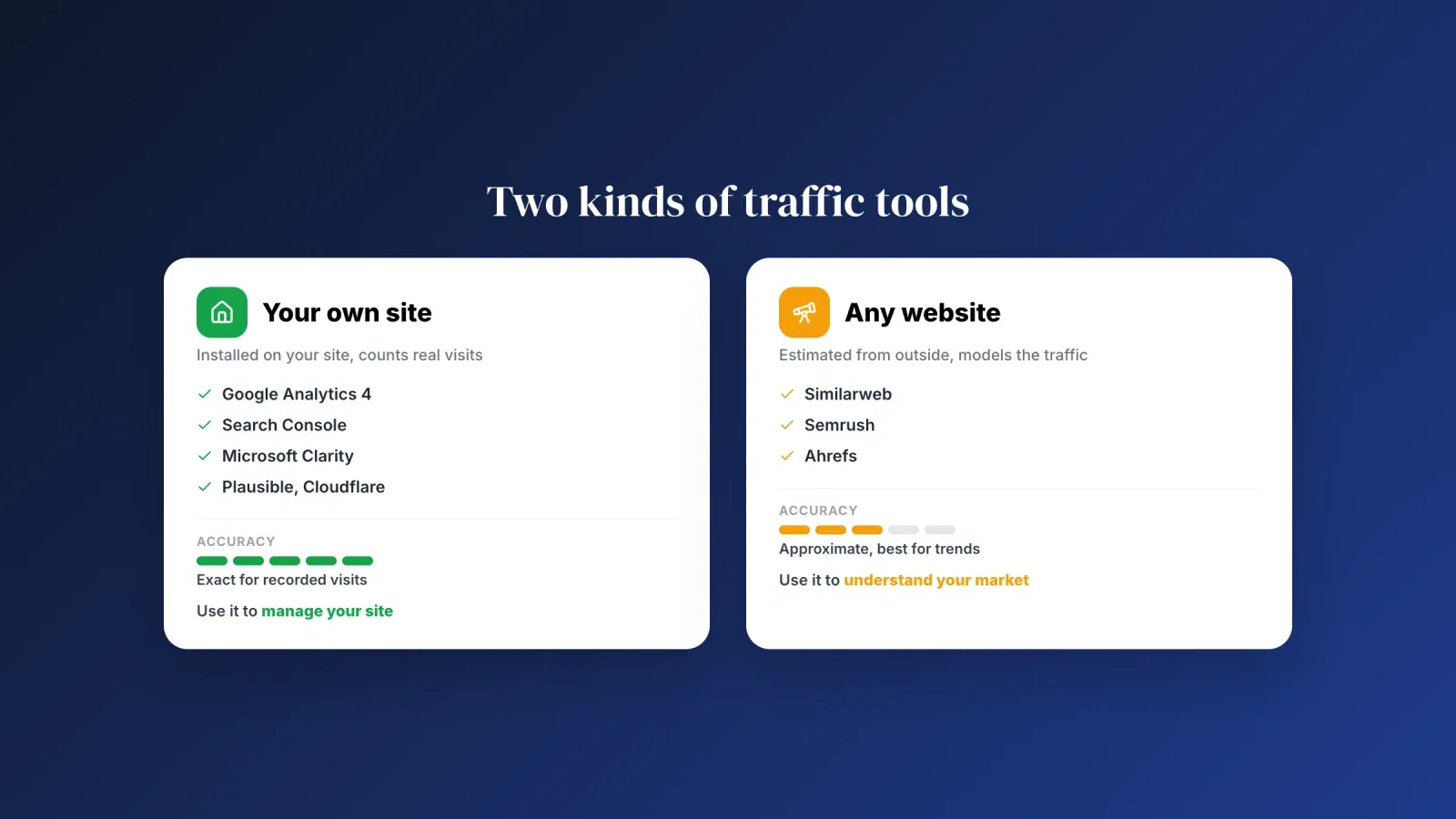
Your own traffic vs a competitor's traffic
Before choosing a tool, decide which question you're asking. There are two very different kinds of traffic data.
First-party data, for your own site. Tools like Google Analytics, Search Console or Plausible collect data directly from your website, through a small script or your server logs. They count real visits, so they're precise. They only work for sites you control, and you have to install them before the data starts.
Estimates, for any website. Tools like Similarweb, Semrush or Ahrefs estimate a site's traffic from outside. They combine panels of users, clickstream data, browser extensions and search rankings, then model the result. You can look up any domain, including competitors, without installing anything. But the numbers are estimates. They're often good for big sites and for trends, and often off for small sites, sometimes by a wide margin.
A simple rule: use first-party tools to manage your site, and estimates to understand your market. Never compare your exact analytics with a competitor's estimate as if they were the same kind of number. Compare estimates with estimates, for example your site and a rival's site in the same estimating tool.
What to measure, the metrics that matter
Every traffic tool shows dozens of numbers. These are the ones worth checking every week.
- Users and sessions. Users are the people who visit, sessions are their visits. One user can make several sessions. Watch the trend over weeks, not day-to-day noise.
- Traffic sources. Where visits come from: organic search, social media, direct, referral from other sites, email, paid ads and, more and more, AI assistants. A healthy site doesn't rely on a single source.
- Top landing pages. The pages where visits start. They show what attracts people, and which pages deserve updates or better calls to action.
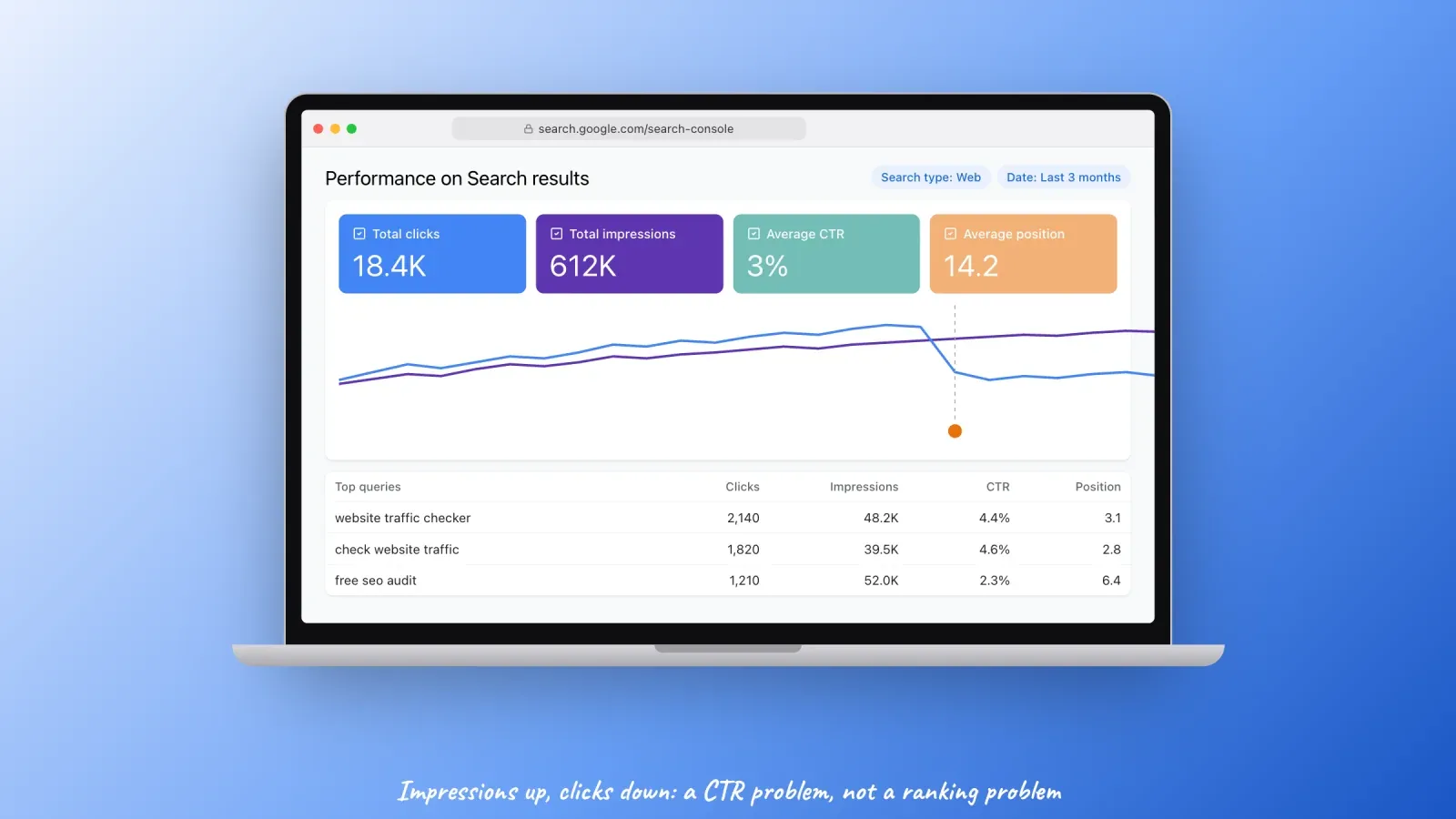
- Search clicks, impressions, CTR and position. From Search Console. Impressions are how often you appear in Google, CTR is the share of those impressions that become clicks. A drop in clicks with stable impressions points to a CTR problem, not a ranking problem.
- Engagement. In GA4, an engaged session lasts more than 10 seconds, views at least two pages or triggers a conversion. It replaces the old bounce rate as the main sign of interest, although GA4 still shows bounce rate as its opposite.
- Conversions. Purchases, sign-ups, bookings, downloads, contact form submissions. Traffic only matters if some of it does what you want. Your conversion rate connects the two.
- Competitor direction. Not their exact numbers, but whether they're growing faster or slower than you, and from which channels.
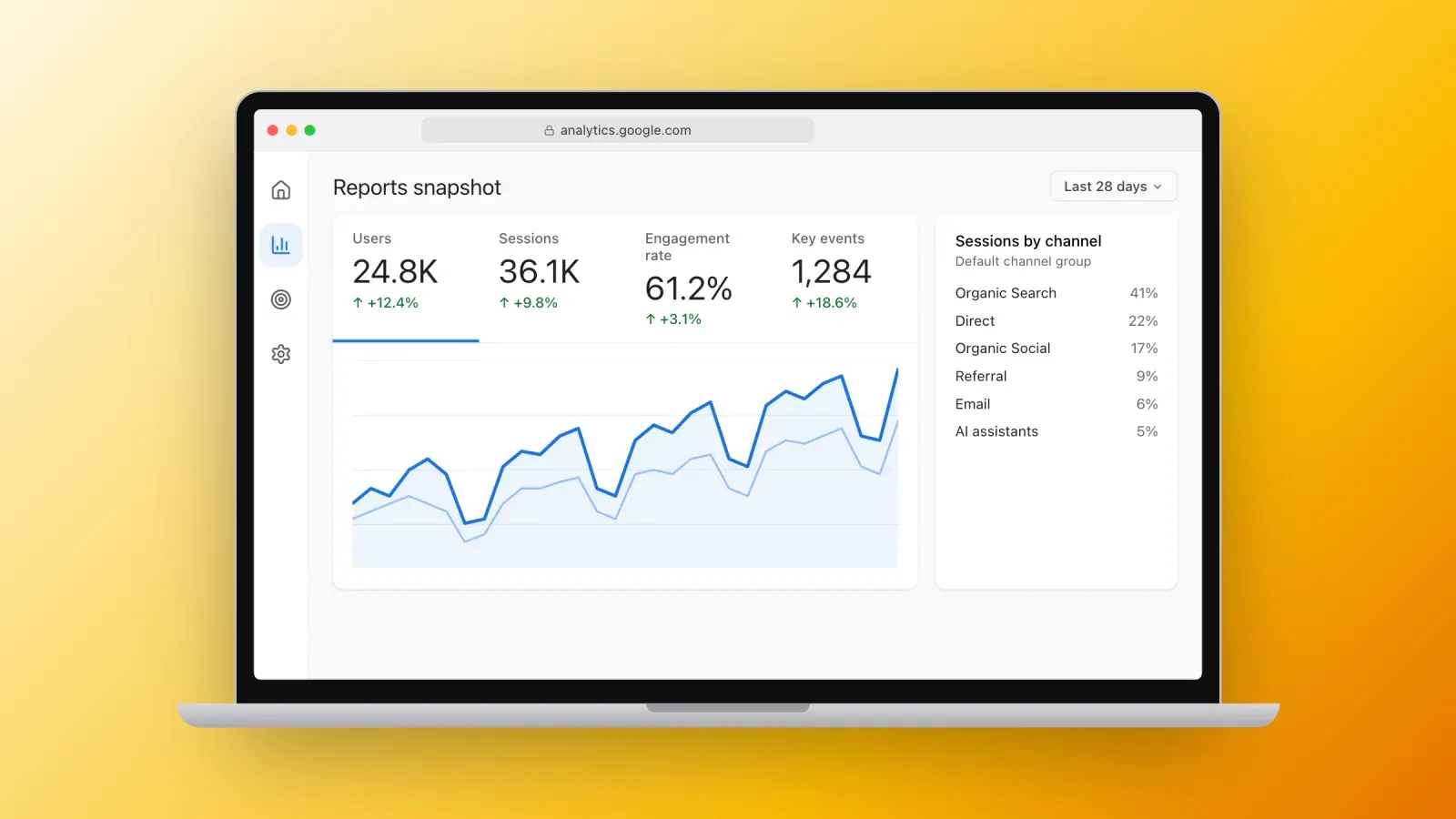
1. Google Analytics 4
Best for: complete, free analytics of your own site.
Google Analytics is the most used traffic analysis tool on the web. According to W3Techs, it runs on about 43.7% of all websites, which is roughly 79% of the sites that use any analytics tool. Its current version, Google Analytics 4, or GA4, tracks visits as events: page views, scrolls, clicks, video plays, purchases, and any custom event you define.
What you get: users, sessions and engagement, traffic sources and campaigns, landing pages, devices and countries, conversion events called key events, e-commerce revenue, real-time reports, and explorations to build funnels and paths.
Accuracy: high for the visits it records, but not perfect. Ad blockers and visitors who refuse cookies are not counted, or are modeled, depending on your consent settings. Expect GA4 to show fewer visits than your server logs.
Good to know: GA4 keeps detailed data for explorations for only two months by default. Change it to 14 months in the property settings, under data retention, on day one. Standard reports aren't affected.
Price: free. A paid version, GA4 360, exists for very large companies.
2. Google Search Console
Best for: understanding your traffic from Google search, before and after the click.
Search Console is the only tool that shows exactly how your site performs in Google search. It tells you which queries show your pages, how many impressions and clicks you get, your average click-through rate and position, and which pages are indexed or excluded, and why.
What you get: the Performance report with queries, pages, countries and devices, the Pages report for indexing, Core Web Vitals, mobile usability, manual actions, security issues, sitemaps and links.
Why it matters for traffic: most traffic problems start here. If clicks fall, Search Console tells you whether you lost rankings, lost impressions because of a seasonal drop in searches, or kept your rankings but lost clicks, for example because an AI summary now answers the question above your result.
Price: free. It requires verifying that you own the site, usually with a DNS record or an HTML tag.
3. Microsoft Clarity
Best for: seeing what visitors actually do on your pages.
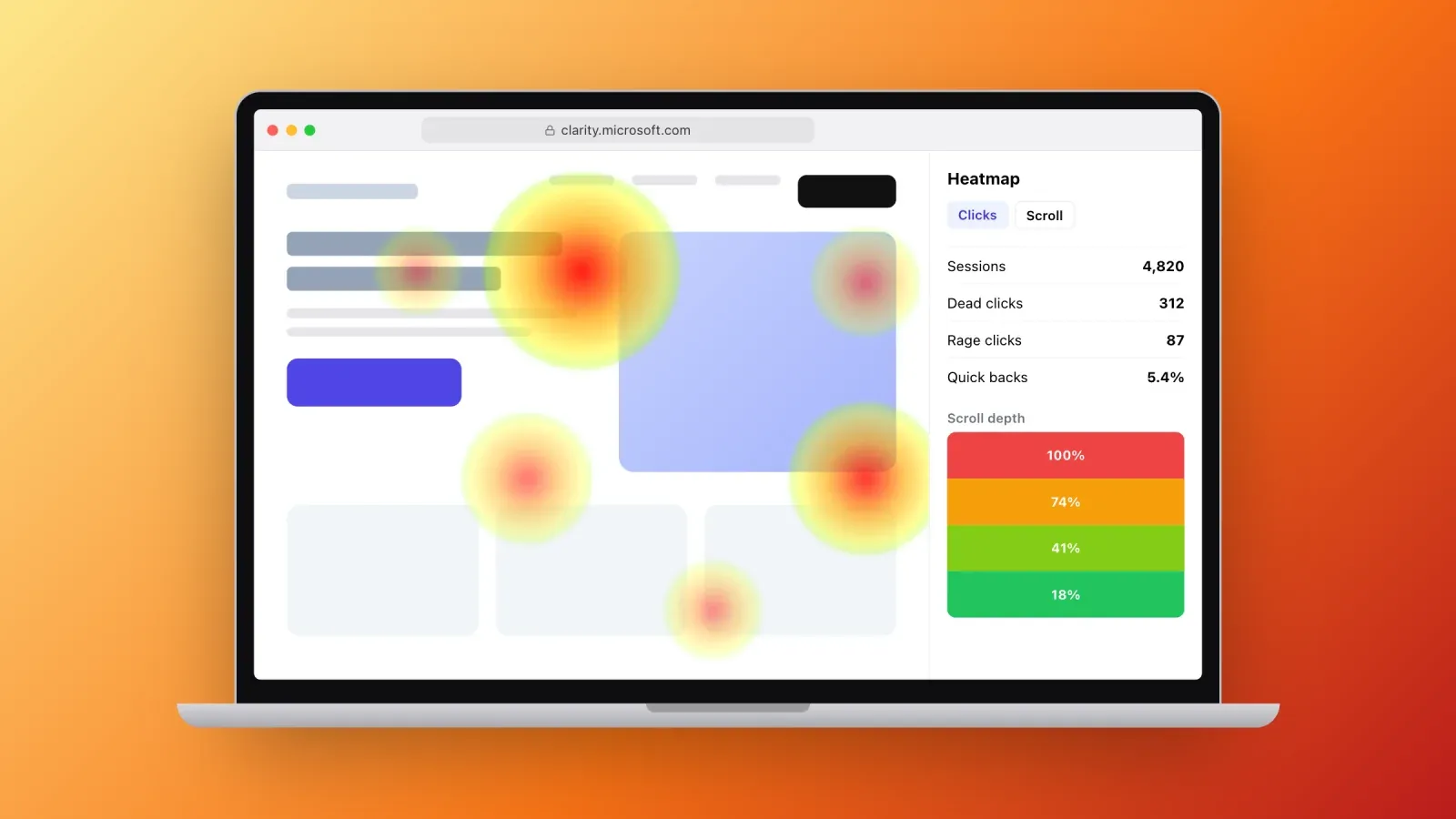
Clarity is a free behavior analytics tool from Microsoft. It records anonymized session replays and builds heatmaps of clicks and scrolling, so you can watch where people hesitate, rage-click or leave.
What you get: session recordings, click and scroll heatmaps, dashboards with dead clicks, rage clicks and quick backs, and an integration with GA4. Since 2025, Clarity also has two channel groups for AI traffic. AIPlatform groups visits from links in AI assistants such as ChatGPT, Claude, Gemini, Copilot and Perplexity. PaidAIPlatform groups visits from ads shown inside these assistants.
Price: free, with no traffic limit.
4. Bing Webmaster Tools
Best for: a second view of your search traffic, and faster indexing.
Bing's answer to Search Console shows clicks, impressions and keywords from Bing search, plus site scans, backlinks and SEO reports. It's worth setting up because Bing also powers results in other search products and assistants, and because it supports IndexNow, a protocol that tells search engines immediately when you publish or update a page.
Price: free. You can import your sites from Google Search Console in a few clicks.
5. Cloudflare Web Analytics
Best for: simple, privacy-friendly traffic numbers without cookies.
If your site uses Cloudflare, or even if it doesn't, Cloudflare Web Analytics gives you a lightweight dashboard of visits, page views, referrers, countries, devices and Core Web Vitals. It doesn't use cookies or fingerprinting, which makes it easier to use under strict privacy rules.
Limits: fewer features than GA4. No conversion funnels or detailed campaign analysis.
Price: free.
6. Plausible Analytics
Best for: clear, privacy-first analytics for small businesses and creators.
Plausible is an open-source alternative to Google Analytics. Its single-page dashboard shows visitors, page views, sources, pages, countries, devices and goals, with no cookies and no personal data. Many European sites choose it to simplify GDPR compliance.
Price: paid, with plans from $9 per month for 10,000 monthly page views on its Starter plan, and a free trial. You can also host it yourself.
Similar tools include Fathom Analytics, Simple Analytics and Matomo, which can also be self-hosted.
7. Similarweb
Best for: estimating any website's traffic, especially competitors.
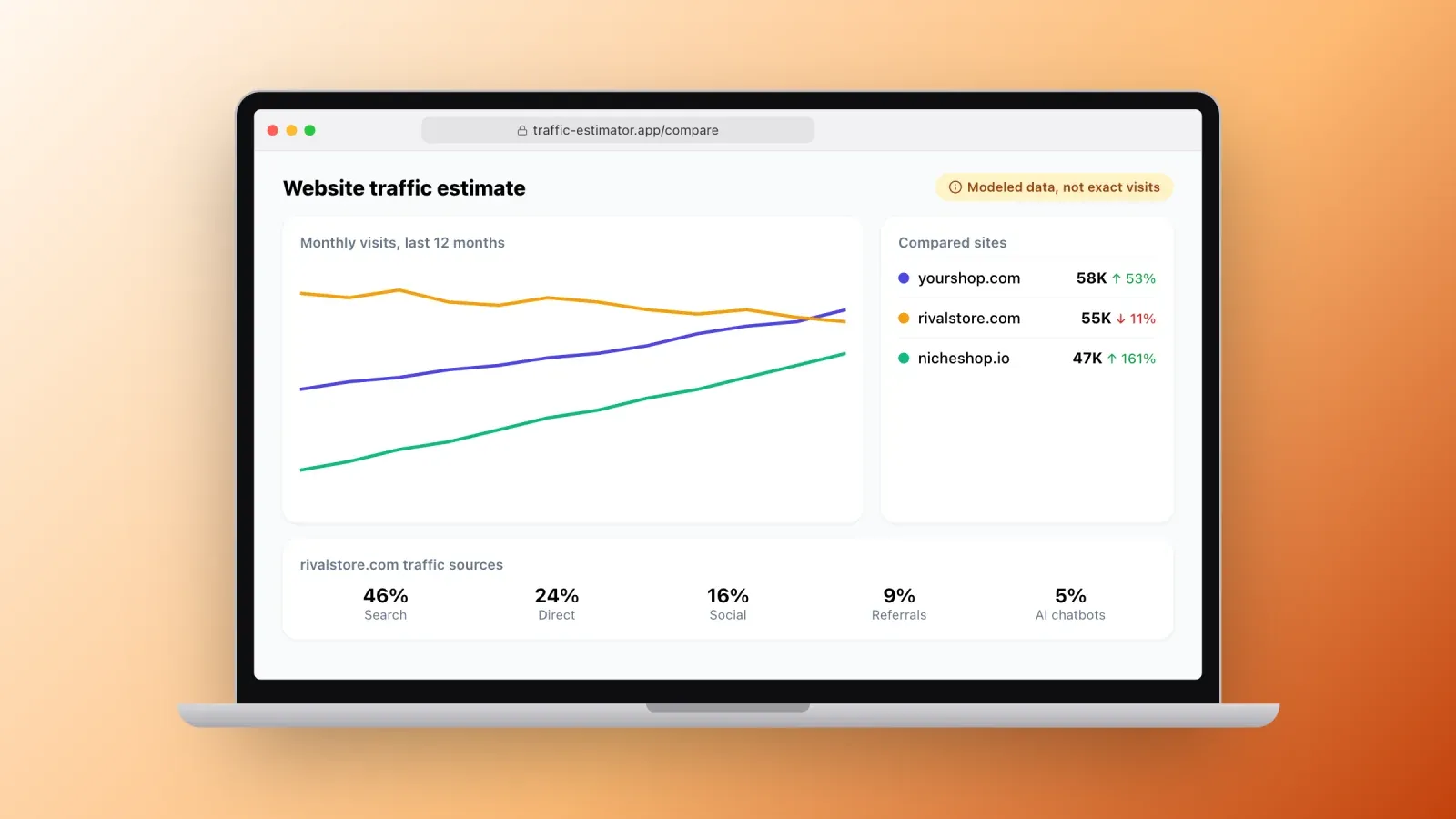
Similarweb is the best-known site to check website traffic for domains you don't own. Type a domain and see estimated monthly visits, traffic sources, top countries, audience interests and similar sites. Its free browser extension shows the same estimates for the site you're browsing.
AI traffic: Similarweb also offers a free AI Traffic Checker that estimates how much traffic any site gets from ChatGPT, Gemini, Claude, Perplexity and other assistants, and compares up to five competitors.
Accuracy: good for large sites and trends, rough for small sites. The free version shows limited data and history.
Price: free version, paid plans for full data.
8. Semrush and Ahrefs
Best for: competitor traffic from organic search, and your own SEO health.
Semrush and Ahrefs are complete SEO suites. Both estimate a domain's organic search traffic from its keyword rankings, show which pages and keywords bring the most visits, and track changes over time. Semrush also offers a traffic analytics module that estimates traffic from all channels.
Free options: Ahrefs Webmaster Tools is free for sites you verify, with site audits and backlink data. Semrush has a free account with a limited number of daily requests.
Accuracy: organic estimates depend on the keywords in their databases and on assumed click-through rates. Treat them as directional.
Price: paid plans, usually from about $100 per month, with limited free tiers.
9. Looker Studio
Best for: one dashboard with all your traffic sources.
Looker Studio, formerly Google Data Studio, is a free dashboard tool. Connect GA4, Search Console and dozens of other sources, then build a single report you check every Monday or share with your team or clients. Ready-made templates make the first version quick.
Price: free. Some third-party connectors are paid.
10. Your platform's built-in analytics
Best for: quick answers without extra setup.
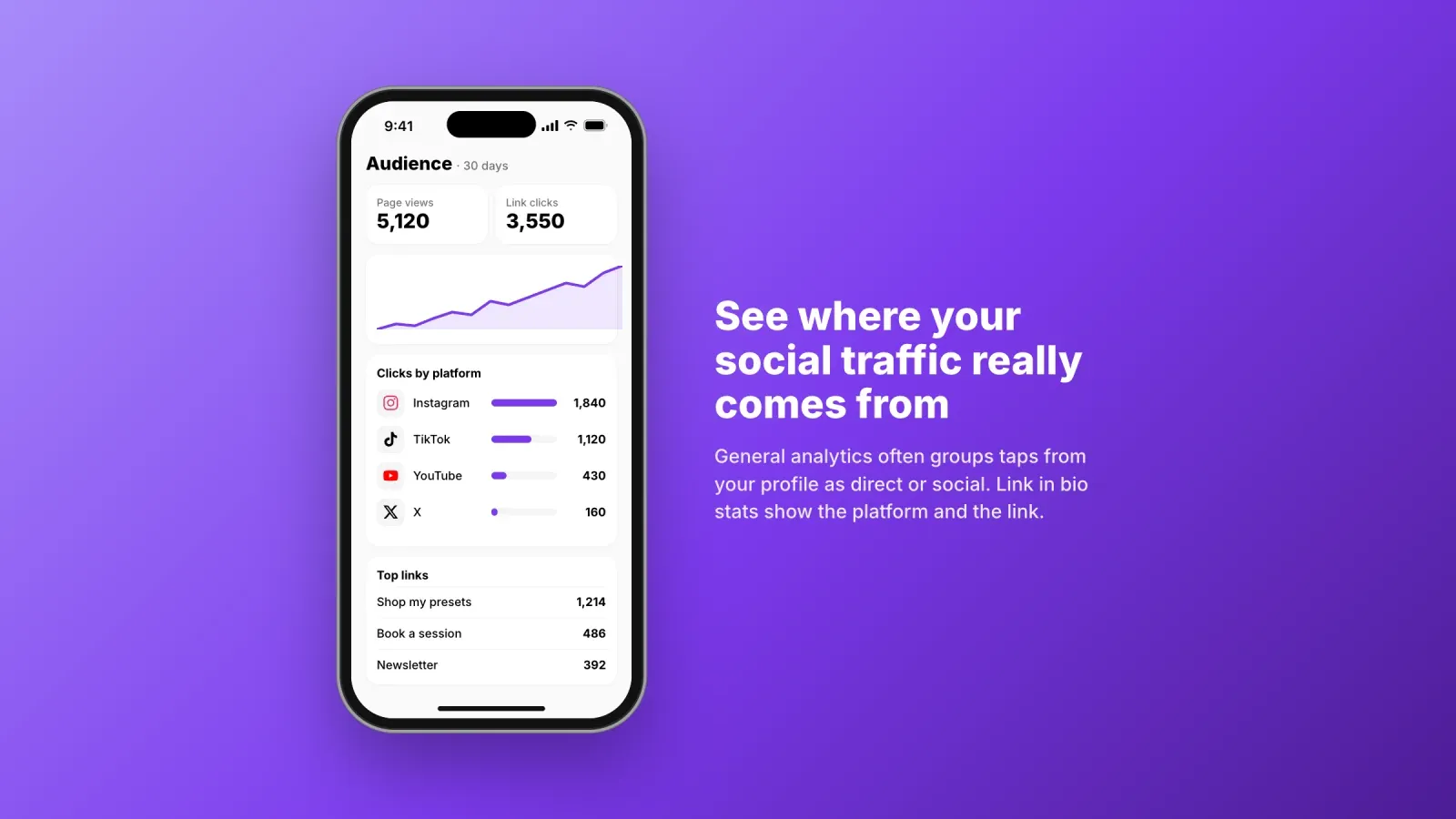
Most website builders, online stores and link in bio tools include their own analytics: Shopify, Wix, Squarespace, WordPress plugins, newsletter platforms and creator tools. They show visits, top pages, sales and sources directly in the dashboard you already use.
Built-in stats are especially useful for traffic that comes from social media. When followers tap the link in your Instagram or TikTok profile, your link in bio tool can show how many clicked, which links they chose and which platform sent them, data that general analytics often groups as "direct" or "social" without detail.
Which numbers matter for your type of site
The same dashboard doesn't mean the same thing for every business. Focus on the few numbers that match your goal.
- Online store. Sessions from each channel, product page views, add-to-cart rate, checkout completion and revenue per session. A traffic increase that doesn't move revenue usually means the new visitors aren't the right audience.
- Creator or influencer. Clicks from each social platform to your link in bio, the links people choose, email sign-ups and sales of your products or bookings. Your followers' path is often profile, link, page, purchase.
- Local business. Calls, direction requests and bookings matter more than page views. Google Business Profile shows how many people found you on Maps, and Search Console shows the local queries you rank for.
- Blog or media site. Search clicks, top landing pages, engaged sessions, newsletter sign-ups and returning users. Content that keeps people reading is worth updating first.
- SaaS or service business. Visits to pricing and demo pages, trial or quote requests, and the sources of the visitors who convert, which are rarely the same as the sources with the most visits.
How to set up traffic monitoring in one afternoon
You don't need all ten tools. This setup covers most sites, for free.
- Install GA4 with your site builder's integration or Google Tag Manager. Set data retention to 14 months and mark your important actions, like purchases or sign-ups, as key events.
- Verify your site in Google Search Console and submit your XML sitemap.
- Add Microsoft Clarity for heatmaps, session recordings and AI traffic channels.
- Import your site into Bing Webmaster Tools from Search Console, and turn on IndexNow if your platform supports it.
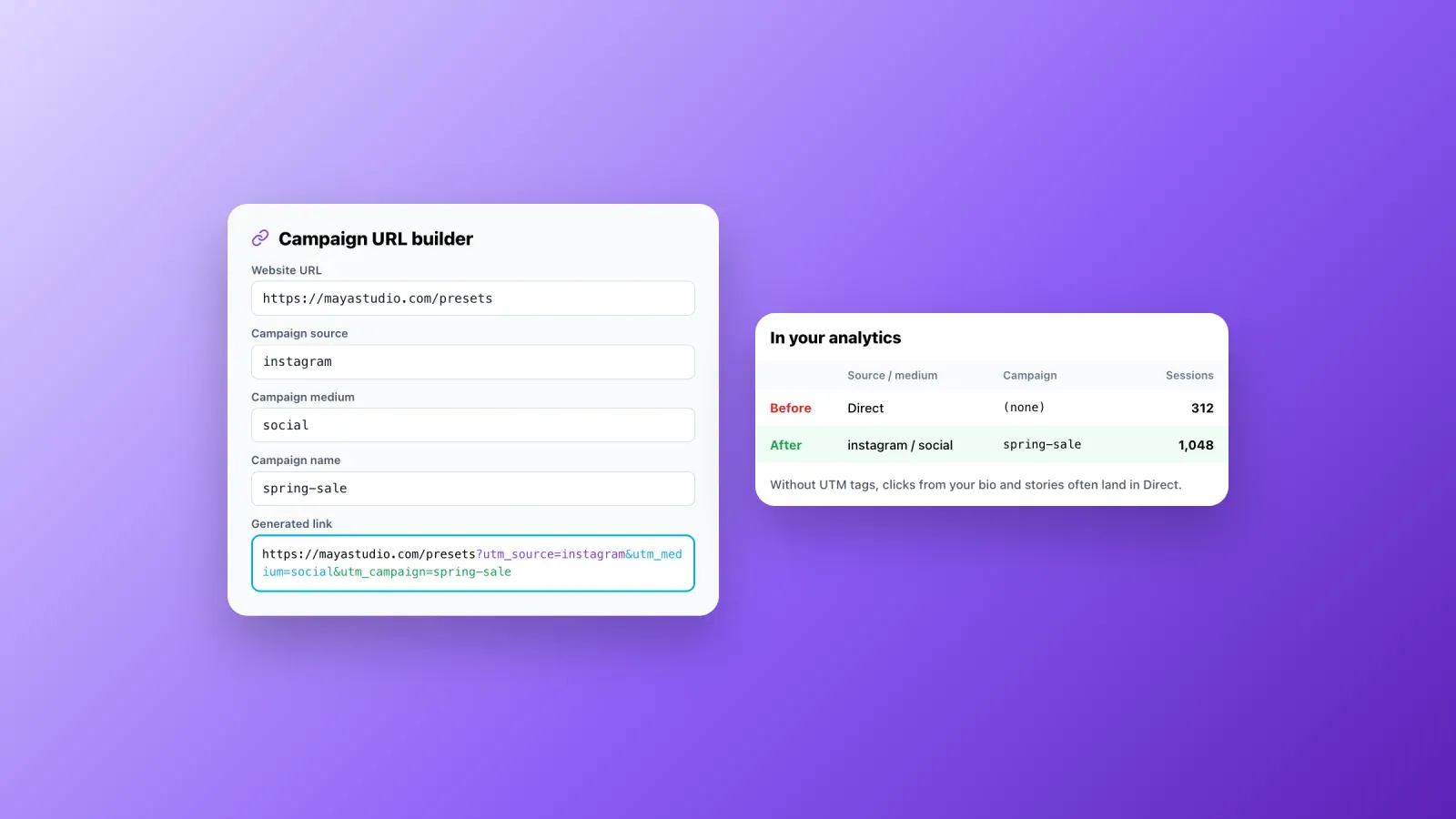
- Tag your campaign links. Add UTM parameters to the links you share in newsletters, ads and social posts, for example
?utm_source=instagram&utm_medium=social&utm_campaign=spring-sale, so they appear correctly in your reports instead of as direct traffic. Our glossary entry on tracking explains how attribution works. - Build a simple Looker Studio dashboard with users, sources, landing pages, search clicks and conversions.
- Add three to five competitors to Similarweb and check their direction once a month.
Before you start measuring, it's also worth making sure your site has no technical problem holding traffic back. Run a free audit to check my site SEO on your home page and main templates: missing titles, a stray noindex tag or slow pages will show up in your traffic numbers sooner or later.
How to track traffic from AI assistants
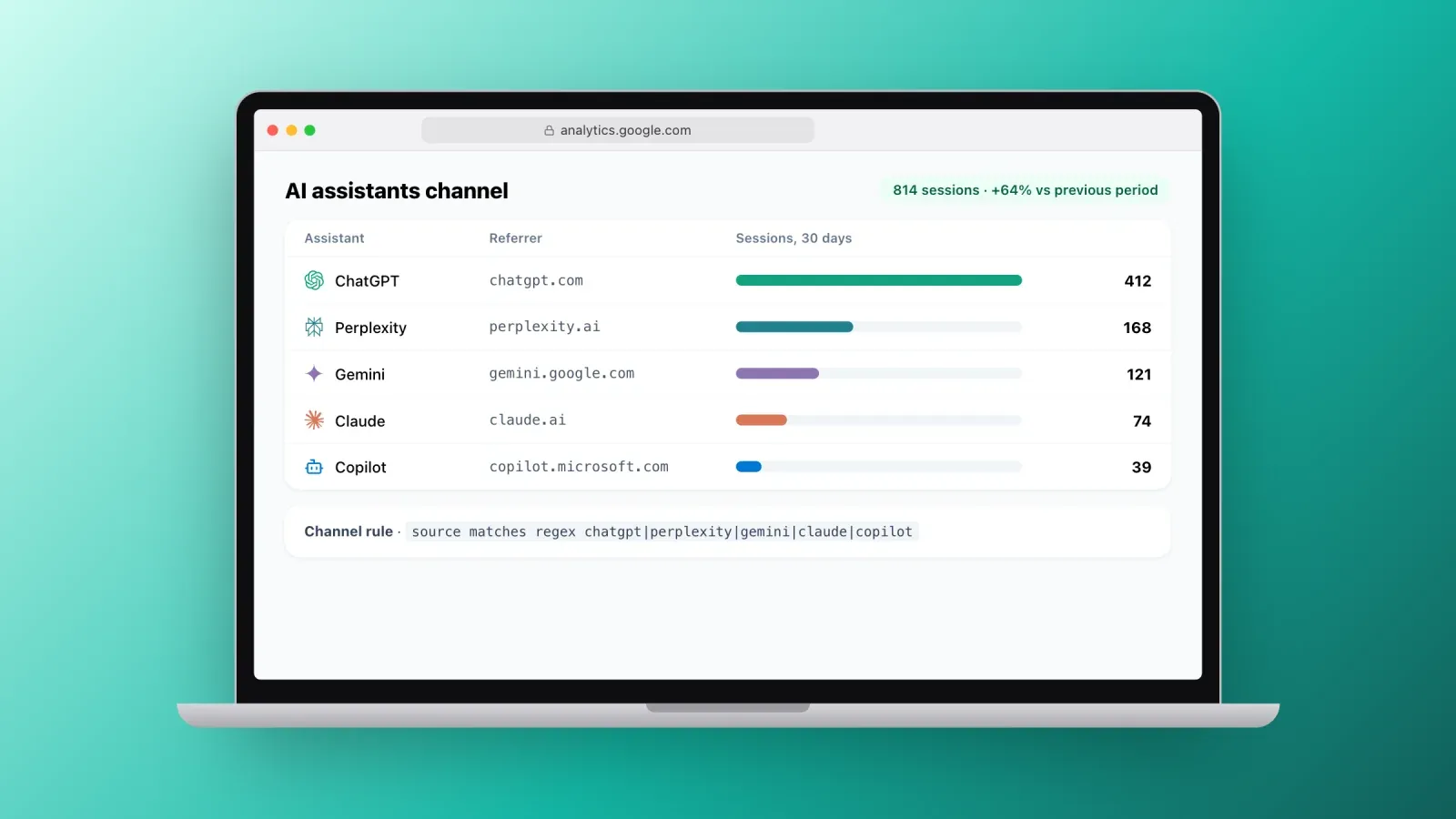
A growing share of visits now comes from AI tools. People ask ChatGPT, Perplexity, Gemini, Claude or Copilot a question, and click a link in the answer.
- In GA4, these visits usually appear as referrals from domains such as chatgpt.com, perplexity.ai, gemini.google.com, claude.ai or copilot.microsoft.com. Create a custom channel group or an exploration filter that matches these domains, so AI traffic gets its own line.
- In Clarity, the AIPlatform and PaidAIPlatform channels do this automatically.
- For competitors, Similarweb's AI Traffic Checker shows estimates by assistant.
- In Search Console, visits that come from Google's AI Overviews and AI Mode are counted with web search. Watch impressions and click-through rate together to understand their effect.
Some AI visits arrive without a referrer and are counted as direct. AI traffic is usually underestimated, so watch the trend more than the absolute number.
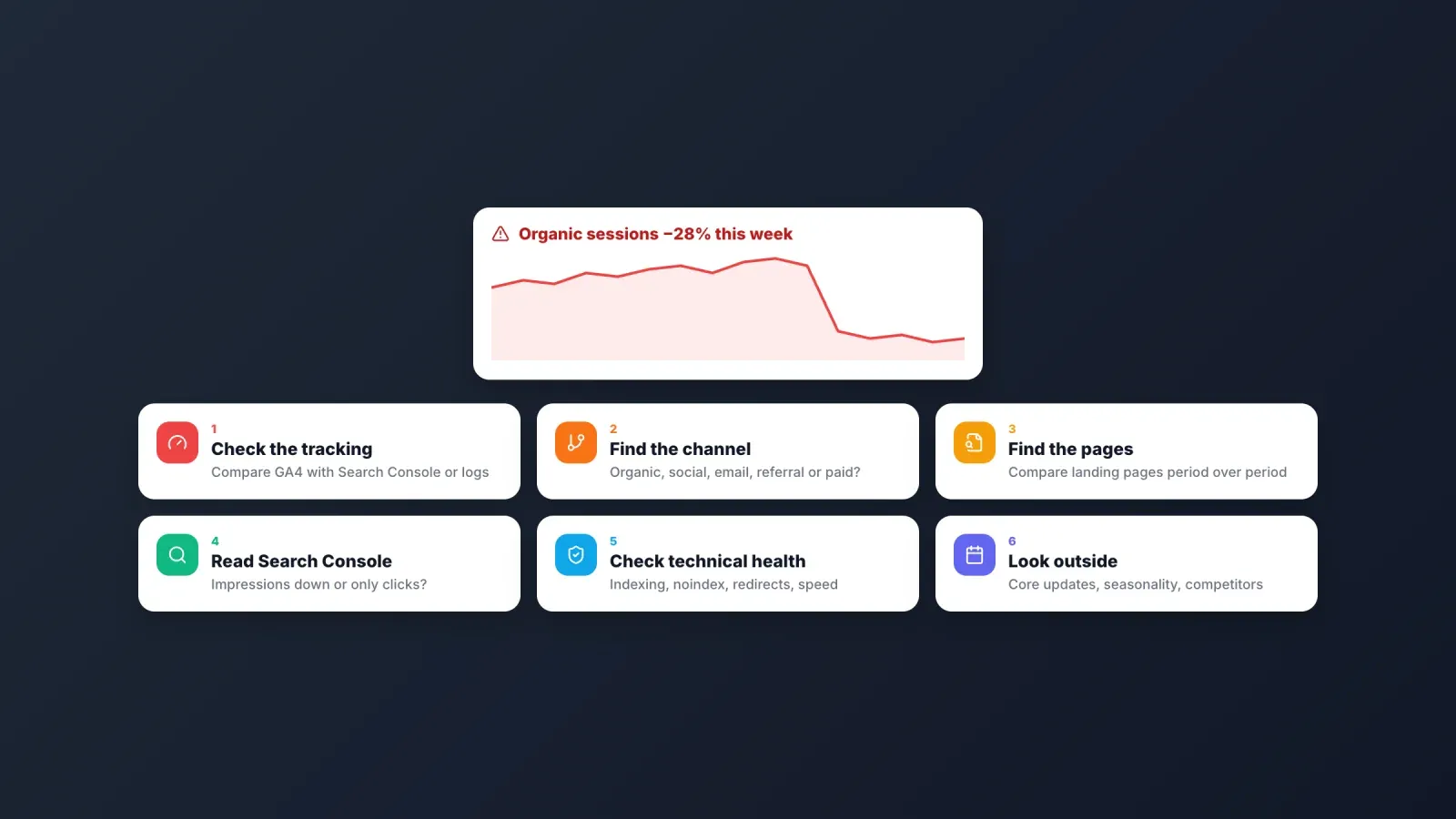
What to do when your traffic drops
Traffic drops happen. Before panicking, find where the drop comes from.
- Check your tracking first. Did someone change the site, the consent banner or the tag? Compare GA4 with Search Console, Clarity or server logs. If only one tool shows a drop, the problem is probably the measurement, not the traffic.
- Find the channel. Is the drop in organic search, social, email, referral or paid? A drop in a single channel narrows the cause.
- Find the pages. Compare landing pages period over period. A drop concentrated on a few pages often points to a technical issue, a lost ranking or outdated content.
- Read Search Console. Lower impressions mean lost visibility or seasonal demand. Stable impressions with fewer clicks mean a lower CTR, often caused by new search features or a weaker title.
- Check indexing and technical health. The Pages report shows excluded pages, and a quick tool to check website for SEO optimization reveals broken titles, noindex tags, redirects or slow pages after a site update.
- Look outside. Google announces core updates on its Search Status Dashboard. Seasonality, a competitor's campaign or the end of a promotion can also explain a dip.
Compare weeks with the same weeks of the previous year when your business is seasonal, and wait for a few days of data before drawing conclusions.
Mistakes to avoid
- Using one tool for everything. GA4 doesn't show search impressions, and Search Console doesn't show what people do on your pages.
- Treating estimates as facts. Competitor traffic numbers are models. Use them for direction and comparison.
- Staring at real-time reports. Daily noise hides trends. Review traffic weekly and monthly.
- Not tagging campaigns. Without UTM parameters, newsletters and social posts often end up as direct traffic.
- Measuring visits but not conversions. Ten thousand visitors who never buy are worth less than a thousand who do.
- Forgetting privacy rules. In the European Union and the United Kingdom, analytics cookies usually need consent. Use a consent banner or a cookieless tool.
Grow the traffic you measure
Measuring traffic is only half the job. The other half is earning it: content that answers real questions, pages that load fast and appear correctly in search, and a presence on social media that sends followers to the right place. Our guide to organic marketing explains how these channels work together.
FAQ about checking website traffic
What is the best site to check website traffic for free? For your own site, Google Analytics 4 and Google Search Console together are the best free combination. For a competitor's site, Similarweb's free version and browser extension give a quick estimate.
Can I check the traffic of any website? Yes, with estimation tools like Similarweb, Semrush or Ahrefs. They model traffic from panels, clickstream and search data, so the numbers are approximate, especially for small sites. Only the site owner has exact data.
How accurate are website traffic checkers? First-party tools installed on your site are accurate for the visits they can record, minus blocked or non-consenting visitors. Third-party estimates can be close for large sites and far off for small ones. Use them to compare trends, not exact counts.
What is the difference between users and sessions? A user is a person, identified by a browser or device. A session is one visit. One user can make several sessions over a day or a month.
How do I check my website traffic on Google? Use Google Analytics 4 for all visits and sources, and Google Search Console for visits from Google search, with the queries, impressions, clicks and positions.
How can I see traffic from ChatGPT and other AI tools? In GA4, filter referrals from chatgpt.com, perplexity.ai, gemini.google.com, claude.ai and copilot.microsoft.com. Microsoft Clarity groups this traffic automatically in its AIPlatform channel.
How often should I check my website traffic? Review a short dashboard weekly, analyze trends and conversions monthly, and compare with the previous year quarterly. Set alerts for sudden drops instead of checking every day.
Why does my traffic differ between tools? Each tool counts differently: cookies, ad blockers, bots, consent, time zones and definitions of a session all vary. Pick one tool as your reference and use the others to explain the differences.
Know your numbers, then grow them
There is no single perfect site to check website traffic, but a small set of free tools gives you a complete picture: GA4 for visits and conversions, Search Console for search, Clarity for behavior, and an estimating tool for competitors. Set them up once, review them weekly and act on what they show.
If a big part of your traffic comes from social media, give those visitors a page built to convert them. Create your free Roctify page to turn your link in bio into a storefront for your products and links, with audience analytics on the Creator plan and up to see which platforms and links bring the most clicks, and 0% transaction fees on every plan.