For twenty years, SEO software worked the same way. You opened a dashboard, read charts and tables, exported a spreadsheet, then decided what to do. The tool collected data. You did the thinking and the work.
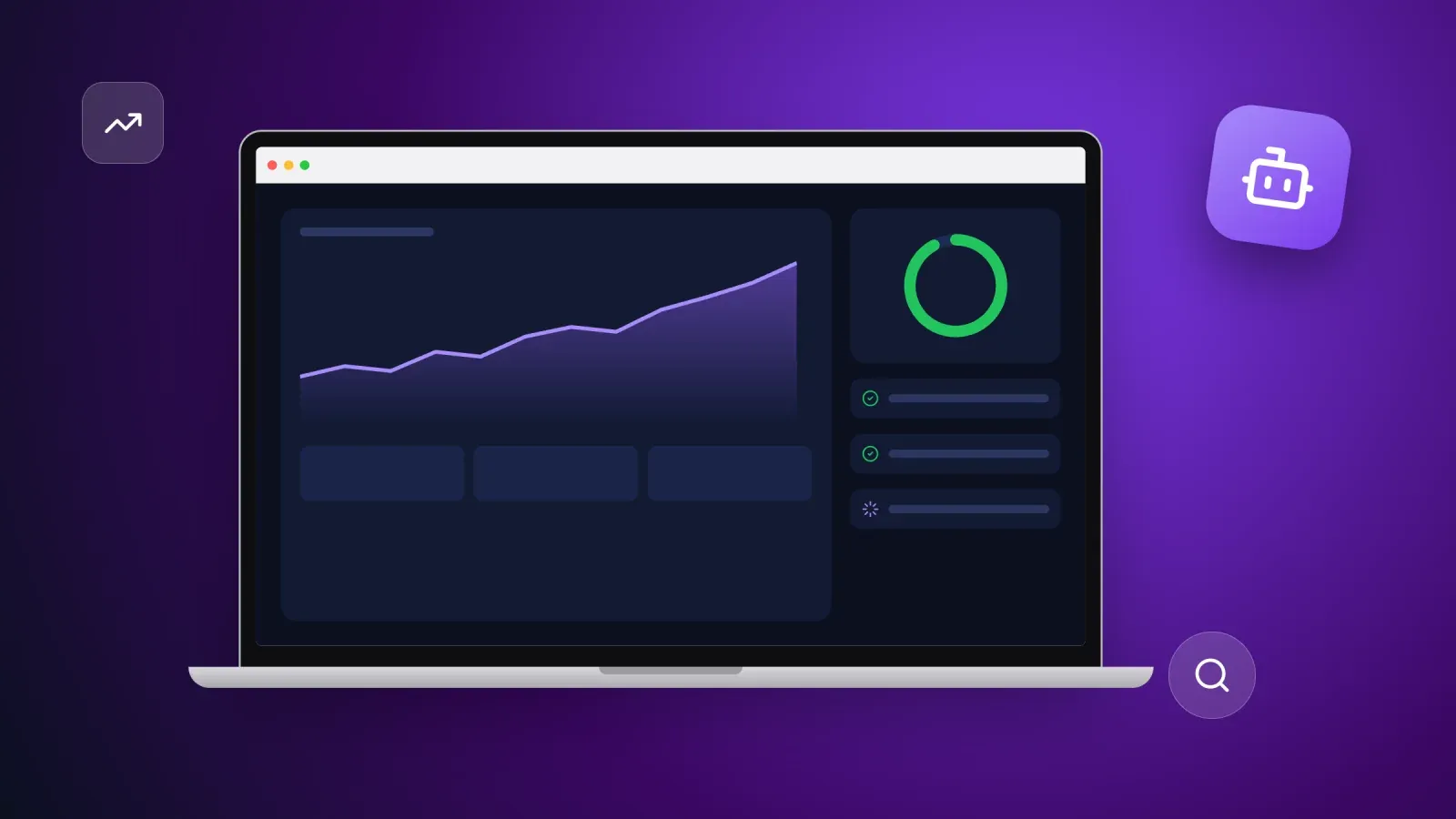
An SEO agent changes that division of labor. Instead of showing you 300 issues, it reads your data, decides which five matter this week, explains why, prepares the fixes and, if you allow it, applies them and checks the result. You move from operator to editor.
This guide explains what an SEO agent really is, how it differs from an SEO tool or a chatbot, what it can do today, how it works under the hood, how to choose one and set up a first workflow, and what it still cannot do. You will also see why the shift to AI search makes agents more useful than ever, with the latest numbers on how AI summaries are changing clicks from Google.
What is an SEO agent?
An SEO agent is software that uses a large language model to pursue an SEO goal on its own. It plans the steps, uses tools to collect data, takes actions and checks the results, with a human approving the important decisions.
Three ingredients make something an agent rather than a simple tool:
- A goal, not a single command. "Grow organic clicks to our product pages" instead of "show me my rankings."
- Tools it can use. A crawler, Google Search Console, a keyword database, a page editor, an analytics account. The agent decides which tool to call and when.
- A loop. It observes, plans, acts, then checks whether the action worked, and starts again.
The language model is the brain that reads, reasons and writes. Our glossary entries on AI agents and large language models explain both in more detail.
An SEO agent is not a magic ranking machine and not a replacement for a strategy. Think of it as a tireless junior SEO analyst who works around the clock, never forgets to check Search Console and always explains its reasoning, but still needs a senior person to set direction and approve changes.
Why SEO agents matter now
SEO has become more work at the exact moment it became harder to win.
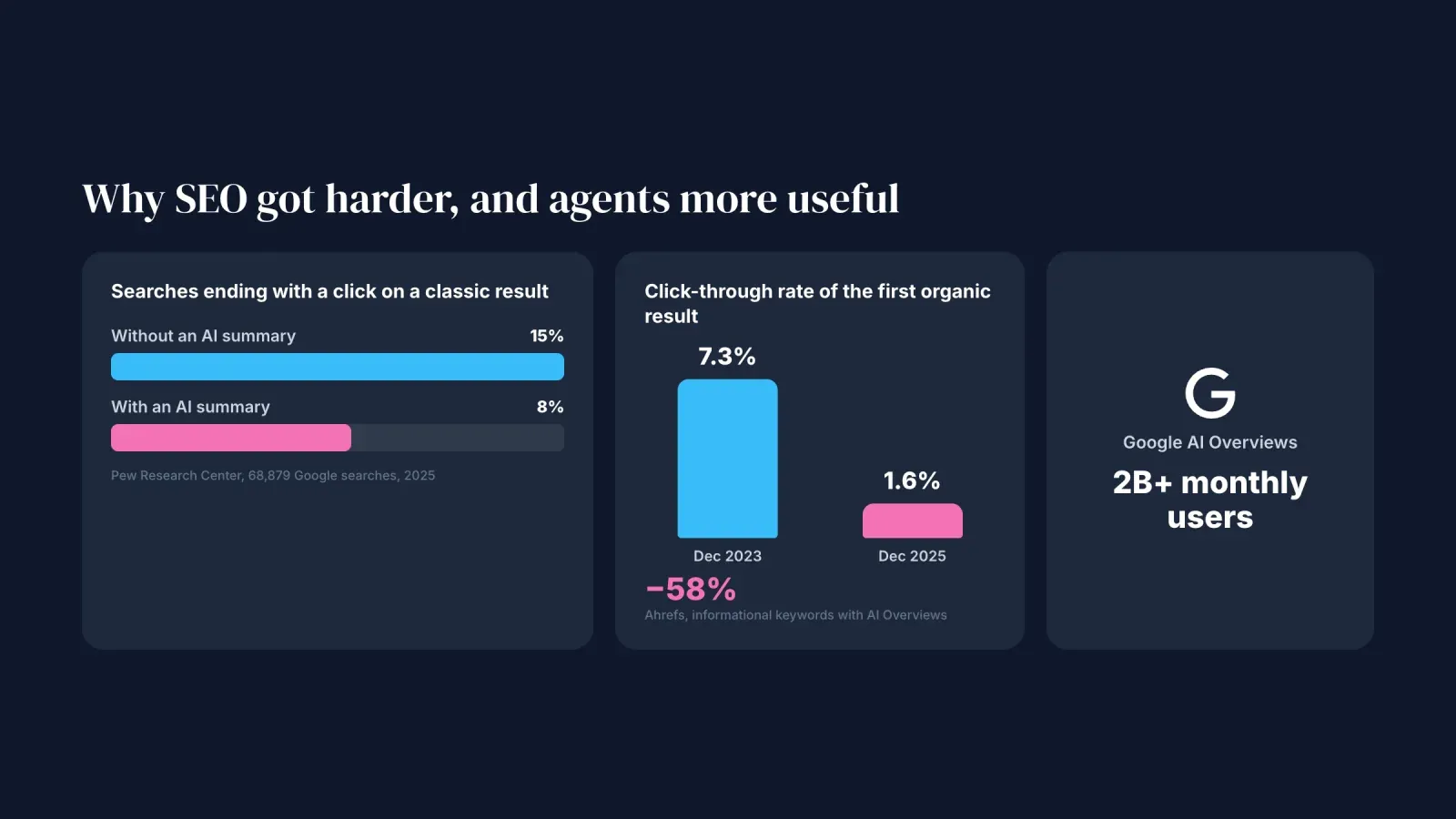
Search results changed. Google's AI Overviews, the AI summaries shown above the classic results, reach more than 2 billion monthly users according to Google. Answers now appear before the links, and that changes behavior.
Clicks are harder to get. A Pew Research Center study of 68,879 real Google searches found that users clicked a traditional result in 8% of visits when an AI summary appeared, against 15% when it did not. Ahrefs measured that, by December 2025, AI Overviews reduced the click-through rate of the first organic result by 58% for affected informational keywords, up from 34.5% in its April 2025 study.
The job got bigger. On top of classic SEO, teams now track their visibility in AI answers from Google, ChatGPT, Perplexity and others, a practice often called generative engine optimization. More channels, more data, more pages to keep updated, and usually not more people.
AI models can now use tools. Since Anthropic published the Model Context Protocol in November 2024, a growing number of SEO data providers, including Semrush and Ahrefs, offer official connectors that let AI agents query their data directly. Agents no longer guess. They can read real rankings, crawl data and Search Console numbers.
The result: the gap between "we know what to fix" and "it is fixed" is where most SEO value is lost, and that gap is exactly what agents are good at closing.
SEO tool, AI assistant and SEO agent compared
The three terms are often mixed up. Here is the difference in practice.
- SEO tool. Collects and displays data. You ask for a report, it gives you charts and lists. Example: a rank tracker or a site crawler. You decide and act.
- AI assistant. Answers questions and writes on request, in a chat. It can explain an issue or draft a meta description, but usually only knows what you paste into the conversation. You still drive every step.
- SEO agent. Connects to your real data, decides what to look at, proposes or executes actions, and checks the outcome. It can run on a schedule and come back to you only when something needs a decision.
The line is not always sharp. Many SEO suites now include an assistant, and many assistants can call tools. The useful question is simple: does it only answer, or does it act and follow up?
What an SEO agent can do for you
Here are the eight jobs SEO agents handle best today, from the most mature to the most experimental.
1. Run technical audits and site checks
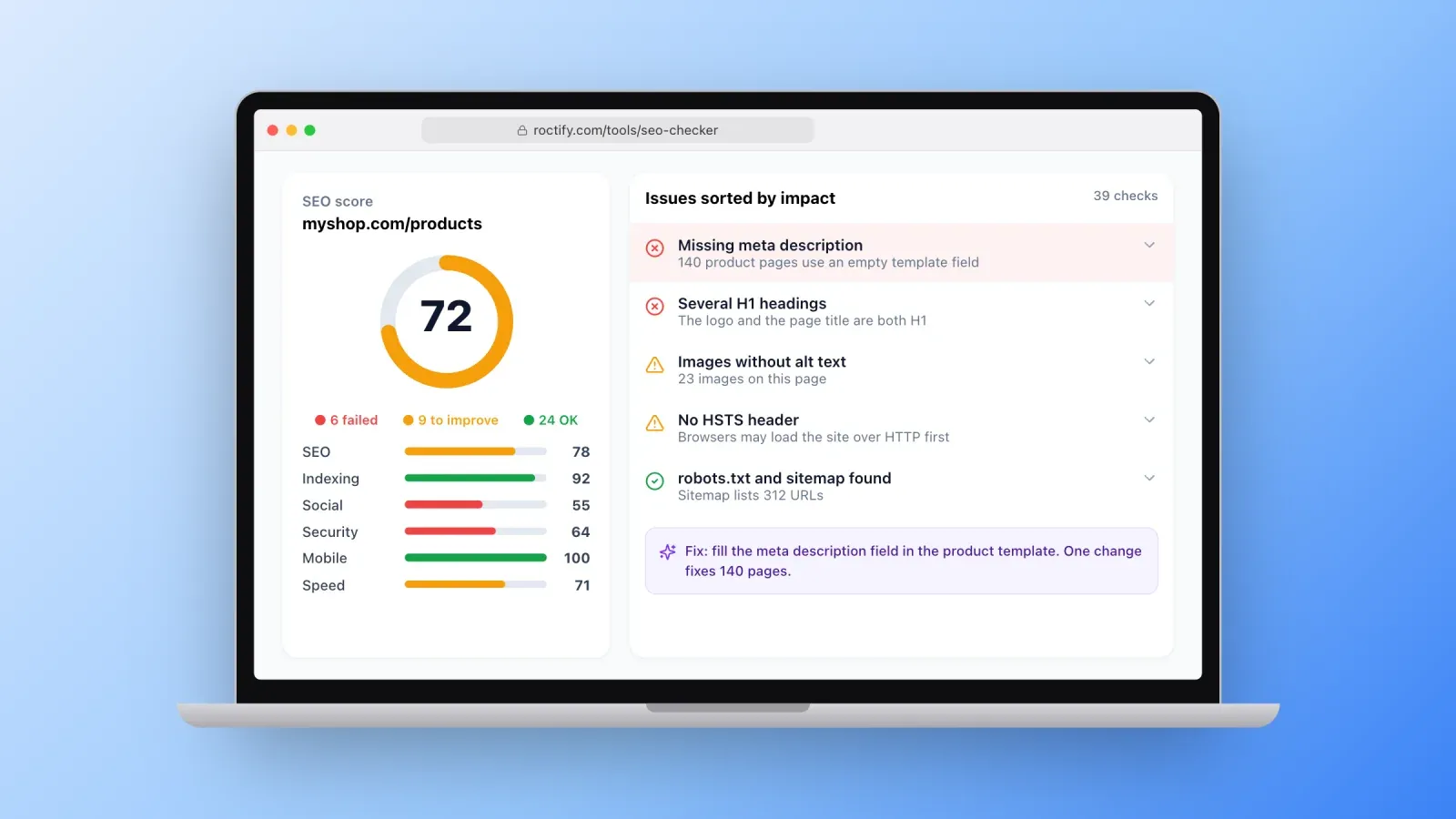
The most established use. The agent crawls your pages, checks status codes, titles, headings, canonical tags, structured data, robots.txt, sitemaps, page speed and mobile setup, then sorts the issues by impact instead of dumping a list of 300 warnings.
What makes an agent different from a crawler is the follow-up. It can group issues by template, for example "all 140 product pages are missing a meta description because the template leaves it empty," explain the fix in plain language and re-check after the change is deployed.
If you want to see what such an audit covers before automating it, run a free SEO site check on one of your pages. It tests about 40 points, from meta tags and headings to indexing, security headers and Google PageSpeed data, and explains how to fix each issue.
2. Watch Search Console and alert you
Google Search Console is the most valuable free SEO data source, and the most neglected. Few people open it every day. To check web traffic from every channel, not only Google, our guide on how to check web traffic compares the best free tools.
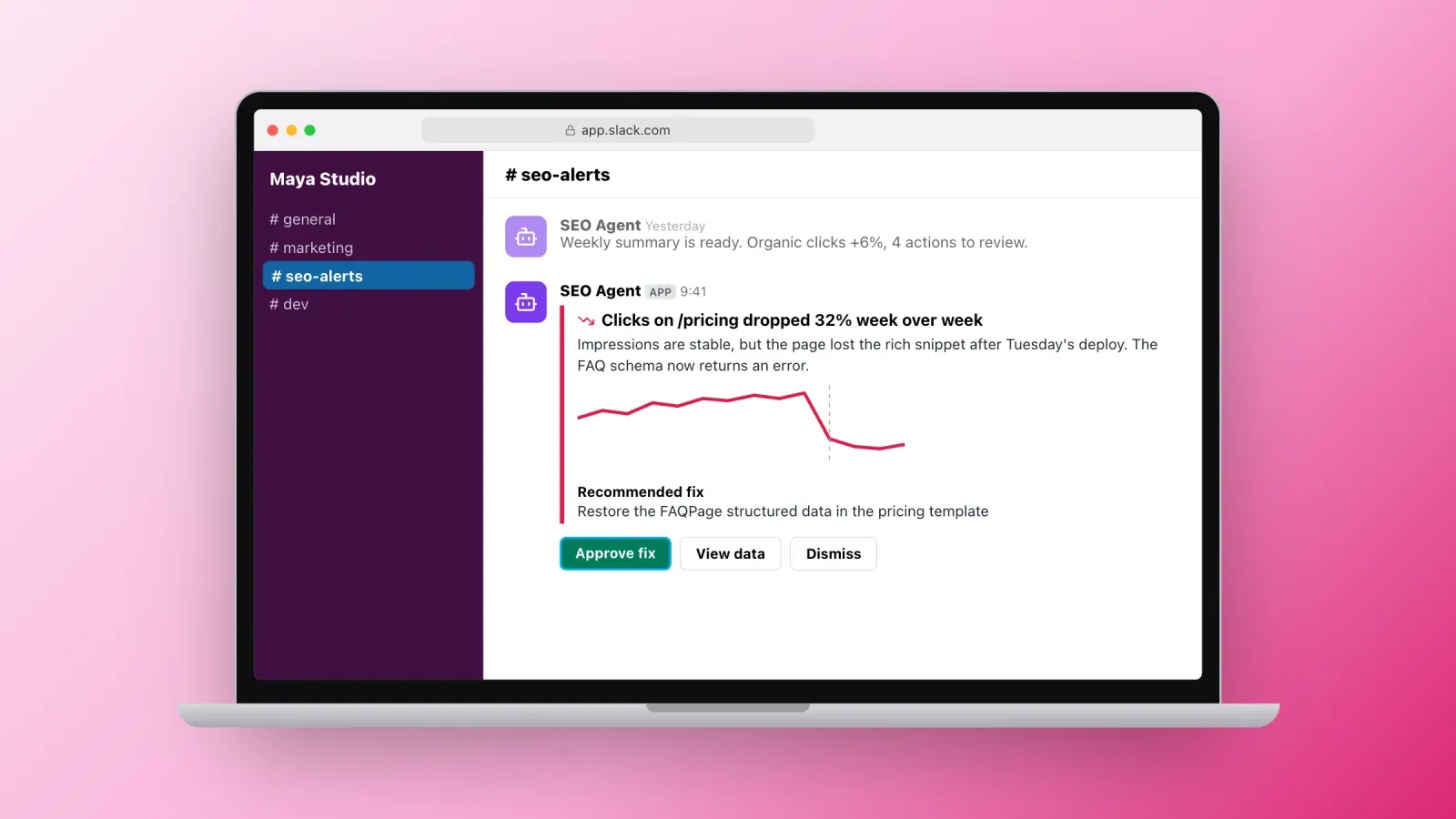
An agent connected to Search Console can watch it for you: a sudden drop in clicks on a key page, a group of pages falling out of the index, a query where you rank sixth with thousands of impressions and a weak click-through rate, a new query that is gaining impressions fast. Instead of a dashboard you never open, you get a short message with the cause it suspects and what it recommends.
3. Research keywords and map them to pages
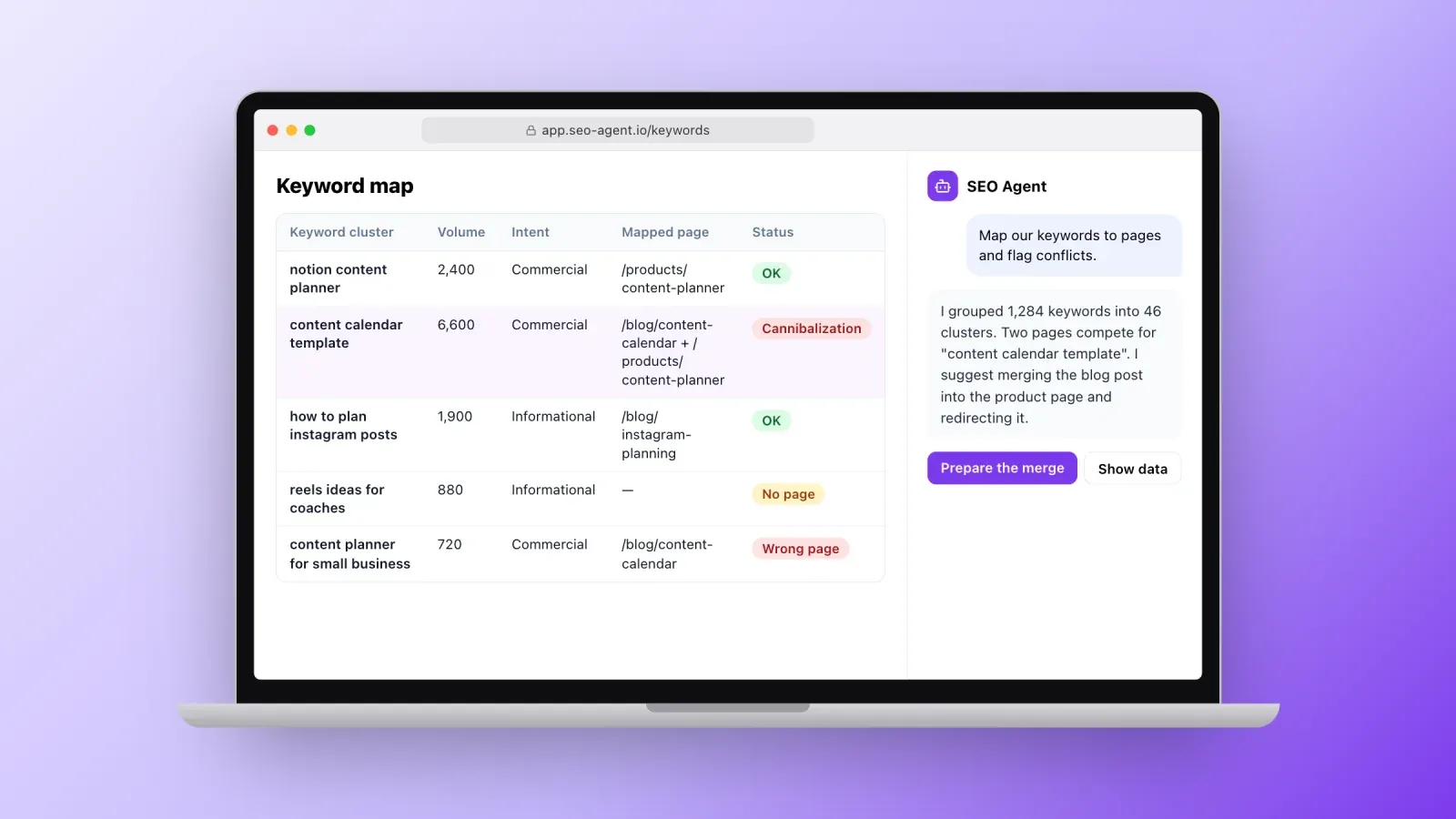
Keyword research used to mean exporting thousands of rows and clustering them by hand. An agent can pull keyword data from a provider, group keywords by search intent, compare them with the pages you already have and show three things: keywords you rank for with the wrong page, keywords where two of your pages compete with each other, and topics where you have no page at all.
This mapping is where most content strategies go wrong, and where an agent saves the most time, because it can check every new idea against your existing pages before anyone writes a word.
4. Brief, write and optimize content
Agents can turn a keyword cluster into a content brief, with the search intent, the questions to answer, the structure of the pages that already rank, internal links to include and the angle that would make yours different. Many can also draft the article or update an old one.
This is also where the risks are highest. Google's spam policies target scaled content abuse, meaning many pages generated mainly to manipulate rankings with little value for readers, whether the content is written by people, AI or both. Use agents to prepare and improve content, then add what only you have: experience, data, opinions, examples and editing.
5. Improve titles and meta descriptions at scale
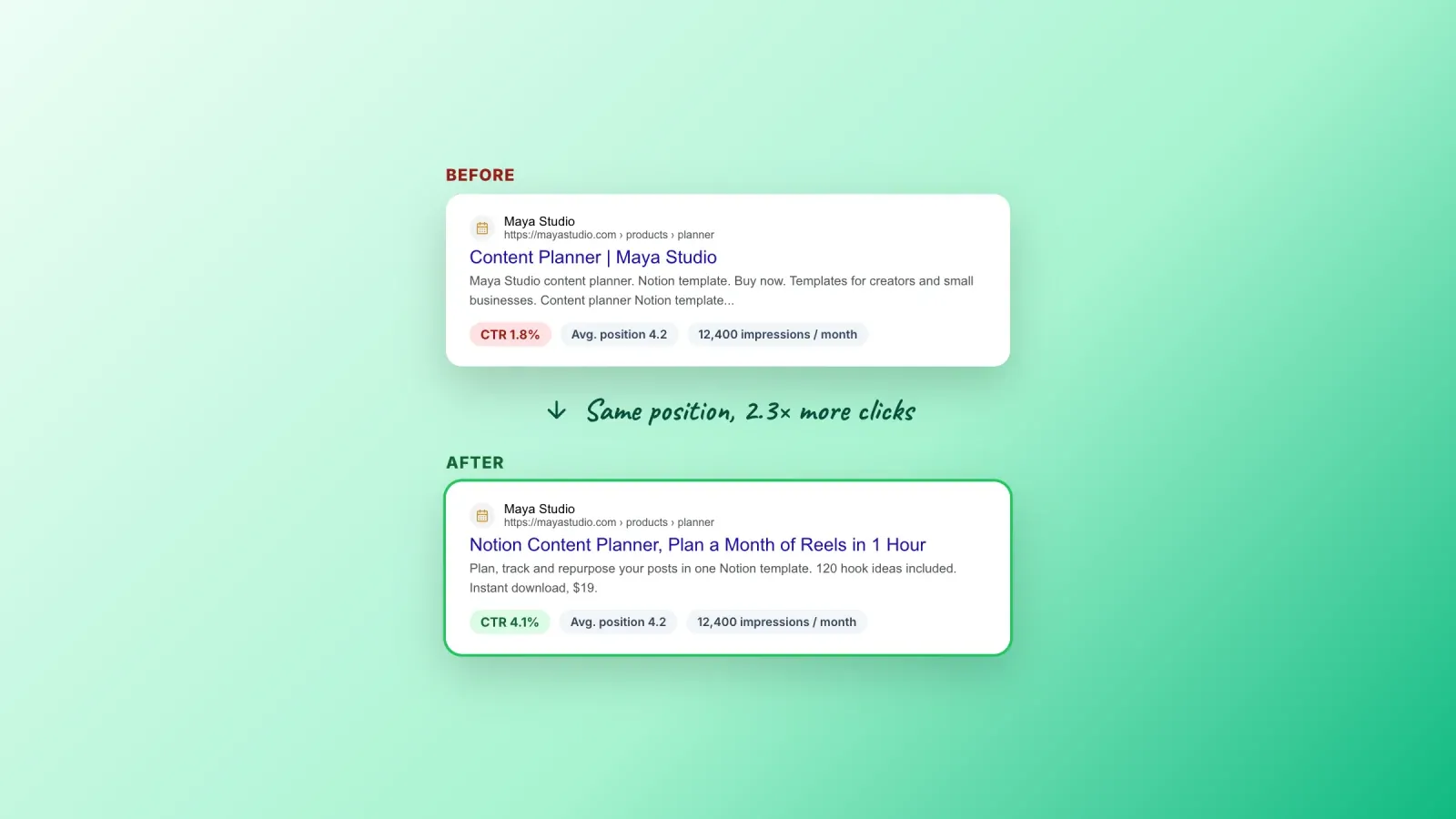
Titles and meta descriptions are small, measurable and repetitive, which makes them a perfect agent task. The agent finds pages with many impressions and a low click-through rate in Search Console, rewrites the title and description to match the query better, applies the change after approval and measures the effect a few weeks later.
On a site with hundreds of pages, this kind of continuous testing is impossible by hand and easy for an agent.
6. Build internal links
Internal links help search engines understand which pages matter and help readers find related content. They are also tedious to maintain. An agent can scan your content, find natural places to link new or important pages, suggest the anchor text and avoid linking two pages that compete for the same keyword.
7. Track rankings and visibility in AI answers
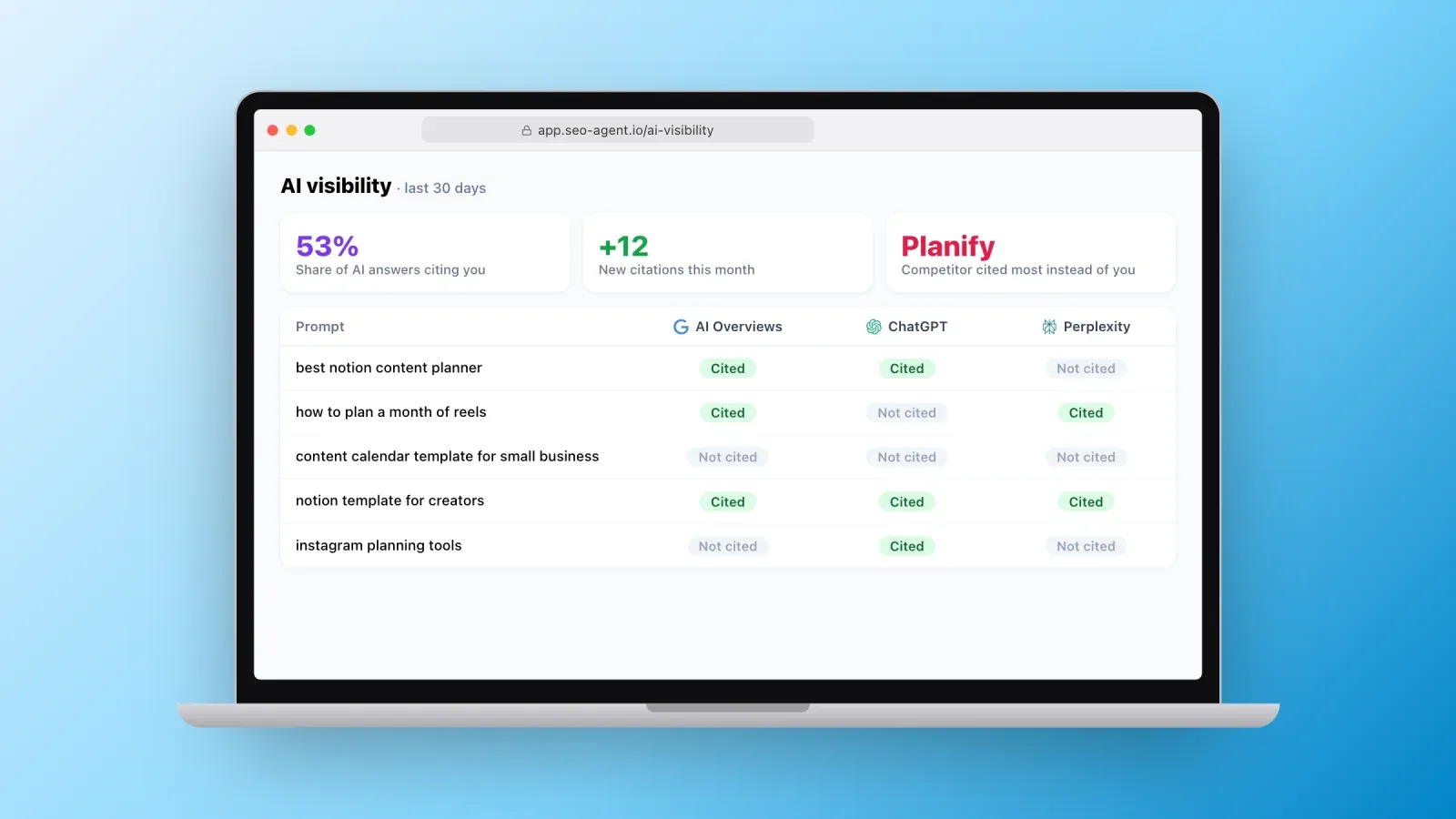
Beyond classic rankings, some agents track whether your brand or pages are cited in AI Overviews, ChatGPT, Perplexity or Google's AI Mode for the questions your customers ask. They can tell you which competitor gets cited instead of you and which content is used as a source, so you know what to improve.
This field is young, measurements vary between tools, and AI answers change from one query to the next. Treat these numbers as trends, not exact rankings.
8. Report and prioritize
Finally, agents are good at turning data into decisions. A weekly summary that says "organic clicks are up 6%, mainly from the pricing page; three product pages dropped after the template change on Tuesday; here are the four actions I recommend this week" is more useful than a 20-page export. The best agents explain their reasoning and show the data behind each recommendation, so you can disagree.
How an SEO agent works under the hood
Most SEO agents follow the same loop.
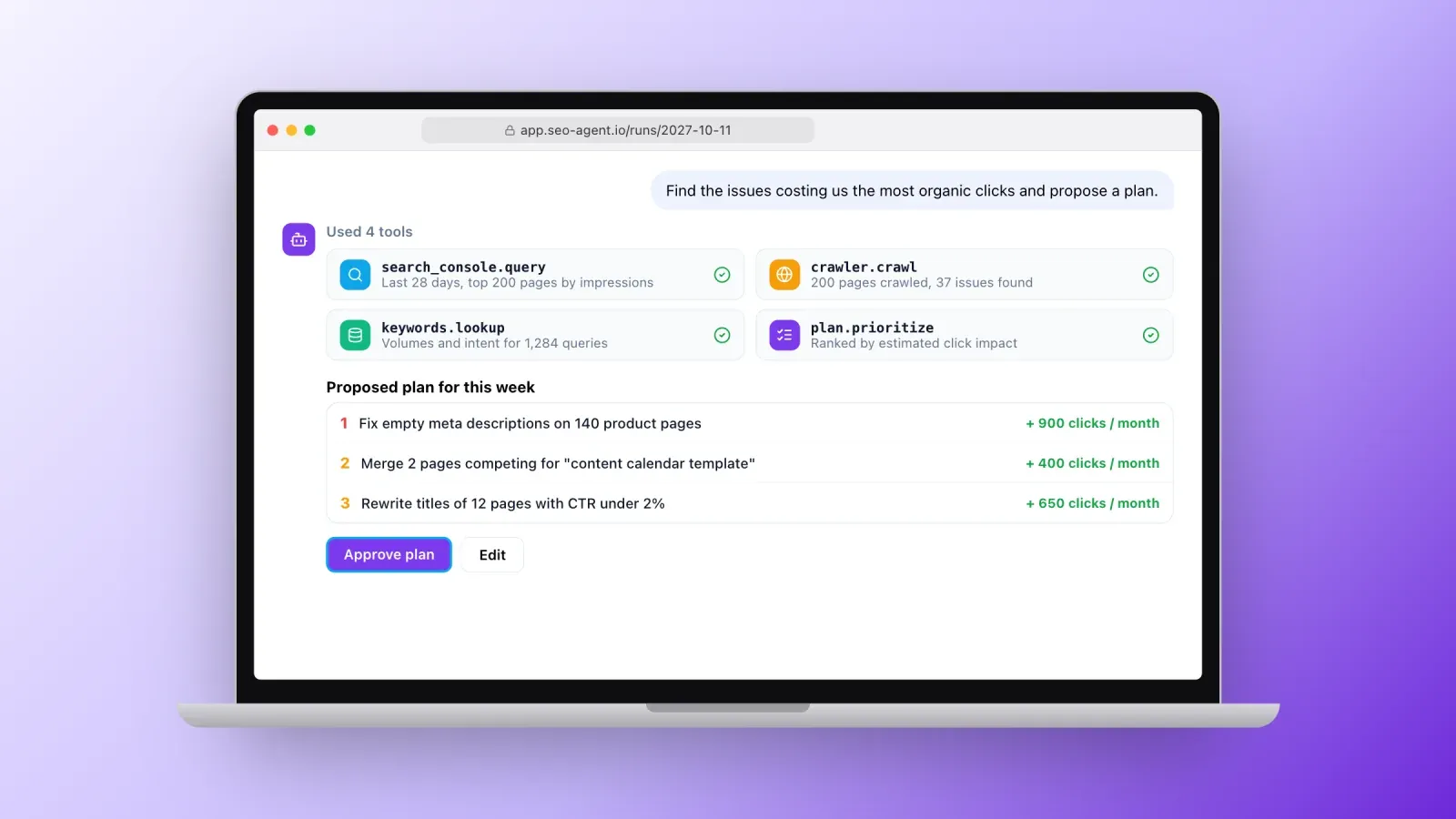
- Goal. You or the product define the objective, such as "find and fix the issues costing us the most organic clicks."
- Plan. The language model breaks the goal into steps: pull Search Console data for the last 28 days, crawl the top 200 pages, compare, rank the issues.
- Tools. The agent calls the tools it has access to: a crawler, the Search Console API, a keyword or backlink database, a page speed test, your content management system. Through the Model Context Protocol, many of these tools can be plugged into general AI agents with official or community connectors.
- Action. It proposes changes, drafts content or, with permission, edits pages directly.
- Check. It verifies the result, for example by re-crawling the page or watching clicks over the following weeks.
- Memory. It keeps notes on what it changed and what worked, so next week's plan builds on this week's results.
Two design choices matter more than the model itself. First, data access: an agent without your real Search Console and crawl data is just guessing. Second, permissions: what it can read, what it can change and what needs a human approval.
Types of SEO agents
You will meet four kinds of solutions.
- All-in-one SEO agent products. Dedicated software that connects to your site and Search Console and runs audits, content and monitoring for you. Easiest to start, less flexible.
- Agents inside SEO suites. Assistants and agent features added to established platforms. They sit on top of large keyword and backlink databases you may already pay for.
- Do-it-yourself agents. A general AI agent connected to SEO data through connectors, such as Search Console, a crawler and a keyword provider. Very flexible and often cheaper, but you design the workflows and the safeguards.
- Agency plus agent. SEO agencies and consultants use agents to handle monitoring and repetitive work, and spend their time on strategy, content and links. You get the automation with a human accountable for results.
How to choose an SEO agent
Before you pick one, check these points.
- Data sources. Does it connect to your own Search Console and analytics, or only to third-party estimates? First-party data should come first.
- Coverage of your site. Can it crawl your platform correctly, including JavaScript pages, multiple languages and large sites?
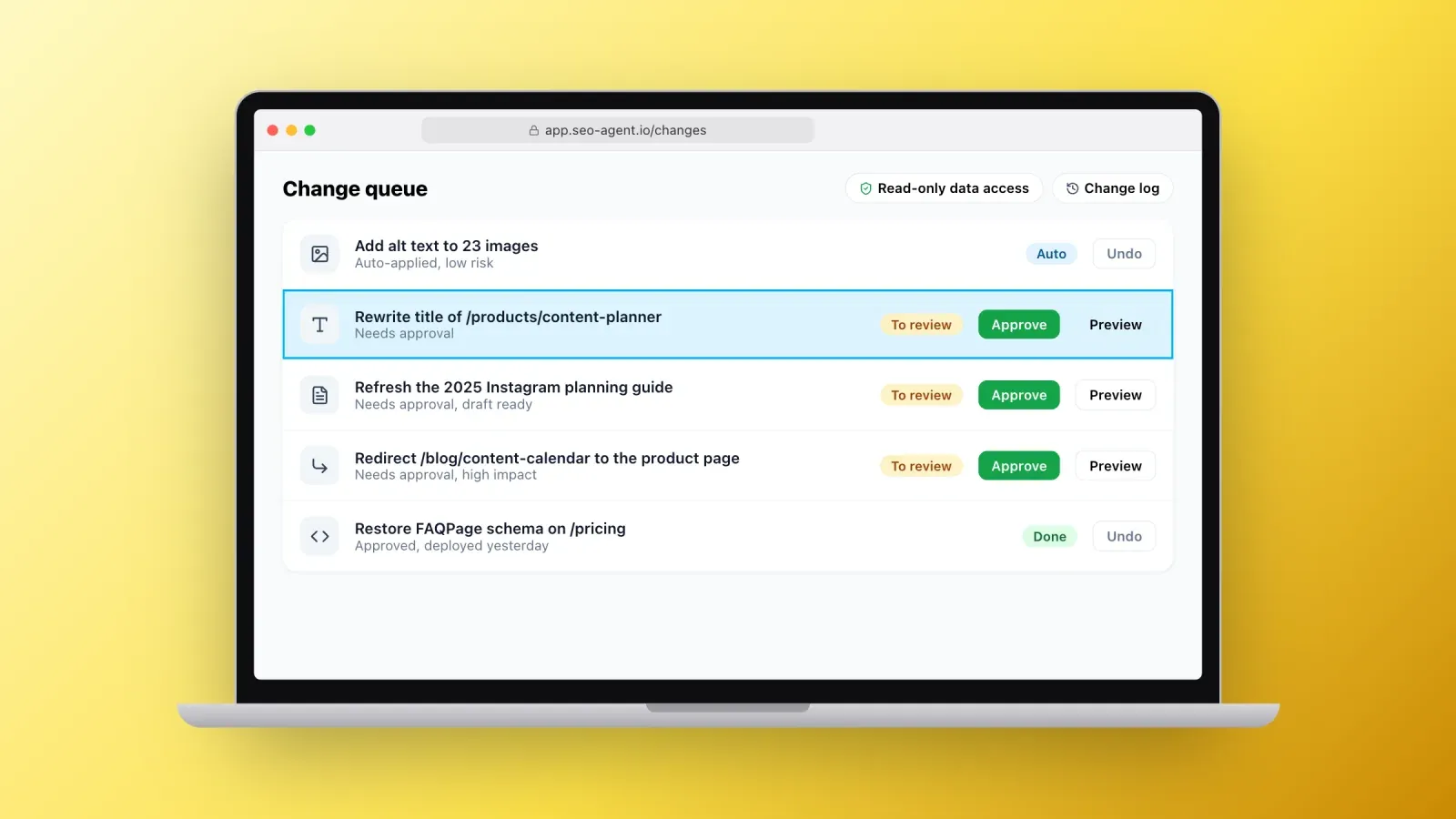
- Read and write permissions. Can you start in read-only mode? Can you require approval for every change? Is there a log of what it did and a way to undo it?
- Explanations. Does it show the data and reasoning behind each recommendation, or only conclusions?
- Content safeguards. Does it encourage human editing and fact-checking, or push you to publish at volume?
- Languages and markets. Does it understand the languages and countries you target?
- Privacy and security. Where is your data stored, is it used to train models, and who can access your accounts?
- Total cost. Subscription, plus usage-based AI and data costs, plus the time you will spend reviewing its work.
How to set up your first SEO agent workflow
Start small, measure, then give the agent more responsibility.
- Get a baseline. Before automating anything, run a free SEO online check of your home page and your most important templates, and note the scores and main issues. Export your last three months of Search Console data.
- Pick one goal. For example: improve the click-through rate of the 20 pages with the most impressions, or fix all indexing issues on product pages.
- Connect read-only data first. Search Console, analytics and a crawl. Let the agent produce recommendations for two weeks without changing anything, and judge their quality.
- Define the approval rules. Which changes can it apply alone, such as alt text on images, and which need your approval, such as titles, redirects or new content.
- Run a weekly loop. Agent review on Monday, your approval in 20 minutes, changes deployed, results checked the following weeks.
- Measure against the baseline. After six to eight weeks, compare clicks, impressions, average position and the issues fixed. Expand to a second goal only if the first one worked.
What SEO agents still cannot do
Agents are powerful, but they have clear limits.
- Strategy. Deciding which market to target, which products to push or how to position your brand against competitors requires business context an agent does not have.
- Real expertise and experience. Google rewards content that shows first-hand experience and expertise. An agent can structure and polish your knowledge, not replace it.
- Relationships. Earning quality backlinks still comes from partnerships, digital PR and content people want to cite.
- Judgment in edge cases. Migrations, penalties, legal topics and sensitive industries need an experienced human.
- Perfect accuracy. Language models can be confidently wrong. Always verify facts, numbers and technical changes before they go live.
Risks and good practices
- Never give full write access on day one. Start read-only, then allow small, reversible changes.
- Keep a change log. Every edit should be traceable and reversible.
- Edit before you publish. Treat AI drafts as drafts. Add examples, data and your voice.
- Avoid scaled low-value content. Publishing hundreds of thin pages is the fastest way to lose rankings.
- Check the basics yourself regularly. A quick independent audit tells you whether the agent is actually improving things.
- Protect your accounts. Use dedicated access with the minimum permissions, and remove it when you stop using a tool.
SEO agent or SEO agency?
An SEO agent is cheaper and works continuously, but it needs someone to set goals, review its work and handle what it cannot. An SEO agency or consultant brings strategy, experience and accountability, and the best ones now use agents to work faster.
For a small business or a creator with a simple site, an agent plus a few hours of your own time each month can be enough. For a large site, an important migration, a competitive market or when you simply do not have time to review an agent's work, a specialist is worth it. If you want help, our SEO agency in Paris combines technical audits, content strategy, link building and optimization for AI answers, and our SEO optimization plans list what is included.
FAQ about SEO agents
What is an SEO agent? An SEO agent is AI software that pursues an SEO goal on its own: it collects data from tools such as Search Console and crawlers, decides what to do, proposes or applies changes, and checks the results, with a human approving important decisions.
Is an SEO agent the same as an AI SEO tool? No. An AI SEO tool usually answers a request or generates content when asked. An agent works in a loop, uses several tools, follows up on its actions and can run on a schedule.
Can an SEO agent replace an SEO expert? Not entirely. It can take over audits, monitoring, reporting and repetitive optimizations, but strategy, original expertise, link building and judgment in complex cases still need a human.
Is AI-generated content bad for SEO? Not by itself. Google evaluates content quality, not how it was produced. Content created mainly to manipulate rankings at scale, with little value for readers, violates its spam policies whether it is written by humans or AI.
How much does an SEO agent cost? It ranges from a few dozen dollars per month for simple agent products to several hundred for advanced suites, plus usage-based costs for AI and data in do-it-yourself setups. The time you spend reviewing its work is part of the cost.
Do I need Google Search Console to use an SEO agent? It is strongly recommended. Search Console is free and gives the agent real data about your clicks, impressions, queries and indexing, which makes its recommendations far more reliable.
How do I check if my site is ready for an SEO agent? Run a quick SEO verify of your main pages to fix the obvious technical issues first, make sure Search Console is set up and verified, and decide which changes you are comfortable automating.
Start with a clear picture of your site
An SEO agent is only as good as the data it reads and the goals you give it. Start with a baseline, connect real data, keep humans in charge of strategy and approvals, and let the agent take over the monitoring and repetitive work that usually never gets done.
The first step costs nothing: run our free SEO checker on your most important page and see where you stand. And if you sell online, create your free Roctify page to get a store with clean URLs, titles, meta descriptions, a sitemap and fast pages out of the box, with 0% transaction fees on every plan.