AI has become part of everyday work for online sellers. Writing product descriptions, removing photo backgrounds, answering customer questions at midnight, translating a store into another language or drafting next week's emails used to take hours. With the right AI tools, a solo founder or a small team can now do them in minutes.
The hard part is choosing. There are thousands of AI tools for ecommerce, many doing the same thing, and most promise more than they deliver. This guide sorts the most useful ones by job, from writing and product photos to customer service, email, ads, pricing, translation and automation. For each, you'll see what it does, who it suits and how much it costs to start. You'll also find ready-made starter stacks by budget, prompts you can use today, the rules to respect and the mistakes to avoid. Prices were checked in October 2026 and change often, so confirm them on each vendor's site before you buy.
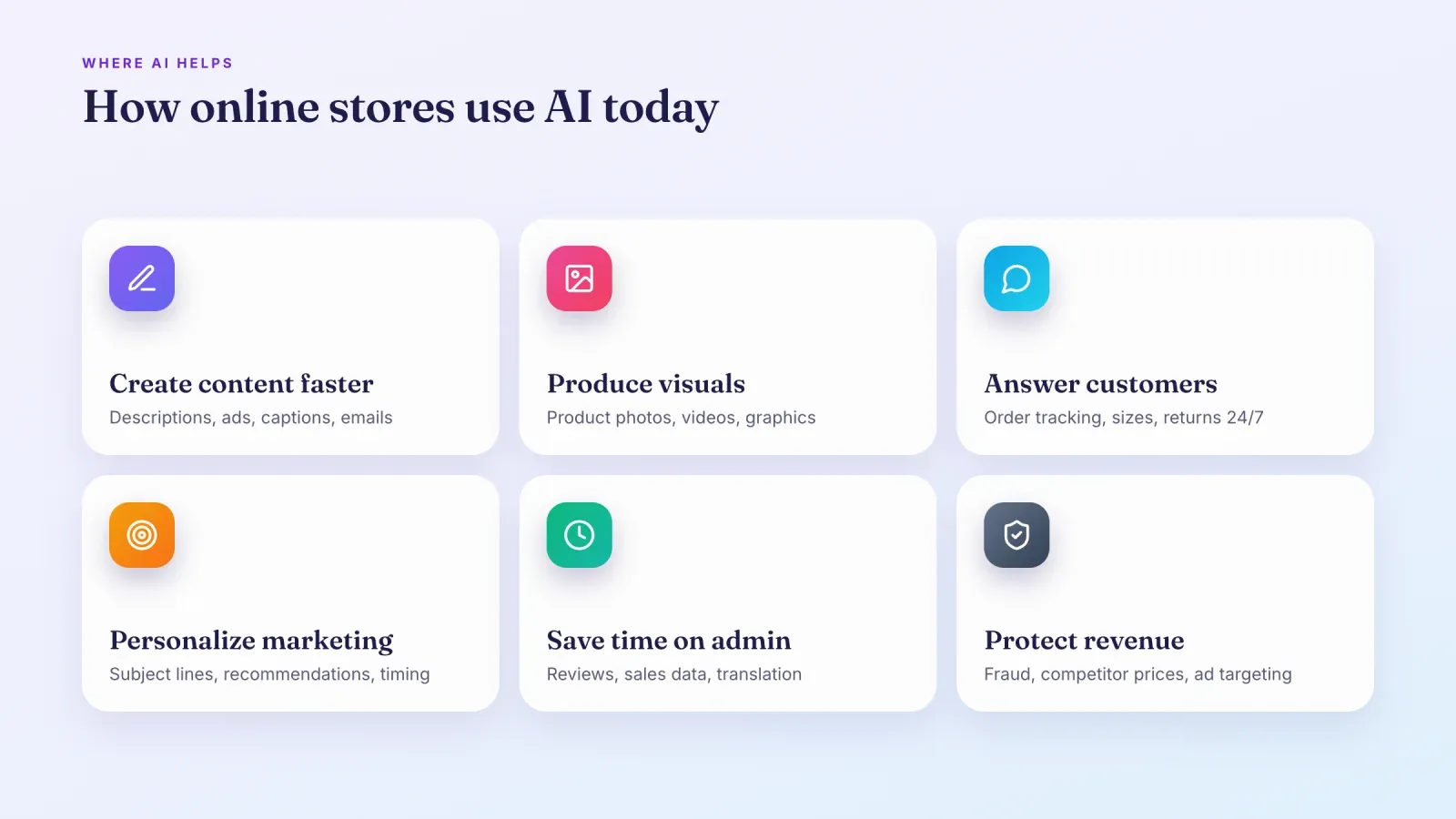
How online stores use AI today
Most stores use AI for a handful of concrete, everyday tasks.
- Creating content faster. Product descriptions, blog posts, ad copy, captions and email drafts.
- Producing visuals. Clean product photos, lifestyle backgrounds, short videos and social graphics.
- Answering customers. Chatbots and AI agents that handle order tracking, sizing and return questions around the clock.
- Personalizing marketing. Better subject lines, product recommendations and send times based on customer behavior.
- Saving time on admin. Summarizing reviews, analyzing sales data, translating content and connecting tools so data moves automatically.
- Protecting revenue. Fraud detection, competitor price tracking and smarter ad targeting.
The common thread is time. For a small business, AI is most valuable when it takes a repetitive task off your plate so you can focus on product, customers and growth.
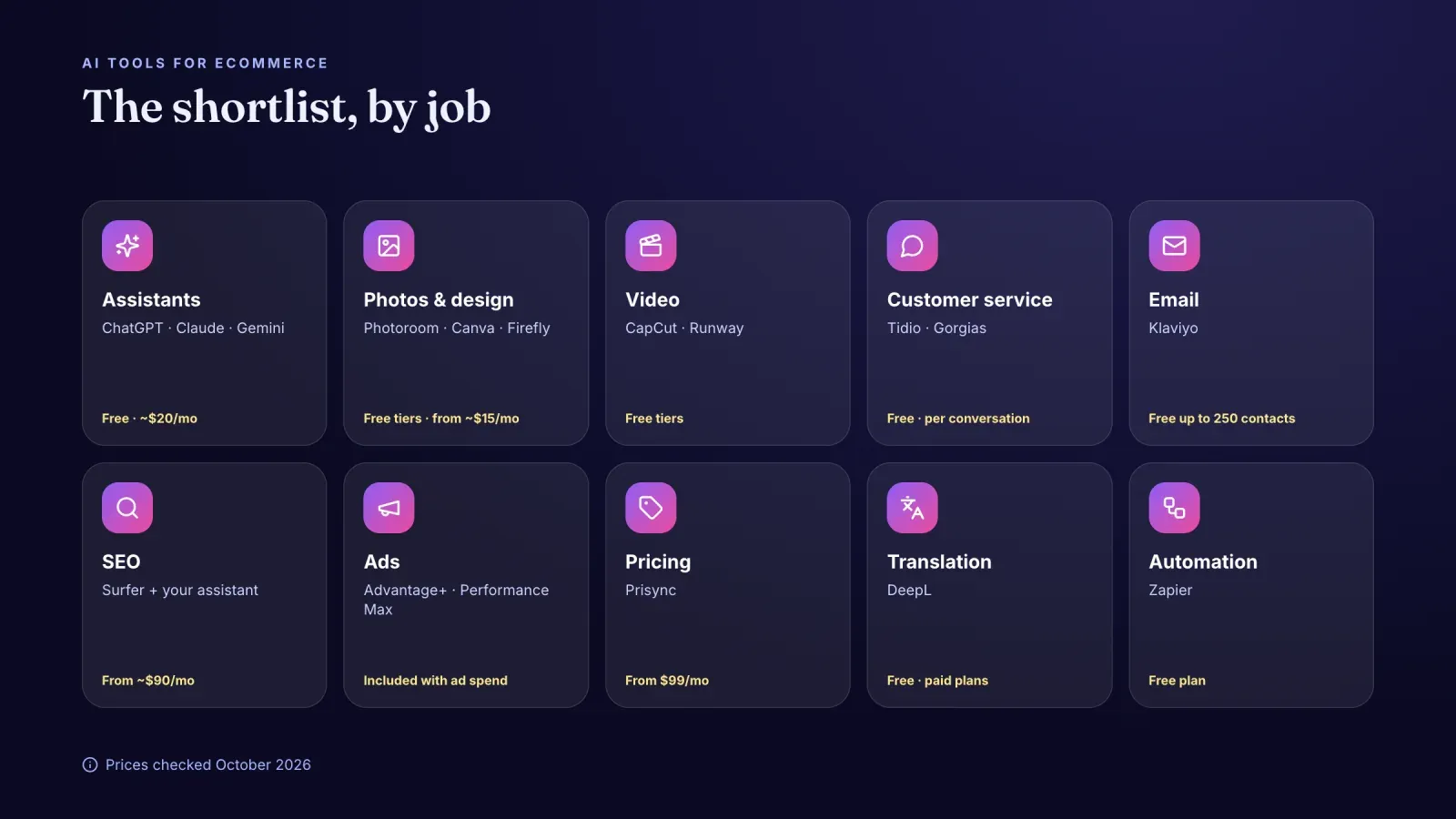
AI tools for ecommerce at a glance
Here's the shortlist covered in this guide, grouped by the job they do.
- AI assistants: ChatGPT, Claude and Gemini. For writing, research, analysis and brainstorming. Free plans, paid from about $20 a month.
- Product photos and design: Photoroom, Canva and Adobe Firefly. For backgrounds, edits and marketing visuals. Canva Pro costs about $15 to $18 a month depending on billing.
- Video: CapCut and Runway. For short-form editing, captions and AI-generated clips. Both offer free tiers with limits.
- Customer service: Tidio and Gorgias. For live chat and AI agents that answer common questions. Tidio has a free plan, and AI conversations are billed on top.
- Email marketing: Klaviyo. For AI subject lines, segments and predictions. Free plan for up to 250 contacts and 500 emails a month.
- SEO and content: Surfer, plus your AI assistant. For keyword research and on-page optimization. Surfer starts around $90 a month on annual billing.
- Advertising: Meta Advantage+ and Google Performance Max. AI built into the ad platforms. No extra fee beyond your ad spend.
- Pricing: Prisync. For competitor price tracking and dynamic pricing. From $99 a month.
- Translation: DeepL. For translating product pages and emails. Free version with limits, paid plans for business use.
- Automation: Zapier. For connecting your tools and adding AI steps to workflows. Free plan with limited tasks.
AI writing assistants
General AI assistants are the most versatile tools on this list. They are built on large language models, which predict text from the instructions you give them.
ChatGPT from OpenAI is the best-known assistant. It writes, summarizes, analyzes files and spreadsheets, browses the web and creates images. There's a free plan, a low-cost Go plan, and Plus at $20 a month, with higher Pro tiers for heavy users.
Claude from Anthropic is popular for long documents, careful writing and analysis. It handles large files well, such as a full product catalog or a long supplier contract. Claude Pro costs $20 a month, or about $17 a month on annual billing.
Gemini from Google is built into Google's apps, such as Gmail, Docs and Sheets. Google's AI Pro plan, the successor of Gemini Advanced, costs $19.99 a month.
What they're best for in a store:
- Writing and rewriting product descriptions in your brand voice.
- Drafting FAQs, size guides and shipping policies.
- Generating ad copy and caption variations to test.
- Summarizing customer reviews into strengths and complaints.
- Analyzing a sales export to spot best-sellers, slow movers and seasonal patterns.
- Brainstorming product names, bundles and promotions.
The quality of the result depends on your instructions. Our glossary entry on prompting explains how to write prompts that get useful answers.

AI tools for product photos and visuals
Good photos sell, and AI has made studio-quality visuals affordable.
Photoroom is built for product photos. It removes backgrounds, creates clean white or colored backgrounds, generates lifestyle scenes around your product and resizes images for each marketplace. It works on mobile, which makes it practical for sellers who shoot with a phone. Paid plans unlock higher-quality exports and batch editing, and its API is billed separately for stores that need automation.
Canva combines templates with AI features called Magic Studio, such as background removal, image generation, text-to-design and resizing for every social format. It's ideal for social posts, ads, banners and simple product mockups. Canva Pro costs about $15 to $18 a month for one person.
Adobe Firefly is Adobe's generative AI, available on the web and inside Photoshop and Express. It's useful for extending backgrounds, removing objects and creating campaign visuals, and Adobe trains it on licensed content, which reassures many brands about commercial use.
Use AI visuals with care. Generated images should never misrepresent the product a customer will receive, such as its color, size, texture or included items. Use AI for backgrounds and scenes, and keep the product itself real.
AI video tools
Short videos drive discovery on TikTok, Instagram and YouTube, and AI tools cut editing time drastically.
CapCut is a free video editor with AI features such as automatic captions, background removal, script-to-video, voice effects and templates. It's the fastest way for most sellers to turn raw clips into Reels and TikToks. Some advanced features require a paid plan.
Runway generates and edits video from text or images. It's useful for creating short visual clips, motion backgrounds and creative effects for ads. It has a free plan with limited credits and paid plans for regular use.
A practical workflow is to film real product clips with your phone, edit and caption them in CapCut, and use generative tools only for intros, transitions or backgrounds.
AI customer service and chatbots
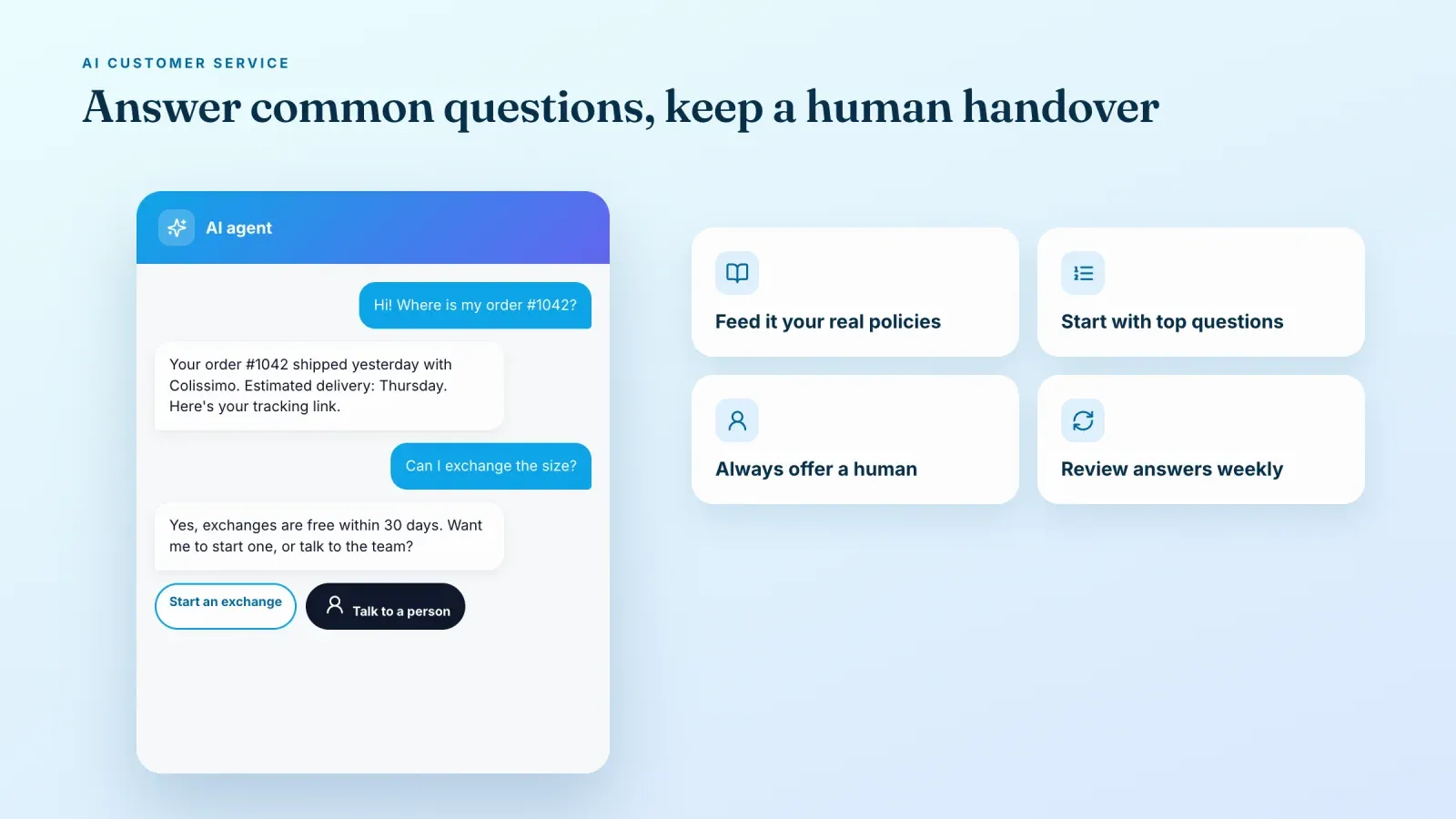
Customers expect quick answers, especially to "where is my order?" and "which size should I pick?". AI chatbots and AI agents can now answer many of these on their own.
Tidio combines live chat, email and an AI agent called Lyro, which answers questions based on your FAQs and store information. It suits small and mid-sized stores. Tidio has a free plan, and Lyro conversations are billed separately, so check how many conversations your plan includes.
Gorgias is a helpdesk designed for ecommerce, with deep integrations with store platforms. Its AI agent can handle order status, returns and product questions. AI interactions are billed per interaction, about $0.90 to $1.00 each at list prices, on top of the helpdesk plan.
How to get good results:
- Feed the AI your real information. Shipping times, return policy, size charts and product details.
- Start with the most common questions. Order tracking, delivery times and returns usually make up a large share of messages.
- Keep a human handover. Customers should always be able to reach a person for complex or emotional issues.
- Review conversations weekly. Fix wrong answers and add missing information.
AI email marketing
Email marketing is one of the most profitable channels for small stores, and AI makes it easier to run well.
Klaviyo is the leading email and SMS platform for ecommerce. Its AI features help write subject lines and content, build segments from plain-language descriptions, predict when customers are likely to buy again and suggest the best send time. The free plan covers up to 250 contacts and 500 emails a month, and paid plans grow with your list.
Even without a dedicated tool, an AI assistant can draft welcome sequences, abandoned cart emails and post-purchase follow-ups that you then load into your email software.
AI tools for SEO and content
Search is still a major source of free traffic, and AI helps you produce optimized content faster.
Surfer analyzes the pages that rank for a keyword and tells you which topics, terms and structure your page needs. It also includes AI writing features. Plans start around $90 a month on annual billing, so it makes most sense once content is a real growth channel for you.
Your AI assistant can also help with keyword ideas, meta titles and descriptions, product page structure and blog outlines. Always edit AI drafts. Search engines reward helpful, accurate, original content, and generic text rarely ranks. For a deeper look at automating search work, read our guide to the SEO agent.
AI for advertising
The biggest AI tools for advertising are already inside the ad platforms you use.
Meta Advantage+ uses AI to choose audiences, placements and creative combinations across Facebook and Instagram. Advantage+ shopping campaigns can find buyers with very little manual targeting.
Google Performance Max runs your ads across Search, Shopping, YouTube, Display, Gmail and Maps from a single campaign, with AI deciding where to spend.
Both are included at no extra cost beyond your ad spend. Their results depend on the quality of your creatives and your conversion tracking. Feed them several strong images and videos, and make sure purchases are tracked correctly. To see what competitors are running before you build your own ads, the Facebook Ads Library is free and full of ideas.
AI pricing tools
Prisync tracks competitors' prices and stock and can adjust your prices automatically based on rules you set. Plans start at $99 a month for 100 products, and dynamic pricing is an add-on. It's most useful for stores selling products that customers can easily compare, such as electronics, beauty or home goods.
For small catalogs, a simple spreadsheet of competitor prices reviewed monthly, with an AI assistant summarizing changes, can be enough.
AI translation
Selling in several countries means translating product pages, emails and customer replies.
DeepL is widely regarded as one of the most natural-sounding translation tools, especially for European languages such as French, German and Spanish. There's a free version with limits and paid plans for business use, with better privacy and document translation.
Machine translation is good enough for a first draft, but have a native speaker check your key pages, especially product names, sizes, legal texts and anything involving prices.
AI automation
Automation tools connect your apps and move information between them without manual work.
Zapier connects thousands of apps and lets you add AI steps to workflows. For example, a new order can trigger a personalized thank-you email drafted by AI, a new review can be summarized and posted to your team chat, or a customer message can be categorized automatically. There's a free plan with limited tasks, and paid plans for more volume and multi-step workflows.
Start with one workflow that saves you time every week, test it carefully, then add more.
A starter AI stack by budget
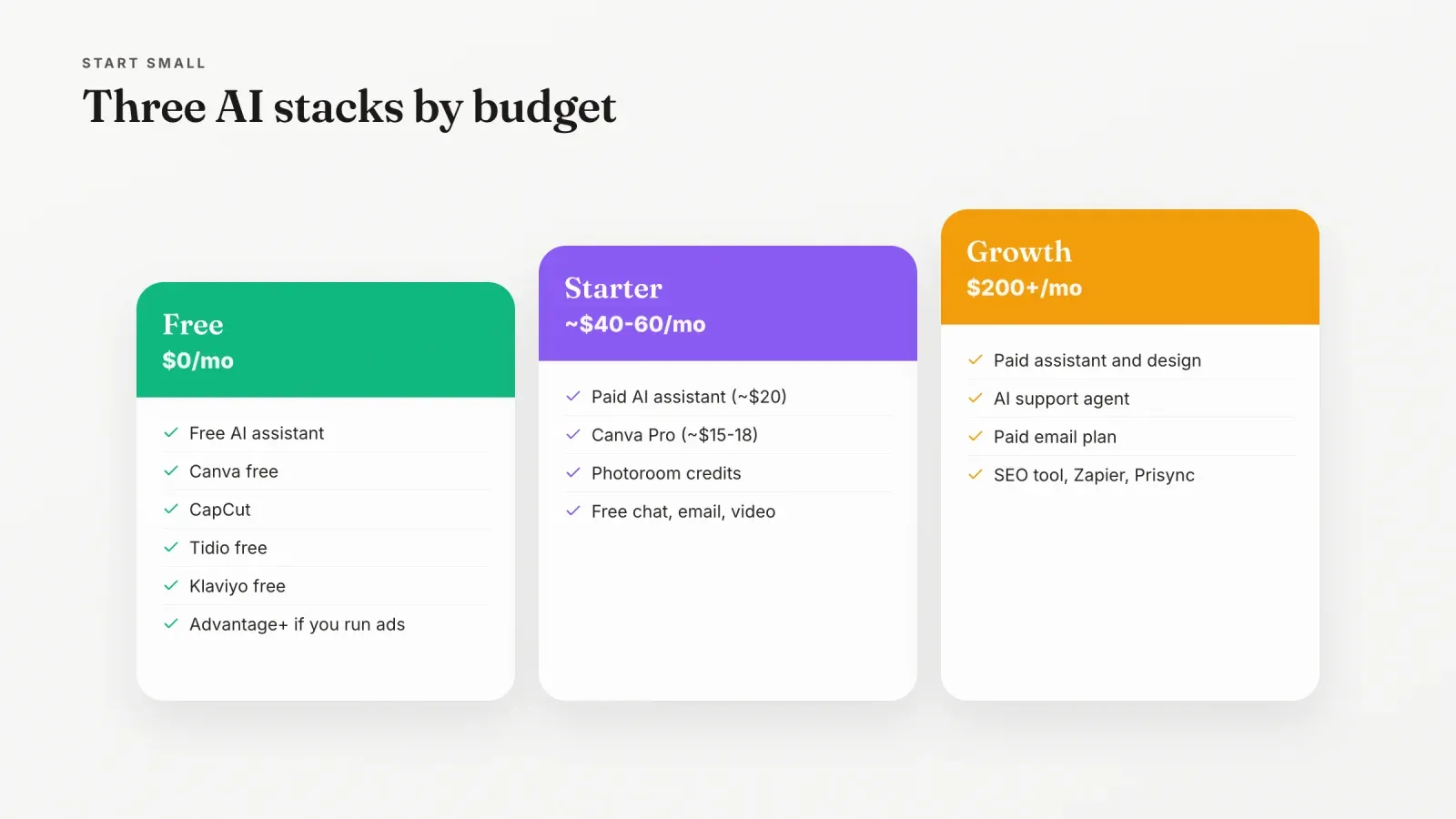
You don't need every tool. Here are three simple stacks.
Free stack, $0 a month
- A free AI assistant for writing and analysis.
- Canva's free plan for visuals.
- CapCut for video editing.
- Tidio's free plan for live chat.
- Klaviyo's free plan for your first 250 contacts.
- Meta Advantage+ if you already run ads.
Starter stack, about $40 to $60 a month
- One paid AI assistant at about $20 a month.
- Canva Pro at about $15 to $18 a month.
- A paid Photoroom plan or a few credits for product photos.
- Free plans for chat, email and video until volume justifies upgrading.
Growth stack, $200 a month and more
- Paid AI assistant and design tools.
- An AI customer service agent, billed per conversation or interaction.
- A paid email plan as your list grows.
- Surfer or a similar SEO tool if content is a key channel.
- Zapier for automations, and Prisync if price competition matters.
How to choose AI tools for your store
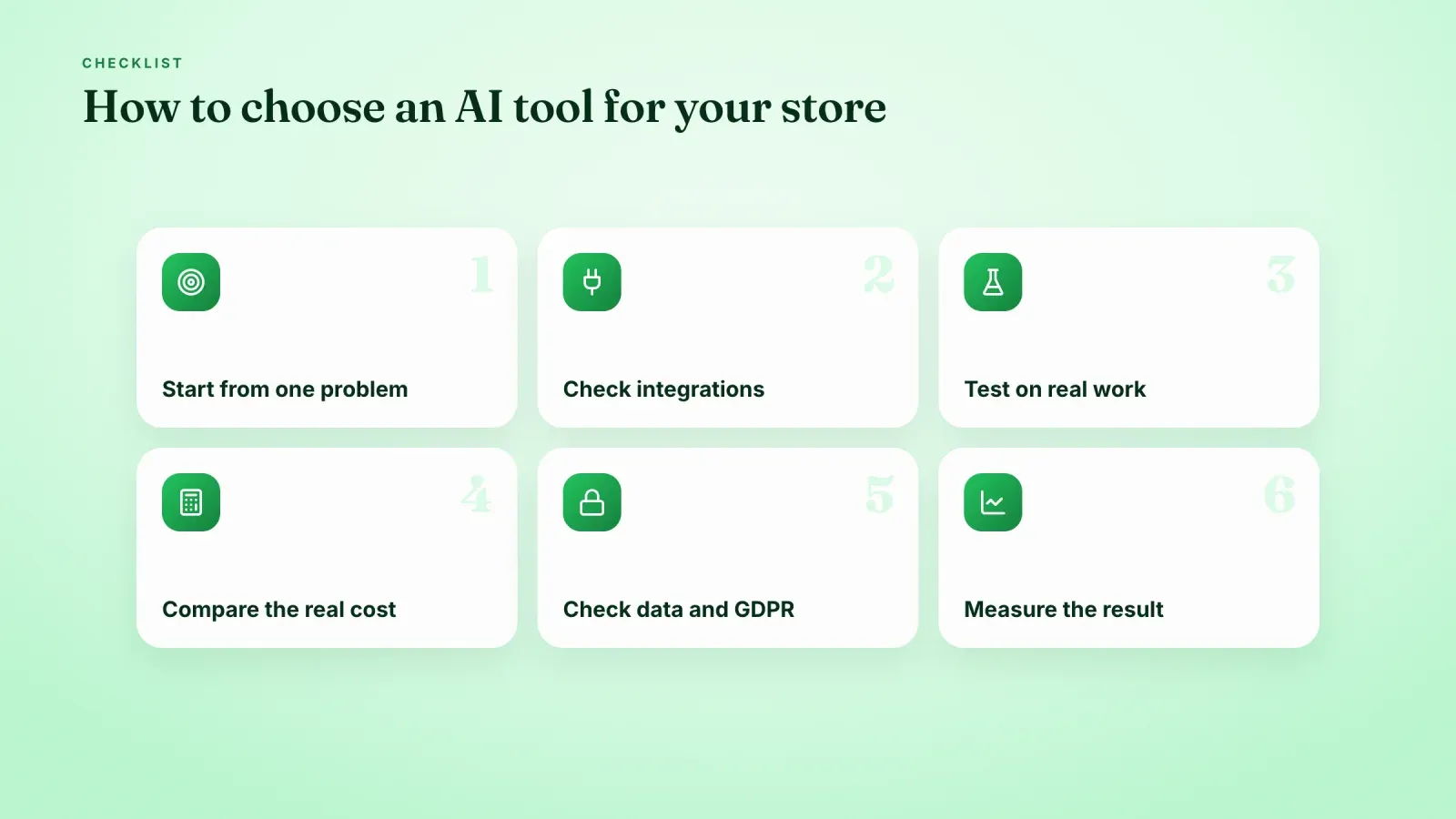
Start from a problem. Pick the task that takes most of your time or loses you the most money, then look for a tool that solves it.
Check integrations. The tool should connect to your store platform, email software or helpdesk. A tool that doesn't fit your workflow won't be used.
Test before paying. Use free plans and trials on real work, such as ten real product descriptions or a week of real customer questions.
Compare the real cost. Look at per-conversation, per-credit and per-user pricing, not just the headline price.
Check data and privacy. Know where customer data goes, whether it's used to train models, and whether the vendor offers data processing agreements for GDPR if you sell in Europe.
Measure the result. Track time saved, conversion rate, response time or revenue before and after.
Prompts you can use today
Copy these into your AI assistant and adjust the details.
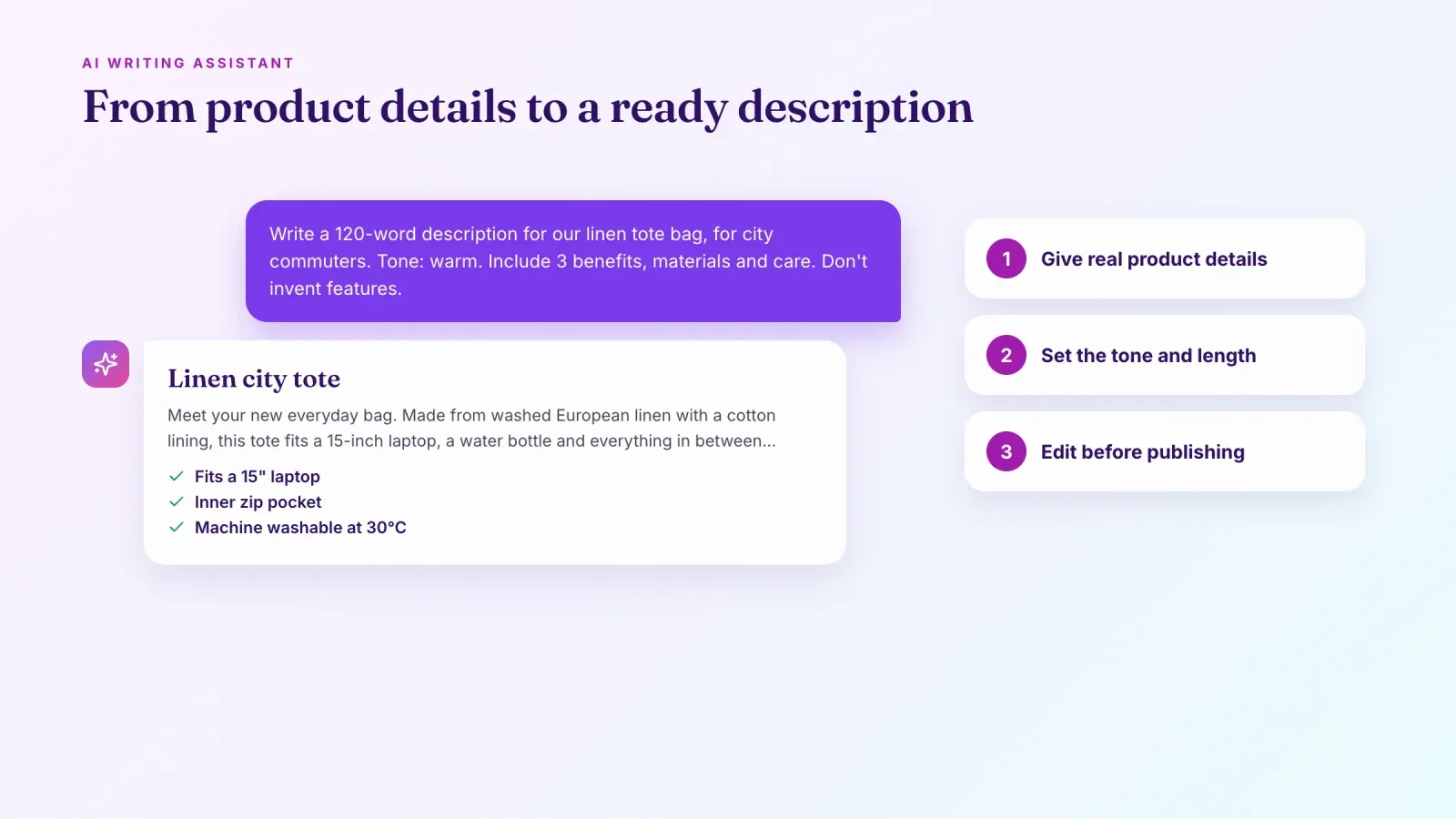
- Product description. "Write a product description of about 120 words for [product], for [target customer]. Tone: [warm, playful or premium]. Include three benefits, materials and care instructions, and end with a short call to action. Don't invent features."
- Review summary. "Here are 50 customer reviews. Summarize the three things customers love most, the three most common complaints and one product improvement idea."
- Email sequence. "Write a 3-email welcome sequence for a new subscriber of [store], which sells [products]. Email 1 thanks them and shares our story, email 2 presents our best-sellers, email 3 answers common questions. Keep each under 150 words."
- Ad variations. "Write 10 short hooks for a Reel ad about [product], each under 10 words, mixing questions, bold statements and problem-and-solution angles."
- Sales analysis. "Here's my sales export for the last 6 months. Identify my top 10 products by revenue, products with falling sales and any seasonal patterns, and suggest two bundles."
Rules and risks to keep in mind
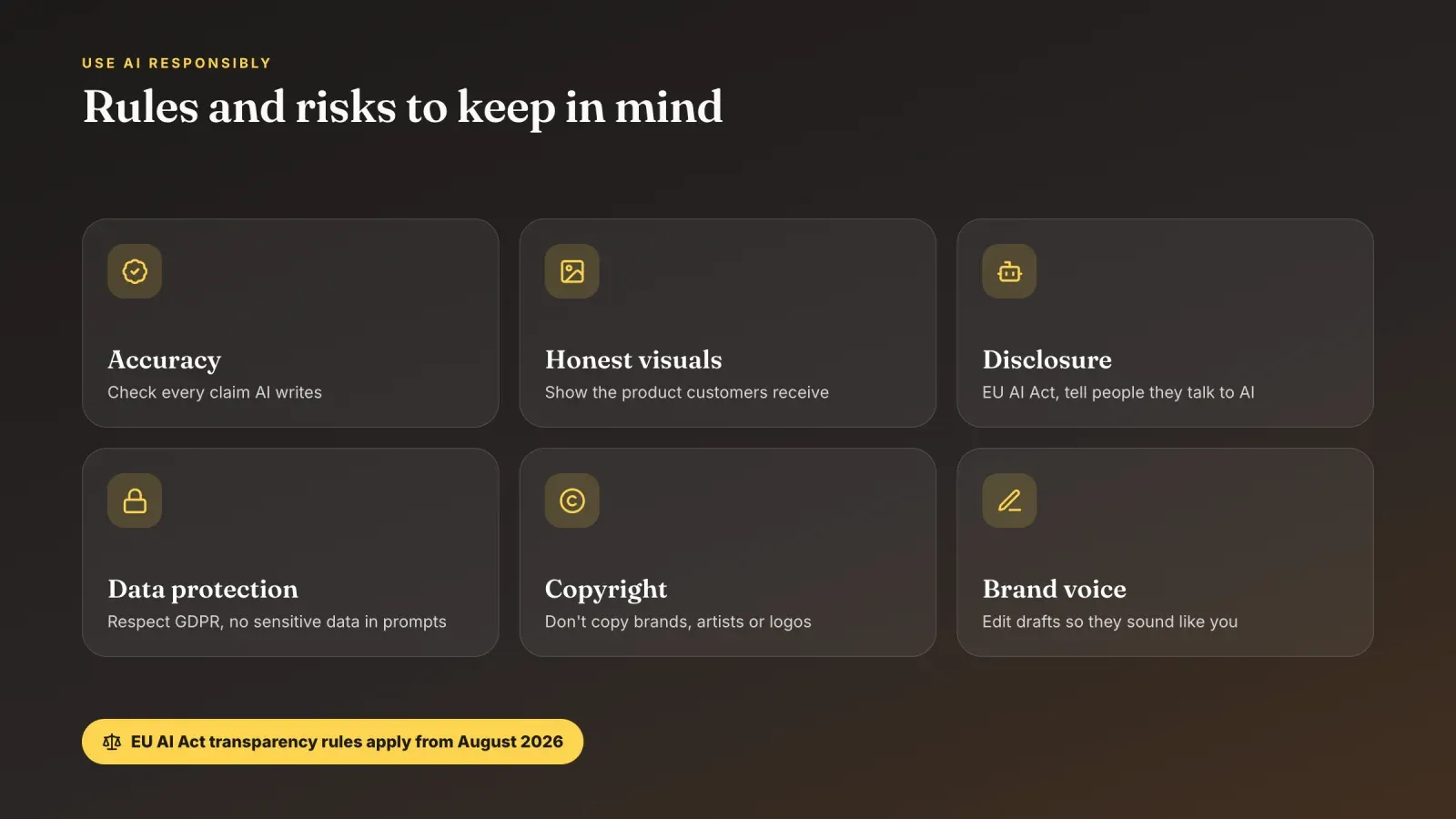
AI tools are powerful, but they come with responsibilities.
- Accuracy. AI can invent facts, features or numbers. Check every claim, especially about materials, safety, health or sustainability.
- Honest visuals. Product images must reflect what customers receive. Misleading AI images lead to returns, bad reviews and possible consumer law issues.
- Disclosure. In the European Union, the AI Act's transparency rules apply from August 2026. People must be told when they're talking to an AI system such as a chatbot, and certain AI-generated content must be identifiable as such.
- Data protection. Don't paste sensitive customer data into tools without a clear data agreement, and respect GDPR and similar privacy laws.
- Copyright and brand rights. Avoid generating content that copies other brands, artists or trademarks.
- Brand voice. Edit AI drafts so they sound like you. Customers notice generic text.
Common mistakes
Buying too many tools at once. Start with one or two tools and add more only when they prove their value.
Publishing AI content without editing. Unchecked text and images create errors and damage trust.
Hiding the human behind the bot. A chatbot that never hands over to a person frustrates customers with real problems.
Ignoring the real cost. Per-conversation or per-credit fees can grow fast with volume.
Forgetting the basics. AI can't fix a weak product, unclear pricing or a slow checkout.
Frequently asked questions
What are the best AI tools for ecommerce? It depends on your needs. Most small stores get the most value from an AI assistant such as ChatGPT, Claude or Gemini, a design tool such as Canva or Photoroom, a chatbot such as Tidio and an email platform with AI features such as Klaviyo.
Are there free AI tools for ecommerce? Yes. ChatGPT, Claude, Gemini, Canva, CapCut, Tidio, Klaviyo and Zapier all offer free plans with limits, which is enough to start.
Can AI write my product descriptions? Yes, and it can save hours. Give it accurate product details, your tone of voice and examples, then edit the result to make sure every claim is true.
Can AI replace customer service? It can handle a large share of simple questions, such as order status and return policies. Complex, sensitive or angry customers still need a human, so always keep a way to reach a person.
Do I need to tell customers I use AI? In the EU, the AI Act requires telling people when they interact with an AI system such as a chatbot, from August 2026. It's good practice everywhere to be transparent.
Can AI create an online store for me? AI can help generate content, images and ideas for your store, and some platforms include AI assistants. You still need a store platform with product pages, checkout and payments.
Is AI-generated content bad for SEO? Not by itself. Google judges content on quality and usefulness, however it's produced. Thin, generic or inaccurate pages perform poorly, so use AI for drafts and structure, then add your own expertise, real product details and original photos.
How much do AI tools for ecommerce cost? Many start free. Paid AI assistants cost about $20 a month, design tools around $15 to $18 a month, and customer service AI is often billed per conversation or interaction.
Put your AI-made content to work
AI helps you create products, photos, videos and copy faster. You still need a place where customers can buy. Create your free Roctify page to turn your link in bio into a storefront with built-in checkout for physical and digital products, with 0% transaction fees on every plan. If you're looking for product ideas to create with these tools, see our list of digital products that sell.