Google handles the vast majority of searches worldwide, so much that "to google" has become a verb. But it is far from the only way to search the web. There are dozens of search engines other than Google, and some of them do things Google does not: they protect your privacy, run on their own independent index, answer questions with AI and cited sources, fund climate projects, or let you pay to remove ads completely.
Whether you want more privacy, less advertising, a different perspective in your results, or you simply want to understand where your customers search, knowing the alternatives is useful. And if you run a business or a website, other search engines are also a source of visitors that many competitors ignore.
This guide presents the best search engines other than Google, what makes each one different, how to choose the right one for you, how to make it your default in your browser, and how to make sure your own website shows up on them.
Why use a search engine other than Google?
People switch for different reasons, and it helps to know which one matters most to you.
Privacy. Most large search engines build a profile from your searches to personalize results and ads. Privacy-focused engines avoid tracking you or storing your personal search history.
Fewer ads and less clutter. Some alternatives show fewer or lighter ads, and a few remove them entirely in exchange for a subscription.
Independence and diversity. Every search engine ranks the web differently. An engine with its own index can surface pages you would not find on the first page of Google.
AI answers. A new generation of answer engines summarizes information and cites its sources, which can be faster for research questions.
Values. Some engines use their profits for environmental or social causes, or are based in regions with strict data protection laws.
Reaching more customers. For businesses, users of other engines are real people with real needs. Being visible there brings traffic that is often less competitive.
Privacy engines vs independent engines
Two words often get mixed up when people talk about alternatives: private and independent.
A private search engine focuses on protecting your identity. It avoids tracking, profiling, and storing your personal search history. But it may still get its results from a larger engine behind the scenes.
An independent search engine has its own crawler and its own index of the web. It decides which pages exist in its database and how to rank them, without relying on Google or Bing.
Some engines are both, some are one or the other. Neither is automatically better. If your priority is not being tracked, a private engine that uses another company's results is perfectly fine. If you care about diversity of results and reducing dependence on a few big companies, independence matters more.
1. Bing
Bing is Microsoft's search engine and the largest alternative to Google in many countries. It runs on its own large index of the web, and that index also powers several other search engines and services.
What stands out:
- Strong web, image, video, and news search.
- AI features through Microsoft Copilot, which can summarize results and answer follow-up questions.
- Microsoft Rewards, which gives points for searching that can be exchanged for gift cards and other rewards in eligible countries.
- Deep integration with Windows and the Microsoft Edge browser.
Good to know: Bing is ad-supported and personalizes results when you are signed in with a Microsoft account. It is a solid all-round alternative if you want results comparable to Google's with a different ranking.
For website owners: Bing Webmaster Tools lets you submit your sitemap, see how Bing crawls your site, and check which searches bring you traffic.

2. DuckDuckGo
DuckDuckGo is probably the best-known privacy search engine. Its promise is simple: it does not track your searches or build a personal profile from them.
What stands out:
- No personal search history and no profiling for ads.
- Results built from many sources, including Bing and its own crawler.
- "Bangs," shortcuts such as !w for Wikipedia or !a for Amazon, that send your search directly to another site.
- Optional AI-assisted answers for some queries.
- Its own browser apps with tracker blocking.
Good to know: DuckDuckGo shows ads, but they are based on what you search right now, not on a profile. The results can feel less personalized than Google's, which is exactly what many users want.
3. Brave Search
Brave Search, from the company behind the Brave browser, runs on its own independent index. That makes it one of the few major engines that does not depend on Google or Bing for its core results.
What stands out:
- Independent index built by its own crawler.
- No user profiling.
- AI-generated summaries at the top of many results.
- "Goggles," custom rules that let you re-rank results, for example to favor certain types of sites.
- An optional paid plan that removes ads.
Good to know: Because the index is newer, results for very niche or local queries can sometimes be thinner than Google's. For everyday searches, it is fast and capable.
4. Startpage
Startpage offers something unique: results similar to Google's, delivered without the tracking. It acts as a privacy layer between you and the results.
What stands out:
- Google-quality results without your searches being linked to your identity.
- "Anonymous View," which lets you open search results through a proxy so websites cannot see your IP address.
- Based in Europe, under strict data protection rules.
Good to know: Startpage is private but not independent, since its results come from another engine. It is ideal if you like Google's results but not its tracking.

5. Ecosia
Ecosia is a search engine with a mission: it uses its profits to fund climate action, best known for tree-planting projects around the world.
What stands out:
- Profits go toward climate and reforestation projects.
- Regular financial reports showing how the money is used.
- A privacy-friendly approach that does not sell your data to advertisers.
- Results powered by larger engines, with work underway with other European partners on a shared European index.
Good to know: Ecosia is ad-supported, and its impact grows with the number of searches. It is a good fit if you want your everyday searching to support a cause.
6. Qwant
Qwant is a French search engine built around privacy and European values. It does not track users or profile them for advertising.
What stands out:
- No personal tracking and the same results for everyone searching the same query.
- A clean interface and a focus on European users.
- Part of a European effort to build a shared independent index.
Good to know: Some of Qwant's results come from partners, and its index is still growing. It is a natural choice for French and European users who want a local, privacy-respecting alternative.
7. Kagi
Kagi takes a completely different approach: it is a paid search engine with no ads at all. You pay a subscription, and the product is designed only around the quality of your results.
What stands out:
- No ads and no tracking-based business model.
- Control over your results, such as blocking sites you never want to see or boosting sites you trust.
- "Lenses" that focus your search on specific types of content, such as forums or academic sources.
- AI tools for summarizing pages and answering questions.
Good to know: Kagi offers a limited free trial, then requires a monthly subscription. It appeals to people who search a lot for work and value a clean, customizable experience.

8. Perplexity
Perplexity is an AI answer engine. Instead of a list of links, it writes a direct answer to your question and shows the sources it used, so you can check them.
What stands out:
- Conversational answers with numbered citations.
- Follow-up questions in the same thread.
- Useful for research, comparisons, and learning about a new topic quickly.
- A free version and a paid plan with more advanced features.
Good to know: AI answers can occasionally be wrong or incomplete. Always open the cited sources for important decisions. Perplexity complements a classic search engine more than it replaces one.
9. ChatGPT search
ChatGPT, from OpenAI, can search the web and include up-to-date information and links to sources in its answers. For many people, it has become a new starting point for questions they used to type into a search engine.
What stands out:
- Answers written in natural language, with links to the pages used.
- The ability to refine a question through conversation.
- Useful for planning, explaining, comparing, and summarizing.
Good to know: Like other AI tools, it can make mistakes, and it is less suited to quickly browsing many results or finding a specific website. Use it for understanding, and a classic engine for discovery and navigation.
10. Mojeek
Mojeek is a UK search engine with its own independent crawler and index, built from scratch. It is one of the longest-running truly independent engines.
What stands out:
- Fully independent index.
- No tracking of users.
- Results that are often genuinely different from the big engines, which can help you discover smaller websites.
Good to know: The index is smaller than Google's or Bing's, so results for very specific queries may be limited. It is a great second opinion when you want a different view of the web.
Regional search engines
In some countries, local search engines have a large share of searches, and they matter if you do business there.
- Yandex is widely used in Russia and some neighboring countries.
- Baidu is the leading search engine in China.
- Naver is a major search portal in South Korea.
- Seznam is a popular search engine in the Czech Republic.
- Yahoo remains a familiar brand in several markets, with web results powered by Bing.
If your customers are in one of these markets, check how your website appears on the local engine, and use its webmaster tools when available.
Comparing the main alternatives at a glance
Here is a quick summary of how the engines above differ on the points people care about most.
- Bing: own index, ad-supported, personalized when signed in, strong AI features.
- DuckDuckGo: mixed sources including Bing, no profiling, contextual ads, bangs.
- Brave Search: own independent index, no profiling, optional ad-free plan.
- Startpage: Google-sourced results, strong privacy, anonymous page viewing.
- Ecosia: results from larger engines, profits fund climate projects.
- Qwant: European, no profiling, same results for everyone.
- Kagi: paid, no ads, highly customizable.
- Perplexity: AI answers with citations, free and paid plans.
- ChatGPT search: conversational answers with sources inside ChatGPT.
- Mojeek: fully independent index, no tracking, smaller but different results.
When comparing, try the same five or six searches you do every week on two or three engines. Look at whether you find what you need on the first screen, how many ads you see, and how comfortable the layout feels. Your own habits are the best test.
How to choose the right search engine
Start from your main priority:
- Maximum privacy with minimal change: DuckDuckGo or Startpage.
- Google-like results without tracking: Startpage.
- An independent index: Brave Search or Mojeek.
- The closest overall alternative to Google: Bing.
- Support a cause: Ecosia.
- European and privacy-focused: Qwant or Ecosia.
- No ads, full control, willing to pay: Kagi.
- Quick answers with sources: Perplexity or ChatGPT search.
You do not have to choose only one. Many people use a privacy engine by default, an AI engine for research, and switch to another engine when they cannot find what they need. DuckDuckGo's bangs make that easy: add !g, !b, or another shortcut to send a single search elsewhere.
11. How to make another search engine your default
Changing your default search engine takes less than a minute in most browsers.
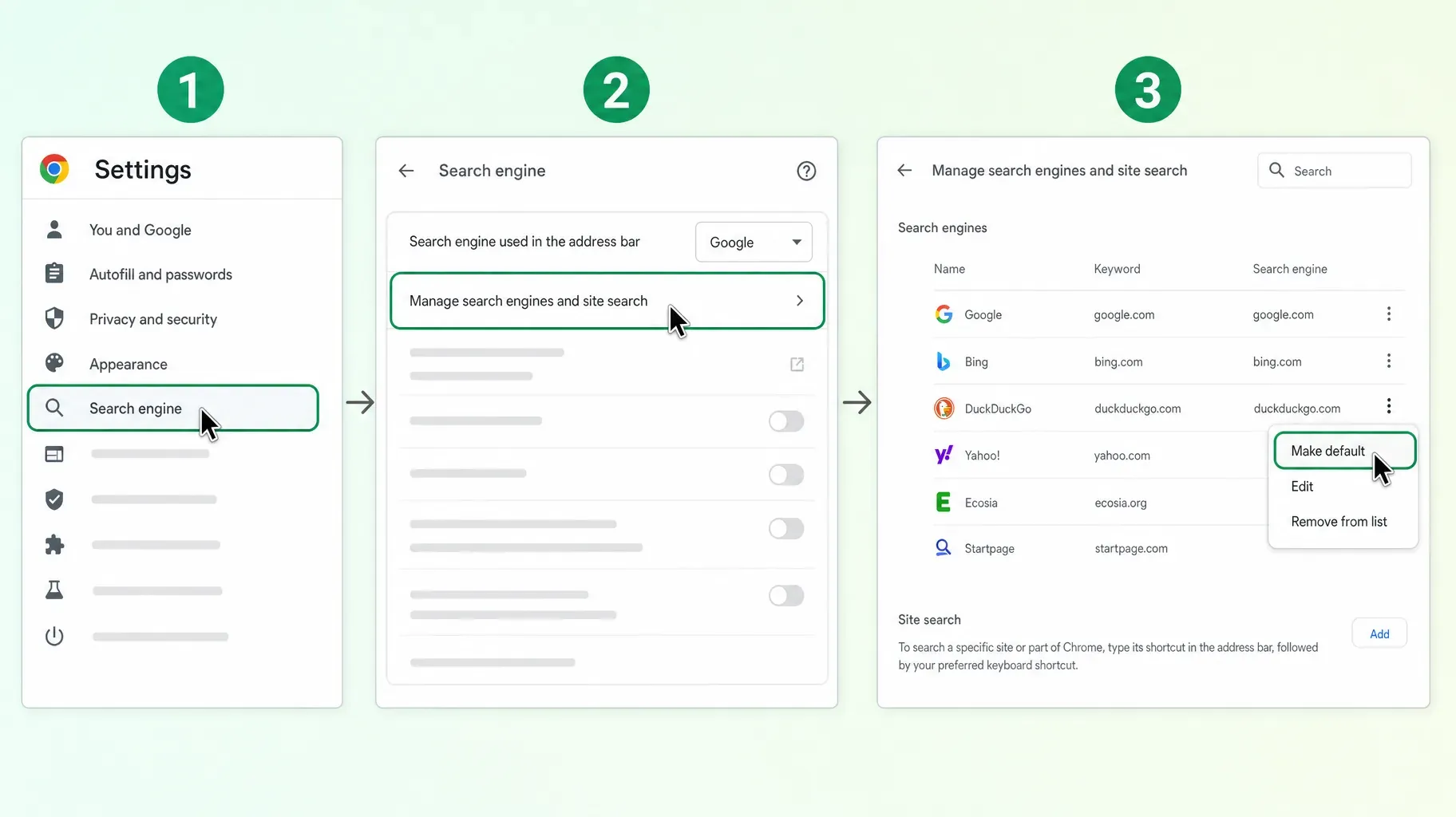
In Google Chrome on a computer:
- Open Chrome and go to Settings.
- Click Search engine in the left menu.
- Choose an engine from the list next to "Search engine used in the address bar."
- If the engine you want is not listed, click Manage search engines and site search, find it or add it, then click the three-dot menu next to it and choose Make default.
In Safari on iPhone: open Settings, tap Safari, tap Search Engine, and choose from the list.
In Firefox: open Settings, go to Search, and choose your default search engine.
In Microsoft Edge: open Settings, go to Privacy, search, and services, then Address bar and search, and choose your search engine.
On Android: open your browser's settings and look for the search engine option. Many privacy engines also offer their own browser apps with the engine built in.
Tip: Try your new engine for a full week before deciding. It takes a few days to get used to a different layout and ranking, and you will quickly see whether it works for your everyday searches.

12. How to get found on search engines other than Google
If you run a website, a shop, or a link-in-bio page, other search engines are an opportunity. The basics that help you rank on Google help you everywhere, but a few extra steps make a difference.
Submit your site to Bing Webmaster Tools. Because Bing's index powers several other engines, being well indexed on Bing can improve your visibility on some of them too. Submit your sitemap and check for crawl errors.
Use IndexNow. IndexNow is a protocol that lets you instantly notify participating search engines, including Bing, Yandex, Seznam, and Naver, when a page is added or updated. Many website platforms and plugins support it, and it helps new content appear faster.
Keep a clean, up-to-date sitemap. Make sure it lists every important page and only real, working URLs, with accurate last-modified dates.
Write clear titles and descriptions. Every engine uses them to understand your pages and build their result snippets.
Make your site fast and mobile-friendly. Speed and usability matter to users on every engine.
Structure your content for AI answers. AI engines favor clear, well-organized pages that answer questions directly, with headings, short paragraphs, lists, and FAQs. Being cited as a source can bring qualified visitors.
Check local and regional engines. If you sell in a market where a local engine is popular, register with its webmaster tools and check how your pages appear.
Track your traffic sources. In your analytics, look at visitors from each search engine. You may be surprised by how much traffic already comes from outside Google.
Search engines for specific needs
Beyond general-purpose engines, some tools are better suited to particular kinds of searches.
Families and schools. Some engines focus on filtering adult and violent content by default, making them a safer choice for children and classrooms.
Academic research. Scholarly search tools index research papers, theses, and citations, and are more reliable than general engines for academic work.
Code and technical questions. Developers often combine a general engine with AI assistants and documentation search to find answers faster.
Shopping. Marketplaces and price comparison sites work as search engines for products, with filters for price, delivery, and reviews.
Local businesses. Map apps are the search engine of choice for finding shops, restaurants, and services nearby, so keeping your business listings accurate matters as much as your website.
Knowing which tool fits each task saves time and often gives better results than forcing every question into one search box.
Mistakes to avoid when switching
Expecting identical results. Each engine ranks differently. Give it time, and use shortcuts to check another engine when needed.
Confusing private with independent. A privacy engine may still use another company's results, which is fine as long as you know what you are choosing.
Trusting AI answers blindly. Always check the sources for important information.
Forgetting your mobile browser. Change the default on your phone too, since that is where many searches happen.
Ignoring other engines as a business. If you only optimize for Google, you may miss visitors who are easier to reach elsewhere.
Frequently asked questions
What is the best search engine other than Google?
It depends on your priority. Bing is the closest all-round alternative, DuckDuckGo and Startpage are excellent for privacy, Brave Search and Mojeek offer independent indexes, Ecosia supports climate projects, and Kagi removes ads entirely for a subscription.
Which search engine does not track you?
DuckDuckGo, Startpage, Brave Search, Qwant, and Mojeek are all known for not building personal profiles from your searches. Always check each engine's privacy policy for details.
Do other search engines use Google's results?
Some do. Startpage shows results sourced from Google, while others rely on Bing or build their own index. Brave Search and Mojeek run on their own independent indexes.
Are AI search engines replacing Google?
Not entirely. AI answer engines are great for summaries and research, but classic search engines remain better for browsing many results, finding specific websites, and local searches. Most people use both.
How do I change my default search engine?
In your browser's settings, look for the search engine or search section and choose a new default. In Chrome, go to Settings, then Search engine.
Should my business care about search engines other than Google?
Yes. Users of other engines are real customers, competition is often lower, and tools like Bing Webmaster Tools and IndexNow make it easy to get indexed.
Search smarter, and be found everywhere
Google is not the only door to the web. Whether you value privacy, independence, AI answers, or a cause, there is a search engine other than Google that fits the way you search, and switching takes less than a minute.
If you are a creator or a business, make sure people can find you whatever engine they use. A fast, well-structured page with a clear title and description helps you appear across search engines and AI answers. A Roctify page gives you a mobile-first link-in-bio and storefront with clean SEO settings, so your brand, products, and links are easy to find. Create your Roctify page and get found beyond Google.