TikTok can put your videos in front of thousands of people in a single afternoon. Turning those viewers into subscribers, customers, or clients is harder, because TikTok gives you very few places to send them. Links in captions and comments are not clickable, so the website field on your profile, your link in bio, is the main door from TikTok to everything else you offer.
The catch is that not every account can add a link right away. You may not see the website field at all, or you may see it and wonder why your link does not work. This guide explains exactly who can add a link to their TikTok bio, how to add it step by step, how to unlock the option if it is missing, what to do in the meantime, and how to turn that single link into real results.
Who can add a link to their TikTok bio?
TikTok does not show the website field to every account. Based on how the feature works today, you can usually add a clickable link if one of these applies:
- You have a Business account. Switching to a Business account generally unlocks the website field right away, with no follower minimum.
- You have a personal account with at least 1,000 followers. Personal accounts typically see the website field once they reach that milestone.
In both cases, you also need to be at least 18 years old, and the feature may vary by country and app version. TikTok adjusts its features over time, so if the steps below do not match what you see, update the app and check again.
What about links in captions and comments? They appear as plain text and cannot be tapped. That is why "link in bio" became the standard call to action on TikTok, and why the one clickable link on your profile matters so much.
How many links can you add? One. TikTok gives you a single website field. If you want to send people to several places, point that link to a link-in-bio page that lists everything.
Business account or personal account?
If you do not have 1,000 followers yet, switching to a Business account is the quickest way to get a clickable link. Before you switch, know the trade-offs.
What you gain with a Business account:
- The website field in your profile, usually without a follower minimum.
- Access to business analytics and insights about your audience and videos.
- Business tools such as contact buttons, promotion options, and, in some regions, shopping features.
What you give up:
- Access to the full music library. Business accounts use the Commercial Music Library, a collection of sounds cleared for commercial use. Many trending songs are not available.
- Some features and programs designed for personal creator accounts may not be available.
Which to choose? If you run a business, sell products, or promote services, a Business account usually makes sense, and the link alone can justify the switch. If trending music is central to your content and you are close to 1,000 followers, it may be worth staying personal until you reach the milestone. You can switch back to a personal account later if you change your mind.
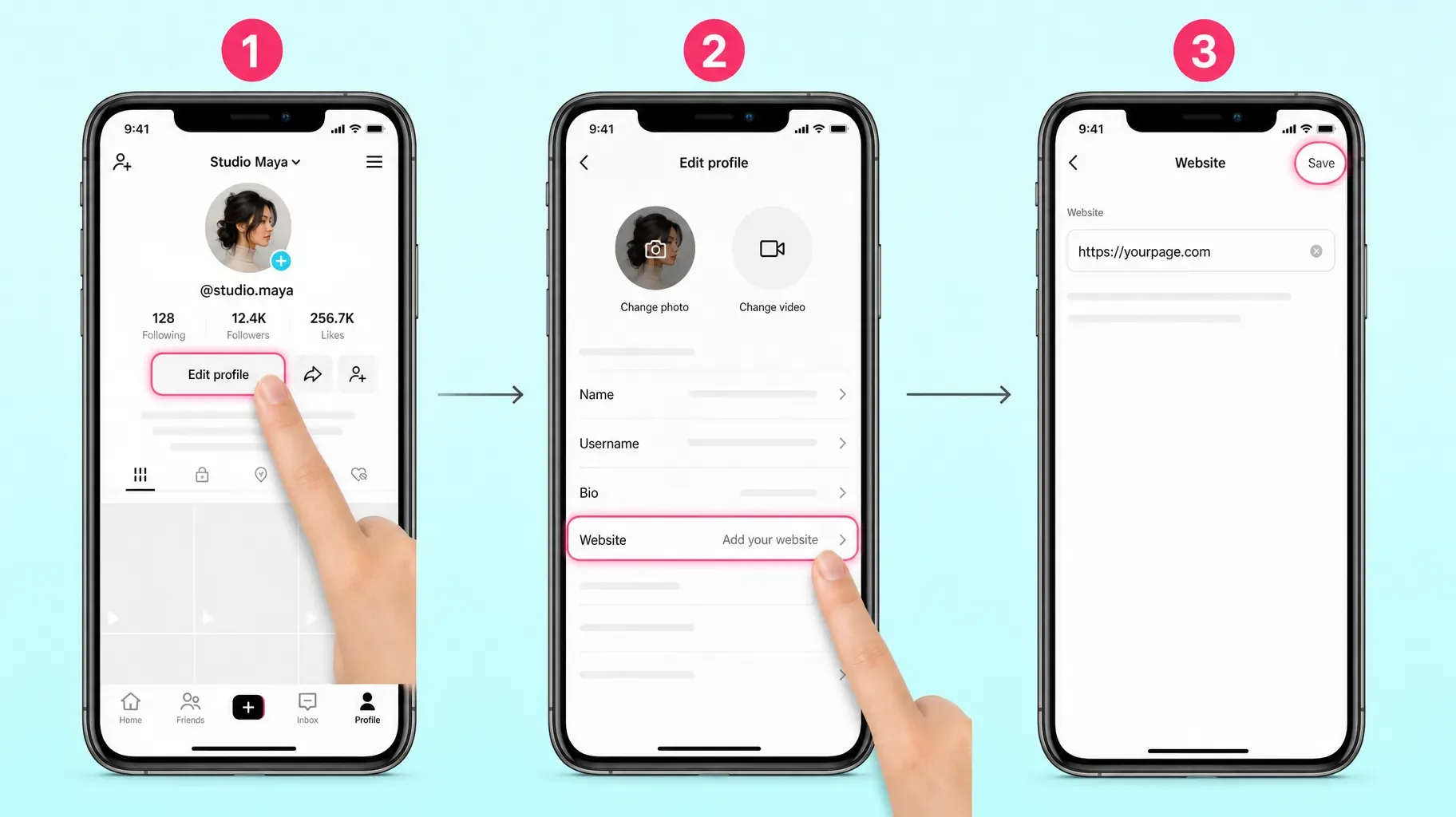
1. Add a link to your TikTok bio
If your account is eligible, adding the link takes less than a minute.
- Open the TikTok app and tap Profile in the bottom right corner.
- Tap Edit profile.
- Tap Website. If you do not see this field, your account is not eligible yet. Skip to section 2.
- Paste your full link, starting with https://.
- Tap Save.
- Go back to your profile. Your link now appears under your bio.
- Tap the link to make sure it opens the right page.
The website field is only available in the mobile app. You cannot add or edit your bio link from TikTok on a computer.
Tip: Copy the address from your browser after opening the page on your phone, instead of typing it. A single wrong character sends visitors to an error page, and TikTok does not always warn you.
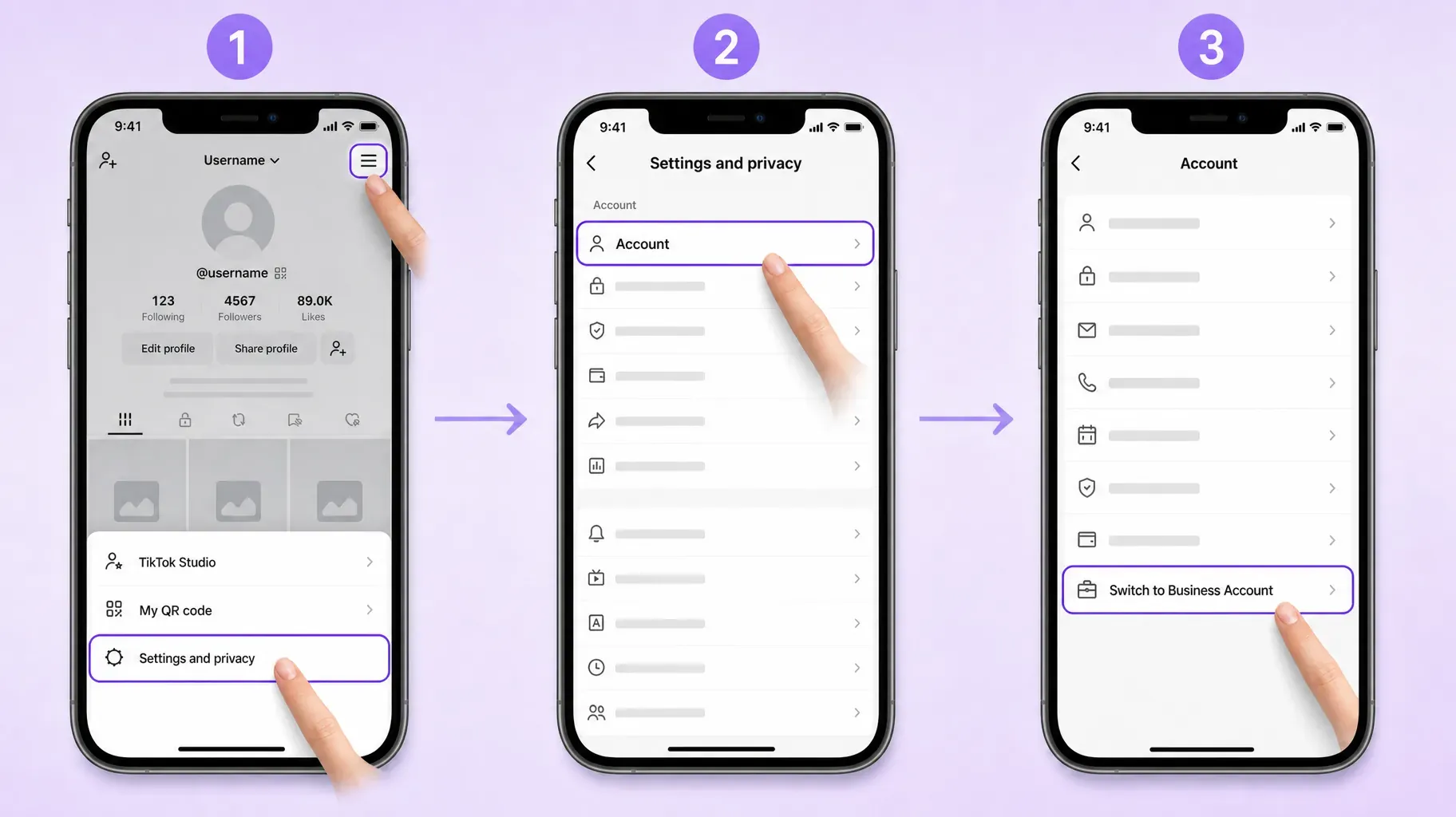
2. Switch to a Business account to unlock the link
If the website field is missing, switching to a Business account usually unlocks it.
- Go to your Profile.
- Tap the three-line menu in the top right corner.
- Tap Settings and privacy.
- Tap Account.
- Tap Switch to Business Account.
- Choose the category that best describes your content or business, such as Personal Blog, Education, Beauty, or Food and Beverage.
- Follow the remaining prompts, such as adding an email address.
Now go back to Edit profile. The Website field should appear. If it does not show up right away, close and reopen the app, and make sure it is up to date.
Switching back. You can return to a personal account at any time from the same Account settings. If you switch back before you have 1,000 followers, you may lose the website field again.
3. Choose the right link for your bio
You only get one link, so choose it carefully. Here are the main options.
Your website or shop. Good if you have one main destination and a site that works well on mobile.
A single product or offer page. Good during a launch or a campaign, when every video points to the same product.
A booking page. Good for coaches, consultants, beauty professionals, and other service providers who want appointments.
A link-in-bio page. Good for most creators and small businesses. One link opens a mobile page with your products, services, latest content, email signup, and other social profiles, so visitors can choose what interests them.
A link-in-bio page is especially useful on TikTok, where one video might promote a product, the next a free guide, and the next your YouTube channel. Instead of changing your bio link every day, you update the page and the link stays the same.
Keep it clean. Use a short, readable address. Long links full of tracking codes look suspicious, and some visitors hesitate to tap them.
4. Write a bio that makes people tap
Your link sits directly under your bio, so the text above it has one job: give people a reason to tap.
Say who you are and what you share. TikTok bios are short, limited to 80 characters, so be specific. "Budget travel tips for students" works better than "Living my best life."
Add a clear call to action. Point to the link with words that promise a benefit: "Free packing list below," "Shop the looks below," or "Book your session below."
Use emojis to guide the eye. An arrow or pointing hand next to your call to action draws attention to the link. One or two are enough.
Match your bio to your current content. If your latest videos promote a new product, your bio should mention it. When the video, the bio, and the link all say the same thing, more people follow through.
Update it regularly. Refresh your call to action whenever your main offer changes, and remove references to offers that have ended.

5. Drive traffic from your videos to your link
Having a link is only the start. Most people will not visit your profile unless your videos give them a reason. Our guide on how to get more followers on TikTok covers the content side in depth.
Say it out loud. End videos with a short, specific call to action: "The full recipe is in my bio," "Grab the free template from the link in my bio."
Show it on screen. Add a text overlay such as "Link in bio" in the last seconds of the video, with an arrow.
Pin a comment. Pin a comment on your video that repeats the call to action. The link will not be clickable, but it reminds people where to go.
Reply to questions with videos. When viewers ask where to buy something or how to get a resource, reply with a short video that points them to your bio link.
Use Stories and lives. Mention your link during lives and in Stories, and pin your offer in live chats when available.
Promote one thing at a time. Videos that point to a single, clear offer get more clicks than videos that mention five different links.
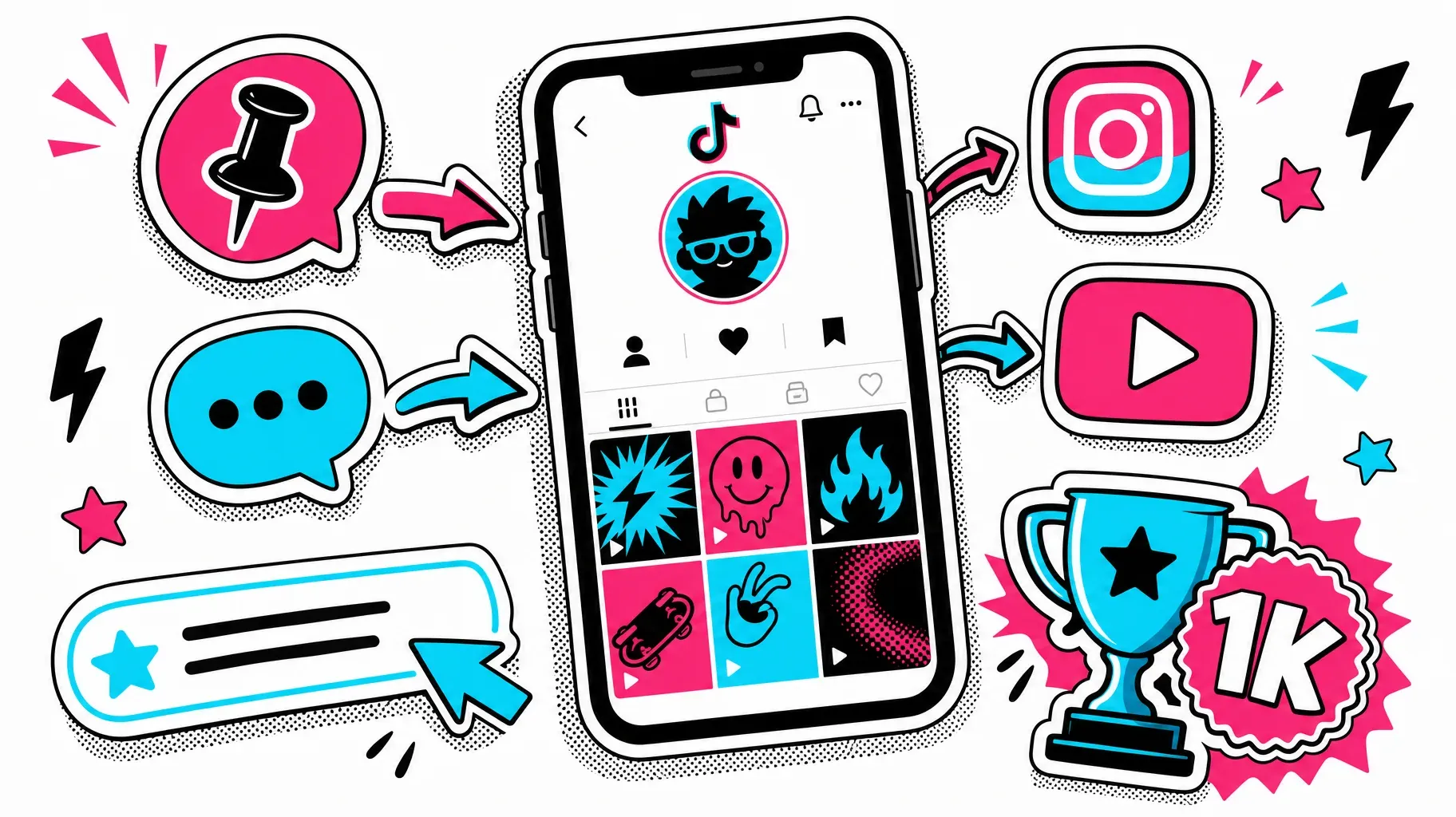
6. What to do if you cannot add a link yet
If you do not want to switch to a Business account and you have fewer than 1,000 followers, you still have options while you grow.
Put your website or handle in your bio as text. It will not be clickable, but people can type it. Keep it short and easy to remember.
Link your other social profiles. TikTok lets you connect Instagram and YouTube accounts to your profile. Those icons are clickable, and your Instagram or YouTube bio can then send people to your link-in-bio page.
Use direct messages. When someone asks for a link, you can send it in a message. Depending on your settings and TikTok's rules, links in messages may be clickable.
Grow toward 1,000 followers. Focus on content that attracts your ideal audience. Consistent posting, strong hooks, and a clear niche help you reach the milestone faster.
Consider switching temporarily. If a launch or event depends on having a link, a Business account can give you one immediately. You can switch back later.
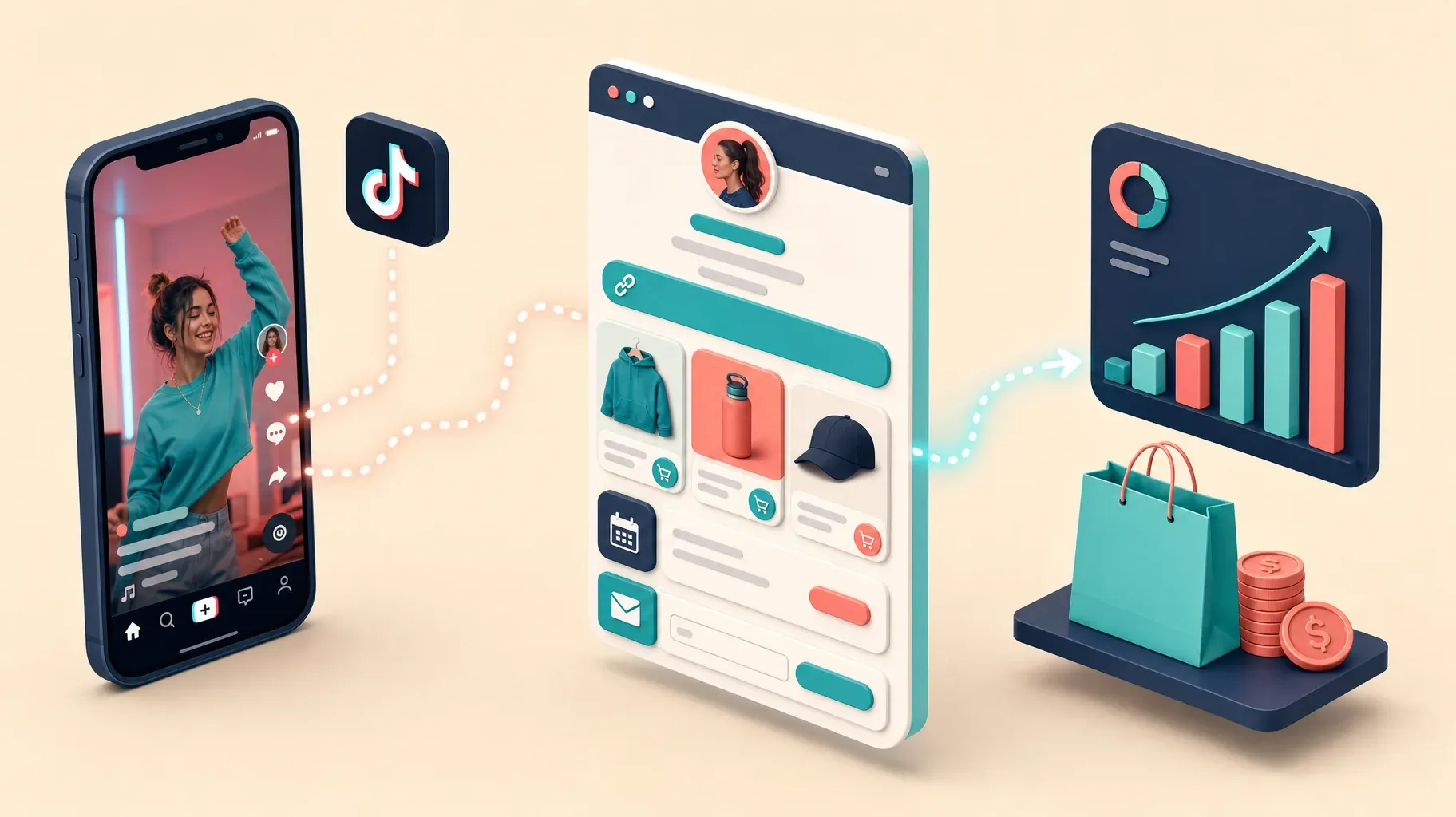
7. Track your clicks and improve your results
Once your link is live, measure what it brings you so you can improve it.
Use TikTok analytics. Business and creator tools show profile views and, in many cases, how often people tap the link in your bio. Watch how these numbers change after new videos.
Use a link-in-bio page with analytics. A link-in-bio page can show how many visitors came from TikTok and which products, buttons, or signups they clicked.
Add campaign parameters to your website link. If your link goes to your own website, add parameters such as a source of "tiktok" and a medium of "bio," so your analytics tool shows exactly how many visits and sales come from TikTok.
Compare videos. Look at which videos led to spikes in profile views and link clicks. Make more of those, with the same kind of hook and call to action.
Test your bio. Change one thing at a time, such as your call to action or the first item on your link-in-bio page, and compare results over a week or two.
What makes a good link-in-bio page for TikTok
If your bio link opens a link-in-bio page, the page itself decides whether visitors act. TikTok viewers arrive quickly, on a phone, often in the middle of scrolling, so the page needs to deliver in seconds.
Put your main offer at the top. The product, guide, or booking mentioned in your latest videos should be the first thing visitors see.
Match the look of your TikTok. Use the same profile photo, colors, and tone, so people instantly know they are in the right place.
Keep it short. Four to six clear buttons or cards work better than a long list. Group the rest under collections or a secondary section.
Show prices and details. If you sell something, show the price and what people get. Hidden details create hesitation.
Let people buy or book on the page. Every extra redirect loses visitors. A page that lets people purchase, book, or sign up directly keeps the momentum from your video.
Capture email addresses. Many TikTok viewers are not ready to buy today. A free resource in exchange for an email address lets you stay in touch after the algorithm moves on.
Load fast. Compress images and avoid heavy embeds at the top. A slow page wastes the attention your video earned.
A weekly routine for your TikTok bio link
- Monday: check which videos from last week brought the most profile views and link clicks.
- Tuesday: update the top of your link-in-bio page to match your best-performing topic or current offer.
- Wednesday: refresh your bio call to action if the offer changed.
- Thursday: publish a video that clearly points to the offer in your bio.
- Friday: remove expired offers and check that every button still works.
Fifteen minutes a week keeps your link aligned with your content, which is what turns views into clicks.
Troubleshooting your TikTok bio link
The Website field is missing. Your account is probably not eligible yet. Switch to a Business account or reach 1,000 followers, check that you are 18 or older, and update the app.
The link does not save. Check the address for typos and spaces, make sure it starts with https://, and try again on a stable connection.
The link is not clickable. Make sure you added it in the Website field of Edit profile, not in the bio text.
TikTok says the link is not allowed. TikTok blocks links it considers unsafe, spammy, or against its guidelines, and may restrict some shortened links. Use the full address of a trustworthy page.
The link disappeared. If you switched from a Business account back to a personal account with fewer than 1,000 followers, the website field may be removed. Account restrictions can also temporarily limit the feature.
The link opens the wrong page. Recheck the saved address in Edit profile, and test the page directly in your browser to rule out a redirect problem on your website.
Examples of great TikTok bio links
A handmade jewelry shop uses a Business account, writes "New drops every Friday, shop below," and links to a link-in-bio page with the latest collection, best sellers, and a waitlist.
A fitness coach links to a page with a free 7-day plan, a coaching booking button, and client results. Every workout video ends with "Free plan in my bio."
A cooking creator links to a page with printable recipes, a cookbook, and their YouTube channel, and pins a comment with the recipe name on every video.
A local café links to a page with the menu, opening hours, directions, and online ordering.
A freelance designer links to a page with a portfolio, services with starting prices, and a contact form.
In each case, the bio promises something specific, and the link delivers exactly that.
A podcaster links to a page with the latest episode, a listener survey, and a supporter membership, and changes the top card every week.
Mistakes to avoid
Putting the link in the bio text. It will not be clickable. Use the Website field.
Using a vague call to action. "Check out my link" gives nobody a reason to tap. Say what they will get.
Sending people to a slow or desktop-only page. Almost all TikTok traffic is mobile. Test your page on your phone.
Changing your link too often. Old videos keep driving traffic for weeks. If your bio link changes every day, viewers of older videos may not find what they were promised. A link-in-bio page solves this.
Forgetting to mention the link in videos. People rarely check your bio unless you tell them to.
Leaving expired offers online. Remove sold-out products and past events from the page your link opens.
Frequently asked questions
How do I add a link to my TikTok bio?
Go to your profile, tap Edit profile, tap Website, paste your link, and tap Save. If you do not see the Website field, your account is not eligible yet.
Why can't I add a link to my TikTok bio?
You usually need a Business account or at least 1,000 followers on a personal account, and you must be 18 or older. Update the app if the field is still missing.
Do I need 1,000 followers to add a link on TikTok?
Not if you switch to a Business account, which usually unlocks the Website field without a follower minimum. Personal accounts generally need 1,000 followers.
How many links can I put in my TikTok bio?
One. To share more, link to a link-in-bio page that lists all your destinations.
Can I add a link to my TikTok bio from a computer?
No. The Website field is only available in the TikTok mobile app.
Will I lose music if I switch to a Business account?
You will use the Commercial Music Library instead of the full library, so some popular songs will not be available.
Can I use a link shortener in my TikTok bio?
You can, but TikTok may restrict some shortened links, and long unknown short links can look suspicious to visitors. A clean, branded address such as your own domain or a link-in-bio page is usually safer and more trustworthy.
Does adding a link to my bio hurt my reach?
There is no evidence that simply having a bio link reduces how TikTok distributes your videos. What matters is the quality of your content. Sending people to a helpful page, rather than spammy destinations, keeps your account in good standing.
Can I change my TikTok bio link as often as I want?
Yes, you can edit it anytime from Edit profile. Remember that older videos still bring visitors, so avoid changing the destination so often that people cannot find what an older video promised.
Turn your TikTok views into results
A single clickable link can turn short videos into sales, bookings, and subscribers, as long as it is easy to find, clearly promised in your bio, and leads to a page that delivers. Unlock the link, write a bio that gives people a reason to tap, mention it in your videos, and measure what works.
If you want one link that can hold all your offers, create a link-in-bio page. A Roctify page can show your products, services, booking options, email signup, and social profiles in one place, with 0% transaction fees on every plan. Create your Roctify page and add it to your TikTok bio today.