Search "OnlyFans app" in the App Store or Google Play and you will not find what you are looking for. You will find OFTV, a handful of look-alike apps with suspicious reviews, and a lot of confusion. Yet millions of fans and creators use OnlyFans on their phones every day, many of them from an icon on their home screen that looks exactly like an app.
So is there an OnlyFans app or not? The short answer is no, there is no official OnlyFans app for the main platform on iPhone or Android. There is an official web app you can install from your browser in under a minute, and there is OFTV, a separate official app with free, safe-for-work videos.
This guide explains why OnlyFans is not in the app stores, what OFTV is and is not, and how to install the OnlyFans web app on iPhone, Android, iPad, Mac and Windows, step by step. You will also learn how to secure your account, how to recognize fake OnlyFans apps, and, if you are a creator, how to run your page from your phone and send your audience to it without breaking the rules of other platforms.
The OnlyFans app in short
If you only have 30 seconds, here is what you need to know.
- There is no native OnlyFans app for the main platform in the Apple App Store or the Google Play Store.
- OnlyFans works in any mobile browser at onlyfans.com, with the same features as on a computer: subscriptions, feed, messages, purchases, settings and, for creators, posting and payouts.
- You can install it as a web app. On iPhone, use Add to Home Screen in Safari. On Android, use Add to home screen or Install in Chrome. You get an icon on your home screen that opens OnlyFans in its own window, like an app.
- OFTV is the only official OnlyFans app in the stores. It is free, has no adult content, and is a separate streaming service, not a way to access your OnlyFans subscriptions.
- Any other "OnlyFans app" is unofficial. APK files, "Premium" or "free" versions and login apps are at best useless and at worst built to steal your account or your card details.
The scale of the platform explains why so many people search for an app. According to the accounts of Fenix International, the company behind OnlyFans, fans paid about $7.8 billion to creators on the platform in the year to November 2025, and creators kept 80% of that money. A large share of those payments are made from a phone.
Why there is no OnlyFans app in the App Store or Google Play
OnlyFans has every reason to want an app. Apps get more engagement, more notifications and more visibility than websites. Three things stand in the way.
App store content rules. Apple's App Store Review Guidelines exclude apps with overtly sexual or pornographic material, and Google Play's policies ban apps that contain or promote sexual content. OnlyFans hosts many kinds of creators, including fitness coaches, chefs, musicians and comedians, but it also allows adult content. An app that gives access to the whole platform would not be accepted by either store.
The app store commission. When digital content is bought inside an iPhone or Android app, Apple and Google generally require their own payment system and take a commission of up to 30%. OnlyFans takes 20% of what fans pay and gives 80% to creators. If every subscription and tip went through an app store, either creators would earn much less or fans would pay much more.
The web is good enough. Modern browsers can do most of what an app does: save a login, open full screen from a home screen icon, play video and, on many devices, send notifications. Running one website also lets OnlyFans ship updates to everyone instantly, without waiting for app review.
The result is a deliberate choice. OnlyFans keeps the full platform on the web, and uses a separate, curated app, OFTV, to be present in the app stores.
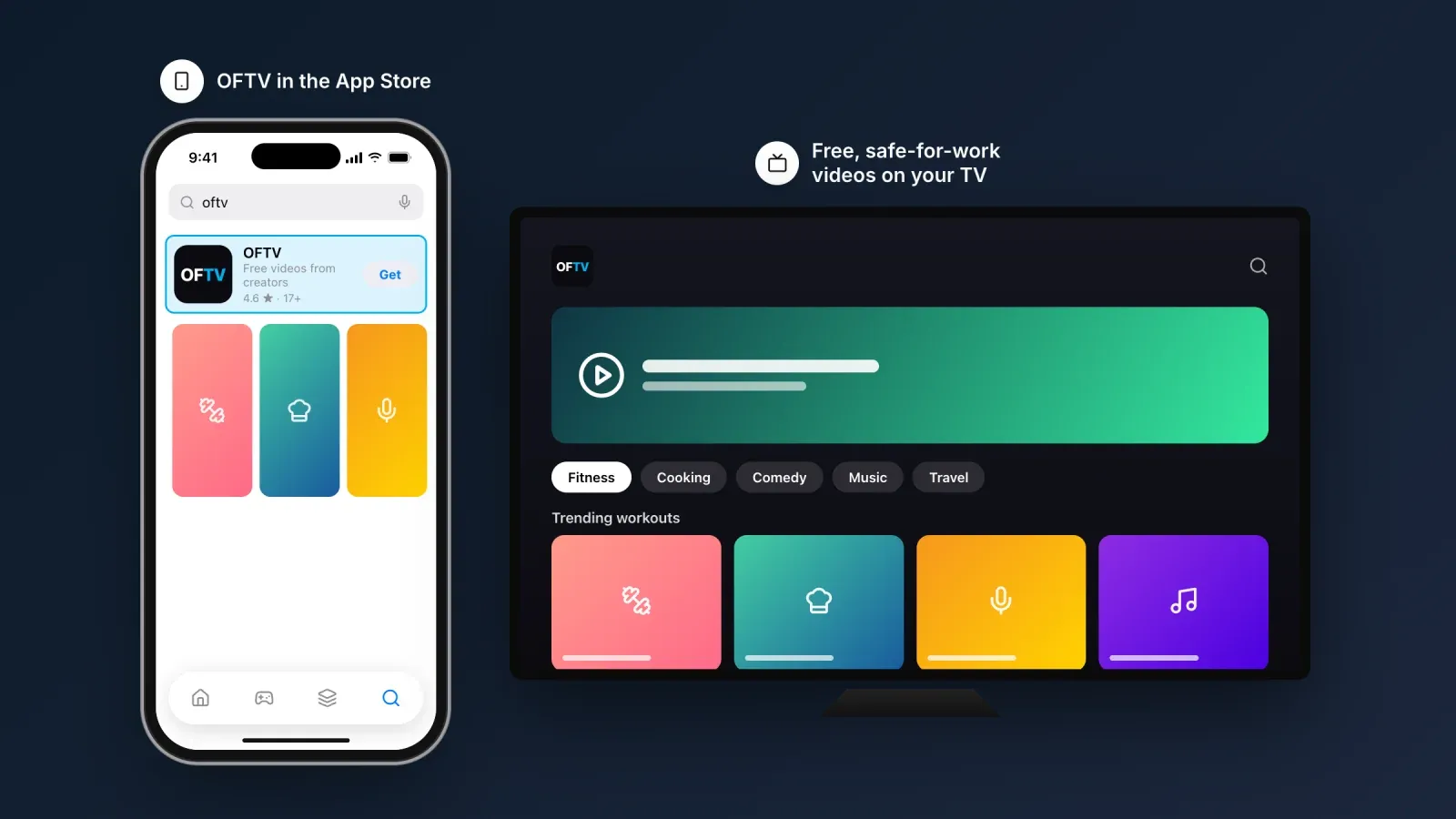
OFTV, the official OnlyFans app that does exist
OFTV launched in 2021 as a free streaming app for safe-for-work videos made by OnlyFans creators. Think of it as a showcase: fitness workouts, cooking, comedy, music, travel, gaming and behind-the-scenes content, with no paywall and no adult material.
Where to get it. OFTV is available in the Apple App Store and Google Play, and on TV platforms such as Apple TV, Roku, Amazon Fire TV, Android TV and Samsung smart TVs.
What it does. You can browse categories, watch free videos and discover creators. It works without an OnlyFans subscription.
What it does not do. OFTV does not give access to your OnlyFans subscriptions, messages or purchases. You cannot subscribe to a creator's OnlyFans page or pay a tip through it. For all of that, you still need onlyfans.com.
For creators, OFTV is worth knowing as a discovery channel. A safe-for-work series about your training routine, your recipes or your music can reach people who would never search for you on the main platform.
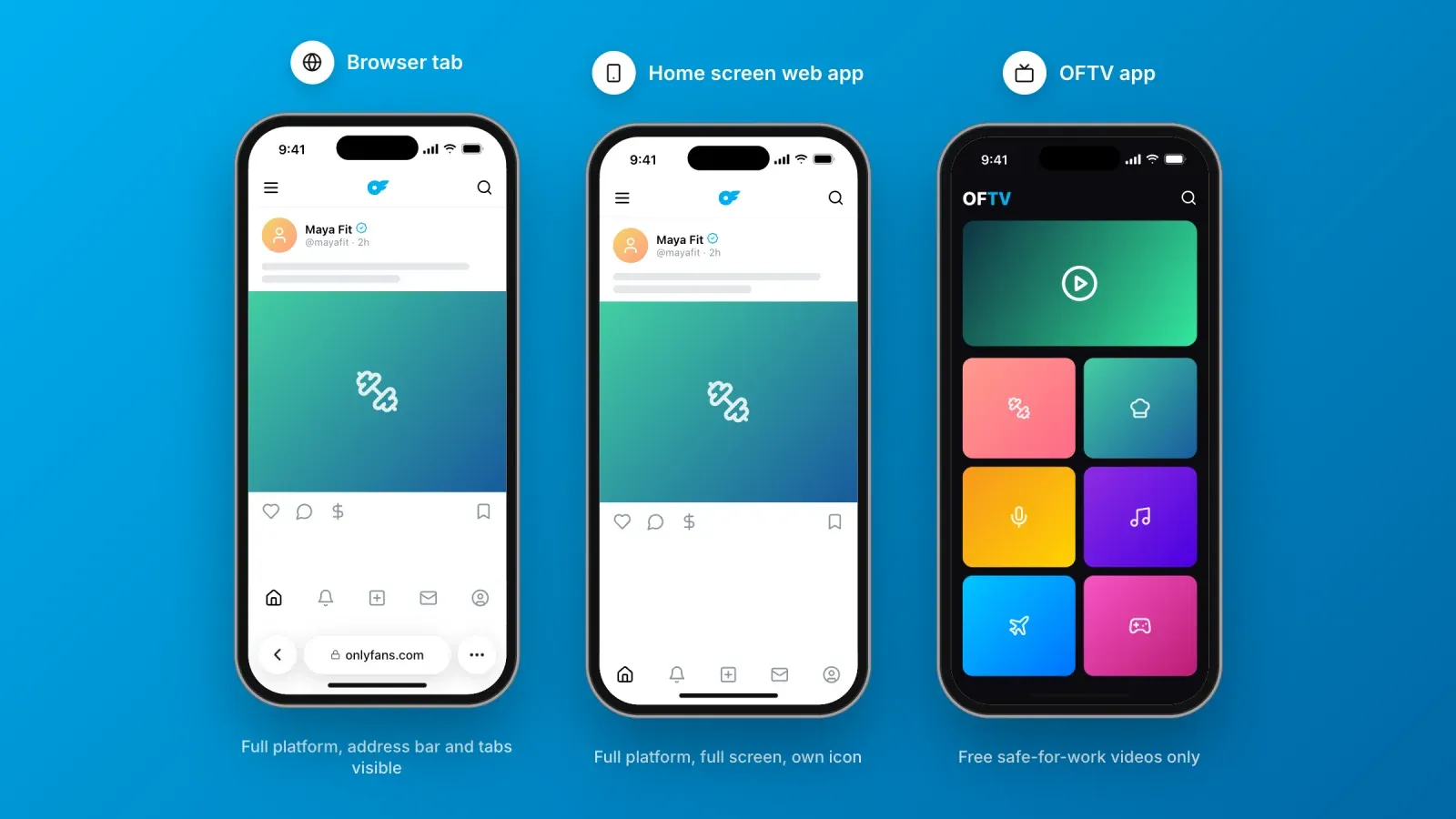
OnlyFans website, web app and OFTV compared
Here is how the three official ways to use OnlyFans compare.
- onlyfans.com in a browser. Full platform, every feature, works on any device. You need to open your browser and type the address or use a bookmark each time.
- The OnlyFans web app on your home screen. The same full platform, opened from its own icon, full screen, without the browser's address bar. It takes less than a minute to install and needs no download from a store.
- OFTV. A separate official app with free, safe-for-work videos from creators. No subscriptions, no messages, no purchases.
For most people, the web app is the best of both worlds. It is the real OnlyFans, with the convenience of an icon.
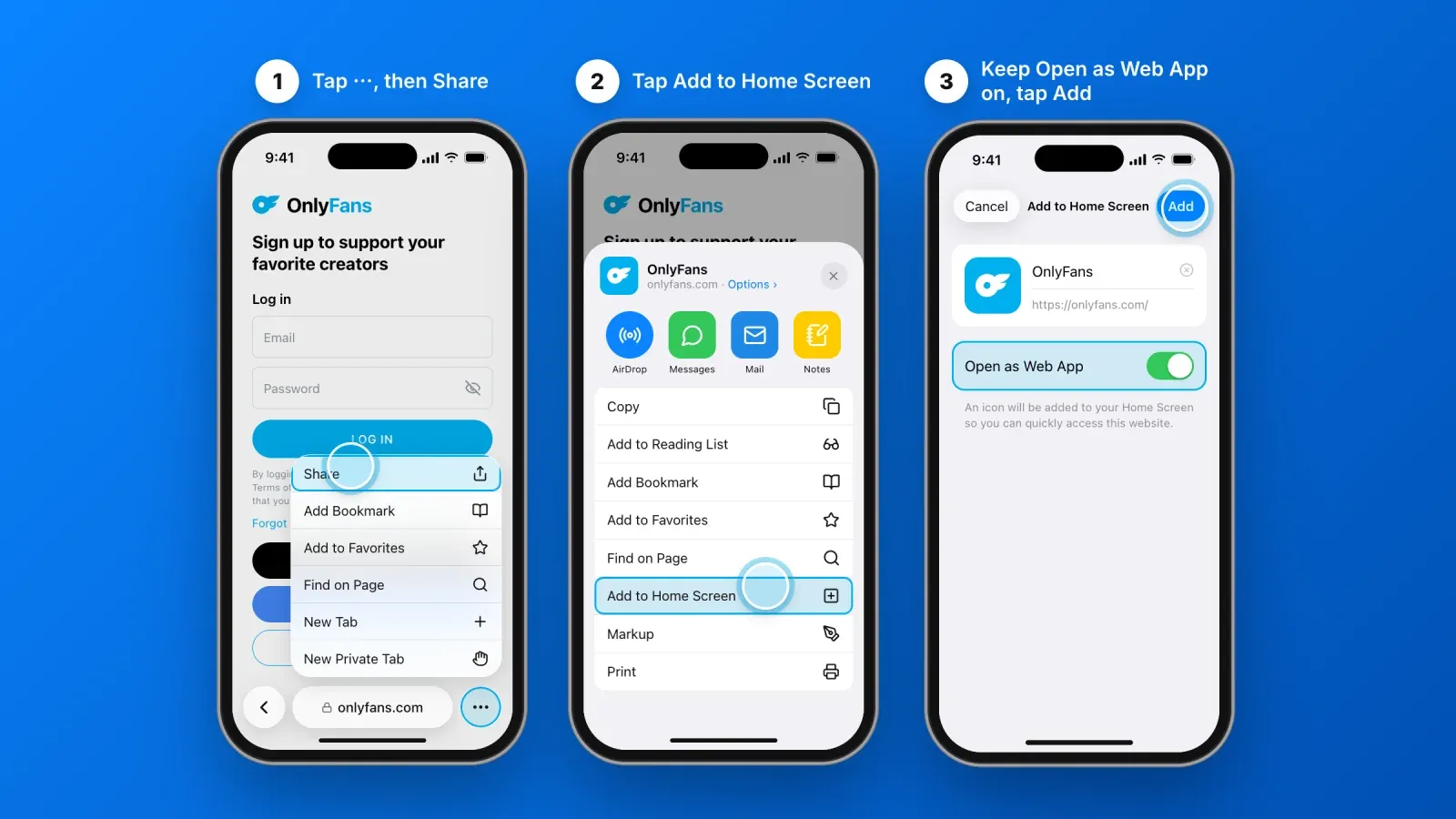
1. How to install the OnlyFans app on iPhone
On iPhone, the OnlyFans web app is installed from Safari. The steps below are for iOS 26. Older versions of iOS work the same way, with a Share button directly in the toolbar.
- Open Safari and go to onlyfans.com. Type the address yourself rather than following a link from a message or an ad.
- Tap the ⋯ button next to the address bar, then tap Share.
- Tap Add to Home Screen. If you do not see it, scroll down the list of actions or tap View More.
- Keep Open as Web App turned on. This makes OnlyFans open in its own full-screen window, like an app, instead of a Safari tab.
- Tap Add. The OnlyFans icon appears on your home screen.
- Open it and log in. A web app has its own storage on iPhone, so you need to log in once inside it, even if you were already logged in in Safari.
You can move the icon, put it in a folder or add it to your dock like any other app. To remove it, press and hold the icon, then tap Remove App or Delete Bookmark. This does not delete your OnlyFans account.
If you are in Instagram, TikTok or another app's built-in browser, the Add to Home Screen option is not available. Open the page in Safari first, from the ⋯ or compass button of the built-in browser.
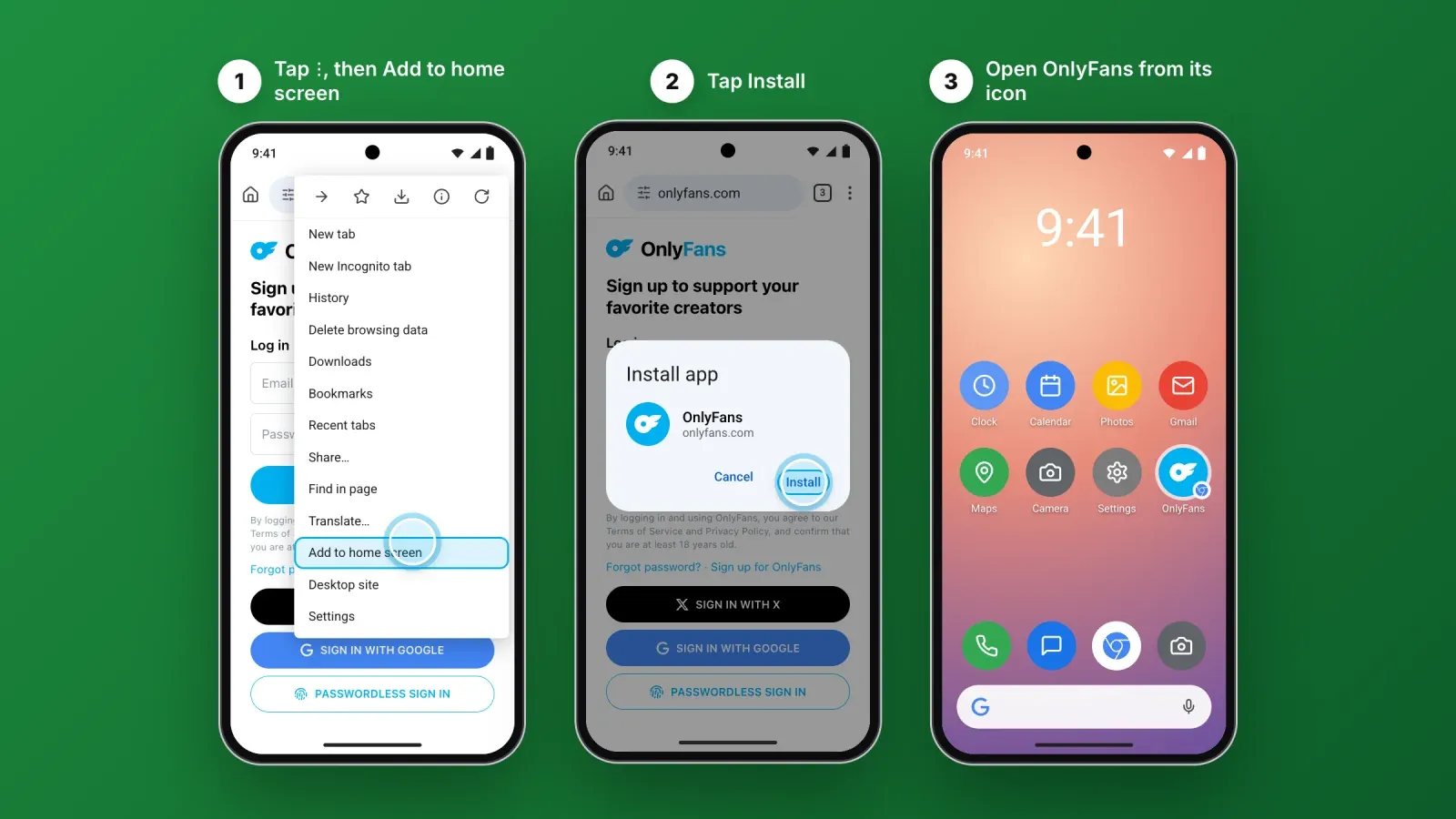
2. How to install the OnlyFans app on Android
On Android, Chrome is the easiest browser for installing the OnlyFans web app. Samsung Internet, Edge and Firefox offer similar options.
- Open Chrome and go to onlyfans.com.
- Tap the ⋮ menu in the top-right corner.
- Tap Add to home screen. On some versions, the option is called Install app.
- Choose Install if Chrome offers it. Otherwise, confirm with Add.
- Confirm the icon placement, or let Android add it automatically.
- Open OnlyFans from the new icon and log in.
On Samsung Internet, tap the menu button, then Add page to, then Home screen. On Firefox, tap the menu, then Add to Home screen.
Do not download any APK file that claims to be the OnlyFans app. Installing the web app from your browser never requires a file download or permission to install unknown apps.
3. How to use OnlyFans as an app on iPad, Mac and Windows
The same principle works on larger screens.
iPad. Follow the iPhone steps in Safari. Tap the Share button, then Add to Home Screen, and keep Open as Web App turned on.
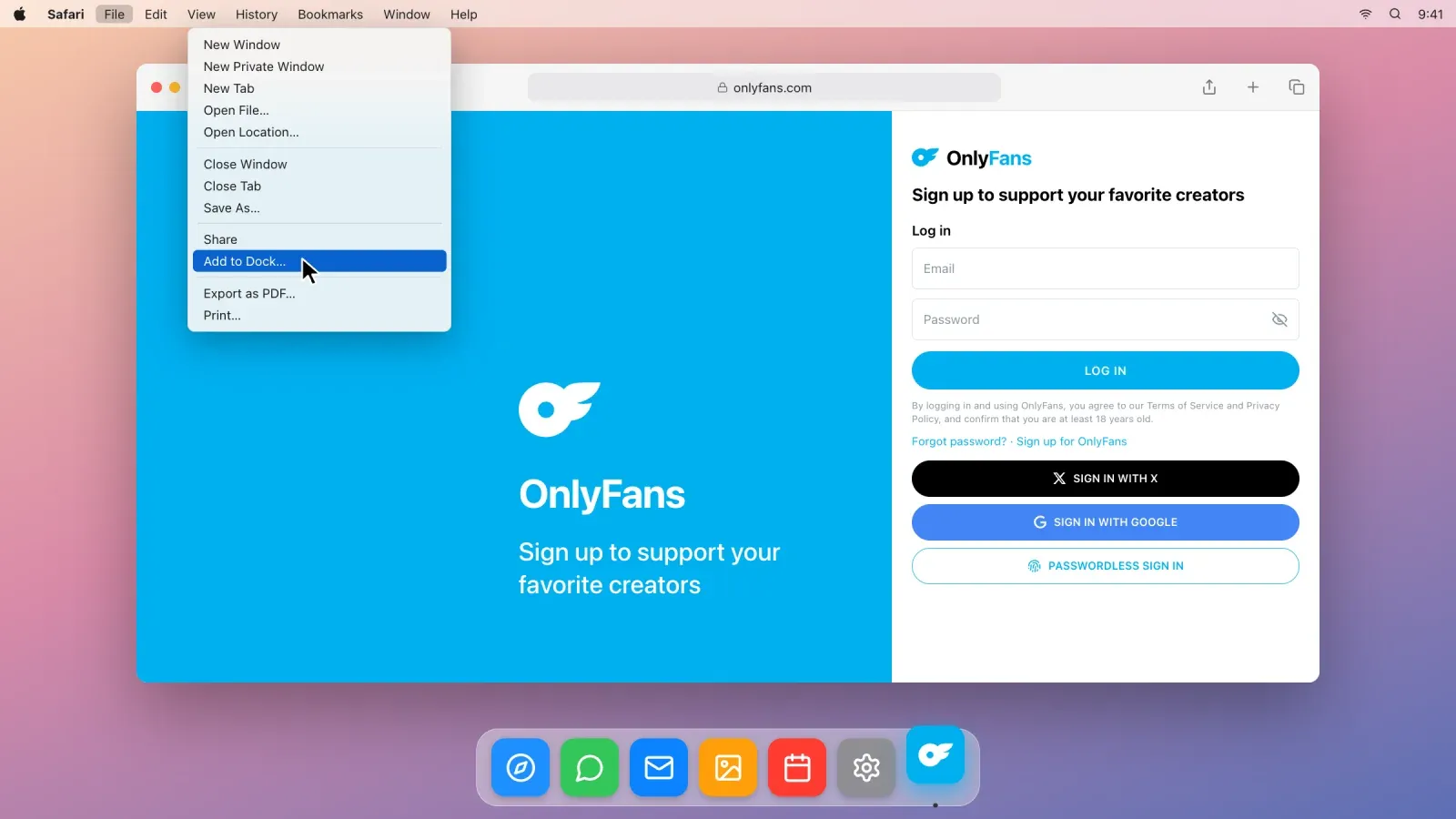
Mac. In Safari on macOS Sonoma or later, open onlyfans.com, then choose File in the menu bar and Add to Dock. OnlyFans gets its own icon in the Dock and opens in a separate window. In Chrome, open the ⋮ menu, then Cast, save, and share, then Install page as app.
Windows. In Microsoft Edge, open the ⋯ menu, then Apps, then Install this site as an app. In Chrome, use the same Cast, save, and share menu as on Mac. The OnlyFans web app then appears in the Start menu and can be pinned to the taskbar.
A desktop web app is particularly useful for creators who manage messages, uploads and statistics for long sessions. It keeps OnlyFans separate from dozens of browser tabs.
4. How to get notifications from the OnlyFans web app
Notifications are the main thing people miss from a native app. Here is how to get as close as possible.
Check your OnlyFans notification settings. In your account, open Settings, then Notifications. You can choose which events you want to be notified about, such as new messages, new posts from creators you follow, comments, tips or new subscribers, and through which channels.
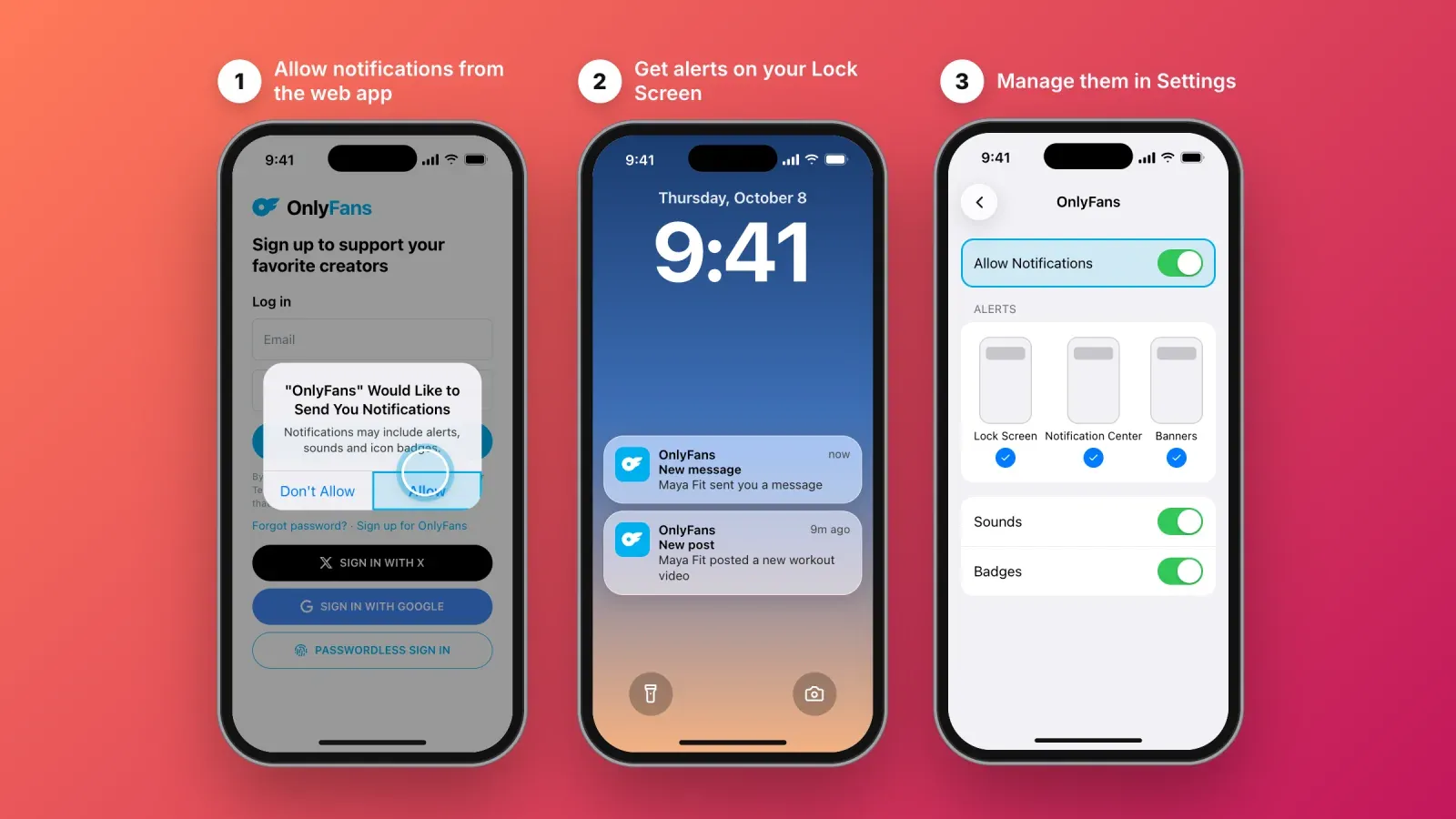
On iPhone and iPad. Websites can send push notifications only when they have been added to the home screen as a web app, on iOS 16.4 or later. Open OnlyFans from its home screen icon and accept the notification request if the site asks. You can then manage these notifications in the iPhone Settings app, under Notifications, like any other app.
On Android and computers. Browsers can show notifications from websites directly. If you allow notifications for onlyfans.com, you can manage them in your browser's site settings.
Use email as a backup. If you do not receive push notifications on your device, email notifications for messages and important account events are a reliable alternative.
5. How to secure your OnlyFans account on mobile
Whether you are a fan or a creator, your account contains payment information, private messages and, for creators, income. Five settings protect it.
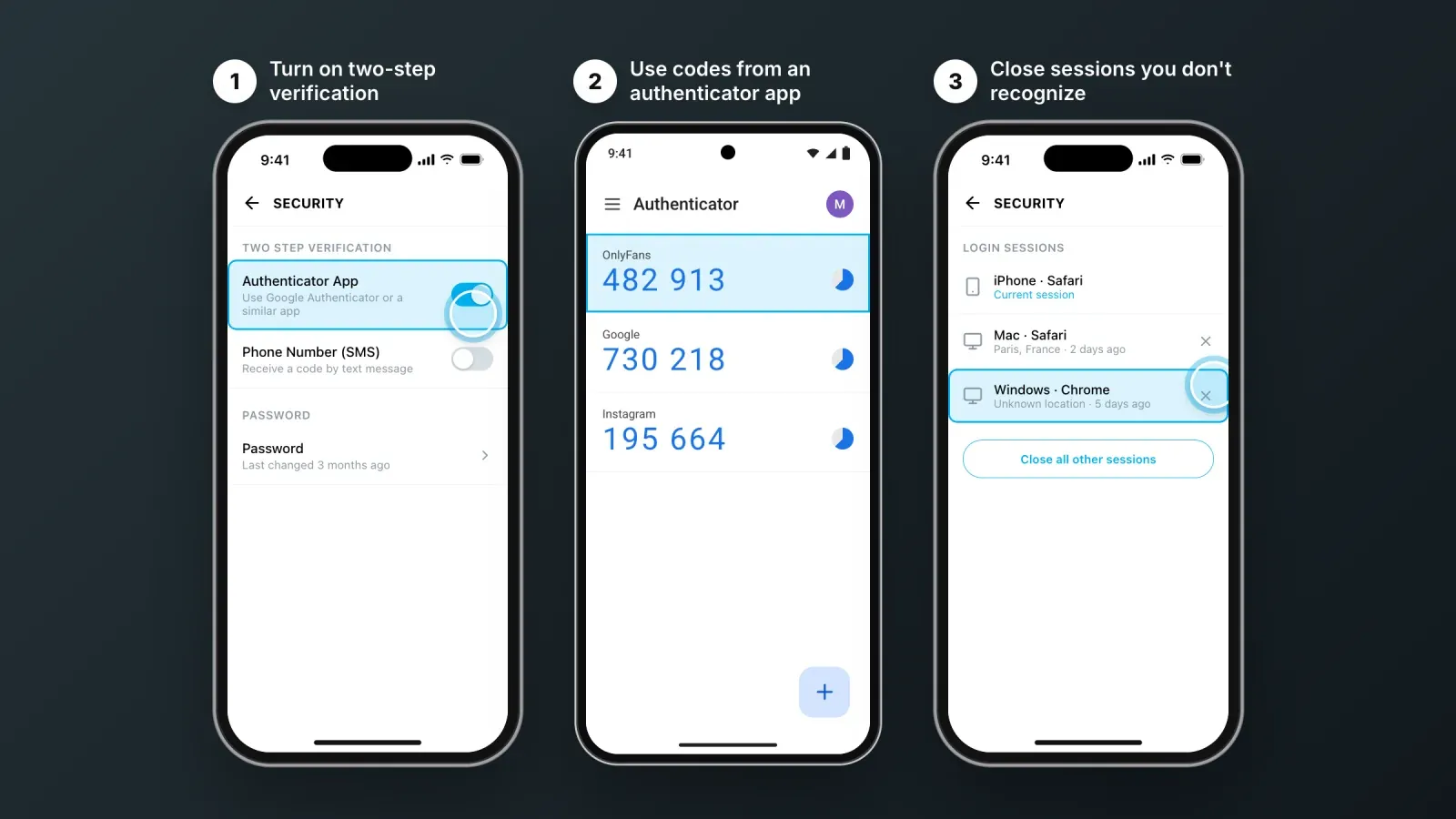
- Turn on two-step verification. In Settings, then Security, enable two-step verification with an authenticator app or SMS. An authenticator app such as Google Authenticator or Microsoft Authenticator is more secure than SMS.
- Use a unique password. Never reuse the password of your email or social accounts. A password manager makes this easy.
- Check your login sessions. The security settings show where your account is logged in. Close any session you do not recognize.
- Lock your phone and your web app. A strong passcode and Face ID or fingerprint unlock protect everything on the device, including the OnlyFans web app.
- Never share your login. No legitimate service, agency or "verification" process needs your password. Creators working with a team should use tools and permissions designed for that, not a shared login.
Beware of fake OnlyFans apps
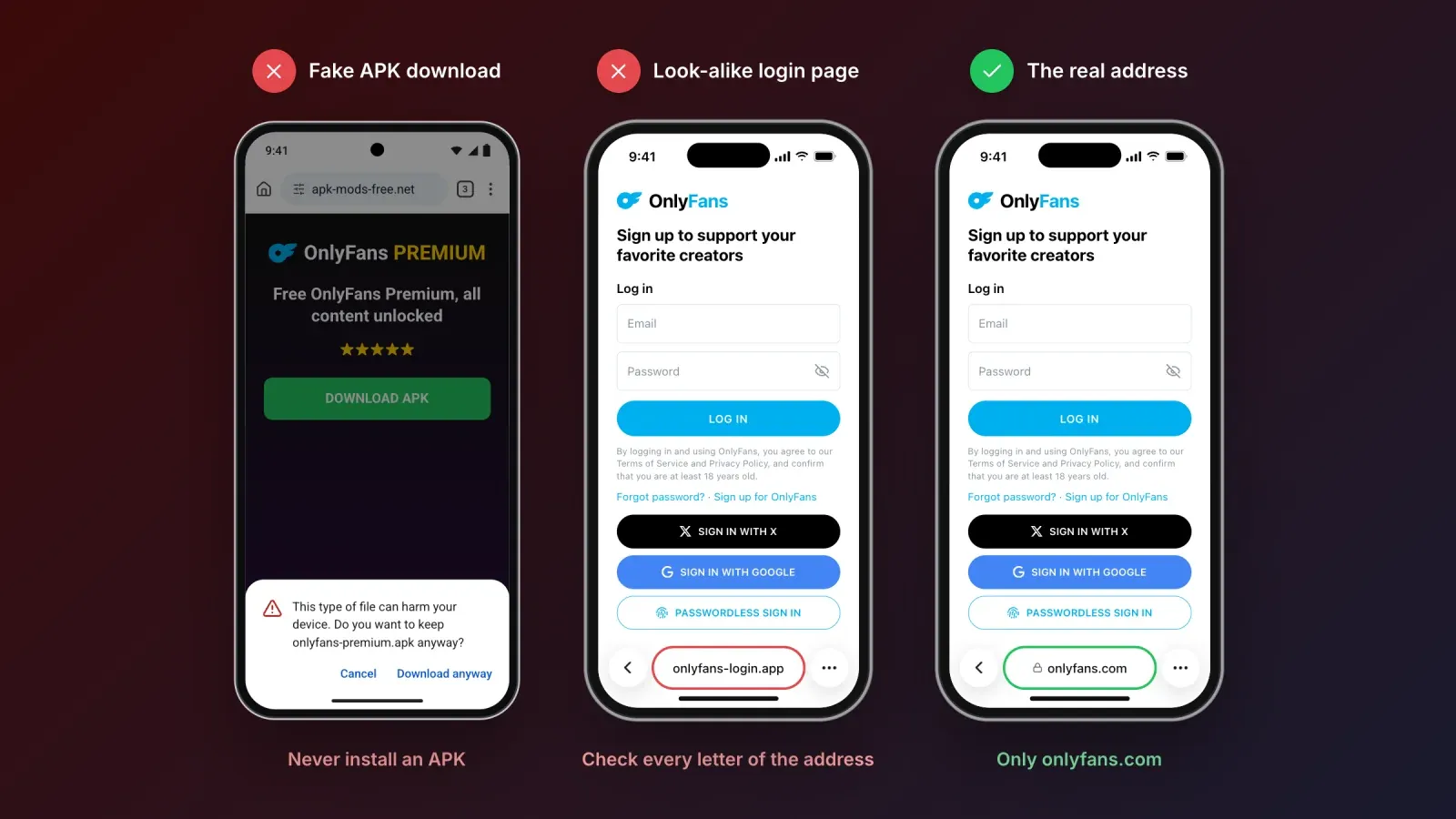
The demand for an OnlyFans app has created a market for fake ones. They appear in app stores under slightly different names, on download sites as APK files, and in ads promising free access to paid content.
Common forms include:
- "OnlyFans Premium", "OnlyFans Pro" or "OnlyFans Free" APKs that claim to unlock content without paying. They do not. They can install malware, display aggressive ads or request access to your messages and contacts.
- Login apps that show an OnlyFans-style login screen and send your email and password to someone else.
- "Downloader" and "viewer" apps that promise to save or show paid content. Besides the security risk, they violate creators' rights and the platform's terms.
- Fake creator profiles and links in direct messages that send you to a page imitating OnlyFans to capture your card details.
How to spot a fake:
- The app is not OFTV, or it is OFTV from a publisher other than the company behind OnlyFans.
- It asks you to download a file or to allow installation from unknown sources.
- It asks for your OnlyFans password outside onlyfans.com.
- It promises free access to paid content.
- The address in your browser is not exactly onlyfans.com.
If you entered your password in a fake app, change it immediately on onlyfans.com, turn on two-step verification, check your login sessions and watch your bank statements.
Using OnlyFans on mobile as a creator
Creators can run most of their business from a phone with the web app. You can post photos, videos and text, schedule posts, upload to your Vault, send messages and mass messages, set prices, go live, follow your statistics and request payouts.
A few tips make mobile management easier:
- Install the web app rather than using a browser tab, so OnlyFans keeps its own login and opens in one tap.
- Prepare content in advance. Edit videos and photos in your usual apps, then upload them in batches to your Vault, where they are ready to post or send.
- Use scheduled posts to keep a regular rhythm without being online at the right time every day.
- Save message templates in your notes app for welcome messages and frequently asked questions.
- Keep heavy work for a bigger screen. Long sessions of messages, analytics or bulk uploads are faster on a computer, where the desktop web app gives you the same separation.
Be careful with third-party tools that ask for your OnlyFans login or browser cookies. Only use services you trust, read what access they need, and keep two-step verification on.
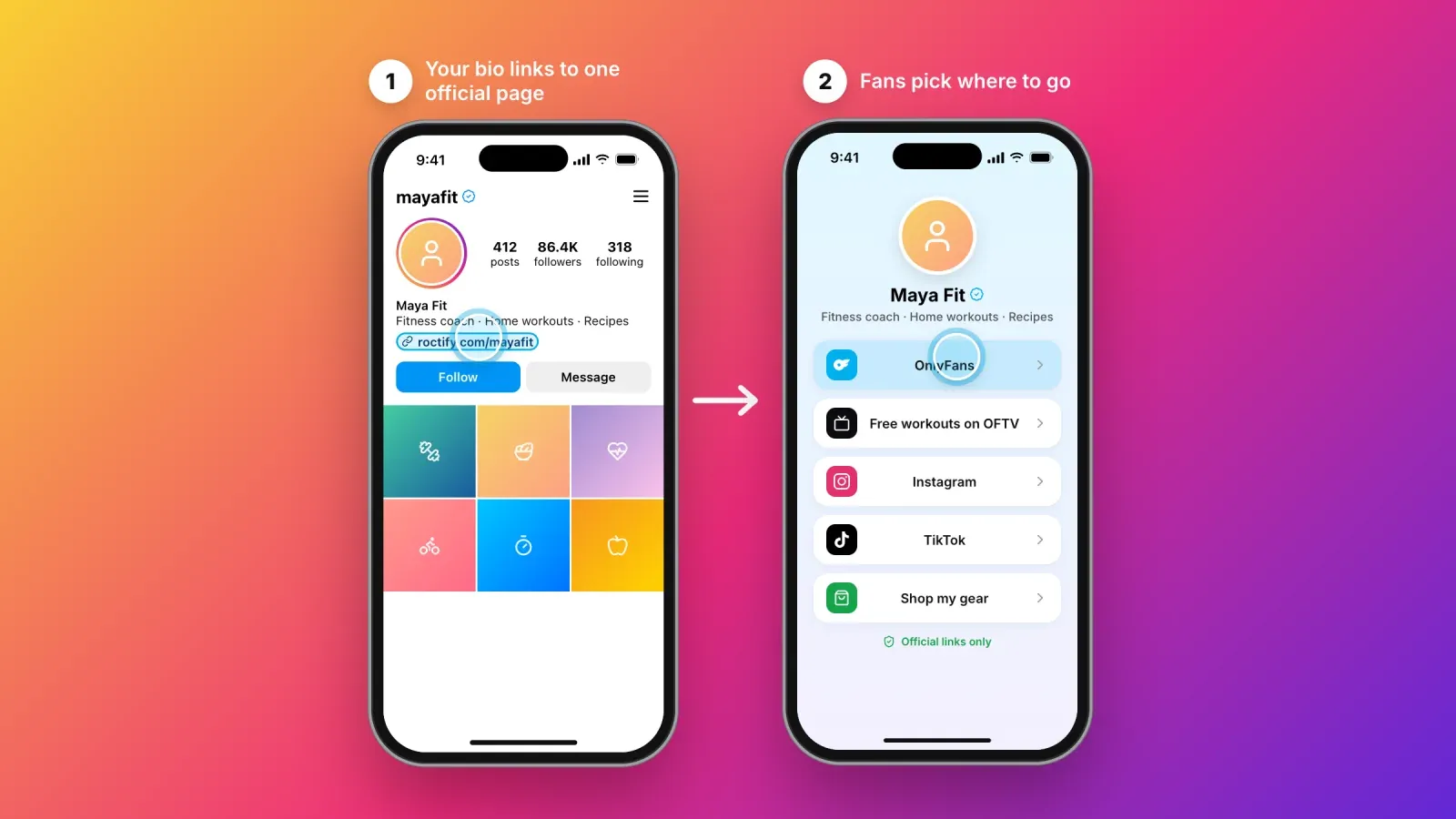
Promote your OnlyFans with a link in bio
Most creators do not get subscribers from inside OnlyFans. Fans discover them on Instagram, TikTok, X, Reddit, YouTube or Twitch, then follow a link. The way you share that link matters.
Respect each platform's rules. Many social networks limit or remove links to adult content, and some restrict the reach of accounts that promote it. Read the rules of every platform you use, keep your public content safe for work, and avoid sending followers directly to explicit material.
Use one page for all your links. A link in bio page lets you present all your official places in one spot: OnlyFans, OFTV videos, other social accounts, merch, a newsletter or a booking link. Fans choose where to go, and you can update links in one place instead of editing every profile. Our guide on how to name the links in your bio helps you write labels that get clicked.
Make it easy to verify you. Fake accounts copy successful creators. A single official page, linked from all your verified profiles, helps fans check that they are paying the real you.
Track what works. Click statistics show which platform and which post brings the most visits to your OnlyFans, so you can spend your time on the content that converts.
Troubleshooting the OnlyFans web app
Add to Home Screen is missing on iPhone. You are probably in an app's built-in browser, such as Instagram or TikTok, or in a browser other than Safari on an older iOS version. Open onlyfans.com in Safari and try again.
The icon opens a Safari tab instead of a full-screen app. Open as Web App was turned off when you added it. Remove the icon and add it again with the option turned on.
I have to log in again every time. Check that you are not in private browsing mode, and that your browser is not set to clear cookies when it closes. On iPhone, remember that the web app keeps its own login, separate from Safari.
Videos do not play or the page looks broken. Update your browser and your phone's operating system, check your connection, and turn off content blockers or VPNs for onlyfans.com to test.
I do not receive notifications. Check your OnlyFans notification settings, then the notification permissions of the web app or browser on your device. On iPhone, notifications only work from the home screen web app.
FAQ about the OnlyFans app
Is there an official OnlyFans app? Not for the main platform. OnlyFans works through its website and can be installed as a web app from your browser. The only official app in the app stores is OFTV, which offers free, safe-for-work videos.
Why is OnlyFans not on the App Store? Apple and Google do not allow apps that give access to sexual content, and they take a commission of up to 30% on in-app purchases of digital content. OnlyFans keeps its full platform on the web instead.
How do I download the OnlyFans app on iPhone? You do not download it from the App Store. Open onlyfans.com in Safari, tap ⋯, then Share, then Add to Home Screen, keep Open as Web App on and tap Add.
How do I get the OnlyFans app on Android? Open onlyfans.com in Chrome, tap the ⋮ menu, then Add to home screen or Install app, and confirm.
Is the OnlyFans APK safe? No. There is no official OnlyFans APK. Files that claim to be the OnlyFans app or a "Premium" version are unofficial and can contain malware or steal your login.
Is OFTV the same as OnlyFans? No. OFTV is a separate free streaming app run by the same company, with safe-for-work content only. It does not give access to OnlyFans subscriptions, messages or purchases.
Can creators post from their phone? Yes. Creators can post, schedule, message, go live, check statistics and request payouts from the mobile web app.
Does the OnlyFans web app send notifications? It can on many devices, if you allow notifications. On iPhone and iPad, this requires iOS 16.4 or later and opening OnlyFans from its home screen icon. Email notifications are a reliable backup.
Give your fans one official place to find you
There is no OnlyFans app to download, and that is fine. The web app gives fans and creators the full platform from a home screen icon, OFTV adds a free discovery channel, and everything else claiming to be the OnlyFans app should be avoided.
If you are a creator, the next step is making sure fans find the real you. Create your free Roctify page to gather your official links in one place, share it from all your profiles, and see which posts bring you the most visits, with 0% transaction fees on every plan.